Friday, September 18th 2026
Modder Builds Split Keyboard With Integrated Joysticks and One-Handed Gaming Functionality
The Tiwaz is an open-source split keyboard product that started as a DIY project and morphed into something a little more concrete and comprehensive. Unlike traditional split ergonomic keyboards, like the MoErgo Go60 and ZSA Voyager, which generally eschew any thoughts of gaming prowess in favor of ergonomics, the Tiwaz was designed with gaming in mind. Specifically, its designer, Timo Strube, explains in the project's GitHub that "each half works standalone as a one-handed controller or macro pad," allowing it to be used by left-and right-handed users. The keyboard uses hot-swap sockets compatible with standard MX-style mechanical switches, giving it a wider degree of customization.
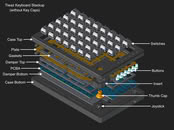
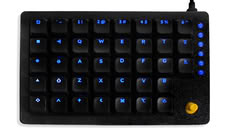
The Tiwaz uses a split ortholinear layout, meaning the keys are arranged in straight rows and columns, instead of the offsets present in both columnar stagger and row stagger layouts. Another interesting feature in the Tiwaz is that it features two thumb joysticks—one on the inner side of the keyboard itself. These can be configured to output cardinal directions, analog directions like a gamepad, or even mouse movements. The actual layout of the keyboard is also rather unorthodox, even for a split keyboard, with a total of 76 keys (38 per side), which is already a lot for a split keyboard, which usually hover around 50-60 keys at most. It also has a gasket-mounted case design, which also runs counter to many split ergonomic keyboards that forego features like gasket mounts in search of thinner cases for ergonomics purposes.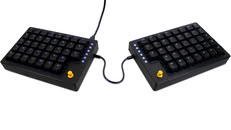
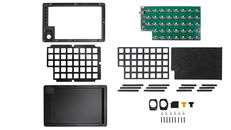 It uses open-source QMK firmware and is compatible with Vial, the browser-based configuration tool. Project files are currently available on GitHub, allowing DIY enthusiasts to build the keyboard themselves with little more than a 3D printer, a PCB ordered through a service like PCBWay, and a soldering iron. The project also aims to launch as a complete kit on Crowd Supply in the near future.
Sources:
Tiwaz on Crowd Supply, u/Breschtling on Reddit
The Tiwaz uses a split ortholinear layout, meaning the keys are arranged in straight rows and columns, instead of the offsets present in both columnar stagger and row stagger layouts. Another interesting feature in the Tiwaz is that it features two thumb joysticks—one on the inner side of the keyboard itself. These can be configured to output cardinal directions, analog directions like a gamepad, or even mouse movements. The actual layout of the keyboard is also rather unorthodox, even for a split keyboard, with a total of 76 keys (38 per side), which is already a lot for a split keyboard, which usually hover around 50-60 keys at most. It also has a gasket-mounted case design, which also runs counter to many split ergonomic keyboards that forego features like gasket mounts in search of thinner cases for ergonomics purposes.


Tiwaz technical specifications:
- Split ergonomic keyboard design
- Each half usable independently as a one-handed controller or macro pad
- Gasket-mounted plate
- Internal damping between plate, PCB, and enclosure
- Hot-swappable MX-compatible switches
- Per-key RGB lighting
- QMK firmware support (including VIAL)
- STM32F401 microcontroller
- WS2812 RGB LED for every switch and auxiliary button
- Ideal-diode protection against accidental dual-USB connection
- Self-resetting power fuse
- ESD protection on USB data lines
- USB Type-C connectors
6 Comments on Modder Builds Split Keyboard With Integrated Joysticks and One-Handed Gaming Functionality
This is just "there to be there". You can't put your finger on it firmly and have adequate coverage on the buttons in the same time...
As the article correctly states, the joystick has 3 modes: analog (think regular controller), digital (think D-Pad, or hat on joystick), or mouse simulation). The modes are switchable using a seperate button and using the digital mode, they are remappable.
If you have any questions, I am happy to answer them.Yes, using them as regular controller is not really the idea, hand position and angle of your thumb make precise input difficult, but not impossible. I personally use it in digital mode like a D-PAD and have it assigned to things like character screen, map, inventory, rarely used spells. Depending on the game of course, but I would not control character movement with them.
I see... But in that case it is unnecessary to make it analog HW-vise. And even as a D-pad, ergonomically it should look like the Razer Tartaros. The thumb is a very important finger thanks to it's relatively separated position and independent movement. If you have gaming in mind it is a waste not to use it.
Of corse I'm just mad because I'm waiting since years to put my Tartaros in the trash where all Razer belongs with their always online Spynapse malware bugnest...