News Posts matching #26H2

Return to Keyword Browsing

Windows 11 Will Finally Let You Silence the Sticky Keys Prompt for Good

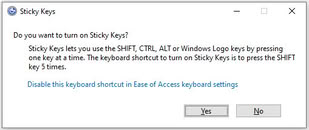
Pressing Shift five times in a row might soon stop summoning the Sticky Keys prompt on Windows 11. Microsoft is updating the dialogs that ask whether you want to turn on Sticky Keys or Filter Keys, adding a way to tell Windows not to ask again directly from the prompt. The change shows up in the release notes for Beta build 26320.9876 and Experimental build 26340.9882, both released to Windows Insiders on November 6. Right now, getting rid of the prompt for good means going into Settings > Accessibility > Keyboard and turning off the keyboard shortcut for each feature. The same Beta build also moves the channel to Windows 11 26H2 and brings Microsoft's rebuilt Windows Search.

This is a small tweak, though it fixes a long-running annoyance for gamers. Plenty of games use Shift to sprint or crouch, which makes it easy to trigger the Sticky Keys shortcut by accident, and the prompt can pull players out of full-screen games. Filter Keys has a similar shortcut that kicks in when the right Shift key is held down for eight seconds. Microsoft's notes don't mention games at all, saying only that it should mean fewer interruptions for people who don't use these features. It looks like another quality-of-life fix from Microsoft's internal push to clean up Windows 11. There's no word on when the updated prompts will reach regular Windows 11 PCs, and Microsoft notes that features in Insider builds may not always ship, so it's reasonable to expect a wait of at least a few weeks.

Windows 11 Optimizations Bring Up to 40% Faster Multitasking to 8 GB PCs

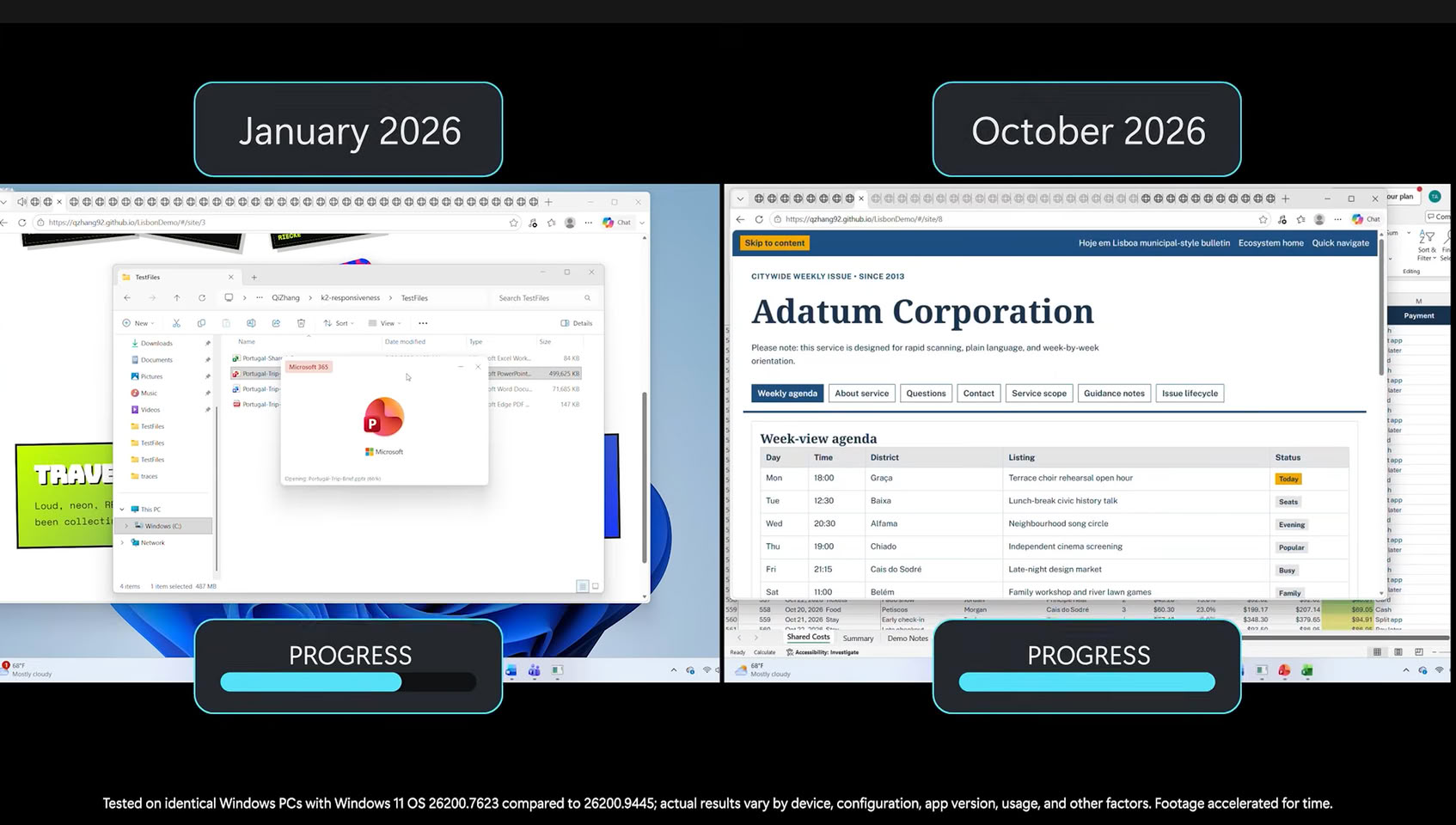
Microsoft today released a series of optimizations for Windows 11 PCs running on 8 GB of system RAM, promising significant improvements for those with smaller RAM capacities. Especially in the age of RAM shortages, Windows 11 is getting an update that might be most beneficial for those with lower PC specifications. With Windows 11, version 26H2, build 26300.9818 or later, users with systems equipped with 8 GB RAM can expect up to a 20% more responsive Windows operating system experience with day-to-day tasks, as well as up to 40% faster multitasking.

Microsoft's labs tested around 20,000 PCs to find solutions for lower hardware specifications and discovered that keeping more data in RAM significantly enhances the Windows experience. For systems with 8 GB of RAM, the OS will now retain up to 2 GB more of your active application data in memory, rather than moving it to slower SSD or HDD storage. This change directly results in a smoother experience. Additional benefits include reducing committed-memory growth by up to 900 MB in apps like Microsoft Edge and 365 apps, and decreasing the memory usage of Word, PowerPoint, Excel, and Outlook by 360 MB. Third-party apps can also take advantage of improved memory management, with Microsoft noting that WhatsApp is already utilizing these enhancements.

Microsoft Adds Cloud Rebuild Recovery to Windows 11 in Latest Preview Update

Microsoft has introduced Cloud Rebuild, a recovery option that can wipe and reinstall Windows 11 by pulling a fresh image and the PC's drivers from Windows Update, even when the system refuses to boot. It ships with KB5127936, the optional preview update released on October 28 for Windows 11 25H2 and 26H2, and it's rolling out gradually. If Windows still loads, the option sits under Settings > System > Recovery as "Rebuild PC." If it doesn't, the PC falls back to the Windows Recovery Environment (WinRE) after a few failed boots, where Cloud rebuild shows up under the Troubleshoot menu.

The "Reset this PC" menu has had a Cloud download mode for a while. According to Microsoft, Cloud rebuild goes a step further by grabbing drivers as well and by not depending on the installed copy of Windows being intact. It is a clean slate, though. The system drive gets reformatted, wiping apps, settings, user accounts, and local files, and only data synced to services like OneDrive survives. Anyone handing the PC off can pick a sanitize mode that has the drive securely erase itself first, and IT admins can kick off a rebuild remotely through the Recovery CSP.

Microsoft Warns Windows Update Will Stop Working on Unpatched PCs Next Year

Microsoft is replacing the certificates that Windows PCs use to confirm they are talking to genuine Windows Update servers, and machines that miss the changeover will stop receiving updates. The company announced the rotation on October 8, and the current certificates expire on May 17 and June 19, 2027. Most users apparently won't have to do anything, since the replacements ship inside the regular monthly security updates. Windows 11 25H2 and later, including the recently launched 26H2, need no action. Windows 11 24H2 needs the September 2025 security update or newer, while other supported Windows 11 and Windows 10 versions need the July 2026 update or later before June 19. Windows 10 Enterprise 2019 LTSC, Windows Server 2019, and Windows Server 2016 face the earlier May 17 deadline.

Microsoft says devices on unsupported versions "will lose access to Windows Update services and won't receive any updates as a result," and its only advice is to upgrade. For home users, that mostly points at Windows 10 PCs that were never enrolled in Extended Security Updates (ESU) after the OS reached end of life in October 2025. Those machines probably never got the July 2026 patch. Microsoft extended ESU coverage to October 12, 2027, so it looks like enrolling and installing the offered updates before June should bring the new certificates along. The warning also comes months after Microsoft began refreshing Secure Boot certificates that were due to expire in late June 2026. Readers are advised to check their update history for a cumulative update from July 2026 or later.

Windows 11 26H2 Update Lowers RAM Consumption

When Microsoft released its Windows 11 26H2 update last week, it didn't include many under-the-hood changes that would affect everyday users. However, according to Windows Latest and several Reddit users, the update reportedly reduces RAM consumption when the system is idle, and even when does better management of RAM when applications are loaded. This improvement wasn't advertised by Microsoft, but it seems to be a welcome change for those who prefer lower RAM usage when not running any tasks. On Reddit, users are reporting a reduction in memory consumption of around 2 GB, with some experiencing up to a 3 GB decrease in idle RAM usage. Testing by Windows Latest on a laptop with 16 GB of RAM shows that, whereas it usually idled at 10 GB of usage, it now consumes 7 GB, with 4 GB of that cached and 8.8 GB available.

The update also introduces features like the Low Latency Profile, which is expanding to nearly all applications and could potentially make software launch faster on weaker hardware. Previously available for Microsoft-branded "in-box" applications, this feature boosts the CPU to its maximum frequency for 1-3 seconds, resulting in noticeably smoother app launches during testing. Launching Microsoft applications like Edge and Outlook is about 40% faster, and other applications, such as the Start Menu and context menus across the operating system, may be up to 70% faster. Now, other applications are receiving this update, which means the overall experience will be much smoother.

Microsoft Launches Windows 11 26H2 Update

Microsoft today released its latest Windows 11 26H2 update, bringing a new milestone for Windows 11 users. In this release, Microsoft is highlighting a few features that Windows 11 25H2 users have not yet experienced. These include a smarter File Explorer with new capabilities such as summarization, additional archive formats, and AI productivity enhancements. Additionally, Windows Search has been improved to prioritize searching through your files before resorting to web searches, while also handling typos and partial application names more effectively. Frequently used folders will receive automatic indexing, making them easier to find. Other optimizations include updates to Magnifier with new zoom and screen tint options, Narrator adding a Braille Viewer, and Voice gaining a wider range of voice-driven commands on Copilot+ PC. Finally, the Start menu and Taskbar now offer new customization options, positioning changes, and a smaller view option.

Interestingly, this update focuses more on resetting the support cycles that Microsoft is implementing, rather than introducing major features or overhauls. For those upgrading, the main change will be an extension of the support cycle as users transition to the 26H2 release. Starting September 29, 2026, there will be 36 months of servicing support for Enterprise and Education editions of Windows 11, version 26H2. Home and Pro editions will receive 24 months of support.

Windows 11 26H2 Goes Into Release Preview Channel

Microsoft has released Windows 11 version 26H2 to the Release Preview Channel, with build number 26300.9278, for Windows Insiders. As we mentioned just a few days ago, Windows 11 26H2 is one of the more boring releases in terms of new features. This update focuses on resetting the support cycles that Microsoft is implementing, rather than introducing major features or overhauls. For those upgrading, the main change will be an extension of the support cycle as users transition to the 26H2 release.

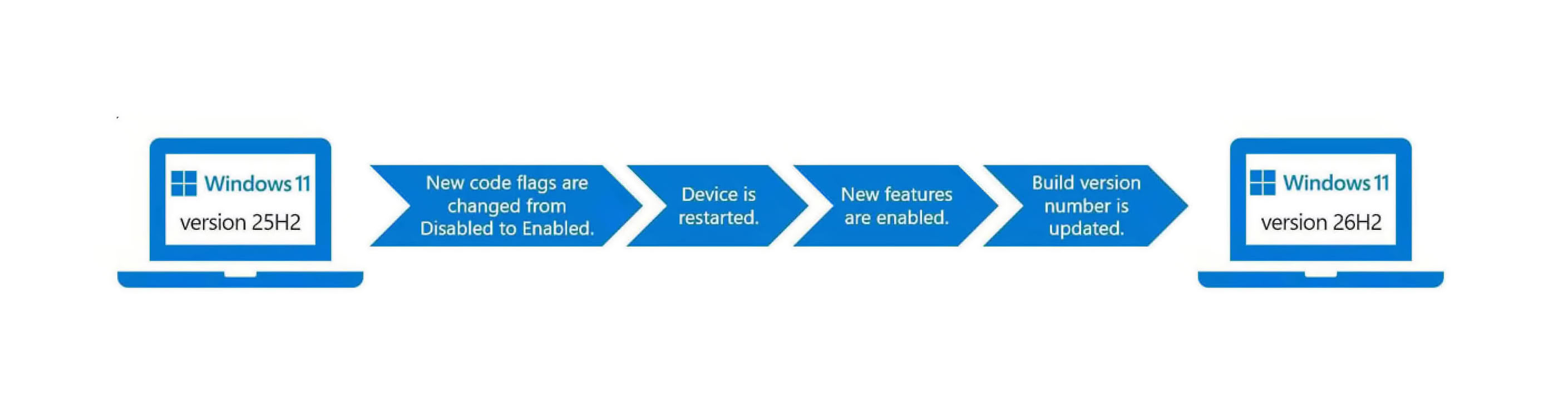
Since late 2024, support and updates have been rolled out across every OS branch, with each new release cycle activating these features rather than leaving them dormant in the kernel. Enablement packages (eKB) are central to this process, as downloading an update essentially involves eKBs that activate certain functionalities. For instance, on a device running Windows 11 24H2 or 25H2, a simple eKB is needed to upgrade to the latest Windows 11 26H2 version. For older versions like 22H2 and 23H2, which are on an older servicing branch, Windows 11 26H2 will be a full feature update.
Windows 11 26H2 Update

Windows 11 26H2 Update Focuses on Extended Servicing, Not New Features

According to Windows Latest, Microsoft's upcoming Windows 11 26H2 is expected to be one of the most uneventful releases in terms of new features. Instead, this release focuses on resetting the support cycles that Microsoft is implementing, rather than introducing major features or overhauls. For those who are not aware, Microsoft has altered its update approach for Windows 11 for some time now. Since Windows 11 24H2, the company has adopted a shared servicing model applied to the Windows 11 24H2 and 25H2 branches. Since late 2024, support and updates have been rolled out across every OS branch, with each new release cycle activating these features rather than leaving them dormant in the kernel. Enablement packages (eKB) are central to this process, as downloading an update essentially involves eKBs that activate certain functionalities.

For instance, on a device running Windows 11 24H2 or 25H2, a simple eKB is needed to upgrade to the latest Windows 11 26H2 version. For older versions like 22H2 and 23H2, which are on an older servicing branch, Windows 11 26H2 will be a full feature update. In terms of new functionality with 26H2, Microsoft's focus is on resetting the support cycle timeline. The 26H2 version will receive regular support for 24 months on Home and Pro versions, while Enterprise and Education versions will receive 36 months of support. Starting from 2026, this support will extend until October 2028 for Home and Pro, and until October 2029 for Enterprise and Education. For those already running Windows 11 24H2 and 25H2 with the latest updates and patches, 26H2 will not introduce any new features.
Return to Keyword Browsing
Nov 11th, 2026 06:15 CST change timezone

New Forum Posts

Popular Reviews

TPU on YouTube

Controversial News Posts