Tuesday, November 3rd 2026

Windows 11 Optimizations Bring Up to 40% Faster Multitasking to 8 GB PCs

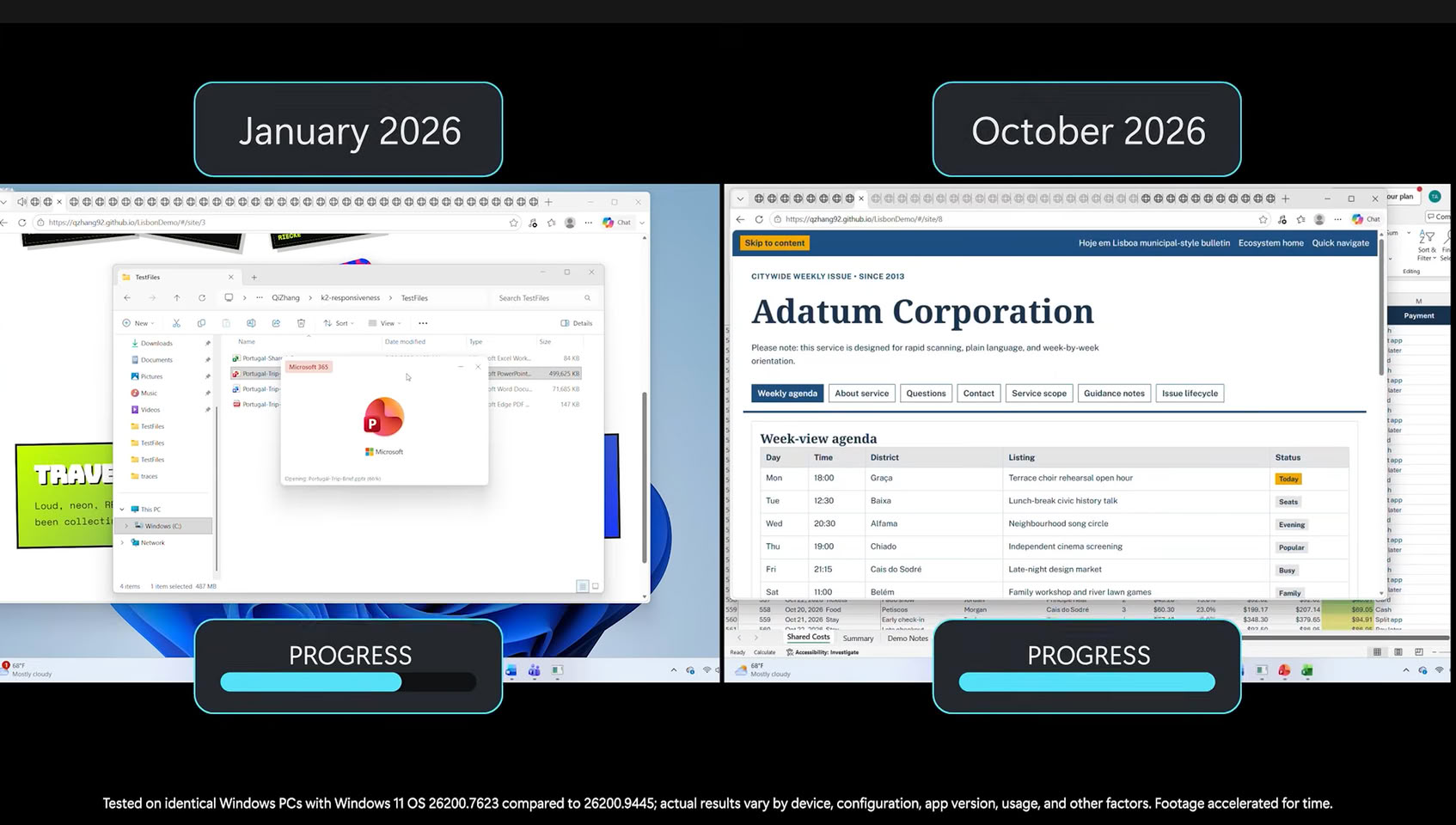
Microsoft today released a series of optimizations for Windows 11 PCs running on 8 GB of system RAM, promising significant improvements for those with smaller RAM capacities. Especially in the age of RAM shortages, Windows 11 is getting an update that might be most beneficial for those with lower PC specifications. With Windows 11, version 26H2, build 26300.9818 or later, users with systems equipped with 8 GB RAM can expect up to a 20% more responsive Windows operating system experience with day-to-day tasks, as well as up to 40% faster multitasking.

Microsoft's labs tested around 20,000 PCs to find solutions for lower hardware specifications and discovered that keeping more data in RAM significantly enhances the Windows experience. For systems with 8 GB of RAM, the OS will now retain up to 2 GB more of your active application data in memory, rather than moving it to slower SSD or HDD storage. This change directly results in a smoother experience. Additional benefits include reducing committed-memory growth by up to 900 MB in apps like Microsoft Edge and 365 apps, and decreasing the memory usage of Word, PowerPoint, Excel, and Outlook by 360 MB. Third-party apps can also take advantage of improved memory management, with Microsoft noting that WhatsApp is already utilizing these enhancements.


Microsoft also noted that the performance of systems with 8 GB of RAM largely depends on the underlying silicon that powers them. A 2026 8 GB Dell XPS 13 delivered up to 94% faster multicore CPU performance than a 2021 8 GB model with a new Windows 11 update. This means that newer configurations with Intel's "Wildcat Lake" will show good performance despite having only 8 GB of system memory. Additionally, Microsoft is working on further memory compression for Windows 11, so we can expect more improvements in the coming months.

Source: Windows Blog
Add your own comment

33 Comments on Windows 11 Optimizations Bring Up to 40% Faster Multitasking to 8 GB PCs

#2
Hecate91
The key point with that claim is "up to" 20%, and I'd like to see independent testing done as I can't trust anything MS says anymore.
Also, IMO this is something W11 should've had all along, not Microslop acting like they've made a massive achievement with getting it to run sufficiently on less than 16GB.
Posted on Reply
#3
Athena
Microsoft's labs tested around 20,000 PCs to find solutions for lower hardware specifications and discovered that keeping more data in RAM significantly enhances the Windows experience. For systems with 8 GB of RAM, the OS will now retain up to 2 GB more of your active application data in memory, rather than moving it to slower SSD or HDD storage.
Anyone with half a brain would know that keeping it in RAM would be faster... and it took MS 20K PCs to figure this out? sheesh
Posted on Reply
#4
john_
Well, well, look at that. Suddenly we don't need 32GB to work anymore. Not even 16GB. 8GB is suddenly enough for us. What kind of miracle happened and we suddenly learned how to code? Did we get AI to write the code, or did we simply disable a dozen stupid features designed to keep OEMs happy by forcing people into continuous, practically pointless upgrades?

I wonder what Windows 11 actually does better than Windows 7 (yes, Windows 7, not 10)—and I mean in terms of what genuinely matters to the user, not what matters to Microsoft and the telemetry data being collected and shipped off to its servers. Windows 7 ran on 4GB of RAM and mechanical hard drives. Suddenly, just to see the exact same desktop layout in front of us, we need 16GB, preferably 32GB, and an NVMe SSD. It took a 20% drop in PC sales, memory and storage upgrades becoming prohibitively expensive for a section of the public, and people starting to seriously explore Linux—largely thanks to Valve, I believe—for them to finally say, "Maybe we should focus on optimization instead of slowdation?"
Posted on Reply
#5
xxxZAURxxx
There is much that could be said, but I choose not to say it; they just do whatever they please anyway.

Posted on Reply
#8
xxxZAURxxx
GreenTabascosuddenly 8gb is all you need. smh
Next year, even 4GB will be enough. :D
Posted on Reply
#9
Shrek
We complained that Windows 11 takes too much RAM,

"Windows 11 26H2 Update Lowers RAM Consumption"
AleksandarK in Windows 11 26H2 Update Lowers RAM ConsumptionWhen Microsoft released its Windows 11 26H2 update last week, it didn't include many under-the-hood changes that would affect everyday users. However, according to Windows Latest and several Reddit us…
so I have some sympathy for MicroSoft, 'damned if you do and damned if you don’t'
Posted on Reply
#10
maur0
xxxZAURxxxNext year, even 4GB will be enough. :D
Microsoft must have discarded the "largesystemcache" key, which was 0 by default.
Posted on Reply
#11
GeoffreyA
AthenaAnyone with half a brain would know that keeping it in RAM would be faster... and it took MS 20K PCs to figure this out? sheesh
The thing is, NT has been caching since at least Vista. I expect the algorithms were tuned.
xxxZAURxxxNext year, even 4GB will be enough. :D
The memory crisis has its silver lining :)
ShrekWe complained that Windows 11 takes too much RAM,

so I have some sympathy for MicroSoft, 'damned if you do and damned if you don’t'
A no-win situation.
Posted on Reply
#12
Wirko
xxxZAURxxxNext year, even 4GB will be enough. :D
The newest development in memory technology, the HUDIMM, makes this possible. It's no coincidence.
Posted on Reply
#13
Darmok N Jalad
It’s not about caching what we actually use in RAM, it’s eliminating the MS services and apps that we explicitly don’t use, or the wasteful apps and services that we do use that are the problem. Many devs have gotten comfortable wasting resources. Cloud syncing services are a prime example of how some can be really lean, while others use multiple times more resources to do the same thing. Outlook shouldn’t be using as much RAM as Excel with 2 large documents open.
Posted on Reply
#14
Tess
ShrekWe complained that Windows 11 takes too much RAM,

"Windows 11 26H2 Update Lowers RAM Consumption"

so I have some sympathy for MicroSoft, 'damned if you do and damned if you don’t'
I protested on TPU for the opposite. I said and I still want Win11 to use A LOT more RAM. The more of it that's copied to RAM or at least remains there on use, the faster things are. It's not like it's not freed up when something else asks for it. :P

I think it's pretty bad timing with the new RAM prices but I want enough RAM that I can put the entire OS on a recoverable RAM drive - like I used to do back when Windoze was smaller and RAM was cheaper. :D So Faaaaaaaast!
Posted on Reply
#15
lexluthermiester
TesselatorAccording to @lexluthermiester's thread here on TPU, there there's no speed up if you have 32GB though. :P
I had forgotten about that thread. 7years old.. time flies..
Shrekso I have some sympathy for MicroSoft, 'damned if you do and damned if you don’t'
Kinda weird isn't it?
Posted on Reply
#16
Let3r
Up to. The magic tech catch-all. It could mean that performance on 8gb got worse. It doesn’t mean anything.
Posted on Reply
#17
Shrek
lexluthermiesterKinda weird isn't it?
I sense they are really trying, that's it's not just talk. Of course, the competition can take some of the credit.
Posted on Reply
#18
shuffy_losys
ShrekWe complained that Windows 11 takes too much RAM,

so I have some sympathy for MicroSoft, 'damned if you do and damned if you don’t'
I think the problem is that people see the total RAM usage and complain that Windows is taking too much RAM compared to say Linux or macOS for similar applications, but they don't dive deep into what goes on.

I'm under the impression the OS itself is fine. It also runs in a default configuration that must run on millions and millions of PCs out of the box. So I expect it to run a little fatter than spending time tuning the system settings for my use case.

It's all the userland applications that make me face palm. Web browsers are multi-gigabyte behemoths. A plaintext editor eats more RAM than Doom 3 or Half-Life 2. This is where we've painted ourselves.
Posted on Reply
#19
Launcestonian
HP selling laptops with Win 11 home & 4GB ram.... they knew!
Posted on Reply
#20
GeoffreyA
shuffy_losysI think the problem is that people see the total RAM usage and complain that Windows is taking too much RAM compared to say Linux or macOS for similar applications, but they don't dive deep into what goes on.

I'm under the impression the OS itself is fine. It also runs in a default configuration that must run on millions and millions of PCs out of the box. So I expect it to run a little fatter than spending time tuning the system settings for my use case.

It's all the userland applications that make me face palm. Web browsers are multi-gigabyte behemoths. A plaintext editor eats more RAM than Doom 3 or Half-Life 2. This is where we've painted ourselves.
Windows has issues that need to be fixed, but there is a lot of misinformation about how the OS works. Caching is an example. Now that the RAM usage has gone down a bit, people are still turning that into a negative.
Posted on Reply
#22
NorthByte
The core issue with how users judge Windows memory management has always been the conflation of standby cache with committed dirty pages.
Modern NT kernel memory management operates on the principle that "free RAM is wasted RAM." Having 6GB of an 8GB pool occupied by cached file mapping and pre-fetched binaries (SysMain) is actually desirable, because dropping a standby page when an active process requests memory takes mere nanoseconds in the page fault handler.
Where 8GB machines actually struggle under Windows 11 isn't cache allocation—it's working set pressure and memory compression overhead:
  1. Compression Pool CPU Cycles: When commit charge approaches physical limits, the kernel's Memory Compression process compresses cold private pages into an in-RAM zram-like pool. On an 8-core desktop this is transparent, but on dual-core / quad-core budget laptop SoCs, the compression/decompression threads fight user workloads for CPU time.
  2. I/O Thrashing on DRAM-less NVMe: Once the compressed store is full and Windows is forced to trim working sets into [ICODE]pagefile.sys[/ICODE], budget laptops equipped with DRAM-less QLC drives hit massive queue depth spikes. A hard page fault fetching a 64KB page cluster from a slow QLC drive introduces 15–50ms latency bubbles, which is what users perceive as UI hitching.
If Microsoft's latest scheduler optimizations truly refine heuristic working-set decay without causing premature page-out churn on background browser tabs, that's a genuine architectural win for budget hardware.
Posted on Reply
#23
maxli86
xxxZAURxxxThere is much that could be said, but I choose not to say it; they just do whatever they please anyway.


Hard freaking truth, you try to disable or uninstall Copilot, Onedrive and Edge.
When you restart or boot up the PC from fresh.
It came back to haunt you.
Posted on Reply
#24
VirusDancer
Hrmm, can see where that might save users (if it plays out as outlined) some headaches when shopping budget laptops with 8GB RAM. Can see though in the Similar threads below that there have been discussions about this endeavour going back to August and earlier. I'd say it was tied to all the movement towards Windows-like distros of Linux and loss of their consumerbase. Mind you, I still daily drive Win 11 Pro (32GB) on my laptop and game & whatnot Win 11 Pro (48GB) on my desktop. I've got a pair of Proxmox boxes, and am considering whether to pick up a cheap new-to-me gently used 8GB laptop for some additional Linux action. Or maybe I just dork around with a dual boot off of either the laptop or desktop...
Posted on Reply
#25
cvaldes
As someone with a 6 year old Wintel 8GB notebook I can confirm that it runs better today with Win11 26H2 than it did six months ago. But it’s still not as good as whatever Windows 10 version it shipped with in 2020. Pity.
Posted on Reply
Add your own comment
Nov 23rd, 2026 19:06 CST change timezone

New Forum Posts

Popular Reviews

TPU on YouTube

Controversial News Posts