Monday, February 24th 2020

Microsoft Confirms Xbox Series X Specs - 12 TFLOPs, Custom APU With Zen 2, RDNA 2, H/W Accelerated Raytracing

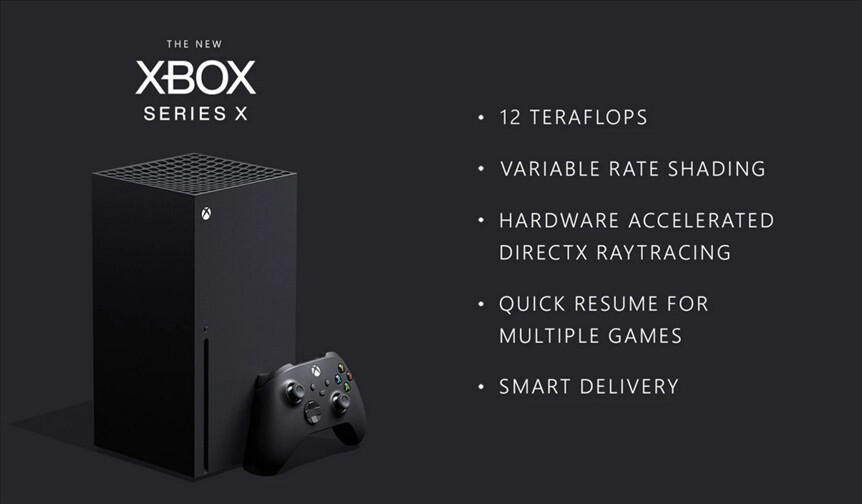
Microsoft has confirmed the official specs for the Xbox Series X games console, due Holiday 2020 (think November). The new specs announcement confirms the powerhouse of a console this will be, with its peak 12 TFLOPs compute being 8 times that of the original Xbox One, and twice that of the Xbox One X, which already quite capable of powering true 4K experiences. This 12 TFLOPs figure is a mighty impressive one - just consider that AMD's current highest-performance graphics card, Radeon VII, features a peak 13.4 TFLOPs of computing power - and that's a graphics card that was launched just a year ago.

The confirmation also mentions support for Hardware-Accelerated raytracing, something that all but confirms the feature being built into AMD's RDNA 2 microarchitecture (of which we are expecting news anytime now). this, alongside Variable Rate Shading (VRS) support, brings AMD to feature parity with NVIDIA's Turing, and should allow developers to optimize their performance and graphical targets without any discernible quality loss.

Another very important metric, however, is still unknown: pricing. But with the new system featuring so many pieces of top-of-the-line technology, including SSD storage, this won't be a cheap endeavor. With Sony also keeping its cards close to its chest in regards to PS5 pricing (and the company even canceling their appearances at PAX East and GDC), we'll have to wait and see how interesting these systems really are from a value standpoint.

However, I have to throw my two cents in here: Microsoft's alleged approach towards releasing a top-tier (and top pricing) console in the Xbox Series X alongside a cheaper, more nimble system does paint the next-gen scenario as more positive for Microsoft than Sony, should the Japanese company choose to release a single, premium system (which some are saying hardware parts costs are set at $450).

Features of XBOX Series X:
  • Next Generation Custom Processor: Xbox Series X is our most powerful console ever powered by our custom designed processor leveraging AMD's latest Zen 2 and RDNA 2 architectures. Delivering four times the processing power of an Xbox One and enabling developers to leverage 12 TFLOPS of GPU (Graphics Processing Unit) performance - twice that of an Xbox One X and more than eight times the original Xbox One. Xbox Series X delivers a true generational leap in processing and graphics power with cutting edge techniques resulting in higher framerates, larger, more sophisticated game worlds, and an immersive experience unlike anything seen in console gaming.
  • Variable Rate Shading (VRS): Our patented form of VRS empowers developers to more efficiently utilize the full power of the Xbox Series X. Rather than spending GPU cycles uniformly to every single pixel on the screen, they can prioritize individual effects on specific game characters or important environmental objects. This technique results in more stable frame rates and higher resolution, with no impact on the final image quality.
  • Hardware-accelerated DirectX Raytracing: You can expect more dynamic and realistic environments powered by hardware-accelerated DirectX Raytracing - a first for console gaming. This means true-to-life lighting, accurate reflections and realistic acoustics in real time as you explore the game world.
  • SSD Storage: With our next-generation SSD, nearly every aspect of playing games is improved. Game worlds are larger, more dynamic and load in a flash and fast travel is just that - fast.
  • Quick Resume: The new Quick Resume feature lets you continue multiple games from a suspended state almost instantly, returning you to where you were and what you were doing, without waiting through long loading screens.
  • Dynamic Latency Input (DLI): We're optimizing latency in the player-to-console pipeline starting with our Xbox Wireless Controller, which leverages our high bandwidth, proprietary wireless communication protocol when connected to the console. With Dynamic Latency Input (DLI), a new feature which synchronizes input immediately with what is displayed, controls are even more precise and responsive.
  • HDMI 2.1 Innovation: We've partnered with the HDMI forum and TV manufacturers to enable the best gaming experience through features such as Auto Low Latency Mode (ALLM) and Variable Refresh Rate (VRR). ALLM allows Xbox One and Xbox Series X to automatically set the connected display to its lowest latency mode. VRR synchronizes the display's refresh rate to the game's frame rate, maintaining smooth visuals without tearing. Ensuring minimal lag and the most responsive gaming experience.
  • 120 fps Support: With support for up to 120 fps, Xbox Series X allows developers to exceed standard 60 fps output in favor of heightened realism or fast-paced action.
Source: Microsoft
Add your own comment

139 Comments on Microsoft Confirms Xbox Series X Specs - 12 TFLOPs, Custom APU With Zen 2, RDNA 2, H/W Accelerated Raytracing

#126
INSTG8R
Vanguard Beta Tester
ARFAMD offers Radeon Boost - movement based dynamic resolution; Radeon Image Sharpening - enhances visual detail.

And now with the upcoming Variable Rate Shading, I think 4K experiences will be the main headline.

After all, with Nvidia SLI, users do game at 8K Battlefield V:


Thats fine I just don’t see the “wow factor” that goes along with the price/performance ratio. My monitor can do 4K over HDMI but again it doesn’t interest me in the slightest. I don”t see the big deal for such diminishing returns just like SLI ;)
Posted on Reply
#127
NoWrinkles1015
kapone32Everything you just said has me excited! Once you Watercool a GPU there is no turning back. I love seeing my Vegas idle at 2 or 3 degrees above room temps and going into the 60s while gaming but back to 25 C 10 minutes after a session.
This has me excited. I love my Nitro+ 5700 XT, but having recently purchased open-back headphones for gaming (Philips SHP9500 + V-Moda Boom Pro), I would still like it to be quieter under load. Thinking about saving up for a waterblock and making the plunge into watercooling. Have so much research to do...
Posted on Reply
#128
Valantar
ARFYou think 2160p gaming is silly. Why?
4k is 8294400 pixels per frame. 1440p is 3686400 pixels per frame. In other words, for the shader resources needed to run 4k60 you can run 1440p135 instead (and that's ignoring other performance deficits like VRAM needs increasing etc.). Of course real world scaling isn't that linear (due to both GPU and CPU limitations), but 1440p is still dramatically easier to run than 4k. I don't play strategy games or anything else where extreme levels of detail actually make a difference, so I would far prefer the increased smoothness to the increased resolution. Also, with anything where the majority of the screen is showing movement, the perceptible difference between 1440p and 4k on a ~27" display at desktop viewing distances (or a TV sized display at TV viewing distances) is near zero. This of course depends on the display and other factors, but the difference in perceived sharpness is tiny compared to the difference in perceived smoothness of increasing the framerate even by 1.5x. Now, I don't subscribe to the "everything must be ULTRA!!!!!1!1!1!" mode of thinking for graphics settings (a lot of games look great even at medium, and high is often imperceptible from ultra), but even 4k60 high is difficult to run on anything but a top-end GPU still for a lot of games. Now imagine two years into the future.
ARFAMD offers Radeon Boost - movement based dynamic resolution; Radeon Image Sharpening - enhances visual detail.

And now with the upcoming Variable Rate Shading, I think 4K experiences will be the main headline.

After all, with Nvidia SLI, users do game at 8K Battlefield V:


Dynamic resolution output at 4k is not gaming at 4k, even if you're sharpening the output. Upscaling literally means the game is being rendered at a lower resolution. Now, 4k panels do have the advantage of (usually, though dependent on screen size and viewing distance) looking good even at resolutions below their native one, which is something most LCDs suck at, but even then, upscaled, sharpened 1440p output at 4k on a 4k display is not going to look any better than 1440p on a native 1440p display of the same quality. Having the choice can be nice, but that would also mean getting a monitor capable of high frame rates when you want that instead of high resolutions, which immediately sends monitor prices into the stratosphere. Which means that buying a high refresh rate 1440p monitor and a GPU to match is a much smarter choice than going for 4k.
milewski1015This has me excited. I love my Nitro+ 5700 XT, but having recently purchased open-back headphones for gaming (Philips SHP9500 + V-Moda Boom Pro), I would still like it to be quieter under load. Thinking about saving up for a waterblock and making the plunge into watercooling. Have so much research to do...
I use my system with my open-backed Sennheiser HD 599s, and it is awesome. I can sometimes notice a vague background fan hiss, but that is it. Even the best air cooled GPU would be very audible in the same conditions.
Posted on Reply
#129
NoWrinkles1015
ValantarI use my system with my open-backed Sennheiser HD 599s, and it is awesome. I can sometimes notice a vague background fan hiss, but that is it. Even the best air cooled GPU would be very audible in the same conditions.
That's what I'm hoping for! Again, don't get me wrong, my triple fan 5700 XT is quieter than my old Nitro+ 580, and it's quieter than the GPUs my friends use, but I'd still like it even quieter. You can see in my system specs, but I've got a Meshify C with 4 bequiet SW3s for case fans and a Dark Rock 4 cooling my 2600. I love that when just web browsing/watching Youtube, etc. there's only a slight hum coming from my rig. Honestly, the buzz of my UPS is louder than my system at low/no load (which unfortunately I don't think I can solve as that's electrical noise and can't be fixed with a fan replacement or something similar, as far as I know anyway). Now I just want to tackle the GPU noise under load annoyance
Posted on Reply
#130
ARF
milewski1015That's what I'm hoping for! Again, don't get me wrong, my triple fan 5700 XT is quieter than my old Nitro+ 580, and it's quieter than the GPUs my friends use, but I'd still like it even quieter. You can see in my system specs, but I've got a Meshify C with 4 bequiet SW3s for case fans and a Dark Rock 4 cooling my 2600. I love that when just web browsing/watching Youtube, etc. there's only a slight hum coming from my rig. Honestly, the buzz of my UPS is louder than my system at low/no load (which unfortunately I don't think I can solve as that's electrical noise and can't be fixed with a fan replacement or something similar, as far as I know anyway). Now I just want to tackle the GPU noise under load annoyance
Undervolt and underclock the card, and find an appropriate noise dampened case. There are such.

Adjust the fans curve as well. Once you decrease the clocks and voltages, allow the fans to ramp up later on the curve.
Valantar4k is 8294400 pixels per frame. 1440p is 3686400 pixels per frame. In other words, for the shader resources needed to run 4k60 you can run 1440p135 instead (and that's ignoring other performance deficits like VRAM needs increasing etc.). Of course real world scaling isn't that linear (due to both GPU and CPU limitations), but 1440p is still dramatically easier to run than 4k. I don't play strategy games or anything else where extreme levels of detail actually make a difference, so I would far prefer the increased smoothness to the increased resolution. Also, with anything where the majority of the screen is showing movement, the perceptible difference between 1440p and 4k on a ~27" display at desktop viewing distances (or a TV sized display at TV viewing distances) is near zero. This of course depends on the display and other factors, but the difference in perceived sharpness is tiny compared to the difference in perceived smoothness of increasing the framerate even by 1.5x. Now, I don't subscribe to the "everything must be ULTRA!!!!!1!1!1!" mode of thinking for graphics settings (a lot of games look great even at medium, and high is often imperceptible from ultra), but even 4k60 high is difficult to run on anything but a top-end GPU still for a lot of games. Now imagine two years into the future.


Dynamic resolution output at 4k is not gaming at 4k, even if you're sharpening the output. Upscaling literally means the game is being rendered at a lower resolution. Now, 4k panels do have the advantage of (usually, though dependent on screen size and viewing distance) looking good even at resolutions below their native one, which is something most LCDs suck at, but even then, upscaled, sharpened 1440p output at 4k on a 4k display is not going to look any better than 1440p on a native 1440p display of the same quality. Having the choice can be nice, but that would also mean getting a monitor capable of high frame rates when you want that instead of high resolutions, which immediately sends monitor prices into the stratosphere. Which means that buying a high refresh rate 1440p monitor and a GPU to match is a much smarter choice than going for 4k.


I use my system with my open-backed Sennheiser HD 599s, and it is awesome. I can sometimes notice a vague background fan hiss, but that is it. Even the best air cooled GPU would be very audible in the same conditions.
1440p is just Full HD+. It's not even double the number of pixels. I am not interested, at all.

I have tried F1 2018 at 2160p and to be honest, it's a new game compared to 1080p.
Posted on Reply
#131
Valantar
ARFUndervolt and underclock the card, and find an appropriate noise dampened case. There are such.
The former is a good idea, the latter is giving away performance that shouldn't be necessary (though water cooling is a very expensive way of avoiding this). As for noise dampened cases, they restrict airflow to the extent that their thermals generally force you to run faster fans, largely negating their noise dampening (unless, again, you accept giving away performance as the GPU boosts lower due to thermals). For a PC build without any uncontrollable sources of noise (HDDs, coil whine, etc.) a case with good airflow and well laid out low-rpm fans is generally as quiet as - if not quieter than - any dampened case with the same hardware at the same temperatures and performance level. Of course, having a GPU with poor cooling fits badly into this, but that isn't @milewski1015's problem here, just that a quiet air cooler is still not quite there for them. Which is understandable, as three thin ~90mm fans are still likely to make a bit of noise.

A budget option is obviously to remove the fans and shroud from the GPU and strap some big, quiet fans like Noctuas or BeQuiets to the heatsink. This can work wonders if you're not concerned about aesthetics, and if you get the right adapter cable you can usually get the GPU to control their speed too.
ARF1440p is just Full HD+. It's not even double the number of pixels. I am not interested, at all.
Well, I'm sorry that a 78% increase in pixels isn't enough for you. Have you actually tried gaming on a good 1440p monitor? It's a massive difference from 1080p. And as I said, the perceptible difference between 1440p and 4k in most games is near zero at most average size and viewing distance combinations.
ARFI have tried F1 2018 at 2160p and to be honest, it's a new game compared to 1080p.
I don't doubt that - 1080p is rather low. Racing games might be one of the edge cases where higher resolution makes a bigger difference though, as you have the semi-static view of the car + the relatively static sky box visible at all times and filling a large portion of the frame. Still, I would think the difference between 1440p and 4k is smaller than you think it is, and it would allow you to run these latency/response time-intensive games at much higher frame rates, which is a definite advantage. But to each their own, of course - if you prefer resolution over refresh rate to such a large degree, rather than wanting a balance with the best of both, that's obviously your right. Just don't expect it to apply to everyone.

Bringing this a bit back to the topic, I'm very much looking forward to next-gen consoles bringing both higher resolution and higher refresh rate with them. Given that the Xbox One X supports 1440p I would expect the Series X to do the same, which should be perfect for some higher refresh rate play in suitable titles. I'd love to see what Gears of War or Halo looks like at that kind of performance level.
Posted on Reply
#132
efikkan
ARFIt is anti-competitive because forces AMD to bleed money. You know there is such type of practice in the automotive industry where suppliers are blackmailed by the big players, so they supply at unrealistically low prices.

It is not a perfectly viable business model because AMD is under threat of going under.
AMD is participating in the console market voluntarily. Sony and Microsoft have financed some of the development costs for the custom processors, which trickle down to their PC lineup. While AMD don't make huge profits per unit sold, the custom console chips are "safe" money.

Selling consoles at a loss has been the business model for many years, but it's Sony, MS and Nintendo taking this loss (not AMD!), and making it back through overpriced games, subscription fees and accessories. This business model (including the billions invested in these custom machines) will ultimately cause consoles to "merge" with the PC market at some point, but that's another topic.
ARFYou remember how Intel was fined $1.3B for damaging AMD's sales and profits?!
Governments do stupid things.
While there are exceptions, most of these "anti-trust" cases are just government overreach.
Posted on Reply
#133
Valantar
efikkanGovernments do stupid things.
While there are exceptions, most of these "anti-trust" cases are just government overreach.
:roll: :roll: :roll:
Current antitrust laws in both the US and EU are ridiculously weak, and are still barely enforced at all. And when they are, and someone is found guilty, the repercussions for breaking even the most fundamentally obvious laws (such as "paying your customers to not buy from your competitor is contrary to a free and open market") are usually so small as to be entirely meaningless. Calling the ridiculously few applications of them overreach is... well, rather silly. It takes a serious love of monopolies to argue against antitrust.

But this discussion has already veered quite far off topic, let's not wade into politics too, eh?
Posted on Reply
#134
efikkan
ValantarCurrent antitrust laws in both the US and EU are ridiculously weak, and are still barely enforced at all. And when they are, and someone is found guilty, the repercussions for breaking even the most fundamentally obvious laws (such as "paying your customers to not buy from your competitor is contrary to a free and open market") are usually so small as to be entirely meaningless. Calling the ridiculously few applications of them overreach is... well, rather silly. It takes a serious love of monopolies to argue against antitrust.

But this discussion has already veered quite far off topic, let's not wade into politics too, eh?
Enforcement of anti-trust laws in principle is a good thing. In practice though, they generally do nothing with the real cases and make some symbolic and ridiculous cases.
But yeah, let's end it there.
Posted on Reply
#135
NoWrinkles1015
ARFUndervolt and underclock the card, and find an appropriate noise dampened case. There are such.

Adjust the fans curve as well. Once you decrease the clocks and voltages, allow the fans to ramp up later on the curve.
I have undervolted the card - was able to bring the voltage down without lowering clocks any so no loss in performance. Have tried adjusting the fan curve as well. Unfortunately, it seems that's where AMD's drivers get me - I've tried increasing the point at which the fans ramp up, and also manually disabling fan-stop mode an an attempt to run them at a slow speed at low load to keep temps down. The issue is that the card doesn't seem to respond to my set curves. I'll have the first point set 20% RPM at 25C and the card still operates in fan-stop mode until about 60C and then ramps up hard.

As for the noise-dampened case, as @Valantar mentions, the noise-dampening is negated by higher fan speeds due to higher thermals. I'm trying to avoid having to buy a new case if possible as I like the aesthetics and footprint of the Meshify C.
ValantarThe former is a good idea, the latter is giving away performance that shouldn't be necessary (though water cooling is a very expensive way of avoiding this). As for noise dampened cases, they restrict airflow to the extent that their thermals generally force you to run faster fans, largely negating their noise dampening (unless, again, you accept giving away performance as the GPU boosts lower due to thermals). For a PC build without any uncontrollable sources of noise (HDDs, coil whine, etc.) a case with good airflow and well laid out low-rpm fans is generally as quiet as - if not quieter than - any dampened case with the same hardware at the same temperatures and performance level. Of course, having a GPU with poor cooling fits badly into this, but that isn't @milewski1015's problem here, just that a quiet air cooler is still not quite there for them. Which is understandable, as three thin ~90mm fans are still likely to make a bit of noise.

A budget option is obviously to remove the fans and shroud from the GPU and strap some big, quiet fans like Noctuas or BeQuiets to the heatsink. This can work wonders if you're not concerned about aesthetics, and if you get the right adapter cable you can usually get the GPU to control their speed too.
Yeah, I agree. Noise is the main motivation for wanting to watercool the card, but PC hardware has become a hobby and I'd happily throw some more money at it. Aesthetics are a concern, but I have thought about strapping some good fans onto the card. Maybe I'll give that a try first, as I'll have to end up buying fans for a rad if I do go the watercooling route anyway. Was thinking of splitting them to a single motherboard header and setting their fan curve in the BIOS based on GPU temperature. Of course, I could also just live with the noise - after doing some preliminary research, it looks like watercooling the card would be quite an undertaking. I'd have to figure out where to put the res/pump (would like to avoid having to drill holes in the PSU shroud), and working in just the lower confines of the main chamber (as to avoid the Dark Rock 4 I have cooling the CPU) might get cramped. I considered scrapping the Dark Rock 4 and just adding a CPU/monoblock, but it looks like there aren't any monoblocks for the B450 Gaming Pro Carbon, and all the CPU blocks I've seen for AM4 appear to have clearance issues due to the large heatsinks. So I'd likely have to get a new mobo to add a CPU block, which I would also like to avoid. Only possible way I can think of fitting everything without mods is going with a 280 rad in front, removing the cover at the front end of the PSU shroud and doing a pump/res combo down in the basement and then doing a run up to the GPU. Idk, I'm completely new to all this and still have a lot of research to do so I could be overthinking it/getting discouraged for no reason. Just think chucking a waterblock on the GPU would be a fun (albeit expensive) foray into watercooling.
Posted on Reply
#136
Valantar
milewski1015Yeah, I agree. Noise is the main motivation for wanting to watercool the card, but PC hardware has become a hobby and I'd happily throw some more money at it. Aesthetics are a concern, but I have thought about strapping some good fans onto the card. Maybe I'll give that a try first, as I'll have to end up buying fans for a rad if I do go the watercooling route anyway. Was thinking of splitting them to a single motherboard header and setting their fan curve in the BIOS based on GPU temperature. Of course, I could also just live with the noise - after doing some preliminary research, it looks like watercooling the card would be quite an undertaking. I'd have to figure out where to put the res/pump (would like to avoid having to drill holes in the PSU shroud), and working in just the lower confines of the main chamber (as to avoid the Dark Rock 4 I have cooling the CPU) might get cramped. I considered scrapping the Dark Rock 4 and just adding a CPU/monoblock, but it looks like there aren't any monoblocks for the B450 Gaming Pro Carbon, and all the CPU blocks I've seen for AM4 appear to have clearance issues due to the large heatsinks. So I'd likely have to get a new mobo to add a CPU block, which I would also like to avoid. Only possible way I can think of fitting everything without mods is going with a 280 rad in front, removing the cover at the front end of the PSU shroud and doing a pump/res combo down in the basement and then doing a run up to the GPU. Idk, I'm completely new to all this and still have a lot of research to do so I could be overthinking it/getting discouraged for no reason. Just think chucking a waterblock on the GPU would be a fun (albeit expensive) foray into watercooling.
What waterblocks have you been looking at? Judging by MSI's gallery pics like this there should be plenty of clearance around the socket for pretty much any regular water block there. Something like the EK Supremacy Classic barely extends past the socket and mounting holes at all, and is very clearly within the keep-out-zones for AM4, let alone anywhere near interfering with surrounding components on an ATX board. I've attached a mock-up of how that waterblock would fit (tried my best at aligning its screws with the socket mounting screws, but perspective distortion in the photos mean they don't align perfectly and thus look like they take up slightly more space than in reality). Still, there's heaps of space there. Heck, I have mine (well, from before they were called "classic", but same design) on an ITX board and it fits perfectly. Water blocks generally conform very well to socket keep-out zones unless you look at the silly oversized ones from Bykskiand the likes.

But perhaps we should stop this massively OT discussion now? :P
Posted on Reply
#137
Kapone33
milewski1015I have undervolted the card - was able to bring the voltage down without lowering clocks any so no loss in performance. Have tried adjusting the fan curve as well. Unfortunately, it seems that's where AMD's drivers get me - I've tried increasing the point at which the fans ramp up, and also manually disabling fan-stop mode an an attempt to run them at a slow speed at low load to keep temps down. The issue is that the card doesn't seem to respond to my set curves. I'll have the first point set 20% RPM at 25C and the card still operates in fan-stop mode until about 60C and then ramps up hard.

As for the noise-dampened case, as @Valantar mentions, the noise-dampening is negated by higher fan speeds due to higher thermals. I'm trying to avoid having to buy a new case if possible as I like the aesthetics and footprint of the Meshify C.


Yeah, I agree. Noise is the main motivation for wanting to watercool the card, but PC hardware has become a hobby and I'd happily throw some more money at it. Aesthetics are a concern, but I have thought about strapping some good fans onto the card. Maybe I'll give that a try first, as I'll have to end up buying fans for a rad if I do go the watercooling route anyway. Was thinking of splitting them to a single motherboard header and setting their fan curve in the BIOS based on GPU temperature. Of course, I could also just live with the noise - after doing some preliminary research, it looks like watercooling the card would be quite an undertaking. I'd have to figure out where to put the res/pump (would like to avoid having to drill holes in the PSU shroud), and working in just the lower confines of the main chamber (as to avoid the Dark Rock 4 I have cooling the CPU) might get cramped. I considered scrapping the Dark Rock 4 and just adding a CPU/monoblock, but it looks like there aren't any monoblocks for the B450 Gaming Pro Carbon, and all the CPU blocks I've seen for AM4 appear to have clearance issues due to the large heatsinks. So I'd likely have to get a new mobo to add a CPU block, which I would also like to avoid. Only possible way I can think of fitting everything without mods is going with a 280 rad in front, removing the cover at the front end of the PSU shroud and doing a pump/res combo down in the basement and then doing a run up to the GPU. Idk, I'm completely new to all this and still have a lot of research to do so I could be overthinking it/getting discouraged for no reason. Just think chucking a waterblock on the GPU would be a fun (albeit expensive) foray into watercooling.
Though noise is a good reason to Watercool a GPU the mitigating benefit is performance. Usually a GPU that is properly watercooled will not go past 65C under full load (We all know that heat effects performance). The added benefit of undervolting a GPU with water cooling is increasing the power level will allow for better performance. Of course all of this based on the quality of the GPU in question not by brand or level but just like CPUs the silicon lottery. If you just want to walk into Watercooling I would go with the Alphacool Eisbaer. It is a pre-built loop guised as an AIO. The thing about it is the res has a fill port and it is expandable with G1/4 so anything from GPU blocks to Distro plates will be available. The other thing is price/performance, it is always super competitive with other AIOs in terms of price but most of those have aluminum rads while both the block and the rad are copper on the Eisbaer. The newest iteration actually has Be Quiet fans or ARGB PWM fans. They come from 240 to 420MM in terms of rad.

www.alphacool.com/shop/sets-systeme/eisbaer/24618/alphacool-eisbaer-aurora-280-cpu-digital-rgb
Posted on Reply
#138
NoWrinkles1015
ValantarWhat waterblocks have you been looking at? Judging by MSI's gallery pics like this there should be plenty of clearance around the socket for pretty much any regular water block there. Something like the EK Supremacy Classic barely extends past the socket and mounting holes at all, and is very clearly within the keep-out-zones for AM4, let alone anywhere near interfering with surrounding components on an ATX board. I've attached a mock-up of how that waterblock would fit (tried my best at aligning its screws with the socket mounting screws, but perspective distortion in the photos mean they don't align perfectly and thus look like they take up slightly more space than in reality). Still, there's heaps of space there. Heck, I have mine (well, from before they were called "classic", but same design) on an ITX board and it fits perfectly. Water blocks generally conform very well to socket keep-out zones unless you look at the silly oversized ones from Bykskiand the likes.

But perhaps we should stop this massively OT discussion now?
Was just poking around on EK's site and noticed that a lot of the AM4 blocks specifically excluded the B450 GPC in regards to compatibility. I saw a reddit thread about a guy having to sand down his Bykski one to fit. I guess I just didn't look hard enough - again, all very new to me. Thanks for the mockup and recommendation and all the helpfukl info. Yeah, we probably should table this for another thread :p
kapone32Though noise is a good reason to Watercool a GPU the mitigating benefit is performance. Usually a GPU that is properly watercooled will not go past 65C under full load (We all know that heat effects performance). The added benefit of undervolting a GPU with water cooling is increasing the power level will allow for better performance. Of course all of this based on the quality of the GPU in question not by brand or level but just like CPUs the silicon lottery. If you just want to walk into Watercooling I would go with the Alphacool Eisbaer. It is a pre-built loop guised as an AIO. The thing about it is the res has a fill port and it is expandable with G1/4 so anything from GPU blocks to Distro plates will be available. The other thing is price/performance, it is always super competitive with other AIOs in terms of price but most of those have aluminum rads while both the block and the rad are copper on the Eisbaer. The newest iteration actually has Be Quiet fans or ARGB PWM fans. They come from 240 to 420MM in terms of rad.

www.alphacool.com/shop/sets-systeme/eisbaer/24618/alphacool-eisbaer-aurora-280-cpu-digital-rgb
Yeah, I thought the potential for increased performance went without saying :p I'd happily try and squeeze some more performance out of my 5700 XT. Will have to look into the Eisbaer. Thanks for putting it on my radar.
Posted on Reply
#139
Kapone33
milewski1015Was just poking around on EK's site and noticed that a lot of the AM4 blocks specifically excluded the B450 GPC in regards to compatibility. I saw a reddit thread about a guy having to sand down his Bykski one to fit. I guess I just didn't look hard enough - again, all very new to me. Thanks for the mockup and recommendation and all the helpfukl info. Yeah, we probably should table this for another thread :p


Yeah, I thought the potential for increased performance went without saying :p I'd happily try and squeeze some more performance out of my 5700 XT. Will have to look into the Eisbaer. Thanks for putting it on my radar.
No problem, if you are looking for reviews Kit Guru has one on Youtube and they usually publish a written review on their website.
Posted on Reply
Add your own comment
Nov 26th, 2026 15:14 CST change timezone

New Forum Posts

Popular Reviews

TPU on YouTube

Controversial News Posts