Tuesday, September 27th 2022

Intel 13th Gen Core "Raptor Lake" Desktop Processors Launched: +15% ST, +41% MT Uplift
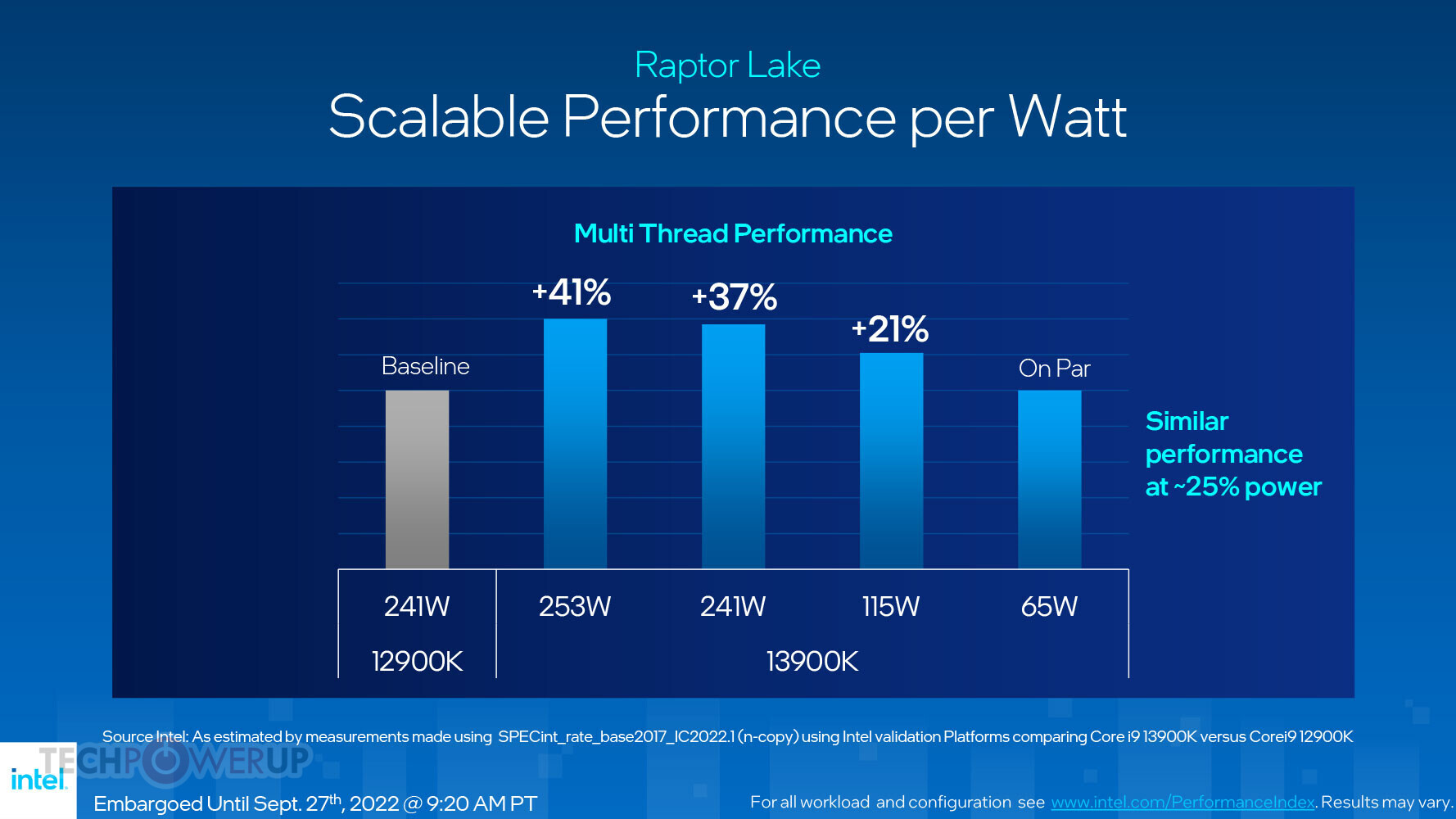
Intel today launched its 13th Gen Core "Raptor Lake" desktop processors, and companion 700-series motherboard chipset. These processors are built in the same LGA1700 package as the previous generation "Alder Lake," and are backwards-compatible with 600-series chipset motherboards through a BIOS update. Likewise, 700-series chipset motherboards support older "Alder Lake" processors. With the new 13th Gen Core, Intel is broadly promising an up to 15% uplift in single-threaded performance, which has a bigger bearing on gaming performance; and an up to 41% multi-threaded performance uplift; over the previous-generation, when comparing the top Core i9-13900K with its predecessor, the i9-12900K. Intel also claims to have outclassed the AMD Ryzen 9 5950X in multi-threaded performance, and the Ryzen 7 5800X3D in gaming performance.
Intel's performance claims are backed by some impressive hardware changes despite the company sticking with the same Intel 7 (10 nm Enhanced SuperFin) foundry node as "Alder Lake." To begin with, the single-thread performance uplift comes from the new "Raptor Cove" performance-core, which promises an IPC uplift over the previous-generation "Golden Cove," comes with more dedicated L2 cache of 2 MB per core (compared to 1.25 MB per core in the previous-generation); and significantly higher clock-speeds, going all the way up to 5.80 GHz. "Raptor Lake" has up to 8 P-cores, but the company has put in a lot of work in improving the contribution of E-cores to the processor's overall multi-threaded performance uplift. This is achieved by doubling the E-core count to 16. These are the same "Gracemont" E-cores as previous-generation, but Intel has doubled the L2 cache that's shared in a 4-core Gracemont cluster, from 2 MB per cluster to 4 MB. There are upgrades to even the hardware prefetchers of these cores.


 Intel didn't go into the nuts and bolts of what makes up the "Raptor Cove" P-core, but broadly explained that it comes with improved speed paths that enable an up to 600 MHz P-core boost frequency uplift at comparable power to the previous-gen "Golden Cove" while staying on the same process. The Intel 7 node also seems to have got some technological improvements, with the company referring to it as the "3rd generation" of this node (optical 10 nm). This mainly concerns better electrical characteristics from improved channel mobility. Cushioning the P-core with a larger 2 MB dedicated L2 cache also appears to be contributing to the iso-power uplift, as the core spends fewer cycles fetching data from the L3 cache. We will learn more about "Raptor Cove" in the coming days, and will hopefully have a more detailed look at the new core in our reviews of these processors.

 The E-core microarchitecture is the very same "Gracemont," but benefits from the node improvements to dial up E-core boost frequencies all the way up to 4.30 GHz. The cores also benefit from the larger 4 MB L2 cache that's shared among four E-cores in a "Gracemont" cluster. "Raptor Lake" has four such clusters, amounting to 16 on the silicon. The E-core clusters have access to the chip's L3 cache, just like the P-cores. As we mentioned earlier, the improved cache, and updated prefetcher algorithm should have an cumulative impact on E-core performance; and when you account for 16 of these, besides the improved 8 P-cores, you begin to see where Intel's 41% generational multi-threaded performance uplift claim is coming from.


 Intel also made updates to the processor's uncore components. The L3 cache that's shared among the processor's P-cores and E-core clusters, is now enlarged to 36 MB, from 30 MB in the previous generation. This cache is a continuously addressable block due to the Ringbus interconnect making ring-stops at various physical segments of the cache. Intel has improved the clock-speed of this fabric, which now boosts up to 5.00 GHz, or 900 MHz higher than the previous-gen.
The DDR5+DDR4 memory controllers also receive an update. The processor now natively supports up to DDR5-5600 JEDEC-standard memory speeds, when using 1 DIMM per 80-bit channel (which has two 40-bit sub-channels); or up to DDR5-4400 when using 2 DIMMs per channel (i.e. populating all four memory slots on your motherboard).
Intel also updated the Thread Director middleware that gives the software some degree of awareness of the Hybrid architecture, and attempts to ensure that the right kind of workload is allocated to the right kind of CPU core. Intel has given TD greater thread class awareness through machine-learning techniques (the processor learns over time what the nature of the workload could be). The processor also takes advantage of new scheduling features of Windows 11 22H2 Update, which introduce PID QoS for system background tasks and user-initiated background tasks.
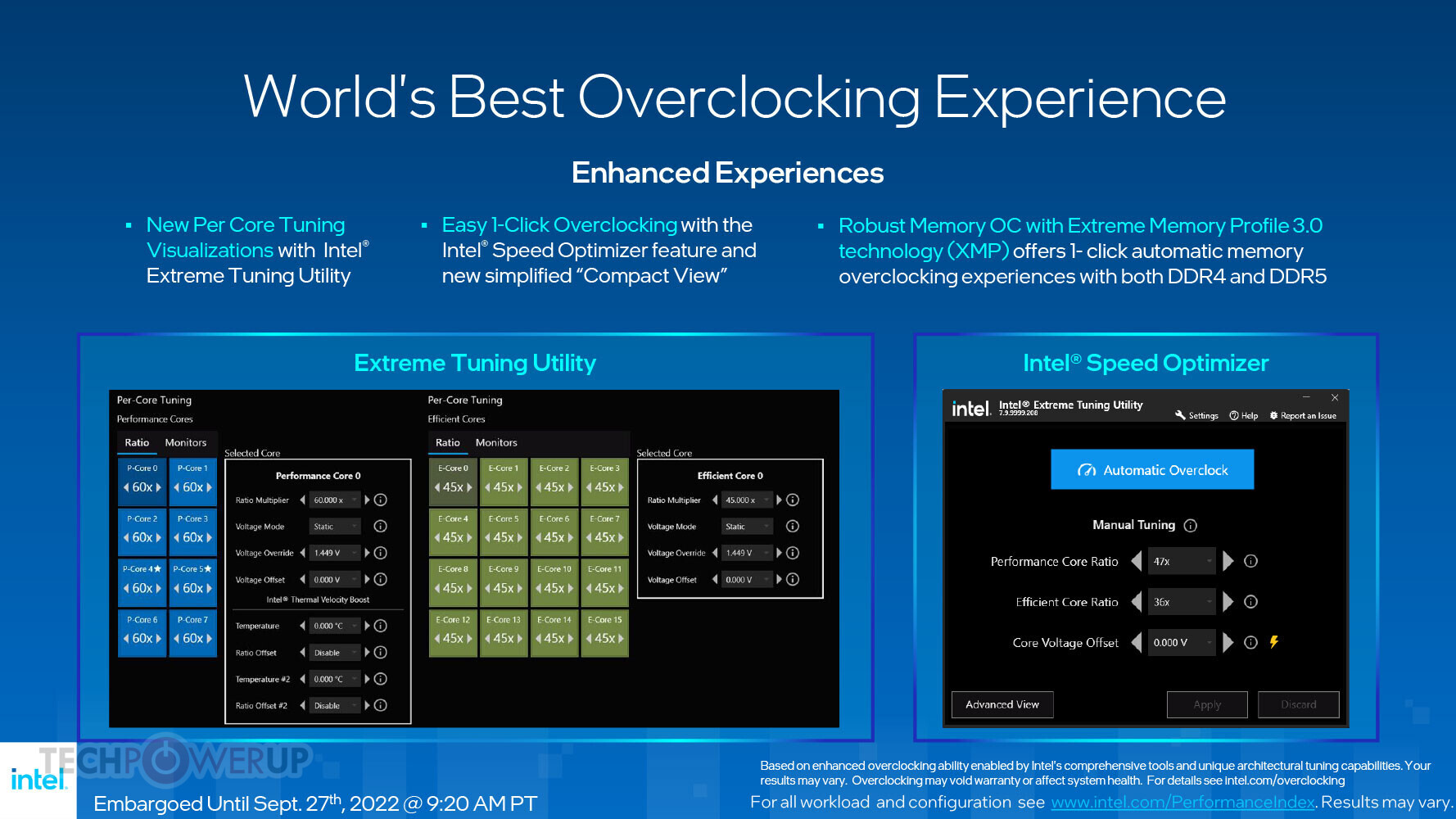
 Intel claims that "Raptor Lake" processors will be memory overclocking monsters, capable of speeds as high as DDR5-10000, when pushed to the limit with enthusiast-grade memory. For the P-cores, the company says that 8.00 GHz overclocks are now within reach for enthusiasts. The updated Intel Extreme Tuner Utility (XTU), allows you to set multipliers on a per-core basis, and tune your memory frequency on-the-fly (no reboots involved).
 Intel is launching the 13th Gen Core "Raptor Lake" desktop processor family with essentially three processor models—Core i9-13900K, Core i7-13700K, and Core i5-13600K; and their "KF" sub-variants that have disabled iGPUs, and are about $10-20 cheaper, depending on the model.
The Core i9-13900K is the flagship part, with 8 P-cores, and 16 E-cores (8P+16E), with the full 36 MB L3 cache available on the silicon. The P-cores have a base-frequency of 3.00 GHz, and boost up to 5.80 GHz; whereas the E-cores run at 2.20 GHz base, boosting up to 4.30 GHz. The processor base power is rated at 125 W, and the maximum turbo power at 253 W (up from 241 W for the i9-12900K). The i9-13900K comes with an MSRP of USD $589, while the i9-13900KF (which lacks the iGPU), is priced at $564.
The Core i7-13700K is an interesting SKU, as it has the same 8P+8E core-configuration as the previous-gen i9-12900K, but with all the new updates detailed above. Intel carved this SKU out by disabling two of the four E-core clusters on the "Raptor Lake" silicon, and reducing the L3 cache to 30 MB. The P-cores have a base frequency of 3.40 GHz, with a maximum boost frequency of 5.40 GHz; while the E-cores run at 2.50 GHz base, and 4.20 GHz maximum boost. These chips have the same 125 W PBP and 253 W MTP as the i9-13900K. The i7-13700K is priced at $409, and the i7-13700KF at $389.
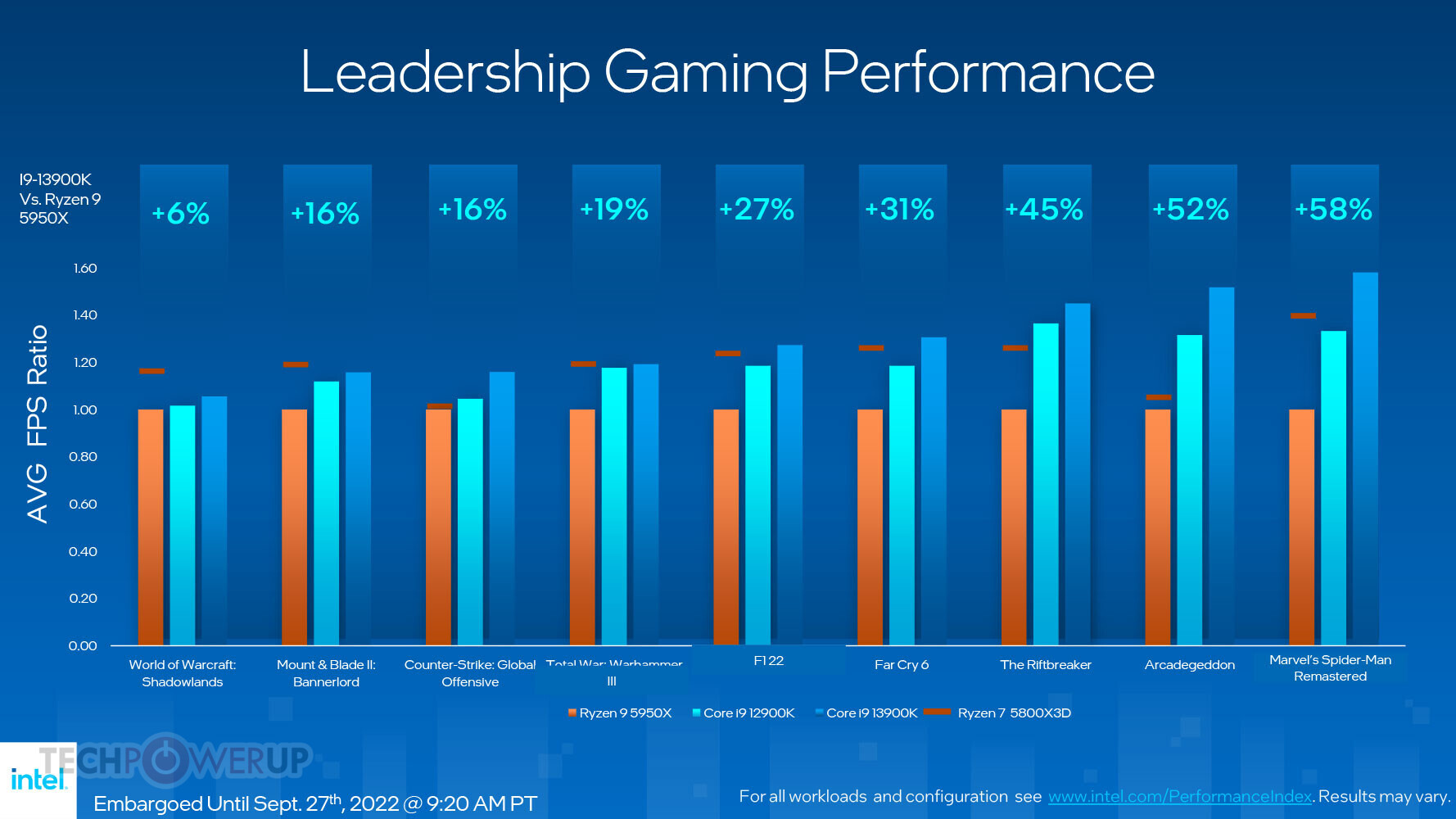
The Core i5-13600K is an equally interesting processor with which the company hopes to hold on to the mid-range. It now comes with a 6P+8E core-configuration, compared to 6P+4E of the i5-12600K. And of course, you get all the generational improvements detailed above. This SKU is carved out by disabling two P-cores, and two E-core clusters; while also cutting down the L3 cache to 24 MB (which is still higher than the 20 MB of the i5-12600K). The P-cores run at 3.50 GHz base with 5.10 GHz boost; while the E-cores do 2.60 GHz base, with 3.90 GHz boost. While the PBP value is the same 125 W as the higher SKUs, the MTP is reduced to 181 W. Intel is pricing the Core i5-13600K at $319, and the i5-13600KF at $294. Intel is claiming gaming performance uplifts of up to 18% when comparing the i9-13900K with the previous-gen i9-12900K, across a wide selection of games; while the comparison with the AMD Ryzen 9 5950X "Zen 3" sees gaming performance gains range between 6% to 58%. The gap only widens when you consider the 99th percentile low-water-mark analysis. Although mainly compared with the 5950X, Intel also threw in gaming performance values it tested on the Ryzen 7 5800X3D, which is shown matching the i9-13900K in games where it's beating the i9-12900K, or within 10% of it in games where the i9-13900K gets ahead. This is interesting, as Intel thinks the performance of "Zen 4" Ryzen 7000-series processors should roughly match that of the 5800X3D. In our performance reviews published on September 26, the 5800X3D is 4.5-5% behind the Ryzen 7 7700X, which means "Zen 4" should end up within 5% of the i9-13900K in gaming performance, should these numbers for the 5800X3D from Intel hold up.


 The platform I/O of these processors is identical to that of "Alder Lake." You get a 2-channel (4 sub-channel) DDR5 + 2-channel DDR4 memory interface. The processor puts out 28 PCI-Express lanes; 16 of these are Gen 5, and intended for the main x16 PEG slot; while the remaining are Gen 4. The main x4 NVMe interface of the processor is Gen 4, while the DMI chipset bus takes up the remaining 8 lanes (DMI 4.0 x8). You should still find motherboards with Gen 5 M.2 NVMe slots, but these would be eating into the x16 PEG bandwidth. Given that NVIDIA's latest GeForce Ada continues to be PCIe Gen 4, cutting into the bandwidth of the PEG slot to run Gen 5 M.2 SSDs could affect graphics performance (but we'll test this theory in upcoming PCIe-scaling articles with the RTX 4090).
The complete slide-deck for the processor launch event follows.


Intel's performance claims are backed by some impressive hardware changes despite the company sticking with the same Intel 7 (10 nm Enhanced SuperFin) foundry node as "Alder Lake." To begin with, the single-thread performance uplift comes from the new "Raptor Cove" performance-core, which promises an IPC uplift over the previous-generation "Golden Cove," comes with more dedicated L2 cache of 2 MB per core (compared to 1.25 MB per core in the previous-generation); and significantly higher clock-speeds, going all the way up to 5.80 GHz. "Raptor Lake" has up to 8 P-cores, but the company has put in a lot of work in improving the contribution of E-cores to the processor's overall multi-threaded performance uplift. This is achieved by doubling the E-core count to 16. These are the same "Gracemont" E-cores as previous-generation, but Intel has doubled the L2 cache that's shared in a 4-core Gracemont cluster, from 2 MB per cluster to 4 MB. There are upgrades to even the hardware prefetchers of these cores.


The DDR5+DDR4 memory controllers also receive an update. The processor now natively supports up to DDR5-5600 JEDEC-standard memory speeds, when using 1 DIMM per 80-bit channel (which has two 40-bit sub-channels); or up to DDR5-4400 when using 2 DIMMs per channel (i.e. populating all four memory slots on your motherboard).
Intel also updated the Thread Director middleware that gives the software some degree of awareness of the Hybrid architecture, and attempts to ensure that the right kind of workload is allocated to the right kind of CPU core. Intel has given TD greater thread class awareness through machine-learning techniques (the processor learns over time what the nature of the workload could be). The processor also takes advantage of new scheduling features of Windows 11 22H2 Update, which introduce PID QoS for system background tasks and user-initiated background tasks.


The Core i9-13900K is the flagship part, with 8 P-cores, and 16 E-cores (8P+16E), with the full 36 MB L3 cache available on the silicon. The P-cores have a base-frequency of 3.00 GHz, and boost up to 5.80 GHz; whereas the E-cores run at 2.20 GHz base, boosting up to 4.30 GHz. The processor base power is rated at 125 W, and the maximum turbo power at 253 W (up from 241 W for the i9-12900K). The i9-13900K comes with an MSRP of USD $589, while the i9-13900KF (which lacks the iGPU), is priced at $564.
The Core i7-13700K is an interesting SKU, as it has the same 8P+8E core-configuration as the previous-gen i9-12900K, but with all the new updates detailed above. Intel carved this SKU out by disabling two of the four E-core clusters on the "Raptor Lake" silicon, and reducing the L3 cache to 30 MB. The P-cores have a base frequency of 3.40 GHz, with a maximum boost frequency of 5.40 GHz; while the E-cores run at 2.50 GHz base, and 4.20 GHz maximum boost. These chips have the same 125 W PBP and 253 W MTP as the i9-13900K. The i7-13700K is priced at $409, and the i7-13700KF at $389.
The Core i5-13600K is an equally interesting processor with which the company hopes to hold on to the mid-range. It now comes with a 6P+8E core-configuration, compared to 6P+4E of the i5-12600K. And of course, you get all the generational improvements detailed above. This SKU is carved out by disabling two P-cores, and two E-core clusters; while also cutting down the L3 cache to 24 MB (which is still higher than the 20 MB of the i5-12600K). The P-cores run at 3.50 GHz base with 5.10 GHz boost; while the E-cores do 2.60 GHz base, with 3.90 GHz boost. While the PBP value is the same 125 W as the higher SKUs, the MTP is reduced to 181 W. Intel is pricing the Core i5-13600K at $319, and the i5-13600KF at $294.


The complete slide-deck for the processor launch event follows.






224 Comments on Intel 13th Gen Core "Raptor Lake" Desktop Processors Launched: +15% ST, +41% MT Uplift
You seem to not have read any of the previous discussion here at all.
The #1/#2 selling CPUs on amazon are Zen 3. #3 is the 7950X. The 7900X is a distant #8, and 7700X very distant #20. The 7600X is way down there, thirty-something. At MC, it's way worse, all the Zen 4 SKUs show up on page 2 just before an out of stock $399 11700K that happens to have an open box buy available.
It makes sense. Nobody wants to upgrade to a $300 or $400 CPU when the rest of the platform (memory/mobo) will run you another $700. If you're going to spend $700 on the mobo / ram, you go for 7950X.
But most won't go for absolute max high end in the first place, so...
Might be a big miscalculation on AMDs part. Then again, they starved the market for Zen 3 and everyone bought Zen 2. Maybe they just price everyone into Zen 3 this time. Still, day 2 is almost done and I'm gonna call this a train wreck from a sales perspective.
Thread director 2, playing riftbreaker on p-cores while e-cores run a Blender render :
www.veed.io/view/0378aced-5a25-4880-8a1b-1836d64196b9
I can make you one with e cores off to compare, the fps will drop drastically. So whoever says e cores are garbage, put them in your ignore list. Indefinitely.
If Spider-Main is using E-cores on the 12900K, it is using them for extra performance on top of the P-cores. The problem is when games use fewer cores, but they allocate their tasks to E-cores instead of P-cores. That can happen in Windows 10 and older games specifically, but it has even been shown in Windows 11.
Your video is impressive. But what do you think your framerate would be like if your 12900K had 10 P-cores and no E-cores? Impossible to say right now. But this would be a good game to test 6P+8E vs. 8P+0E, as both these configurations would occupy roughly the same die space.
I find it surprising that a console port can benefit from more than 8C/16T, especially being a port of a port from PS4. But Nixxes is one of the best PC developers in history, so it is certainly possible.
If you had a bit of free time to spare, I would love to see the 6P+8E vs. 8P+0E comparison. Not to prove anyone right or wrong, but I am genuinely curious about the results. :)
Even if we had a 10p core part though, if its running all cores at 4.9 it would use considerably more power in gaming than an 8+8 configuration. So i think its a balancing act. I dont want to see ecores gone, but im not entirely sure that 16 of them is the way to go either, at least not for a gaming pc. 10+8 would probably be better than the 13900k we are getting
Sure ill test in the afternoon
I would definitely get on board with E-cores if devs started using them specifically.
So everybody will have to play the waiting game until the prices come down, just like with the GPUs after the Proof of Stake for the Etherum.
Just gotta have some patience, that's all. This might be hard for some people though.I also saw only the 7950X sold out on the German Amazon website. I have checked US's and it was the same story.
13400f at $180 will offer most of the performance at a fraction of the price.
Of course by lowering requirements we can look at cheaper processors, and if we don't require ultra high FPS at low resolutions, almost everything in the last several years is GPU limited then.
This has to be the slowest selling launch I've ever seen.
Don't pay much attention to temps and wattage though, I just threw 1.3 volts just for testing stability reasons. The 8+0 is running all cores at 5ghz and the cache at 4.7, since generally speaking the main reason to turn off E cores is to clock the cache thought it would be fair. The 6+8 configuration is running stock cache, P cores at 5ghz and E cores at 4ghz.
8+0
6+8
BTW, here in the UK 5000-series is taking up all the top spots in the Best Seller count. Even the 3XD is now quickly climbing the ladder. I bet AMD anticipated the slow AM5 admission... maybe the 5800X3D and slashed non-X3D variants was a foreseen countermeasure? With X-series boards starting from £350 in the UK... i don't expect 7000-series to top the charts anytime soon.... maybe 7950X/7900X but the rest (majority) is a no-go. I thought pre-launch earlier speculations - "increased build cost" was evident in itself that Zen 4 wouldn't come out with a bang bang? Even if the reviews saw the 7600X outpacing the 12600K by a clear mile... i still wouldn't splurge up for a super expensive platform upgrade. I'm sure many (like myself) are waiting to see how B-series boards hold up, possibly small but relevant further trim on DDR5 prices and no doubt some Intel-AMD price war action at the close of 2022.
Back to the battleground... any ideas how to throw Nvidia in the midst of clashing axes and swords? That would be the prettiest achievement of all!
Main thing I noticed is that with E-cores disabled the CPU usage is over 90% a lot of the time, and it almost maxes out sometimes. That is pretty crazy for a top end CPU with 8C/16T at 5 GHz. Game is definitely CPU-bound in 1080p on both configurations.
I think this thread count will be optimal for a long time and IPC will be the main factor for increasing gaming performance. Meteor Lake is supposed to have lower clock speeds with only a small IPC increase, so I think AL/RL are the ones to get for high framerate gaming.
I am really curious about Zen 4 with 3D cache. Those definitely have a chance of taking the crown.
And it seems that Ada Lovelace and RDNA3 GPUs will be severely CPU-limited in 1080p. Probably even in 1440p in some cases.
Good thing I game in 4K60, so I do not have to worry about CPU performance. :)
It will either begin to throttle or will cause system instabilities - either dead chip or system shut downs.AMD Ryzen 9 7950X Review | PCMag
Consider, cheapest 7600X / 7700X 32GB DDR5-5600 build I can do at Microcenter:
Assumption : You've got a case, PSU, KB / mouse, Wifi Card/wired connection, OS license, CPU cooler, and drives
ASRock X670E PG Lightning AMD AM5 : $259 (note, this just dopped $10 in price)
Corsair Vengeance 32GB (2 x 16GB) DDR5-5600 C36 : $157
7600X : $299
$20 discount on MB/CPU combo : -$20
Total : $695
Sub 7700X @$399:
Total : $795
So, lets say AMD lopped off $50 on the CPU price. That would save you 7% on the 7600X build, and 6.2% on the 7700X build.
Also keep in mind, with the build above, you're not going to see the kind of numbers in the reviews with it.
You need faster memory, and a better cooler than a typical Zen 2/Zen 3 user has. Assuming this mobo can actually hit DDR5-6000, you need to spend about $90 more on RAM and $120 on an AIO that can handle the heat. That brings the totals up to $815 for 7600X build and $915 for 7700X build. This still might not be enough, this is the cheapest ASRock mobo available, no idea how good it is but ASRock doesn't have a good rep right now on low and midrange boards, and most of the cheap boards you're *lucky* if you can hit DDR5-6000 (at least on Alder Lake).
None of these boards seem to have Wifi either, whereas Z690 / Z790 chipsets have a built in AX211 wifi 6E controller - so many of the boards have this for just $10-$20 more. For example, the MSI Z690-A Pro Wifi DDR5 is $239 from MC (no markdown). The Same Z690-A Pro DDR5 without Wifi is only $179 (marked down from $209).
i.e. if you have to buy a Wifi card, that's another $50 or so.
At these prices, lowering the CPU cost $50 - helps - but not much.