Friday, March 24th 2023

NVIDIA RTX 3080 Ti Owners Reporting Bricked Cards During Diablo IV Closed Beta Play Sessions

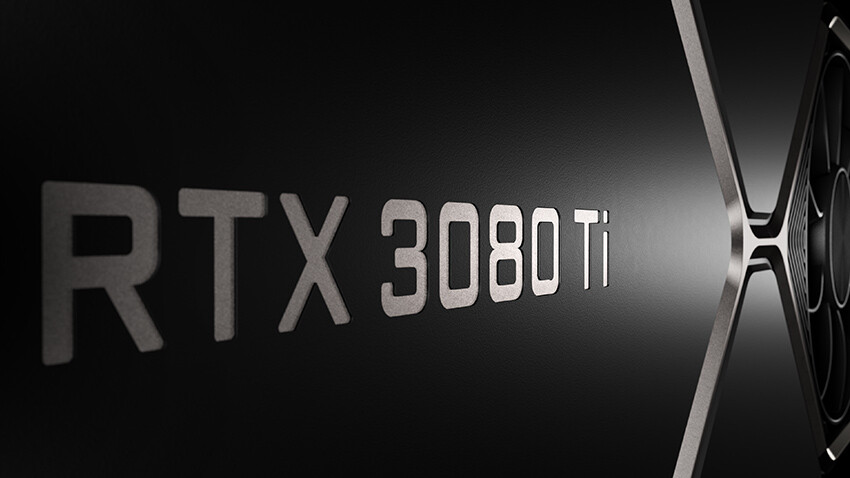
A combination of the Diablo IV Closed Beta and NVIDIA RTX 3080 Ti graphics card is proving lethal for the latter - community feedback has alerted Blizzard to take action, and they will be investigating the issue in the coming days, with assistance from NVIDIA. It is speculated that the game is exposing underlying hardware faults within an affected card, but it is odd that a specific model is generating the largest number of issues. Unlucky 3080 Ti owners participating in the closed beta are said to be experiencing unpleasant or inconsistent in-game performance at best, and BSODs followed by non-functional GPUs at worst.

A Blizzard forumite, ForANge, chimed in with their experience: "My graphics card also burned out. While playing, the fans of my Gigabyte GeForce RTX 3080 Ti suddenly started running at maximum speed. At the same time, the signal from the monitor disappeared. After turning off the power and trying to turn it back on, I couldn't get it to work anymore. The card is just under a year old. It happened during a cutscene with flowers when they showed a snowy landscape."
Sulfate had a similar encounter with their card, albeit with a slightly more explosive effect: "I got to the Church where the flashback scene plays, then fans on my GPU went to max, all three monitors went black and I then killed the power. Smelled that burnt electronics smell. Waited a bit then tried to power back on, and monitors stayed black. After (waiting) a bit (I) killed power, popped open my case tried to power back on. Motherboard has post error lights and shows a solid white, which means error with video card. My Gigabyte GeForce RTX 3080 Ti is dead in the water."

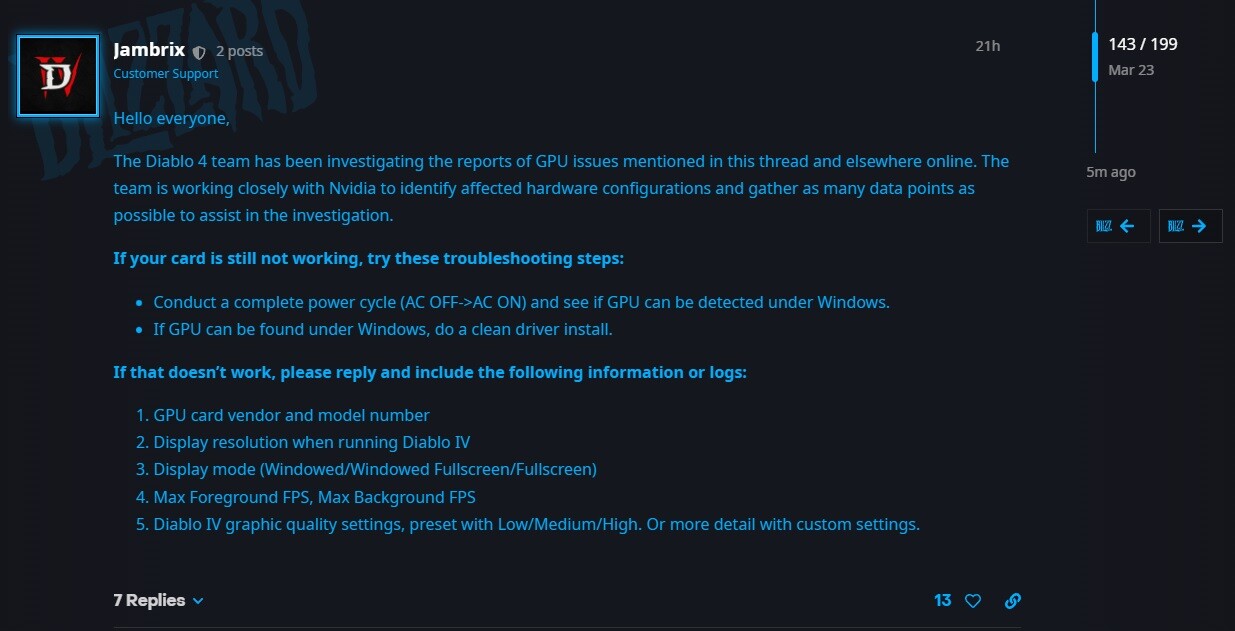
The Blizzard team has posted a message in the thread, and it offers advice for those affected:

"If your card is still not working, try these troubleshooting steps:
  • Conduct a complete power cycle (AC OFF->AC ON) and see if GPU can be detected under Windows.
  • If GPU can be found under Windows, do a clean driver install.
  • If that doesn't work, please reply and include the following information or logs:
1) GPU card vendor and model number
2) Display resolution when running Diablo IV
3) Display mode (Windowed/Windowed Fullscreen/Fullscreen)
4) Max Foreground FPS, Max Background FPS
5) Diablo IV graphic quality settings, preset with Low/Medium/High. Or more detail with custom settings."
The New World, an MMO produced by Amazon Games, gained unwanted notoriety for its apparent ability to kill the mighty RTX 3090 back in mid-2021. Blizzard fans with long memories are also recalling that Starcraft 2 was rumored to be a GPU slayer, roughly around the time of the game's launch. There is early talk of the Diablo IV Beta defaulting to an uncapped frame rate setting, which may send the graphics card into peak performance mode and draw unusually high volumes of power. Community members are suggesting that it is best to cap frame rates via the in-game menu, and to double-check whether the Max Frame Rate setting is disabled within NVIDIA's Control Panel.
Sources: Blizzard Forums, Blizzard Forums Stickied
Add your own comment

44 Comments on NVIDIA RTX 3080 Ti Owners Reporting Bricked Cards During Diablo IV Closed Beta Play Sessions

#26
Dave65
SteevoTo be fair, if this happened to an AMD card the fanbois would be all over AMD for making cheap crap. But since its Nvidia lets blame the game.
So very true.
Posted on Reply
#27
Paganstomp
Diablo IV - Bringing in a new meaning... Too Hot To handle, baby!
Posted on Reply
#28
mechtech
the way it's meant to be played.............

;)
Posted on Reply
#29
N/A
SlizzoIt's not. During the beta last weekend my EVGA 3080Ti had no issues whatsoever, temps and everything else were completely normal while playing.
It's the cutscenes, and those are skipped usually.
Posted on Reply
#30
LabRat 891
Surprised Blizzard hasn't hopped on the issue w/ their PR dept and another tonedef attempt at marketing/humor
This is a feature of the fourth wall-breaking gameplay experience: Sacrifice your GPU to Diablo, today!
[Ice Unto Fire DLC Pre-Order now available, with free beta-access for Apple and Android. ONLY $19.95!]
Posted on Reply
#31
Jism
Some scenes in some games, cause such a spike in power consumption, like running furmark for a brief moment where the power requirement jumps through the roof. Now solid build cards should be able to handle this, when you got crap components out of cost savings you know why it happens.

By default there should be a in game cap framerate in for example menu's of games. I do this with the very few games i play (Pubg, 30FPS) because left uncapped just pushes so much power through the GPU just to render a menu. Not needed.
Posted on Reply
#32
PapaTaipei
SteevoTo be fair, if this happened to an AMD card the fanbois would be all over AMD for making cheap crap. But since its Nvidia lets blame the game.
Bingo
Posted on Reply
#33
Wye
Nvidia released a fixed driver already.
BTW the culprit is Microsoft's DWM(Desktop Windows Manager), not Diablo IV.
Posted on Reply
#34
Veseleil
T0@stIt happened during a cutscene with flowers when they showed a snowy landscape.
T0@stI got to the Church where the flashback scene plays
TL;DR Stay clear of the melancholic landscapes, churches and safely lurk in the shadows within the depths of hell.
Posted on Reply
#35
Steevo
WyeNvidia released a fixed driver already.
BTW the culprit is Microsoft's DWM(Desktop Windows Manager), not Diablo IV.
The culprit is poorly manufactured graphics cards, this is the equivalent of blaming small in place FFTs for burning out a CPU or VRMs when it’s the job of CPU/Mobo manufacturers to ensure their hardware doesn’t die during what’s considered normal use.
Posted on Reply
#36
T0@st
News Editor
VeseleilTL;DR Stay clear of the melancholic landscapes, churches and safely lurk in the shadows within the depths of hell.
I recall Bullfrog Productions having the same intent when they were developing Dungeon Keeper (1997).
Posted on Reply
#37
watzupken
TheinsanegamerNA bad cooler from a third party is a completely different matter then the first party OEM solution being faulty. When EVGA cheaper out on their coolers for the RTX 2000s they were also put on blast and force dot issue an apology and a free fix for their cards, but again, this goes against the narrative of AMD being the victim.

People always have to pull out the whataboutisms and red herrings to prove their precious AMD gets bullied, because mindshare or some such nonsense.
I don't see the difference here really. The reason for the high hotspot temp ultimately boils down to the cooling solution, and it doesn't matter if it is first or third party. AMD made the GPUs, but it was the cooler that they bought from OEM, that was the root cause of the overheating GPUs. Factually, the issue does not affect most or all the AMD or Nvidia cards there. I don't get the AMD hatred here.
SteevoThe culprit is poorly manufactured graphics cards, this is the equivalent of blaming small in place FFTs for burning out a CPU or VRMs when it’s the job of CPU/Mobo manufacturers to ensure their hardware doesn’t die during what’s considered normal use.
In my opinion, Nvidia's high end Ampere seems to have some sort of design flaw. If you recall, RTX 3090 ran into such issue when it was launched. There were a lot of discussions about the caps being used being the root cause. Nvidia eventually "fixed" the issue with driver updates. Fast forward, we see EVGA RTX 3090 burning out when playing New World. Now the same GA102 used in the RTX 3080 Ti is running into issues with another title. I don't think the string of incidents are unrelated because the trend seems to impact high powered GA102 chips.
Posted on Reply
#38
Slizzo
N/AIt's the cutscenes, and those are skipped usually.
Yeah, I played both betas.

I did not skip any cutscenes.
Posted on Reply
#39
vmarv
I wonder of many of these faulty cpu and gpu problems that come up every once in a while are real and caused by the hardware component itself and not, instead, by the stupidity, or luck of knowledge, of the owner.
Certainly, within the persons who claim to have the 3080 bricked by D4, there are guys who bricked their card before and in another way (overclocking or messing up with the bios), and now try to see if they can get a warranty replacement. Assuming they exist at all. Just like there are guys who mount powerful hardware in small cases without proper ventilation, or try to overclock things without really knowing what they are doing.
If a gpu comes with a proprietary connector and the instructions say that you have to use it in a certain way only, but you do it in a different way, who's to be blaimed then if the gpu dies? I mean, we are talking of hardware manufacturers that have hundreds of engineers on their payroll and a quality control system designed to avoid every possible problem that can lead to a class action against them.
Come on... since when cutscenes can brick gpus? :kookoo:
Posted on Reply
#40
chrcoluk
watzupkenI don't see the difference here really. The reason for the high hotspot temp ultimately boils down to the cooling solution, and it doesn't matter if it is first or third party. AMD made the GPUs, but it was the cooler that they bought from OEM, that was the root cause of the overheating GPUs. Factually, the issue does not affect most or all the AMD or Nvidia cards there. I don't get the AMD hatred here.


In my opinion, Nvidia's high end Ampere seems to have some sort of design flaw. If you recall, RTX 3090 ran into such issue when it was launched. There were a lot of discussions about the caps being used being the root cause. Nvidia eventually "fixed" the issue with driver updates. Fast forward, we see EVGA RTX 3090 burning out when playing New World. Now the same GA102 used in the RTX 3080 Ti is running into issues with another title. I don't think the string of incidents are unrelated because the trend seems to impact high powered GA102 chips.
Trying to remember the original noise on the issue, some of the after market cards used components that trigger a fault condition, however apparently these were within spec of what the Nvidia told the manufacturers would be ok so ultimately Nvidia holds some blame as well as the partners. This was mitigated by gimping the drivers, Nvidia got off very lightly especially as the PC tech media gave a vague "fixed in the drivers" without explaining they were gimped.

It would seem the newest GPUs which are considerably more power thirsty, there is niggles in getting everything working well in those conditions, and the errors are not showing up easily hence these late discoveries.

Interestingly though in both cases I think FE cards are not affected.
Posted on Reply
#41
TheoneandonlyMrK
vmarvI wonder of many of these faulty cpu and gpu problems that come up every once in a while are real and caused by the hardware component itself and not, instead, by the stupidity, or luck of knowledge, of the owner.
Certainly, within the persons who claim to have the 3080 bricked by D4, there are guys who bricked their card before and in another way (overclocking or messing up with the bios), and now try to see if they can get a warranty replacement. Assuming they exist at all. Just like there are guys who mount powerful hardware in small cases without proper ventilation, or try to overclock things without really knowing what they are doing.
If a gpu comes with a proprietary connector and the instructions say that you have to use it in a certain way only, but you do it in a different way, who's to be blaimed then if the gpu dies? I mean, we are talking of hardware manufacturers that have hundreds of engineers on their payroll and a quality control system designed to avoid every possible problem that can lead to a class action against them.
Come on... since when cutscenes can brick gpus? :kookoo:
Yep definitely the owners fault.

Nvidia 101 reasoning.


Come on pull your head out of Huang's asss, cut scenes often equal 100/100000 FPS, that coils love to scream about and you think it impossible, it should be indeed, until Nvidia's design development made it an issue.
Posted on Reply
#42
vmarv
TheoneandonlyMrKYep definitely the owners fault.
Nvidia 101 reasoning.
Come on pull your head out of Huang's asss, cut scenes often equal 100/100000 FPS, that coils love to scream about and you think it impossible, it should be indeed, until Nvidia's design development made it an issue.
Yeah, sure, the green bad guys, as always. If it was an hardware problem there would be thousands cards fried by now: the beta was played by some millions of players. Either all the 3080 TI cards or all the 3080 TI of a certain brand, or of a certain batch. Instead nada.
And there will be also some video showing the gpu being bricked in real time while playing the beta, just like people make videos of themselves destroying brand new iPads: for the sake of it and for views. Instead it's always a website article or YT video reporting that according to some reddit/forum/whatever post, "some people say, complain, allegedly, apparently", etcetera.
Where are all these bricked cards? There should be a room full of them by now.
Posted on Reply
#43
TheoneandonlyMrK
vmarvYeah, sure, the green bad guys, as always. If it was an hardware problem there would be thousands cards fried by now: the beta was played by some millions of players. Either all the 3080 TI cards or all the 3080 TI of a certain brand, or of a certain batch. Instead nada.
And there will be also some video showing the gpu being bricked in real time while playing the beta, just like people make videos of themselves destroying brand new iPads: for the sake of it and for views. Instead it's always a website article or YT video reporting that according to some reddit/forum/whatever post, "some people say, complain, allegedly, apparently", etcetera.
Where are all these bricked cards? There should be a room full of them by now.
It's specific model's.

On a specific game.

At a specific point.

With specific settings.


So no it wouldn't effect all cards, No we shouldn't be seeing a room full of them but No your ideology of stupid owners because you said so doesn't trump the many posters who are suggesting they have this issue, gigabyte RMA shit day one, that should tell you something or would if you took your green earmuffs off.

You too are allegedly saying something.
Posted on Reply
#44
Gucky
redeyewell it was released on june 3, 2021. lucky for european owners. that 2 year mandatory warranty should cover you.


nvidia goes to great lengths to prevent you from overclocking too much. (thus this is nvidia’s fault) they limit the power limit etc. throttle the clock rate… in techpowerup reviews they show the effort nvidia goes to throttle the gpu, limit the temperature etc…
so even if the card was overclocked, nvidia has made an effort to “stop” too high overclocks… (when is a last time afterburner, ”released the magic smoke”, lol, or burned an nvidia card. the fact that nvidia limits the clock rate/power limit… means they “approve” of software overclocks… so i still think that mandatory warranty would cover it.

also, if you card is bricked by a game, how is nvidia going to know if you overclocked it?
Nvidia does what? No Nvidia doesn´t prevent you from overclocking. While they don´t provide a program like Afterburner, they also don´t prevent it form working.
In Afterburner i can set my 4090 Founders to 600W, 1,1V and 88°C Templimit (GPU average, NOT Hotspot).
If a 4090 doesn´t have a 600W Bios it is not Nvidias fault, but the manufactorers.

AMD also has certain powerlimits and voltage limits just like Nvidia. Those are to prevent cards from failing.
Remember the 7950X3D der8auer tested? He applied a high voltage due to a bug enableing him to do so and it outright broke at the PC boot up.
Posted on Reply
Add your own comment
Nov 11th, 2026 07:02 CST change timezone

New Forum Posts

Popular Reviews

TPU on YouTube

Controversial News Posts