Thursday, August 14th 2025

Intel "Lunar Lake" Updated PL2 Setting Can Yield Up to 30% Higher Gaming Performance
We recently published our MSI Claw 8 AI+ A2VM review, which is the only handheld gaming device to utilize the Intel Core Ultra 7 258V "Lunar Lake" CPU, featuring four E-cores and four P-cores, paired with the Intel Arc 140V Xe2 GPU. During our testing, we manually set different TDP values via the Manual power profile slider to see what the results are in gaming and how it compares to other, mostly AMD-based, handhelds. However, Intel notified us about performance levels used in testing, and that the official specification for Lunar Lake states that PL2 should always be at least 1 W higher than PL1, or always set at 37 W (the maximum TDP value for Lunar Lake chips). This means that whenever a CPU can extract an additional boost, it will, yielding up to 30% more performance, as we have seen in our own testing.
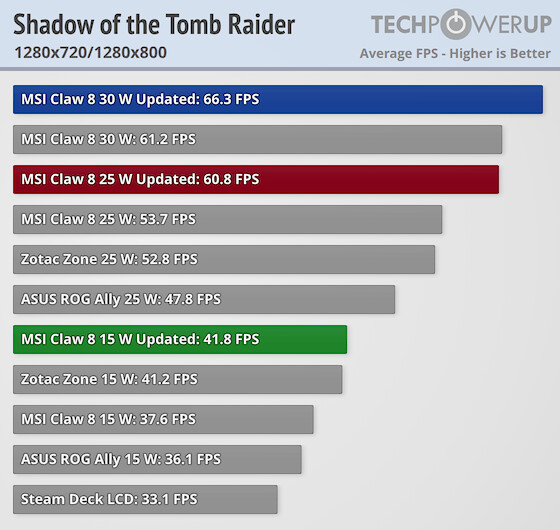
Initially, we used the Manual power profile, which had allowed owners to match PL2 to PL1. However, Intel noted that when PL2 is set to at least a single W higher than PL1, there is an expected 10% performance increase across the suite of games, but depending on the scenario, it can lead to a 30% increase in some instances. An update has arrived for the MSI Center M app, which locks PL2 to always be at least 1 W higher than PL1. As a result, you can no longer match the two. It was only possible before the update. In our retest, Cyberpunk 2077 and Space Marine 2 achieved nearly a 30% performance uplift with this setting. The Lunar Lake-based MSI Claw AI+ A2VM handheld is the highest-performing device we have tested across the board, even surpassing AMD-based devices in our testing suite. In other games, baseline improvement is set at 10%, just as Intel had notified. Our testing confirmed that Lunar Lake is now the most powerful gaming CPU for handheld devices that we own and have tested.
15:57 UTC: We updated some of the claims to better reflect the PL2 setting and that we manually set TDP values, too.
 Below you can find the updated performance graphs.
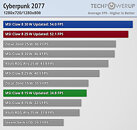
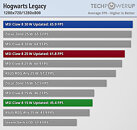
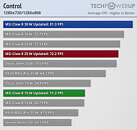
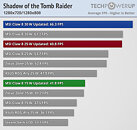 For more details, 1080p testing, and 1% lows, check out the MSI Claw 8 AI+ A2VM review.
Initially, we used the Manual power profile, which had allowed owners to match PL2 to PL1. However, Intel noted that when PL2 is set to at least a single W higher than PL1, there is an expected 10% performance increase across the suite of games, but depending on the scenario, it can lead to a 30% increase in some instances. An update has arrived for the MSI Center M app, which locks PL2 to always be at least 1 W higher than PL1. As a result, you can no longer match the two. It was only possible before the update. In our retest, Cyberpunk 2077 and Space Marine 2 achieved nearly a 30% performance uplift with this setting. The Lunar Lake-based MSI Claw AI+ A2VM handheld is the highest-performing device we have tested across the board, even surpassing AMD-based devices in our testing suite. In other games, baseline improvement is set at 10%, just as Intel had notified. Our testing confirmed that Lunar Lake is now the most powerful gaming CPU for handheld devices that we own and have tested.
15:57 UTC: We updated some of the claims to better reflect the PL2 setting and that we manually set TDP values, too.


38 Comments on Intel "Lunar Lake" Updated PL2 Setting Can Yield Up to 30% Higher Gaming Performance
On the AMD side, the equivalent would be sPPT (Slow Package Power Tracking Limit).This is normal functionality for any modern CPU/APU. If you set PL2 to the same as PL1, there will be no change in performance. Same thing with setting sPPT to be the same as SPL and vice versa on AMD.
"Up to 30% faster empty battery". Fixed for em :D.
Hopefully that changes going forward. I'd rather have more interactive/responsive worlds than graphics that are barely better than 10 years ago but require upscaling and framegen.
Every watt matters on these handhelds, battery life and heat needs to be retested with the CPU allowed to draw up to 37W.
It's not like that very scenario is tested in the review. They increased Pl2 from 10w to 15w, from 15w to 20w, from 20w to 25w, from 25w to 30w, from 30w to 35w and what you are describing hasn't happened, but increasing it to 36w? Yeap, that will totally increase power by 9999%.
Probably their next processor is going to suck again and need a small nuclear reactor to power.
Actually, both MTL and LNL work best with PL1 and PL2 maxed out. It does not change battery life for the worse at all. You can use FPS caps and quality settings to control CPU/iGPU power.
I absolutely 150% trust intel when it comes to power. You set a PL2 on intel chips, it's not going to go over it, ever, period.So TPU's review that has it slamdunking on everything in both performance and baterry life is wrong?
As I noted in my comment to the original test, is that "30W" for Zotac was not the same as "30W" for Lunar Lake.
The Zotac, despite a smaller screen uses 4.5W / hour more than the Lunar Lake.... (neither actually use 30W for the whole handheld, it is more about 37W (Lunar Lake 8") and 42W (Zotac 7") -e.g. RAM is in the 30W intel, but not in the 30W AMD - not explaining the big discrepency though.
And this was at "claimed" 30W, where the LL was already on par with the Zotac before the update (despite the whole handled consuming less).
But the most interesting test will be the same plateform, MSI Claw AMD vs Lunar Lake.
I wish they would show power as the indicated battery draw numbers rather than just a TDP setting...
I always remember in college the anecdote they would give for relative values (dBm's) was the statement that Conchord was only like 2 - 3 dB's louder than a regular jet, to appease the naysayers about noise.
Setting PL1 lower allows the CPU to cool down a bit allowing more average thermal headroom. I know in power limited scenarios, often Balanced power setting can perform better than High Performance. I had that happen with 3rd Gen Core U-series laptop on SC2. Balanced was noticeably better performance than High Performance. I reckon it was 30-40% better.Of course not, 30W is just SoC power. You have the whole COMPUTER to deal with, which includes SSD, RAM, Display, and various components on the board.
Lunarlake uses less overall power because it's better optimized in that regard.This makes sense. Because some workloads need that temporary boost and might be a bottleneck, without impacting overall power in a noticeable amount. The higher PL2 setting "uncorks" the bottleneck.Did you even read the article? What part of it is overvolting and overclocking?