Tuesday, October 7th 2025

Microsoft Blocks Online Account Bypass on Windows 11
Microsoft has released its latest Windows 11 Insider Preview Build 26220.6772 (KB5065797) in the Dev Channel. While it introduces some new Copilot-powered features and updates to Windows Hello, it also rings a death sentence to bypassing Microsoft Online Account, which is now mandatory for everyone. Microsoft has doubled-down on making users sign in with their Microsoft Online Account, and local-only installations are no longer possible at the time of writing. Although new workarounds will likely emerge over time, Microsoft has successfully closed off the most accessible and widely known methods for avoiding Microsoft account creation in recent Windows 11 preview releases. Since these changes currently exist only in preview versions, several weeks will probably pass before they reach the stable, public releases of Windows 11. The latest Windows Blog confirms: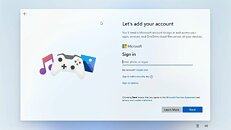 Microsoft has made it clear that Windows 11 installation requires both a Microsoft account and active internet connectivity, and the company is systematically eliminating the simpler workarounds that previously allowed users to skip this requirement. While alternative methods remain available, they now demand significantly more technical expertise, specifically requiring users to modify the Windows installation image beforehand by configuring an unattended setup that includes a local account, a process that proves challenging for average users. Commands like "oobe/bypassnro" and the starting "ms-cxh:localonly" will not give you the desired workaround, as Microsoft has patched that as well.
Sources:
Windows Central, Windows Blog
MicrosoftWe are removing known mechanisms for creating a local account in the Windows Setup experience (OOBE). While these mechanisms were often used to bypass Microsoft account setup, they also inadvertently skip critical setup screens, potentially causing users to exit OOBE with a device that is not fully configured for use. Users will need to complete OOBE with internet and a Microsoft account, to ensure device is setup correctly.

184 Comments on Microsoft Blocks Online Account Bypass on Windows 11
Computers aren't actually world wide yet, 8 billion humans, if eveyrone gets easy and ethical access to computers I think Linux will have multiplayer prospects at that point!
Benedict Chen! GagHahahaha.
Dopes that actually work>!>!>?!?!
Microsoft then Local then delte first, feels like a lot of microsoft services will be activated though and just hang in the backjground.
I am sure even you could fumble your way through linux it doesn't require a competent technologist these days.
Kernel anticheats wont last forever, MS is planning to end access to the kernel after the Crowdstrike outage, besides eBPF is a great secure alternative on linux if game devs want to continue to beat their heads against the wall and trust client data.
If you are stubborn or only use your pc for kernel-anticheat games. Windows 11 LTSC is the only semi-sane option.
It is comical given the resources and the number of people they have, what kind of glacial pace they have.
Linux devs with far less resources are able to iterate much quicker.
Security from malware and threat actors is not the only consideration for end users of software, which is something people like you don't understand. I will gladly use older software that is infinitely more pleasurable to use and respects my rights at the expense of being vulnerable to a ridiculous awful link that I'd never click on and wouldn't be able to load in my browser.
Benedict Chen!
Besides, they intentionally bundle that in, so people like you use "Security" as a socially accepted reason to upgrade. Once you get caught in the upgrade hype, you are then perpetually subscribing to a product you never own and get micro transactioned to bankruptcy. Even Nvidia, AMD and Intel are on the bandwagon, eager to delete drivers the second Microsoft tells them to stop supporting an older OS. There is zero reasons for this practice other than $$$. Being careful to test your software in a virtual environment and archive trusted installers should avoid the need for updates. Better yet, go Linux. Honestly, I am looking at getting Windows XP working again. There are people online who are developing drivers and adding features to it in order to bring it back to life. Microsoft gave up on it long long ago, so why not resurrect it? Hackers no longer target it because of the extremely low user base.
I never did care for Windows 10. I am thinking about virtualizing it, such that I can copy data to a Windows 7 machine. Machine code is the same as it was 20 years ago, so this incompatibility is nothing more than lockouts under the guise of security. Only so much money can be made before the human population realizes that no matter how hard you sugar coat Microsoft, it is still a TURD.Reminds me of Twitter, before the bloat received their separation slips from Elon Musk after he bought the company. Some corporations get so comfortable because they know they have a monopoly and there is no reason to innovate.
I see the issue more with the consumers buying mice which demands a 1GB mor more these days always on software for microsoft windows.
A proper hardware would use proper standards. I did not knew if the device was even supported or not, the M-Audio Air 192|6 uses stanarrdized usb features which work in any operating system. ANY - without drivers.
I would not blame microsoft, I would blame the consumer buying such products. We have usb whcih can offload so much functionality. I hardly see any hardware with open source git repository for the drivers. I do not have to understand why hardware is sold and the driver is just released once. Do they sell hardware or the software? I get the impression those fancy human input devices company and printer companies are selling just one software release version and the hardware is just a free add on.
Why everything has to be a windows software when a single keyboard button, much cheaper, can do all usb rgb keyboard effects, I do not have to understand it. Nearly the same work and same size for the ucontroller in the usb keyboard when using the right compiler.
Objectives are clear, testing is on the fly, code cleanup is near instant and features roll out at a brisk pace.
When the team is too big you get mandatory meetings that should be emails, a SLOG of tests, broken features, etc.
For some reason size also opens them up to becoming targets of ill characters. Military intel calls it, be a weapon or be a target.Soooo you know that security breach thing that was happening really often before a patch?
Some corpos never patched other nuisances like timebomb drivers that crash the OS after X hours or perpetually ON (debug?) ports as exploits.
For some reason I encountered this a lot with nVidia and am just getting around to fighting their craptastic Server display drivers.
I've considered running WinXP/7 machine as a network controller but scrapped that in favor of a NAS with SMBv3 support, which is also miserable on Win11.
There are reasons I do not like Win10. Mostly the changeup in memory management. I don't like how the OS behaves but could afford to throw another 32GB at it.
Sometimes I do regret it. This is completely unnecessary and the only reason I signed off for it was ultra long VR hours.Machine HARDWARE is very different today. There is a MASSIVE difference between this:
And THIS:
The large ones: Multiprocessor technology, Simultaneous Multithread, Nested Page Tables, Hardware and software making use of >4GB memory space
General power consumption of hardware going to extreme highs and lows that make a decades old compare appear very suspicious (like they're dying)
SSSE-3, AVX and FMA instructions along with the POPCNT ladder pull providing very little if anything in the workstation space but all in for multimedia
The HARD lockout from Win11 is justified on that machine. For emergencies there's better and that means there's better for production as well.
I have reason to believe that Microsoft is drawing a line in the sand on support even on capable hardware to steer the direction of hardware/AI.
I'm interested in AI in toolkit but not an adopter of it in the OS itself. So I'm still a general purpose computer user. On that note, not my table.Really fortunate that my Zelotes is just a composite mouse and keyboard that uses the generic driver. Fully programmable keys from its own program too.
I remember the days of WinModems, something that specifically didn't function under other OS, even if it's borderline useless hardware today.
Some wireless adapters like my MSI Turbo only have WinXP level 32-Bit drivers that won't work in a newer/64-Bit system. These shouldn't exist.
But then there's stuff like my Oculus, no-name accelerator cards and the garden variety Chinese unobtanium that can be made better in Python.Can you imagine how empowering it would be if burned out creators could actually square things away on their old computers CORRECTLY for once?
I wouldn't hear meltdowns from six figure socialite anime tards about their NEW $3500 PC chugging on stream because they don't understand hardware.
That IS a real story too, I'm not kidding. Creators are just as deep in the dark as normies and neither one can tell you when they're out of PCI-E lanes.
The tools to make that unfixable garbage a success for those seeking a retry on their own broken bullshit is worth discussion. I should cover it soon™.
It's good support between 8.1/10/11 and Server 2012/2016/2019+.
Any OEM System Builder or MS Partner can figure it out and it's great for the WinPE specialists.
I'm sure the Rufus users could figure it out given half a chance too. What is the likelihood?
Unfortunately I didn't have the Windows 10 OEM key I used for that motherboard anywhere, because I thought it was always going to be tied to the motherboard and I would never have to remember it, but I grabbed the BackupProductKeyDefault out of the system (which is different than the original product key) and used that when Windows 11 installed and it worked. The rufus prepared USB stick that was setup to create a local account by default worked and I didn't get stuck at the screen prompting me to login to an MS account. Regarding windows activation however it seems the backup key didn't work and Windows wouldn't activate.
quote 1, are you saying you created a rufus image and then tried to do a local account install with a normal install routine? @ i disconnected.
the disconnect method hasn't worked for years now.
why would you think rufus in any way has any influence on the install procedure outside of the unattended file it can adhere to or create. which you seemingly did with quote 2.
The confusion probably came into play because I mixed in another issue that deals with activation. Post Windows 10 EOL some of my machines won't reactivate because I changed their hardware and they were never linked to my MS account before the hardware change, making it impossible to use the troubleshooter to recover them. I was able to recover 1 of 4 motherboard activations because I hadn't changed the hardware on one of them and was able to link it to my MS account before changing the hardware. I was able to both reactivate Win10 and activate Windows 11 on that one machine.
I am pretty sure I did everything correctly, but there was no avoiding the setup of an online account. I guess, although can't say 100% that the latest Win 11, even with Rufus blocks local accounts at setup.
I went on to create a local account later. Not ideal though. I am not going into any detail, the whole thing really pissed me off. Back on a local W10 and all is fine.