Tuesday, December 2nd 2025

Microsoft Breaks File Explorer Dark Mode With Latest Non-Security Update
Microsoft has released the KB5070311 non-security preview update for Windows 11, offering enhanced support for dark mode enthusiasts. However, this update introduces an issue with File Explorer's dark mode, causing parts of the app to occasionally flash. The problem results in the application window briefly displaying a blank white screen before loading files and folders. Actions that can trigger this include launching or switching from the Home and Gallery sections, opening new tabs, toggling the Details pane visibility, and requesting additional information during file copy operations. While this is not a critical security issue, it may produce inconvenience to users accustomed to dark mode.
Although Microsoft hasn't yet resolved this issue and has listed it in the "known issues" section, we've managed to recreate what the bug looks like before it returns to normal. It usually lasts for only a second, but it's enough to be annoying, especially if you're using dark mode. The company is working on a fix, which will be included in a future non-security update package. So, those who prefer dark mode will need to endure the inconvenience of flashing white squares a bit longer. It also raises questions about what causes this behavior within File Explorer. With recent issues that Microsoft is actively addressing, it might be due to conflicts between Win32 UI elements and modern WinUI/XAML overlays.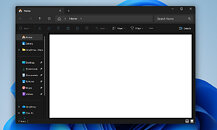 Just a few days ago, Microsoft acknowledged performance issues with File Explorer on Windows 11, which is concerning for such a crucial application within an operating system. To address this, Microsoft is considering preloading File Explorer in the background to enable quicker access when users open the application. Some visual adjustments, like turning off transparency and animation effects, can make File Explorer appear to launch faster, but the underlying problem persists. The older Windows 10 File Explorer used Win32 UI elements. However, Windows 11 overlays this legacy core with modern WinUI/XAML, and these added UI elements are now making the entire application slower, and prone to bugs like we have with dark mode today.
Sources:
Windows Central, Microsoft
Although Microsoft hasn't yet resolved this issue and has listed it in the "known issues" section, we've managed to recreate what the bug looks like before it returns to normal. It usually lasts for only a second, but it's enough to be annoying, especially if you're using dark mode. The company is working on a fix, which will be included in a future non-security update package. So, those who prefer dark mode will need to endure the inconvenience of flashing white squares a bit longer. It also raises questions about what causes this behavior within File Explorer. With recent issues that Microsoft is actively addressing, it might be due to conflicts between Win32 UI elements and modern WinUI/XAML overlays.

67 Comments on Microsoft Breaks File Explorer Dark Mode With Latest Non-Security Update
Why would you want to use Explorer when you can use an AI that nobody asked for?
Slap on top of it this junk focus on the agentic system. What a joke, thankfully, I have to suffer this crap only on my work laptop. Home PC is thankfully fully debloated.
Does anyone still think I'm crazy?Nice!
There was a time MS used 150 different and custom computers followed with 75 beta testers to test all possible combinations in regards of updates. Those days are far gone.
Jokes aside, I can tolerate web applets masquerading as proper software when it comes to some consumer programs like Discord. Having the same approach to fucking core OS utilities is just criminal and MS execs should all be strung up by their balls for even entertaining this dogshit idea, let alone actually going through with it. At this point, just let users straight up opt out of this amazing experience and use pure Win32 versions with the appropriate GUI, Windows 7 Classic Theme style. We are really approaching levels of bad where that would be preferable.
Windows 11. You know you want me
Linux is great when properly managed in small devices like OpenWrt or Android but that’s about it.
Drivers are installed automatically, the only time you'll have worse drivers is with an Nvidia GPU because their drivers are still proprietary.
Frame rate is often better on Linux and more stable, but it's worse on W11 due to the fact of Windows being over bloated garbage.Also the fault of Nvidia drivers being proprietary with their main focus being on Windows, AMD and Intel GPU's work fine.That takes away the whole point of what Linux is, it's not intended to be an all in one OS, Linux is just the kernel base, you're free to build on it and customize everything yourself.
The best option for a single OS for games is SteamOS, though Valve would have to launch a general release of the OS with more broad hardware support.