Tuesday, December 2nd 2025

Microsoft Breaks File Explorer Dark Mode With Latest Non-Security Update
Microsoft has released the KB5070311 non-security preview update for Windows 11, offering enhanced support for dark mode enthusiasts. However, this update introduces an issue with File Explorer's dark mode, causing parts of the app to occasionally flash. The problem results in the application window briefly displaying a blank white screen before loading files and folders. Actions that can trigger this include launching or switching from the Home and Gallery sections, opening new tabs, toggling the Details pane visibility, and requesting additional information during file copy operations. While this is not a critical security issue, it may produce inconvenience to users accustomed to dark mode.
Although Microsoft hasn't yet resolved this issue and has listed it in the "known issues" section, we've managed to recreate what the bug looks like before it returns to normal. It usually lasts for only a second, but it's enough to be annoying, especially if you're using dark mode. The company is working on a fix, which will be included in a future non-security update package. So, those who prefer dark mode will need to endure the inconvenience of flashing white squares a bit longer. It also raises questions about what causes this behavior within File Explorer. With recent issues that Microsoft is actively addressing, it might be due to conflicts between Win32 UI elements and modern WinUI/XAML overlays.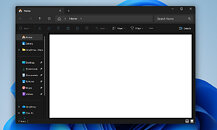 Just a few days ago, Microsoft acknowledged performance issues with File Explorer on Windows 11, which is concerning for such a crucial application within an operating system. To address this, Microsoft is considering preloading File Explorer in the background to enable quicker access when users open the application. Some visual adjustments, like turning off transparency and animation effects, can make File Explorer appear to launch faster, but the underlying problem persists. The older Windows 10 File Explorer used Win32 UI elements. However, Windows 11 overlays this legacy core with modern WinUI/XAML, and these added UI elements are now making the entire application slower, and prone to bugs like we have with dark mode today.
Sources:
Windows Central, Microsoft
Although Microsoft hasn't yet resolved this issue and has listed it in the "known issues" section, we've managed to recreate what the bug looks like before it returns to normal. It usually lasts for only a second, but it's enough to be annoying, especially if you're using dark mode. The company is working on a fix, which will be included in a future non-security update package. So, those who prefer dark mode will need to endure the inconvenience of flashing white squares a bit longer. It also raises questions about what causes this behavior within File Explorer. With recent issues that Microsoft is actively addressing, it might be due to conflicts between Win32 UI elements and modern WinUI/XAML overlays.

67 Comments on Microsoft Breaks File Explorer Dark Mode With Latest Non-Security Update
I wouldn't even have noticed this had it not been for reading this because who uses the builtin gallery or home screen? It's also less than half a second of a flash. Unless you are severely epileptic this really is nothing.
Dark Mode users will not tolerate such things. Also it's likely and easy fix.
Here is the official Preview
BTW, I AM a dark mode user. It's not some elite uber exclusive club.Making it even less newsworthy, yes.
I hardly ever play games these days, I don't have the time for it. Most new games these days... suck. Sure, they look pretty but unless you have extremely high-end hardware, you're not going to be able to play them as the game studio intended it to be played like. And then there's the overall game quality, which has been going down the toilet for a long time now. The last game I actually bought was Diablo 4 and I might as well have lit my money literally on fire for it wasn't anything like what Diablo used to be like.
Yeah... if and when my PC dies, I'm jumping ship to the Mac.