Wednesday, December 17th 2025

Windows Server 2025 Gets Native NVMe SSD Support After 12 Years

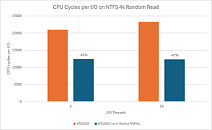
Microsoft has introduced native NVMe SSD support in its Windows Server 2025 build, now available as an opt-in feature for users. After 12 years of NVMe's existence and years of support in the Linux kernel and Linux-based operating systems, native support has been added to the Windows Server stack. Previously, Microsoft converted NVMe drive commands into SCSI commands, which resulted in processing latency and overhead, slowing down read/write speeds in typically high-performing storage configurations. With native NVMe support, the entire stack and I/O processing have been redesigned to achieve optimal SSD performance.

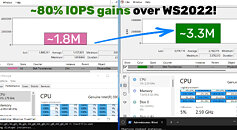
System administrators don't need data to recognize the significant performance improvements that native NVMe support will bring. Windows Server 2025's native NVMe support fundamentally transforms storage performance by enabling direct multi-queue access to modern hardware. It delivers up to 3.3 million IOPS on PCIe Gen 5 SSDs and exceeds 10 million IOPS on HBAs, while reducing latency through streamlined, lock-free I/O paths. This leap in efficiency is essential because traditional SCSI-based processing, originally designed for rotational disks with a single-queue model limited to 32 commands, cannot fully utilize flash storage.

In contrast, NVMe was specifically designed for solid-state media with native support for 64,000 queues, each handling 64,000 simultaneous commands. This allows Windows Server 2025 to eliminate legacy translation layers, improve CPU utilization, and unlock next-generation storage capabilities. Microsoft says that this is a storage revolution and "a new foundation for Windows Server storage, built for the future." Microsoft even has a dedicated email for feedback and questions nativenvme@microsoft.com, which will likely serve as a feedback and bug logger hub. For Windows 11, there is no information on when the OS will bring native NVMe support, but we can assume that it will trickle down in the coming months.
Sources: Microsoft, OC3D
Add your own comment

49 Comments on Windows Server 2025 Gets Native NVMe SSD Support After 12 Years

#26
_JP_
SetsunaFZeroWell i can tell you it's getting worse and worse every 2-4 years.
That's my Windows 11 Enterprise with all it's Enterprise BS running in the background, only Outlook and Teams are open. If i open up all my applications that i need i'm will be hitting 25GB of RAM and I'm just an IT Sys Engineer. 🙄
What do you know, same same! I'm supposedly "idling".

Posted on Reply
#27
PowerBuilder
It seems to be related to DirectStorage (bypass I/O feature) support. It was stated that it was only supported on client OS like Windows 10/11 (further optimized in 11) and described as a feature that will be added in the future for server OS.
Posted on Reply
#28
Frank_100
No matter how low I move the bar, microsoft finds a way to exceed previous disappointments.
Posted on Reply
#29
T550p
What about Windows 7 and 8.1 users? Are they affected by this problem?


Source: files.futurememorystorage.com/proceedings/2016/20160809_FA12_P3_Prepalli.pdf


Source: www.snia.org/sites/default/files/SDC/2019/presentations/Storage_Architecture/Xing_Michael_Zhu_Danyu_Yang_Liang_CSSD_A_New_Monolithic_Cloud_NVMe_Storage_Driver.pdf

Bruh. Well, at least this 'issue' doesn't affect Windows NT 3.51, NT 4.0, 2000, XP, and Vista users because they don't have 'native' NVMe support. Wait a minute, NT 3.51 (implied), NT 4.0 and 2000 does have an unofficial NVMe driver: github.com/techomancer/nvme2k. Quote from page: "Translates SCSI commands to NVMe commands". Uh oh, what about Windows 95, 98 SE, and ME? github.com/LordOfMice/Tools, nvme9x is a port of nvme2k? Oh boy.

How about XP x86 and XP x64? github.com/MovAX0xDEAD/NTOSKRNL_Emu, a backport from 7? XP x64 has msfn.org/board/topic/178182-xp-pro-x64-os-boot-nvme/ ...also uses the same SCSI translation layer. Darn, what about Vista, Generic_NVMe_10.4.49.0? Backport of 7's driver again.

Thanks a lot, Microsoft.
Posted on Reply
#30
Sora
PowerBuilderIt seems to be related to DirectStorage (bypass I/O feature) support. It was stated that it was only supported on client OS like Windows 10/11 (further optimized in 11) and described as a feature that will be added in the future for server OS.
no relation at all.

Here it is guys, have at on Windows 11 Pro/Home

reg add HKEY_LOCAL_MACHINE\SYSTEM\CurrentControlSet\Policies\Microsoft\FeatureManagement\Overrides /v 1853569164 /t REG_DWORD /d 1 /f

reg add HKEY_LOCAL_MACHINE\SYSTEM\CurrentControlSet\Policies\Microsoft\FeatureManagement\Overrides /v 156965516 /t REG_DWORD /d 1 /f

reg add HKEY_LOCAL_MACHINE\SYSTEM\CurrentControlSet\Policies\Microsoft\FeatureManagement\Overrides /v 735209102 /t REG_DWORD /d 1 /f

Posted on Reply
#31
FR3D1
Ninja Cat
I'll add a source to the above entry.
Source

Fame and glory @VCCS

With a friendly smile,
Fred.
Posted on Reply
#32
Shonk
Sorano relation at all.

Here it is guys, have at on Windows 11 Pro/Home

reg add HKEY_LOCAL_MACHINE\SYSTEM\CurrentControlSet\Policies\Microsoft\FeatureManagement\Overrides /v 1853569164 /t REG_DWORD /d 1 /f

reg add HKEY_LOCAL_MACHINE\SYSTEM\CurrentControlSet\Policies\Microsoft\FeatureManagement\Overrides /v 156965516 /t REG_DWORD /d 1 /f

reg add HKEY_LOCAL_MACHINE\SYSTEM\CurrentControlSet\Policies\Microsoft\FeatureManagement\Overrides /v 735209102 /t REG_DWORD /d 1 /f

Just tried it on my Windows 11 26200.7462 PC's worked fine
Just tried it on my Windows 10 19045.6691 PC's no joy (was expecting as much but worth trying)

Doesnt seem any faster in benchmarks on Windows 11

Intel Optane M10 16GB x 4
Intel Optane 800P 120GB x 2
Intel Optane 900P 280GB
Intel Optane 900P 480GB x 2
Intel Optane P1600X 120GB x 4
WD SN 740 256GB
Micron 2450 256GB
Micron 3400 512GB (Crucial P5 Plus in Micron Branding with full 512GB Capacity no downbin)
Micron 3400 1TB (Crucial P5 Plus in Micron Branding with full 1024GB Capacity no downbin)
Micron 3400 2TB (Crucial P5 Plus in Micron Branding with full 2048GB Capacity no downbin)
Corsair MP510 480GB
Corsair MP600 Pro 2TB
Samsung 990 Pro 2TB x 2
Samsung 990 Pro 4TB
etc..
Posted on Reply
#33
Wirko
ShonkDoesnt seem any faster in benchmarks on Windows 11
Specifically in random 4k reads and writes at queue depth above 32, there's no improvement? That's most strange.
T550pWhat about Windows 7 and 8.1 users? Are they affected by this problem?
Hm, "native", in the context of this thread, means native without the need for traslation from NVMe to SCSI and back to NVMe commands. (At least I understand it to be a double translation but not sure.) But your post demonstrates that the Windows 8 driver, and all others derived from it, are not native, correct?
DaemonForceGuys, tough question but why do you care? You're not the ones in the enterprise space and even we don't care about it.
We start WinPE, load the driver, image Windows, bcdboot, reboot, done. Nobody cares about "native" oob support.
Some guys and an occasional gal here at TPU do deal with servers and workstations, which often run on Windows Server too.

But your "native" in quotes made me think. If MS hasn't had a generic native driver until now, did enterprise SSD makers provide their own, native without quotes?
Posted on Reply
#34
kenaj235
My results:

C: Intel Optane 905p 960gb
E: WD BLACK SN8100 4000GB

Win 11 Pro

Before:


After:

Posted on Reply
#35
Visible Noise
WirkoBut your "native" in quotes made me think. If MS hasn't had a generic native driver until now, did enterprise SSD makers provide their own, native without quotes?
Client - no drivers, works OOB and nobody thinks about it at all.

Enterprise Server - (most) Nobody keeps their own storage outside of a boot pool and a local MTA. This all migrated to the cloud even pre-Covid.
Posted on Reply
#36
DaemonForce
Remote clusters MAYBE.

Some of us....Run local cloud servers. We do on-prem storage either for security reasons or convenience of saving bandwidth.

Not everything needs to see the Internets and really, not everything should. If you have the technology to run the drives, great.
Posted on Reply
#37
Visible Noise
DaemonForceRemote clusters MAYBE.

Some of us....Run local cloud servers. We do on-prem storage either for security reasons or convenience of saving bandwidth.

Not everything needs to see the Internets and really, not everything should. If you have the technology to run the drives, great.
Please note the words I used. They were chosen precisely.

“Enterprise Server”

You are not talking about the same thing I am.
Posted on Reply
#38
Unregistered
Sora
reg add HKEY_LOCAL_MACHINE\SYSTEM\CurrentControlSet\Policies\Microsoft\FeatureManagement\Overrides /v 1853569164 /t REG_DWORD /d 1 /f
reg add HKEY_LOCAL_MACHINE\SYSTEM\CurrentControlSet\Policies\Microsoft\FeatureManagement\Overrides /v 156965516 /t REG_DWORD /d 1 /f
reg add HKEY_LOCAL_MACHINE\SYSTEM\CurrentControlSet\Policies\Microsoft\FeatureManagement\Overrides /v 735209102 /t REG_DWORD /d 1 /f
I tested it out, aside from AsSSD still reporting the storNVME driver (its not, I verified it) it seems to work, though the results were basically within margin of error or worse in regard to writes, out of curiosity I also ran the "fsutil bypassIo state c:\" command and it seems that new NVME driver does not support BypassIO yet so I reverted back.


Left: stornvme, right: nvmedisk
Posted on Edit | Reply
#39
Fluke
How's the CPU load during testing?
Posted on Reply
#40
kenaj235
FlukeHow's the CPU load during testing?
CPU usage was very low overall, typically in the 0–3% range and most often around 1%. I didn’t capture detailed metrics, but the tests were run on a Ryzen Threadripper 9960X, so there was plenty of CPU headroom and the load was barely noticeable.
Posted on Reply
#41
T550p
WirkoBut your post demonstrates that the Windows 8 driver, and all others derived from it, are not native, correct?
Yes, but I think it might not be true anymore if there were updates made to driver itself. If you looked at the first .pdf file, you'd notice that it was made in 2016. It has been a looong time since then so I think there might've been an update or two for 8.1's NVMe driver.

The reason why I wanted to know is very simple, this page here: github.com/Seagate/openSeaChest/blob/develop/README.md states that 8.1 is 'mostly' limited to SCSI translation 'except for firmware update'. What does that mean? The firmware update uses the NVMe protocol directly without requiring an SCSI translation layer to apply the update? Or does it imply 8.1's driver is capable of using the NVMe protocol but only to a very limited extent? This of course assumes that there were no updates made to 8.1's NVMe driver.
Posted on Reply
#42
Unregistered
T550pYes, but I think it might not be true anymore if there were updates made to driver itself. If you looked at the first .pdf file, you'd notice that it was made in 2016. It has been a looong time since then so I think there might've been an update or two for 8.1's NVMe driver.

The reason why I wanted to know is very simple, this page here: github.com/Seagate/openSeaChest/blob/develop/README.md states that 8.1 is 'mostly' limited to SCSI translation 'except for firmware update'. What does that mean? The firmware update uses the NVMe protocol directly without requiring an SCSI translation layer to apply the update? Or does it imply 8.1's driver is capable of using the NVMe protocol but only to a very limited extent? This of course assumes that there were no updates made to 8.1's NVMe driver.
The former, else you could not update the firmware at all.
Posted on Edit | Reply
#43
remixedcat
Linux has had native nvme support since 2012

Six_TimesI cant help but wonder IF this was implemented years ago it might have been enough to save Intel's own Optane, 3D XPoint memory technology? That was such a fantastic technology. Try to imagine the generational advancements that we would have today had it not been abandoned due to lack of proper (easy plug and play) support on the server side by Windows Server.

Intel was ahead of their time with XPpoint.
We all need to bring optane back and call it Octane and our company can be Eastern Analog ™️
Posted on Reply
#44
Sora
ShadowizedI tested it out, aside from AsSSD still reporting the storNVME driver (its not, I verified it) it seems to work, though the results were basically within margin of error or worse in regard to writes, out of curiosity I also ran the "fsutil bypassIo state c:\" command and it seems that new NVME driver does not support BypassIO yet so I reverted back.


Left: stornvme, right: nvmedisk
You have your drivers mixed up, both are Stornvme, one is Disk.sys, the other is Nvmedisk.sys
Posted on Reply
#45
aktpu
_roman_the ntfs fuse module is very old and should be well optimised
Oh, it really isn't well optimised. That's why they are working on NTFSplus driver to replace it
Posted on Reply
#46
Unregistered
SoraYou have your drivers mixed up, both are Stornvme, one is Disk.sys, the other is Nvmedisk.sys
Right I was only looking at the naming scheme for the new one only since I was unaware of what it should be called since AsSSD didn't differentiate but yeah Left = disk.sys Right = nvmedisk.sys
Posted on Edit | Reply
#47
evilpaul
TheinsanegamerNThe biggest issue with Optane was that they couldn't get it to scale up. Of course nothing is stopping Intel from taking another crack at it, aside from their heavy cash bleed.
I'm pretty sure they only had one facility that was setup to make it (Micron had the other) and they sold everything off and fired everyone. It's how Intel do.
Posted on Reply
#48
crustaceancrawler45
People have already pulled the driver and tried it themselves on Windows 11 with noticeable improvements.

Source: With Native NVMe Driver, NVMe SSDs Deliver Double-Digit Gains In Random Read/Write On Windows 11 - WCCFTech
Posted on Reply
#49
R-T-B
TheinsanegamerN*WEB servers. The majority of web servers run Linux. However, global server count is a lot bigger then just web hosts, depending on the source, the numbers flip to Window holding a majority.
I really doubt that. Even in my office internal server, it's all Gentoo and the one time I tried WIndows Server it was awful. The general consensus seems to be to avoid it altogether.
_roman_NTFS is outdated and old.
Yes, but people get stuck on filesystems way too much tbh. On an SSD any filesystem with jorunaling will do ok because random accesses are mostly fast now. Yes, this includes NTFS.

But there is no debating NTFS is showing age. It's derived from OS/2's HPFS in code lineage for gosh sake, and that is VERY old shit. It's actually remarkable how far they've made it go with "little patches", considering HPFS itself didn't even support large (>4GB) files.
Posted on Reply
Add your own comment
Nov 14th, 2026 00:28 CST change timezone

New Forum Posts

Popular Reviews

TPU on YouTube

Controversial News Posts