Monday, January 5th 2026
AMD Outlines Massive FPS Boost in Avatar: FoP Expansion - Enabled by FSR
Ubisoft and MASSIVE have dropped the biggest update yet for Avatar: Frontiers of Pandora. The From the Ashes expansion takes you into deeper, darker corners of Pandora, where stunning visuals meet intense performance demands. Luckily, the game already packs excellent AMD FSR technologies support, so we will show you how to harness Frame Generation, a core FSR feature, to push ultra-high refresh rates without losing the lush, jaw-dropping world design on your AMD Radeon GPU.
The AMD FSR Strategy: Fluidity Meets Fidelity
Unlike competitive games, the PvE focus of Avatar means we can activate Frame Generation for a massive FPS boost, providing a buttery-smooth experience while traversing the Western Frontier.

 Ensure you are running the latest AMD Software: Adrenalin Edition drivers, specifically optimized for the expansion.
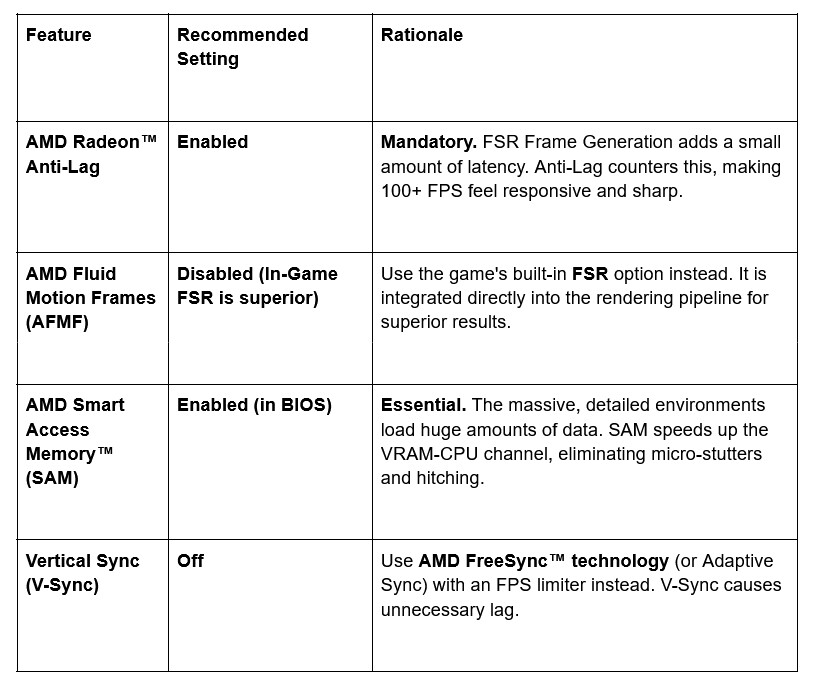
Core AMD Adrenalin Settings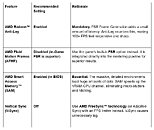 In-Game AMD FSR Configuration
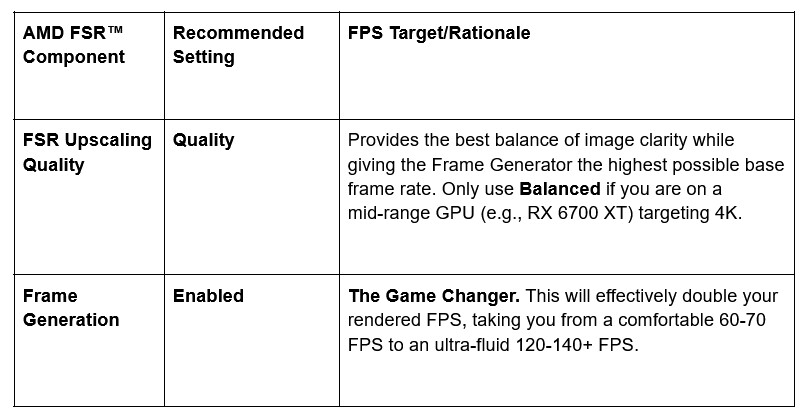
FSR is a two-part system in Avatar: Frontiers of Pandora.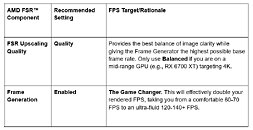
Pro Tip: FSR (and its Frame Generation component) works best when your base frame rate (before Frame Generation) is at least 60 FPS. Tweak your other graphics settings until you hit this baseline, then turn on Frame Generation for maximum stability and visual fidelity.
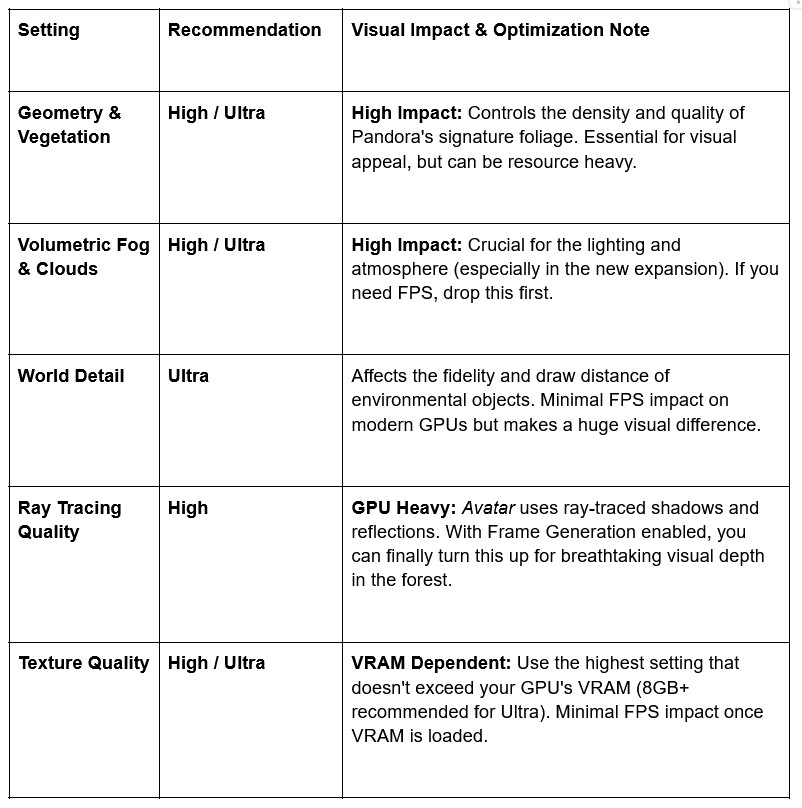
Best Visual Settings for Pandora's Lush Environments
Since FSR gives you massive performance headroom, you can afford to turn up the most visually important settings to maximize immersion in the new regions of the Western Frontier.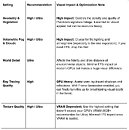 Recommended Immersion & Visibility Tweaks
These settings polish the experience and ensure your camera view is optimal for the new third-person mode coming in the free update before the expansion.
Ready to conquer the wilds of From the Ashes? Pair AMD FSR with Frame Generation and activate AMD Radeon Anti-Lag to keep your reflexes razor-sharp. With this combo, you'll crush extreme frame rates and resolutions while staying locked in for every split-second decision. Pandora's beauty stays intact … and so does your edge.
Source:
AMD Gaming Blog
The AMD FSR Strategy: Fluidity Meets Fidelity
Unlike competitive games, the PvE focus of Avatar means we can activate Frame Generation for a massive FPS boost, providing a buttery-smooth experience while traversing the Western Frontier.


Core AMD Adrenalin Settings
FSR is a two-part system in Avatar: Frontiers of Pandora.
Best Visual Settings for Pandora's Lush Environments
Since FSR gives you massive performance headroom, you can afford to turn up the most visually important settings to maximize immersion in the new regions of the Western Frontier.
These settings polish the experience and ensure your camera view is optimal for the new third-person mode coming in the free update before the expansion.
- Motion Blur: Off. Although some prefer it for cinematic feel, turning it off ensures the FSR-generated frames are as crisp as possible, especially during fast Ikran flight.
- Depth of Field: Off. Turning this off ensures all parts of the environment are sharp, which is critical for distant target visibility.
- Chromatic Aberration: Off. This cinematic effect adds a distracting color fringe at the edges of the screen. Turn it off for a cleaner image.
- Field of View (FOV): Adjust based on preference. Since a third-person mode is coming, ensure your FOV feels comfortable for combat and exploration in both perspectives.
Ready to conquer the wilds of From the Ashes? Pair AMD FSR with Frame Generation and activate AMD Radeon Anti-Lag to keep your reflexes razor-sharp. With this combo, you'll crush extreme frame rates and resolutions while staying locked in for every split-second decision. Pandora's beauty stays intact … and so does your edge.
16 Comments on AMD Outlines Massive FPS Boost in Avatar: FoP Expansion - Enabled by FSR
I think it's safe to leave this here without further comment.
FG is not meant to go from 20 to 30+ like ARK Evolved dev recently proposed for Switch 2 port.
It is not for 30 > 60. It is not even for 60 > 100.
FG baseline is around 80-90 or more and THEN you enable FG to reach your monitors max refreshrate at 120, 144, 165 or whatever.
That is because adaptive sync means 120Hz requires reaching 120fps. If you run at 60fps on a 120Hz monitor you are not running at 120Hz.
You are running at 60Hz (only in the game).
That it what FG is for. Enabling it at such a high base framerate ensures you dont really feel the extra latency because the base latency is already so low.
Im talking about the standard 2x FG here, not MFG. For MFG you need even higher base framerate.
And obviously you only do this in a single player game. Not in a multiplayer game.
Also if there is an option to enable Reflex or Anti-Lag at the same time do that too as this also lowers latency.
FG is widely misunderstood, misused and abused by lazy devs as a crutch. No wonder it gets such a bad rep when even hardware makers claims utter nonsense like "3070 is 4090" or "enable it at 60". Then they wonder what all the backlash is about...
As far as needing 90+ FPS, I guess that probably means 90fps stable with no stutters because in my experience, FG doesn't fix games that mostly run at 100+ but sometimes dip down into the 60s. And honestly, if your game hits 90fps stable I don't believe that FG will improve it at all under any circumstances
Assuming that the majority of non-competitive gamers have low- and mid-range displays with 120–144 Hz refresh rates, 60+ base FPS seems like a better choice for FG.
That is why i say 80-90 baseline for enabling and no the dropoff is not so severe that native would drop from 90 to 60.
The latency is low enough at 80-90 that most people would not notice FG on top.
Screen tearing is a whole other topic and varies from person to person. Some people cant stand it. I barely notice it, but for frame pacing purposes i still use fps cap slightly below my max refreshrate.
Arbitrarily, you might drop from 72 to 60 fps then up to 120 from FG, but with adaptive sync, you might lose 1-2 fps and it'll still play on the monitor. It might not appear as smooth but it will be more responsive (user input to displayed response from the game engine)
The lowest latency response a game can have is dictated by real framerate not frame gen.