Thursday, January 29th 2026

Modder Puts vBIOS From ASUS ROG Matrix RTX 5090 With +200 W Extra Power Onto Astral RTX 5090
Flashing alternative vBIOS versions onto GPUs is a common practice used by modders to increase power limits on GPUs, and it has only become more common since NVIDIA started clamping down on overclocking options available to users via software tools. The recently announced ASUS ROG Matrix Platinum has become an attractive source for one such high-wattage vBIOS, although it has proven difficult to get the aforementioned vBIOS onto certain cards. One user on the HardwareLuxx forum, however, has managed to get the 800 W vBIOS from the Matrix Platinum GPU onto an ASUS ROG Astral GeForce RTX 5090 (read our review of the latter here), although the mod only seems to be necessary on the black version of the card.
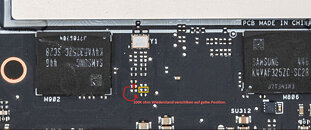
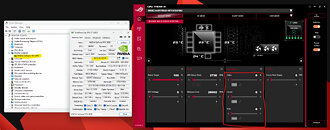
It turns out that in order to flash the Matrix vBIOS onto the black Astral 5090 required physical modifications to the GPU PCB itself—this is due to the rear-mounted fan being wired with the front middle fan on that particular version of the card, as opposed to on a separate header as it is on the white version. The modification in question involves swapping a pull-down resistor in the serial in signal line of the EEPROM to a pull-up resistor. Obviously, this mod alone requires more than a little bit of soldering experience, but there's also the question of cooling. The stock version of the ROG Astral is designed with a 600 W power limit, and the Matrix vBIOS lifts that to 800 W, so realistically, any overclocking attempts made with the modded card requires an aftermarket cooling solution to handle the increased power and corresponding heat.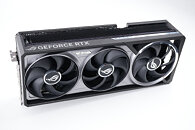
Source:
HardwareLuxx
It turns out that in order to flash the Matrix vBIOS onto the black Astral 5090 required physical modifications to the GPU PCB itself—this is due to the rear-mounted fan being wired with the front middle fan on that particular version of the card, as opposed to on a separate header as it is on the white version. The modification in question involves swapping a pull-down resistor in the serial in signal line of the EEPROM to a pull-up resistor. Obviously, this mod alone requires more than a little bit of soldering experience, but there's also the question of cooling. The stock version of the ROG Astral is designed with a 600 W power limit, and the Matrix vBIOS lifts that to 800 W, so realistically, any overclocking attempts made with the modded card requires an aftermarket cooling solution to handle the increased power and corresponding heat.


41 Comments on Modder Puts vBIOS From ASUS ROG Matrix RTX 5090 With +200 W Extra Power Onto Astral RTX 5090
So you clearly risk end up with a damage card. Short burt with 800 watt maybe be fine. But long running Gaming session is a clear risk.
Sometimes it seems as if these "modders" have money to burn.
For those who don't own one, the 5090 doesn't sit at 600 W, typical gaming load is around 450-500, but depending on the scene it can bump against that 600 W.
Nowadays, the chips are already pushed to the max and OC themselves. There is no point in overclocking in this era other than some benchmarks.
To be honest, I don't need Matrix bios on Astral for gaming.
If you are into 3Dmark and chasing the scores then this helps. :rolleyes:
My card is already shunt moded so ASUS warranty is already gone.
I think 800W bios is overkill for gaming. Maybe rarely needed.🤣
I own both Astral black and white and has been comparing them for two months.
My Astral black sample has a better binned chip and that was the motivation driving to see why Matrix bios works on my Astral White and not on Astral Black.
Regarding the cooling of the connector, I have some heatsinks mounted on PCB. These fit perfectly under the Alphacool block.
The block is open on the back. I have 2200rpm high CFM radiator fan blowing air at full speed at this location when I am benching.
This is the area behind connector that get quite hot as measured by my Thermal camera. Blowing air here when card is pulling over 1000W during benching helps to keep connector at cool temperatures.😄
By the way, if you look at Thermal Grizzly Deltamate, you will see that this block cools this exact area with water.
That card works with Matrix bios. You can just flash it directly.😁
You will find Matrix bios and NVFlash here in TPU download sections.
Though 800W wasn‘t enough for me. :laugh:
The card is shut modded and with EVC2 attached and all my current results in all 3DMark are with Astral White.
Let‘s see now. :rockout:
Hopefully my Black pushes my White down some positions as it has better bin. :rolleyes:
Quiet (600W)
www.techpowerup.com/vgabios/280844/asus-rtx5090-32768-251013-1
Performance (800W)
www.techpowerup.com/vgabios/280329/asus-rtx5090-32768-251013How's your average clocks? Mine averaged 3007MHz almost flatlined on Time Spy and most other non RT workloads, limited to 600 of course. The Palit BIOS does around 2880-2940. Matrix BIOS is really optimized. Time to brag and post benchies :)
I know all about cross flashing, my interest was this specific astral.
My other LC 5090 sees crazier things.
I just found the solution on Wednesday and didn't get afterwards time to really run it through benchmarks expect for basic tests.
The White hits 3400MHz on different 3Dmark benchmark but pulling like 1200W in some situations on my shunt mode plus EVC2. :laugh:
I don't play any games on the Astral Black and Astral White. They are for my bench rig.
For gaming a Gigabyte 5080 is enough for me. :p
I despise this brand (I do own a Gigabyte 3080 tho, can't be picky when there is a global crisis) curious about what a modder think about it.
The build quality is okay, but I like Astral cards better because of their monitoring features.
Lot of people have the bigger brother 5090 from Gigabyte because Gigabyte had often a good bin on those especially on the Master ICE 5090.
I didn't do any benchmarking on the 5080 at the moment, as I was busy with the 5090, but it looks like it has potential.😀
What I don't like about my Gigabyte Aorus Master 5080 is the putty applied everywhere.
I am not a fan of that.
This is how it looked when I opened it.
Putty makes a lot of mess. 😅
GPU covered with mix of Liquid metal and paste.
It would have been better to use liquid metal directly than a mix.
I cleaned it and put it on waterblock. I don't have further pictures with the block.
At some point, I will also shunt mode it and attach EVC2 and run some benchmarks.😆
I thought mixing thermal paste and liquid metal totally defeat the benefits of the second one, that's weird.
If they want the real deal than go directly with LM.
Any case when you have a mix, you still have to do the same protection from shorting the other component like when you have real LM.
Der8auer did ones a video about it that it's a bit better for temperatures than normal thermal paste but you still can't compete with real LM.
By the way look at their protection from leakage of this conductive paste onto other parts of PCB.
They did it with building a wall from normal thermal past around the GPU chip. 🤣
It really looks messy.😂
You didn't buy the RTX 5080 Miku when it was out the last two months? (Albeit that shit was $1800 alone) Or did you specifically want a 5090?
I was planning to get it myself, but a RTX 5080 would be useless to me.
I would've probably sold my RTX 5090 FE and RX 9070 XT for it. :laugh: