Thursday, January 29th 2026

Modder Puts vBIOS From ASUS ROG Matrix RTX 5090 With +200 W Extra Power Onto Astral RTX 5090
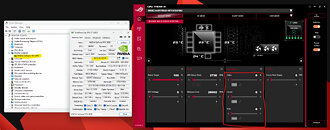
Flashing alternative vBIOS versions onto GPUs is a common practice used by modders to increase power limits on GPUs, and it has only become more common since NVIDIA started clamping down on overclocking options available to users via software tools. The recently announced ASUS ROG Matrix Platinum has become an attractive source for one such high-wattage vBIOS, although it has proven difficult to get the aforementioned vBIOS onto certain cards. One user on the HardwareLuxx forum, however, has managed to get the 800 W vBIOS from the Matrix Platinum GPU onto an ASUS ROG Astral GeForce RTX 5090 (read our review of the latter here), although the mod only seems to be necessary on the black version of the card.
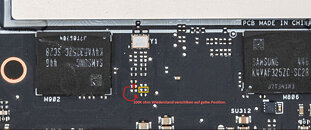
It turns out that in order to flash the Matrix vBIOS onto the black Astral 5090 required physical modifications to the GPU PCB itself—this is due to the rear-mounted fan being wired with the front middle fan on that particular version of the card, as opposed to on a separate header as it is on the white version. The modification in question involves swapping a pull-down resistor in the serial in signal line of the EEPROM to a pull-up resistor. Obviously, this mod alone requires more than a little bit of soldering experience, but there's also the question of cooling. The stock version of the ROG Astral is designed with a 600 W power limit, and the Matrix vBIOS lifts that to 800 W, so realistically, any overclocking attempts made with the modded card requires an aftermarket cooling solution to handle the increased power and corresponding heat.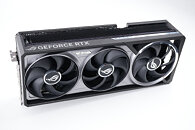
Source:
HardwareLuxx
It turns out that in order to flash the Matrix vBIOS onto the black Astral 5090 required physical modifications to the GPU PCB itself—this is due to the rear-mounted fan being wired with the front middle fan on that particular version of the card, as opposed to on a separate header as it is on the white version. The modification in question involves swapping a pull-down resistor in the serial in signal line of the EEPROM to a pull-up resistor. Obviously, this mod alone requires more than a little bit of soldering experience, but there's also the question of cooling. The stock version of the ROG Astral is designed with a 600 W power limit, and the Matrix vBIOS lifts that to 800 W, so realistically, any overclocking attempts made with the modded card requires an aftermarket cooling solution to handle the increased power and corresponding heat.


41 Comments on Modder Puts vBIOS From ASUS ROG Matrix RTX 5090 With +200 W Extra Power Onto Astral RTX 5090
Before:
After:
I am obviously joking, this thing can be a fire hazard even at 300 watts.
Needless to say this isn't for the average user, and anyone running this knows what they're doing. If I ever get around waterblocking my card, I will daily the 800W BIOS too.
I have two spare connectors lying in my closet if I burn one. 😆
As I posted above, I cool mine with heatsinks on the PCB. See the PCB shots posted before.
I keep an eye on the connector with my Thermal imaging camera during bench so that I have the temperature in my sight. I never had until now more than 35°C on the cables. There is a 2200rpm high CFM fan running at 100% and blowing air onto the PCB and connector when I am benching.
Besides I don't just pull 800W over this connector but more than 1200W. 🤣
The card is shunt moded and has EVC2 connected to increase the voltage.
I use my Astral for benching and not daily use. 😄
Will also do this mod for the 2nd BIOS slot..
If you want to bench then it is best to go with Matrix bios plus Shunt mode.
The XOC bios has crap performance and my scores with Gigabyte bios on Astral Black were better than XOC bios.
It could be that the new Lightning XOC bios would be better but I don't expect those Elite class of paid by AIB Ocer will give it out except if somebody leaks it like Asus XOC bios.
Would you leave it unsupervised for a week rendering, for example, at full power? @turbogear @RootinTootinPootin
As I mentioned here before, I personally don‘t recommend this mod for gaming either.
If you leave it heat up for a longer period, the connector will eventually fail. :p
Mr. Leather Jacket has created a sensitive connector that can even burn at 300W if the balancing of the current over the pin is not correct.
On the 5090 Astral cards there is a per pin current monitoring so I check time to time if the balancing is good in Tweak III.
Even if you buy a really good cable, you can still have issues when you plug it and unbalancing occurs after already 3-4 time when you unplug the cable and plug it back.
Many who don‘t have Astral are now using WireView Pro 2 which can monitor also the current per each pin.
This mod is intended for people who do benchmarking with their cards and there are lot of those in Hardwareluxx and OCN forums.
That why this mod was posted there by me because I got around 50 PM in those forums by users asking me to reveal it after they knew that I have solved the issue.
It‘s a risk that people like us are ready to take for the 3Dmark scores. :rolleyes:
Good luck with desoldering R002. 😂
They are sitting on top of a thick copper plane, unlike the 0402 resistors that I desoldered.
This copper plane goes through the PCB and instantly dissipates the heat.
Without putting the card on a hotplate, it is really hard to get the area heated.
I could have done it as I have a hotplate, but it was not necessary to heat the PCB for that purpose, as the bridge behaves like a short circuit across the resistor, and I have unlimited power draw to the GPU as this is like zero ohm.
I didn't ask your opinion. :cool:
It is in anycase not for people who are scared of burning their cards.
This is for benchers and modders and therefore it was posted by me in the 5090 OCing forums in Hardwareluxx and OCN where the right audience is for this.
I didn't ask Techpower to post it here. They copied the news from Hardwareluxx where I put this solution in the forum. 😅
Videocardz also copied the news from Hardwareluxx.
There are enough people who are happy about the fact that I found this workaround.
www.overclock.net/posts/29553948/
Even der8auer liked it in the Offizieller Nvidia RTX 5090 Overclocking und Modding Thread: www.hardwareluxx.de/community/threads/offizieller-nvidia-rtx-5090-overclocking-und-modding-thread.1363289/post-31082541
Am not a softie, also doesn't care for that 10% fps on games, I neither do game or bench anyway, too old to be told what to do on what occasion..
you keep the good work going bud!!