Friday, March 13th 2026

Windows 11 Insiders Get Support for >1,000 Hz Monitor Refresh Rate

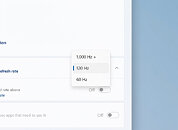
Microsoft has released its latest Windows 11 builds, 26100.8106 and 26200.8106 (KB5079387), to Insiders in the Release Preview Channel. This update notably introduces support for monitor refresh rates exceeding 1,000 Hz, marking the first time Windows 11 officially supports four-digit refresh rates. Over the years, gaming monitors have rapidly progressed from double-digit to triple-digit refresh rates. However, reaching four-digit levels so quickly was unexpected, as the general gaming audience has been limited by current technology's ability to output such high frame rates. With modern GPUs capable of running hundreds of frames per second in FPS titles, it's logical for Windows to prepare for future advancements.

For instance, Philips and AOC have introduced the first gaming monitors capable of supporting 500 Hz at 1440p and 1,000 Hz at 720p. The Philips Evnia 27M2N5500XD and AOC AGON Pro AGP277QK monitors were showcased in China on December 6 and appear to be built around the same 27-inch panel. Both models are QHD 500 Hz displays that can switch to a lower-resolution 720p mode, doubling the refresh rate to 1,000 Hz. Generally, this resolution is required to achieve frame rates above 500 FPS, but modern GPUs like the NVIDIA GeForce RTX 5090 can easily reach these numbers in games like Counter-Strike 2. At 1080p, we observed about 726 FPS, indicating that 720p gaming can fully utilize the 1,000 Hz display.
We are also anticipating further advancements in display technology before 1,000 Hz gaming becomes widespread. Playing FPS games at 720p resolution might seem unusual, considering most displays today are 1080p or higher. It will take time before we see 1080p, 1440p, and eventually 4K displays running at 1,000 Hz. In the meantime, GPUs will continue to advance, supporting high-refresh gaming at higher resolutions without issue.
Source: Windows Blog
Add your own comment

29 Comments on Windows 11 Insiders Get Support for >1,000 Hz Monitor Refresh Rate

#2
FR3D1
Ninja Cat
and eventually 4K displays running at 1,000 Hz.
That means significantly higher power consumption, right? Right? And back when plasma TVs were around, people were always complaining.

Totally ridiculous, in my opinion.

With a friendly smile,
Fred.
Posted on Reply
#3
Alan Smithee
Just to be clear, this is literally just adding 4 digit values to the Settings dialog
Posted on Reply
#4
ZoneDymo
TIL there is such a thing as a refreshrate limitation build into Windows.
Posted on Reply
#5
mechtech
Video cards everywhere are cringing................
Posted on Reply
#6
EnviousFrog
ZoneDymoTIL there is such a thing as a refreshrate limitation build into Windows.
If your refresh rate goes over 900, the display engine physics go out of whack and everything on your desktop flies away.
Posted on Reply
#7
Darmok N Jalad
I know everyone has to have a hobby, but if I start talking about going to a 1MHz display, feel free to take me behind the barn.
Posted on Reply
#8
lightning70
Honestly, 1000Hz or so seems unnecessary to me. It's very difficult to feel anything beyond 240Hz. 360Hz is the highest point for me; even I play many games at 60-100 FPS.
30 to 60 is a huge revolution,
60 to 144 is a nice improvement, but when I compare it to 144 to 240, I honestly don't see the difference.
Posted on Reply
#9
Onasi
lightning70Honestly, 1000Hz or so seems unnecessary to me. It's very difficult to feel anything beyond 240Hz. 360Hz is the highest point for me; even I play many games at 60-100 FPS.
30 to 60 is a huge revolution,
60 to 144 is a nice improvement, but when I compare it to 144 to 240, I honestly don't see the difference.
Theoretically, it has been proven that 1000Hz is the point of completely eliminating any perceived blur on sample-and-hold displays, which, yes, affects even OLEDs. But that is just theory. How relevant that is in practice for 99.99% of PC users is a different question with the most likely answer being “not very”. But it IS the point beyond which any possible refresh rate improvements just do nothing.
Posted on Reply
#10
Event Horizon
I guess this is what the esports/competitive gamers want. For the mainstream this is about as unnecessary as 8k resolution.
Posted on Reply
#11
Chaitanya
And still M$ cannot fix scaling on displays with PPI higher than 110.
Posted on Reply
#12
Solaris17
Super Dainty Moderator
Event HorizonFor the mainstream
For the esports people to I’d imagine. I’m sorry I just don’t believe “you” are soooo good you need a 1000hz display for that “competitive advantage”.
Posted on Reply
#13
Wye
Using a 5090 to play a 25 years old game at 720p is a waste of money.
Posted on Reply
#14
KLH Techsystems
I think 1000 Hz is worth pursuing as the refresh rate equivalent of "Retina" resolution. At that rate, I could probably turn motion blur off or use just a very small amount to eliminate stroboscopic effects.
mechtechVideo cards everywhere are cringing................
TBH GPUs scale up more easily since they can generally just be made wider, meanwhile CPUs and the game code they run still tend to lean heavily on per-thread performance, which is much harder to improve. Outside of raytracing games, I've nearly always hit a CPU bottleneck before the GPU maxes out.
lightning70Honestly, 1000Hz or so seems unnecessary to me. It's very difficult to feel anything beyond 240Hz. 360Hz is the highest point for me; even I play many games at 60-100 FPS.
30 to 60 is a huge revolution,
60 to 144 is a nice improvement, but when I compare it to 144 to 240, I honestly don't see the difference.
When I started playing DOOM Eternal at 240 FPS instead of 120, I was able to turn motion blur from medium to low while still avoiding obvious stroboscoping. The other 3D game I run at 240 FPS, Little Witch Nobeta, has no motion blur available and the stroboscoping is quite noticeable on some objects. This probably isn't that important to most people (and I bet some find the idea of intentionally using motion blur to be revolting), but I find the stroboscopic effect to be extremely distracting and annoying.
Posted on Reply
#15
nguyen
Well even with 1000hz+ monitor I would still be losing to the cheaters that plague every competitive games out there :(
Posted on Reply
#16
MarkoB88
In CS2 with 5090 , what idiot buys 5090 to play at 720P?

I think that Crapple should immediately upgrade its Neo display to 1000 Hz, it gets 6 FPS on CS2 hahahhahaha
Posted on Reply
#17
mechtech
KLH TechsystemsTBH GPUs scale up more easily since they can generally just be made wider, meanwhile CPUs and the game code they run still tend to lean heavily on per-thread performance, which is much harder to improve. Outside of raytracing games, I've nearly always hit a CPU bottleneck before the GPU maxes out.
I mean even 2D desktop. I've had a 144hz screen and going from 60 to 144 in 2d desktop increases the watt draw quite a bit.

I'm thinking work with laptops and 2-3 monitors on a docking station @ 1440p or 2160p and they were 120+hz and all 3 defaulted to that the fans would scream lol
Posted on Reply
#18
KLH Techsystems
mechtechI mean even 2D desktop. I've had a 144hz screen and going from 60 to 144 in 2d desktop increases the watt draw quite a bit.

I'm thinking work with laptops and 2-3 monitors on a docking station @ 1440p or 2160p and they were 120+hz and all 3 defaulted to that the fans would scream lol
Oh right, I forgot about that, high refresh rates do make discrete GPUs push their memory clocks up and cause the OS display compositor to load the CPU too. I guess a push for ever-higher refresh rates should include functionality similar to Apple ProMotion that only uses the higher refresh rates when needed (there's an Intel+BOE effort to do something like this with their "1 Hz" idle mode IIRC).
Posted on Reply
#20
Jack1n
Won't GPU's coil whine at 1k fps?
Posted on Reply
#21
lightning70
Jack1nWon't GPU's coil whine at 1k fps?
Some graphics cards are noisy even at 100-200fps.😀
Posted on Reply
#22
Prima.Vera
Yep, all my GPUs start to coil after ~130-140 fps or more. Good thing that recently, I always play with 97 fps cap, and cannot be more happy.
Posted on Reply
#23
micropage7
they add more features and could be more bugs there
Posted on Reply
#24
_roman_
why does windows needs to unlock 1khz, not 1000 Hz, monitor refresh rate?

when i bothered with the faulty amd gpu windows 11 pro driver i saw the modelines are exactly the same as for 35years or more with the x-server and the linux kernel. same values, work the same for the radeon 6800 non xt in w11 pro and the linux kernel with mesa and amdgpu kernel module

why should those modelines for a screen not support 1khz or even more by default?

edit: 75Hz was also high power consumption. we need to rise the bar so reasonable refresh rates consume less.

the 60Hz crap screens and default values need to go.
Posted on Reply
#25
THU31
Perfect for Lossless Scaling x20 Frame Generation.
Posted on Reply
Add your own comment
Nov 24th, 2026 11:47 CST change timezone

New Forum Posts

Popular Reviews

TPU on YouTube

Controversial News Posts