Sunday, April 19th 2026

Windows 11 April 2026 Update Triggers BitLocker Recovery on Some PCs
It has been a while since one of Microsoft's Windows 11 updates wreaked havoc among PC enthusiasts, and the April update seems to be another in line for IT administrators. In an updated support document on the Windows 11 KB5083769 cumulative update, Microsoft officially confirms that some users are encountering an unexpected BitLocker recovery prompt after applying the update. However, the good news is that this issue requires a specific BitLocker Group Policy configuration that Microsoft refers to as "unrecommended," which is less likely to be found outside of managed IT departments. This includes systems managed through group policy settings, making it less likely to affect PC enthusiasts' builds. For the issue to occur, a few conditions must be met. First, BitLocker must be enabled on the PC. Second, the BitLocker Group Policy setting "Configure TPM platform validation profile for native UEFI firmware configurations" must be configured with PCR7 (a TPM 2.0 module register) included in the validation profile.
Once these conditions are met, running system information, or msinfo32.exe, shows that the Secure Boot State PC47 Binding is "Not Possible." Additionally, the Windows UEFI CA 2023 certificate must be present in the device's Secure Boot Signature Database (DB), making the device eligible for the Windows Boot Manager signed in 2023 to become the default. Finally, the device must not be running this 2023-signed Windows Boot Manager that it supports. Only by fulfilling this unusual set of conditions does the BitLocker Recovery environment trigger, leading to a password prompt. After this, subsequent startups will not trigger it again.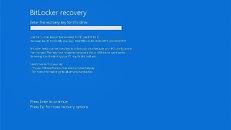 As a workaround, Microsoft recommends removing this group policy configuration before installing the update across the company PC network or simply using a Known Issue Rollback (KIR). The first option is recommended, but for customers who can't remove the PCR7 group policy, the KIR is a better option in case something happens. Microsoft is already planning a fix scheduled for the new Windows 11 update, but since the issue only affects some PCs, its severity is much smaller than previous worldwide problems Microsoft has faced in the past.
Source:
Microsoft
Once these conditions are met, running system information, or msinfo32.exe, shows that the Secure Boot State PC47 Binding is "Not Possible." Additionally, the Windows UEFI CA 2023 certificate must be present in the device's Secure Boot Signature Database (DB), making the device eligible for the Windows Boot Manager signed in 2023 to become the default. Finally, the device must not be running this 2023-signed Windows Boot Manager that it supports. Only by fulfilling this unusual set of conditions does the BitLocker Recovery environment trigger, leading to a password prompt. After this, subsequent startups will not trigger it again.

51 Comments on Windows 11 April 2026 Update Triggers BitLocker Recovery on Some PCs
This the best solution.
That is old news and a common microslop issue with windows 10 pro on various devices. And all intune etc configurations looked the same.
i saw that screen several times a month on ~500 machines. nothing unusual
Well some diehards will say it is this or that.
it is easier with intune you see the bitchlocker key. after you login in intune, a microsoft webpage, you can see the employees bitchlocker keys. than you can enter that key physically on the device. i think i read that when you use the microsoft email account on your own device you can see the bitchloker key also on a webpage from microsoft.
another reason why i disabled bitchlocker and i was forced to remove it completly with several hacky linux style commands. disabling bitchlocker in microsoft means it is sleeping but still enabled. the windows explorer showed it wrong in may 2023, and wrong on my refurbished notebook which is less than a year old with microsoft windows 11 pro refurbisher official microsoft license.
-- yes blame the it department and the group policies. the group policies are not nasty hacks and are much easier to learn as any gnu linux shell /sarcasm.
edit: i will not discuss here that company it policy, what was allowed to do, etc. that is out of scope, in response to two posts below this post
Sorry but I lost count of how many OOBs MS has released this year. No idea why Nadella expects people not to call them Microslop.
Edit: I'll give you a hint. Google "bitlocker alternatives", scroll down and take a look. Also, avoid anything with MFA/2FA. You can be locked out of your own system should authentication fail.
I don't agree with the opening statement. The general observation is whenever there is an update that MS pushes out to the public, something is bound to go wrong. Every time I read news on their mess up, I am reminded of the perks of staying outside their ecosystem.
Seriously their entire software stack is complete trash.