Sunday, April 26th 2026

Windows 11 Updates Can Now Be Skipped and Even Paused Indefinitely

Microsoft is... giving users exactly what they want? In the latest Windows Insider preview for Windows 11, Microsoft is rolling out an updated Windows Update experience that gives users more control over their update process. This includes the option to skip updates entirely during the out-of-box experience (OOBE) menu, allowing you to set up a PC without applying updates first. Previously, new PC configurations and installations might have been several months behind on Windows 11 updates, and Microsoft would force users to apply these updates immediately. This led to prolonged OS setup times and user frustration. Now, for those who need to move to a new desktop quickly and apply updates at a later date, Microsoft is finally offering an option during OOBE to install the OS first and apply updates later.

Additionally, Microsoft is now allowing users to pause Windows 11 updates in the settings with a dedicated calendar that extends up to 35 days. This ensures you have ample time to schedule an update session without disrupting your workflow. However, the 35-day mark is not a hard stop, as users can re-pause updates for another 35 days even after the original period has expired, essentially allowing updates to be paused indefinitely. There are no limits on how many times you can reset this pause date, giving you full control over the entire update process. This could be especially useful when a new update series arrives, and you want to wait and see if there are any OS issues or known problems before applying the update. For example, in the latest Windows 11 April update, some PCs might experience a BitLocker trigger, but this will be resolved in a future fix. Users can wait a few days for a fix to arrive and then install updates all at once without being forced to do so immediately.
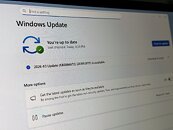

Last but not least, Microsoft is also introducing a highly-requested feature related to power settings. Traditionally, when an update is installed, the power menu gives users the options to "Update and restart" or "Update and shut down," alongside the "Lock" and "Sleep" options. However, the new update will ensure that the regular "Shutdown" and "Restart" options are always present, without the OS forcing you to apply the patch right away. Your OS update can be installed, but you can restart or shut down the device without a mandatory application, so if you need to get something done quickly, the OS won't stand in your way. Finally, the Redmond-based giant is also promising more transparency with updates, especially regarding drivers. As system driver updates sometimes carry little information about what is updated, Microsoft is promising improvements in this area as well.
Source: Windows Insiders Blog
Add your own comment

61 Comments on Windows 11 Updates Can Now Be Skipped and Even Paused Indefinitely

#26
RejZoR
lexluthermiesterI'm not jumping down that conversational rabbit hole. Have fun!
No one asked you to. I just told how utterly broken Windows is at its foundation and Microslop is cluelessly promising things...
Posted on Reply
#27
Dimitriman
Too late for me, Microslop. I'm currently too busy trying Linux to update windows.
Posted on Reply
#28
Eternit
Vayra86Right. Except you still can't choose what to update. The moment you let Microsoft 'update' your system, you'll be stuck with whatever comes up in their vibe coded minds.

I'll pass indefinitely.

MS needs to realize we haven't been waiting for their updates for the last what, 8 - 10 years now. GTFO. Your OS is already done and your updates are a nuisance altogether.
Exactly. I want security updates and nothing else. On my private computer I have 10 and I'm happy with it. On my corporate laptop I have 11 and I cannot install on it any software I would like to. MS was able to ruin even the Notepad and I cannot install any alternative.
Posted on Reply
#29
Tomorrow
LycanwolfenNice about time. But they need to fix the update downloads. They are taking hours to download things that I can download in sec's. Like the update to say 25h2 windows update took 4 hours to download it. I went to site downloaded the whole ISO in 4 sec.

Also noticed Windows update is not updating drivers anymore. I setup a new Machine the other day and it did not download one driver. I had to manually find them for that computer took me hours. MS update used to update all the chipset drivers lan network wireless and others now nothing!
Then there's something broken with your install. Latest updates have all been largely just small enablement packages that only require apply and restart. Not four hour downloads. In terms of update sizes and download speeds, and apply speeds they have been very good. Even with my weak VDSL 30Mbit/s download speeds i cant complain. I still remember how on Win 7 it took hours and multiple passes to update new installs. And that was with an SSD (small 64GB at the time). On an HDD it was pure nightmare fuel.
Posted on Reply
#30
Jeager
OnasiWhile it’s obviously an improvement over the current state of things, I cannot stress enough that this should have been baseline behavior from day one of any sane OS release.
Why ? How will they force you into AISpyware reloaded if this was release like that ? x)
Posted on Reply
#31
PrEzi
Vayra86Right. Except you still can't choose what to update. The moment you let Microsoft 'update' your system, you'll be stuck with whatever comes up in their vibe coded minds.

I'll pass indefinitely.

MS needs to realize we haven't been waiting for their updates for the last what, 8 - 10 years now. GTFO. Your OS is already done and your updates are a nuisance altogether.
Windows Update Manager is the magic word.... At least for me --- Sledgehammer + Wumgr combo and I selectively update when and what I want.
Posted on Reply
#32
Mysteoa
I was just reading this news when I was hit by Windows Insider Survey about Windows updates.
I made sure to mark them as negative and requested an easy way to block Windows update from updating GPU drivers.
Posted on Reply
#33
mechtech
Keep on backpedaling until you’re back to win7 controls/etc.
Posted on Reply
#34
theonlyrobert
Kind of a shame that people can't appreciate a positive development from Microsoft for once.
Posted on Reply
#35
_roman_
HenryLootgraabSeriously. On my clean, testing PC, Windows Update broke the system twice, in February and March this year. Blows my mind how this gotten so bad. And then the freaking NVIDIA drivers. I'm still on a 6 months old driver because all drivers after that gave me problems.
100% agree with my refurbish notebook with the microsoft refurbisher windows 11 pro license and the default refurbisher installation. they refurbisher company have the fancy silver microsoft sticker to be totally microsoft..

the hole point of the notebook was to have something on the road and to experience the out of box windows 11 experience. How reliable the updates are. Changing to black mode, using a local user account - I would not claim as too heavy modifications. When you argue about black and white mode and local user account I will accept your opinion.

every time i use that notebook i am more happy when i turn on my 20 year old gnu gentoo linux. i am more forgiving for my windows 11 pro on this box which i use for gaming only with the amd hardware.

you need to see yourself how bad the windows alternative is to see the current base line.

i had several months broken updates last year on that notebook.. this year i have only turned on teh notebook 3 times so far. ( 3x in 4 months)
the usual consumer turns on the box and also changes only hte user, the password, the black and white mode and the desktop background.
whats worse, we talk about common amd business lenovo hardware. stuff sold in the millions.

-- a pop up box, let's say two times a day, is enough with: "HEY update your windows." I talk about those pop up boxes which will vanish themselves when the mouse is moving after maximum of 3 minutes. 35 days is forced updates. When anyone sees the changes as positive, okay. There are more user friendly ways to notify the user about updates.
Posted on Reply
#36
Lycanwolfen
zenlessyankLook in advanced options> optional updates.
Nothing still like I said.
All ? in device manager have to load manually.
Posted on Reply
#37
zenlessyank
LycanwolfenNothing still like I said.
All ? in device manager have to load manually.
There aren't many there usually, just basic drivers for monitor and keyboard/mouse, maybe a network card.

To be fair, I would NEVER use a Microsoft driver unless it was for an actual Microsoft product like an Xbox controller etc. Always get drivers from manufacturer.
Posted on Reply
#38
AleXXX666
AleksandarKensure that the regular "Shutdown" and "Restart" options are always present, without the OS forcing you to apply the patch right away
lol no issue for me same as for others, the buttons were there...
Mysteoaeasy way to block Windows update from updating GPU drivers
exactly. Even after installing latest and newest gpu drivers, stupid shitdows will force download some ten years old drivers for gpu and install it again and again until you block driver updates via WU lol f..n bastards!:mad:
TomorrowThen there's something broken with your install. Latest updates have all been largely just small enablement packages that only require apply and restart. Not four hour downloads. In terms of update sizes and download speeds, and apply speeds they have been very good. Even with my weak VDSL 30Mbit/s download speeds i cant complain. I still remember how on Win 7 it took hours and multiple passes to update new installs. And that was with an SSD (small 64GB at the time). On an HDD it was pure nightmare fuel.
LMFAO 30 mbs is OKAY speed for downloading something not very large or not streaming 4K videos or playing featured online games:rolleyes::oops:
no, stupid shitdows updates will download regardless of speed like 0,000001% per hour! Parallel .msu download via even f..kin BROWSER takes few minutes even on 30 mbs slouch internet:rolleyes::oops:
EternitMS was able to ruin even the Notepad and I cannot install any alternative.
"classic" notepad from win10, classic calculator, calssic paint without stupid "paint 3D" link, wordpad where it's missing (24H2+ anyone), even old msconfig and task manager from win7 if needed could be installed lmfao:rolleyes:
zenlessyankThere aren't many there usually, just basic drivers for monitor and keyboard/mouse, maybe a network card.

To be fair, I would NEVER use a Microsoft driver unless it was for an actual Microsoft product like an Xbox controller etc. Always get drivers from manufacturer.
tell it to Intel AHCI/RST... if you want to mess up with bugs, use it... already a ton years ago it started to be a mess.. so it's better to let it be default MS driver lol
Posted on Reply
#39
Tek-Check
Doctor WhoI am still on Windows 10. I don't want to deal with the unstable gimmickry of Windows 11.
My Win11 Pro on one PC has never crashed. I installed it with scripts getting rid off all AI, tracking and diagnostic nonsense. It's lean, clean and de-bloated.I always postpone all updates for 5 weeks.
Posted on Reply
#40
lexluthermiester
Tek-CheckMy Win11 Pro on one PC has never crashed. I installed it with scripts getting rid off all AI, tracking and diagnostic nonsense. It's lean, clean and de-bloated.I always postpone all updates for 5 weeks.
Proper nice! Right there with you!
Posted on Reply
#41
notoperable
Dampen the fallout by fixing anything that does not touch the data mining value extraction parts, meaning everything that is wrong with the so "operating system" is the usual smoke screen to pacify the user.

m$ propaganda division in full gear
Posted on Reply
#42
Thunderslat
AleXXX666"classic" notepad from win10, classic calculator, calssic paint without stupid "paint 3D" link, wordpad where it's missing (24H2+ anyone), even old msconfig and task manager from win7 if needed could be installed lmfao:rolleyes:
Before laughing your ass off sarcastically notice that it is a work computer. Surely it is locked down.
Posted on Reply
#43
Tek-Check
lexluthermiesterProper nice! Right there with you!
It's just that Microslop plays this dirty game of trying to shove everything down our throat that we don't like without making it optional for us. We are forced to spend additional hours to research how to avoid installing the OS without signing into MS account, and more time to de-bloat the OS. They have been making it as difficult as possible for those who want clean OS.
Posted on Reply
#44
BillyRazOr
I have Windows 11 Pro and nothing else have any issues at all, those apps can be uninstall for debloat, including Copilot. Talking about Linux inside Microsoft topics are just making excuses, but I'm not always said Linux are bad or anything else.
Posted on Reply
#45
AleXXX666
ThunderslatBefore laughing your ass off sarcastically notice that it is a work computer. Surely it is locked down.
most of these could be "portable" and don't need admin rights;)
Tek-Checkwho want clean OS
f..n idiots in MS just want to "reinvent" the term "clean OS" to "clean money flow to MS", that's what the fuzz 'bout.:mad:
Posted on Reply
#46
Shrek
_roman_as discussed in the locked topic from bill.
Why was it locked?
Posted on Reply
#47
Raiden85
Amazing what a little competition from Linux and Mac can do when people start moving over to those two.

Microsoft has needed a kick up the arse for a long time.
Posted on Reply
#48
BlindZenDriver
It was potential good news, but the headline of this thread is overselling big time - it's essentially clickbait :mad:

Windows 11 Updates Can Now Be Skipped and Even Paused Indefinitely

From what I gather the fine print doesn't back up the claims, here is what I understand is reality.
  1. The changes aren't here now. They are in whats essentially a pre-release which means it is not a given they will ever be in the full production build, likely only nothing is given.
  2. You can't skip updates in the sense that you don't install them, you can postpone them and you can keep postpone them further - only 35 days at a time.
  3. A mere 35 days is not indefinitely, it is very very far from indefinitely. Seems like someone failed at math.
Lets us know if Microslop ever changes their ways and gives their customers actual control, that will be worthy of a headline. For now I am not holding my breath, they don't even allow for the control of basic GUI settings and every release they bring tends to takes things in the wrong direction and/or break stuff.
Posted on Reply
#49
Raptor_i
So laptops shipped with earlier versions of Win11 will still have to update before completing windows setup ? or is this a server side fix that will include all Win11 pre-installed computers ?
Posted on Reply
#50
theonlyrobert
ShrekWhy was it locked?
Probably so the discussion would move to this thread.
Posted on Reply
Add your own comment
Nov 21st, 2026 05:01 PST change timezone

New Forum Posts

Popular Reviews

TPU on YouTube

Controversial News Posts