Thursday, April 30th 2026

ASRock Reveals the X870E Taichi White Motherboard

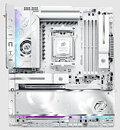
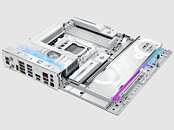
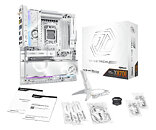
ASRock, the global leading manufacturer of motherboards, graphics cards, mini PCs, gaming monitors, power supply units and AIOs, today announced the launch of the X870E Taichi White, the first pure-white motherboard in its flagship Taichi series. Featuring a futuristic, digital-inspired white design, the X870E Taichi White introduces a bold new look to the Taichi family. In addition to its eye-catching appearance, it is built with flagship-level hardware to deliver both refined aesthetics and outstanding performance. Designed to pair perfectly with the newly launched AMD Ryzen 9 9950X3D2 Dual Edition processor, the X870E Taichi White reflects the growing popularity of white PC builds while redefining flagship style and performance in a pure-white form.

The X870E Taichi White introduces a futuristic, all-white design inspired by a digital sci-fi aesthetic. While staying true to the Taichi series' philosophy of balance, it reinterprets that identity through a more modern and refined visual language. Blending premium craftsmanship with an elegant new look, it brings a fresh dimension to the Taichi flagship.


On the hardware side, the X870E Taichi White features a robust 24+2+1 phase, 110 A SPS power design and comes equipped with dual PCIe 5.0 x16 slots, supporting high-performance expansion and multi-GPU applications. For connectivity, it offers 10GbE LAN, 802.11be Wi-Fi 7, and dual USB4 Type-C 40 Gbps ports, delivering ultra-fast and low-latency data transmission. It also includes a 64 MB BIOS ROM, providing support for future AM5 processor upgrades and ensuring long-term compatibility and platform flexibility.

The X870E Taichi White fully supports AMD's latest Ryzen 9 9950X3D2 Dual Edition processor, enabling users to unleash its full performance potential. With its pure-white aesthetics and top-tier hardware, the X870E Taichi White stands out as an ideal flagship motherboard for the Ryzen 9 9950X3D2 Dual Edition processor.

Source: ASRock
Add your own comment

19 Comments on ASRock Reveals the X870E Taichi White Motherboard

#1
Chaitanya
For a "flagship" class board single wired NIC is a bit disappointing.
Posted on Reply
#2
Gigaherz
This looks really decent. XOC features and good IO. But for that tier I also want Surround Audio.
Posted on Reply
#3
TheLostSwede
News Editor
ChaitanyaFor a "flagship" class board single wired NIC is a bit disappointing.
What are you using more than one for? I've had boards with more than one port, but never had a need for the secondary port.
Also, it's 10 Gbps, you need more speed than that?
Posted on Reply
#4
Inferna
There is an information missing, how much time to burn X3D CPU ? :D
Posted on Reply
#5
Hereticbar
ChaitanyaFor a "flagship" class board single wired NIC is a bit disappointing.
Hey at least if it only has one, it is 10GbE LAN. :roll:
GigaherzThis looks really decent. XOC features and good IO. But for that tier I also want Surround Audio.
You can still get 5.1 surround audio by using optical out or HDMI.

Most X870E motherboards at this tier seems to only come with two analog audio outputs.
Posted on Reply
#6
bonehead123
Well, this is probably as close to "WHITE" as we'll ever get, but still not 100% WHITE :D

Otherwise it looks like a really nice board though, with a great feature set & connectivity too....

But I have a feeling that it'll be one of those "arm, leg, kidney, testicle/mammory" boards.
Posted on Reply
#7
Gigaherz
HereticbarYou can still get 5.1 surround audio by using optical out or HDMI.uts.
I use optical rn and it really sucks. Needs full driver reinstall after every major pc crash. Never had this with direct analog.
Posted on Reply
#8
lexluthermiester
ChaitanyaFor a "flagship" class board single wired NIC is a bit disappointing.
No it isn't. It would be disappointing if it were only 1Gbps ethernet but it's 10Gbps. Seriously, what are you going to do with two?
GigaherzI use optical rn and it really sucks. Needs full driver reinstall after every major pc crash. Never had this with direct analog.
Buy a SoundBlaster card.
Posted on Reply
#9
Chaitanya
TheLostSwedeWhat are you using more than one for? I've had boards with more than one port, but never had a need for the secondary port.
Also, it's 10 Gbps, you need more speed than that?
lexluthermiesterNo it isn't. It would be disappointing if it were only 1Gbps ethernet but it's 10Gbps. Seriously, what are you going to do with two?
One for Intranet(generally higher speed one) and another one for internet. I keep my NAS and NVR completely disconnected from internet. In enterprise/workstation applications would use 2nd NIC for failover.
Posted on Reply
#10
Hereticbar
GigaherzI use optical rn and it really sucks. Needs full driver reinstall after every major pc crash. Never had this with direct analog.
Speaking from personal experience using optical audio, I think that' might be more of a "you problem" than the norm with using motherboards' optical audio output.

I believe my nForce2 based Abit NF7-S was the very first motherboard I owned to come with optical audio out, so I have been using optical audio output from my motherboards on and off since 2003. Although in recent years I have switched to using HDMI to bitstream Dolby True HD and DTS HD MA audio to my amplifier.
Posted on Reply
#11
lexluthermiester
ChaitanyaOne for Intranet(generally higher speed one) and another one for internet. I keep my NAS and NVR completely disconnected from internet. In enterprise/workstation applications would use 2nd NIC for failover.
Ok, that is not a very common use-case. Most buyers of a board like this simply will not use it that way. So again, a single 10Gbps port is in no way disappointing. If you need another port for such usage, get a USB to ethernet dongle and call it a day.
Posted on Reply
#12
TheLostSwede
News Editor
ChaitanyaOne for Intranet(generally higher speed one) and another one for internet. I keep my NAS and NVR completely disconnected from internet. In enterprise/workstation applications would use 2nd NIC for failover.
Fair enough, but how fast internet do you have then? You could pick up a 1 Gbps NIC for $10 or less.
And yes, I'm aware other high-end boards have two network interfaces, but you're in a very small group of people that require more than one.
Posted on Reply
#13
Mr. Perfect
InfernaThere is an information missing, how much time to burn X3D CPU ? :D
It's the same speed as the normal Taichi, but now it's easier to see the scorch marks on the white PCB.
Posted on Reply
#14
Chaitanya
TheLostSwedeFair enough, but how fast internet do you have then? You could pick up a 1 Gbps NIC for $10 or less.
And yes, I'm aware other high-end boards have two network interfaces, but you're in a very small group of people that require more than one.
250Mbps so I can actually make do with 1Gbps NIC. Also PCIe slots are falling out of fashion for these high end boards.
Posted on Reply
#15
Hereticbar
Chaitanya250Mbps so I can actually make do with 1Gbps NIC. Also PCIe slots are falling out of fashion for these high end boards.
No PCIe slot?

No problem, you can always use an USB-C 10GbE ethernet adapter. :laugh:
Posted on Reply
#16
TheLostSwede
News Editor
Chaitanya250Mbps so I can actually make do with 1Gbps NIC. Also PCIe slots are falling out of fashion for these high end boards.
That board seems to have one at the bottom no?

Hoping we'll upgrade to 2500 Mbps when we change fibre provider next year, as the current one is a middleman that is just costing a lot of money, for the illusion of choice.
HereticbarNo PCIe slot?

No problem, you can always use an USB-C 10GbE ethernet adapter. :laugh:
The 10 Gbps ones need a 20 Gbps USB-C port though, so they don't work with a lot of things, mostly because Intel in their wisdom didn't think Thunderbolt needed support for USB 3.2 Gen 2x2...
Posted on Reply
#17
lexluthermiester
HereticbarNo problem, you can always use an USB-C 10GbE ethernet adapter. :laugh:
TheLostSwedeThe 10 Gbps ones need a 20 Gbps USB-C port though, so they don't work with a lot of things, mostly because Intel in their wisdom didn't think Thunderbolt needed support for USB 3.2 Gen 2x2...
With only 250Mbps internet and likely only 1Gbps ethernet network, a 1Gbps USB dongle is all one would need. And the plus side is that the higher quality adapters are not expensive.
Posted on Reply
Add your own comment
Nov 17th, 2026 13:53 CST change timezone

New Forum Posts

Popular Reviews

TPU on YouTube

Controversial News Posts