Thursday, May 7th 2026
Satechi Introduces DotDisk 80 Gbps SSD Enclosure With Active Cooling
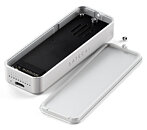
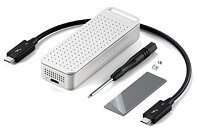
Satechi has launched the DotDisk, a compact M.2 NVMe enclosure with a USB4 V2 interface running at up to 80 Gbps. Satechi isn't new to the SSD enclosure space, having previously launched products like the compact Mini NVMe SSD in 2024, the USB4 Slim NVMe SSD enclosure last year, and the versatile Thunderbolt 5 CubeDock docking station shown at CES in January. This new addition can accommodate a single M.2 2280 PCIe 4.0 drive and supports capacities up to 8 TB, with the slot being user-accessible for later upgrades. The enclosure is made from milled aluminium with an integrated cooling fan. Active cooling in something this small is worth noting, as most compact enclosures rely on passive heat dissipation and can throttle under sustained load. A thermal pad is included to help seat the drive properly against the heatsink.
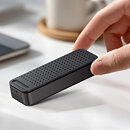
The USB-C port covers Thunderbolt 5, Thunderbolt 4, USB4 V2, and USB4, so it'll work with most modern Macs and PCs without adapter hassle. A Thunderbolt 5 cable ships in the box alongside a magnetic screwdriver for installation. OS compatibility covers macOS Sonoma 14.6 and later, Windows 11, and Linux. Worth mentioning that the enclosure is not compatible with SSDs equipped with heatsinks, double-sided and 2230/2242/2260 sizes. The Satechi DotDisk comes in silver and Space Black and is available now at satechi.com for $199.99. No SSD is included.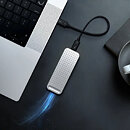
Source:
Satechi
The USB-C port covers Thunderbolt 5, Thunderbolt 4, USB4 V2, and USB4, so it'll work with most modern Macs and PCs without adapter hassle. A Thunderbolt 5 cable ships in the box alongside a magnetic screwdriver for installation. OS compatibility covers macOS Sonoma 14.6 and later, Windows 11, and Linux. Worth mentioning that the enclosure is not compatible with SSDs equipped with heatsinks, double-sided and 2230/2242/2260 sizes. The Satechi DotDisk comes in silver and Space Black and is available now at satechi.com for $199.99. No SSD is included.


7 Comments on Satechi Introduces DotDisk 80 Gbps SSD Enclosure With Active Cooling
The fan is under the disk tray which is on the empty side of the disk. All the components you want to cool (controller first, then Nand and Dram) are on the opposite side, connected to the external aluminium sheet via thermal pad so they aren't going to benefit from the fan.
Why even mentioning USB4v2 in the first line of your product page if Apple users are your main audience?
satechi.com/products/dotdisk-80gbps-ssd-enclosure
While the disk is only connected to the upper removable covering.
A) dat price...ouch !
B) Too many screws....to fiddle with and/or drop/lose.......
C) Only fits 2280 drives, so if you have other sizes, you're S.O.L...:(