Thursday, May 7th 2026

Microsoft Is Testing a Windows 11 Feature That Maxes Out CPU Speed for Faster App Launches
According to Windows Central, Microsoft is working on a new feature for Windows 11 called "Low Latency Profile," as part of the Windows K2 effort. This feature aims to make app launches noticeably faster by pushing the CPU core to its maximum boost frequency in very short bursts. Reportedly, this feature boosts the CPU to its maximum frequency for 1-3 seconds, resulting in noticeably smoother app launches during testing. When launching Microsoft applications like Edge and Outlook, known as "in-box" apps, the result is about a 40% faster application launch. Other applications, such as the Start Menu and context menus across the operating system, may be up to 70% faster. Overall, the Windows 11 operating system is expected to receive a significant performance boost, though at the cost of the CPU reaching its maximum frequency.
Currently, this feature within the Windows K2 effort is automatic, with no clear indication if it can be turned on or off. Running a CPU at its maximum frequency is somewhat unusual, as the purpose of an operating system is to minimize strain on the PC, leaving headroom for heavier applications to load. However, since the boost is only applied in short bursts of up to three seconds, it is expected that the performance benefits and overall smoothness will outweigh potential issues. These issues include elevated CPU frequency during lighter tasks and general OS usage, which could result in slightly higher temperatures overall. For laptop users, this might lead to faster battery drain, but it is likely that the Windows K2 effort will account for this, with minimal impact.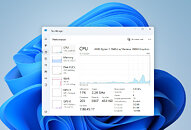 This Low Latency Profile feature is reminiscent of Microsoft's previous efforts when the company started preloading the File Explorer application at startup. Late last year, Microsoft explored this option, which had minimal impact on overall application launch speed. Since Microsoft cannot preload every application on Windows 11, the company is now looking into ways to have the CPU handle the heavy lifting, but only in short bursts that should not be very noticeable to the end user. Many enthusiasts would be willing to accept a snappier experience at the expense of higher CPU utilization for a second or two, provided it is implemented smoothly without significantly increasing the average CPU temperature.
Source:
Windows Central
Currently, this feature within the Windows K2 effort is automatic, with no clear indication if it can be turned on or off. Running a CPU at its maximum frequency is somewhat unusual, as the purpose of an operating system is to minimize strain on the PC, leaving headroom for heavier applications to load. However, since the boost is only applied in short bursts of up to three seconds, it is expected that the performance benefits and overall smoothness will outweigh potential issues. These issues include elevated CPU frequency during lighter tasks and general OS usage, which could result in slightly higher temperatures overall. For laptop users, this might lead to faster battery drain, but it is likely that the Windows K2 effort will account for this, with minimal impact.

64 Comments on Microsoft Is Testing a Windows 11 Feature That Maxes Out CPU Speed for Faster App Launches
MS seemingly assumes that you want to do all things external to your PC first, which is quite dumb. If I want to “search the web”, it’s far easier and more natural to open the browser of my choice and initiate the search on the search engine of my choice. After all, a web search from Start will just open a browser anyway. Are we really saving any time? As it turns out, no, we are just wasting time waiting for the Start menu to respond.
Maybe they should look to see what Windows 7 did.
The problem with Window's scheduler is it only responds to bandwidth (roughly, long term) loads and ignores latency (roughly, short term) loads. What the article discusses is a step toward correcting that.
Admittedly, it's a weak and hackish step. But my hope is it's a sign they're starting to pay attention to the core of their operating system again, rather than the user-facing junk they've wasted their time on for the past half-decade.Which doesn't negate anything I said. Android will still push clocks as high as it can to get low-latency tasks like UI work done as quickly as possible.
wasn't there a couple of third party file browser software to replace File Explorer on windows? I think I remember being told their performance is excellent
Also unless you disable it in group policies, searchapp.exe will periodically fire up to do some kind of activity and calls a bunch of msedge processes.
AMD prepares OS-level boost clock reporting for future CPUs:
videocardz.com/newz/amd-prepares-cppc-highestfreq-support-to-report-cpu-boost-clocks-directly-to-the-os
I've upgraded my 3 year old W10 installation into W11 using a clean install. The first thing i did was Shutup Windows 10 or 11, disabled pretty much everything i don't need and in particular have telemetry eat and send back to homebase. That still was a slow experience, i've used Win11debloat now and the visuals or performance in general is just quite better at this point.
Perhaps ms should listen to the ones who are creating these tools to begin with and make windows a compelling OS again, as it was with W7, W10. W11 is completely the opposite way, with forced products nobody ever asked for. I'm pretty sure that if they long term continue with these things, linux will grow more over the course of time, because MS had to shit completely on it's windows product.
Leave AI Vibe coding; and use real people who know what they do.
Microsoft shouldn't have taken years to listen to the negative feedback.
I only moved to linux because I was curious and Windows was so bad. If I hadn't have looked, I wouldn't have known.
I absolutely NEVER EVER thought I would be a linux user but they drove me away.
Bad Windows performance comes from Windows becoming more and more pile of dogshit and malware Microslop has been piling on top of Windows "core", which itself would work fast if everything on top of it were properly designed and coded.
Around Y2K it was joked that Windows is the most widespread computer virus.
Well, now it is that with all this hogging of resources and slowing PC down, spamming ads and spying users.
(and forced BitLocker starts approaching ransomware behaviour)
Remove those ads and spyware and web search, kill these "modern" asslets/crapplets/whatever and UI shenanigans and return to old applications, control panel and Start menu coding and I bet Windows becomes suddenly fast and reactive to user input.
Like it used to be on far slower hardware than today.
And that race to idle saves power only when everything has been designed from the start to consume as little as possible.
And even that could actually increase total amount of consumed energy per task, if CPU is pushed too far past power efficient clock speeds needing significant cranking up of voltage. (which leads to rapid increase in power consumption for minimal performance gains)
Windows has one another problem (or feature) – it's related to power plans; there are so many "power-saving features" that reduce power consumption and limit CPU clock speeds.