Tuesday, May 12th 2026

Microsoft's Windows 11 UI Is About to Get Much More Responsive

Microsoft is updating the native Windows user interface to create more responsive Windows 11 UI elements through the Windows K2 initiative. The company is transitioning its core Windows 11 elements from third-party frameworks to the Windows-native WinUI 3. In a recent GitHub post by Microsoft engineer Beth Pan, it's clear that Microsoft is making changes even within the WinUI 3 framework itself, demonstrating significant improvements in application launches. The company is using File Explorer and Notepad as benchmarks for performance improvements, as these core apps require much better responsiveness. With the latest set of patches arriving soon, File Explorer will have much less background work to do before launching, meaning that the launch should feel nearly instant.

For example, the latest WinUI 3 patches enable 41% fewer allocations, 63% fewer transient allocations, 45% fewer function calls, and 25% less time spent in the WinUI code powering the framework. This means that the upcoming File Explorer patch should feel noticeably faster with the updated framework, delivering on a promise to make the Windows 11 user interface a much smoother experience. As these changes are expected to be integrated into the WinAppSDK 2.x soon, we should see them arrive in the operating system in the coming weeks. Some changes are still too risky to implement in such a large piece of software, so users will need to wait a bit longer in case the testing encounters issues.
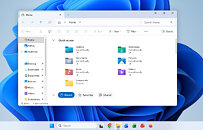
Currently, Windows 11 is a mix of legacy Microsoft frameworks for the user interface. This jumble of UIs has led to a lot of inconsistency, with daily operations encountering non-uniform interfaces carried over from the Windows 7 era. This mix includes web-based WebView2, React, and others. Microsoft plans to transition its entire user experience to the desktop-only WinUI 3 framework, which will reduce application latency, improve user experience, and make it feel noticeably smoother. All of this fine-tuning is being done alongside the "Low Latency Profile," which boosts the CPU frequency to its maximum state for 1-3 seconds to open applications faster and make the OS feel much smoother overall.
Sources: Microsoft on GitHub, via Windows Central
Add your own comment

98 Comments on Microsoft's Windows 11 UI Is About to Get Much More Responsive

#76
MTS-C
AleksandarKAlready? What? Thats fast!
Hasn't been pushed to me yet, I'm on experimental channel.
Posted on Reply
#77
FR3D1
Ninja Cat
@MTS-C
This update is not directed at your channel.

Regards,
Fred.
Posted on Reply
#78
MTS-C
FR3D1@MTS-C
This update is not directed at your channel.

Regards,
Fred.
Yea I just checked, I already got that update at some point. When sifting I only looked at the last digits.
Posted on Reply
#79
HLB
Speaking of disabling Defender. I did some testing on older and newer machines and honestly I saw no global performance benefits of removing it. It does affect some apps and games but then I'd just create folder and process exclusions and there is a nifty utility called Defender Exclusion Tool that lets you do this quickly and easily. I kind of enjoy having a bit of protection even though it may not be prefect.

Disabling VBS (Virtualization Based Security), i.e. Core Isolation and Memory Integrity was sort of proven to fix performance issues in the past, in some games, but personally I see almost no benefit from disabling it now. I think one of my games may have issues with it so I keep this disabled.

The same goes for various CPU mitigations, I tested this early this year and I saw zero improvement with Intel based PCs. This lack of gains was verified by some other NTLite users. It seems that Intel and Microsoft were able to regain the lost performance or these tweaks simply no longer work with the latest BIOSes. Someone claimed improvements by flashing his mobo with an older BIOS but I'm not gonna go that way and can't recommend this.

But yeah, my opinion overall is that we should not be doing this and I am getting tired of this. Even though I got this down to a routine, it's getting to be too much. An OS should only require some basic personalizations and customizations using only built-in controls, without resorting to different third party tools and advanced editing and hacking. I can configure Fedora or Debian with KDE Plasma to near-perfection in under 10 minutes using only the stock tools that come with the distro. Why can't I do this with Windows?

This situation has become ridiculous and I understand people who are not willing to deal with this any more. I built my last Windows ISO in March and I'm sitting on the fence watching both Windows and Linux developments until the end of this year. Then I'll see. I'd prefer to stay on Windows because of some apps, but, unless Microslop fixes it, I may not want to any more.
Posted on Reply
#80
micropage7
HLBSpeaking of disabling Defender. I did some testing on older and newer machines and honestly I saw no global performance benefits of removing it. It does affect some apps and games but then I'd just create folder and process exclusions and there is a nifty utility called Defender Exclusion Tool that lets you do this quickly and easily. I kind of enjoy having a bit of protection even though it may not be prefect.

Disabling VBS (Virtualization Based Security), i.e. Core Isolation and Memory Integrity was sort of proven to fix performance issues in the past, in some games, but personally I see almost no benefit from disabling it now. I think one of my games may have issues with it so I keep this disabled.

The same goes for various CPU mitigations, I tested this early this year and I saw zero improvement with Intel based PCs. This lack of gains was verified by some other NTLite users. It seems that Intel and Microsoft were able to regain the lost performance or these tweaks simply no longer work with the latest BIOSes. Someone claimed improvements by flashing his mobo with an older BIOS but I'm not gonna go that way and can't recommend this.

But yeah, my opinion overall is that we should not be doing this and I am getting tired of this. Even though I got this down to a routine, it's getting to be too much. An OS should only require some basic personalizations and customizations using only built-in controls, without resorting to different third party tools and advanced editing and hacking. I can configure Fedora or Debian with KDE Plasma to near-perfection in under 10 minutes using only the stock tools that come with the distro. Why can't I do this with Windows?

This situation has become ridiculous and I understand people who are not willing to deal with this any more. I built my last Windows ISO in March and I'm sitting on the fence watching both Windows and Linux developments until the end of this year. Then I'll see. I'd prefer to stay on Windows because of some apps, but, unless Microslop fixes it, I may not want to any more.
i remove defender coz it really kills potato laptops performance, actually if you have more resources just let the defender not touched. meanwhile M$ kinda hit and run the patches
Posted on Reply
#81
HLB
micropage7i remove defender coz it really kills potato laptops performance, actually if you have more resources just let the defender not touched. meanwhile M$ kinda hit and run the patches
Oh, I believe you. But generally, yeah, I prefer to leave it on.
Posted on Reply
#82
FR3D1
Ninja Cat
HLBand I'm sitting on the fence watching both Windows and Linux developments until the end of this year.
I think that after K2, further "under-the-hood improvements" regarding Windows will be necessary (the focus seems to be on responsiveness and appearance rather than integrity?). Therefore, I don't think the timeframe will be sufficient. I'm less worried about Linux at the moment. The two options I'm keeping an eye on aren't going to mutate into an agent-based operating system (like Android 17?).

And how is version 26100.8514/26200.8514 performing, by the way?

Regards,
Fred.
Posted on Reply
#83
HLB
FR3D1I think that after K2, further "under-the-hood improvements" regarding Windows will be necessary (the focus seems to be on responsiveness and appearance rather than integrity?). Therefore, I don't think the timeframe will be sufficient. I'm less worried about Linux at the moment. The two options I'm keeping an eye on aren't going to mutate into an agent-based operating system (like Android 17?).

And how is version 26100.8514/26200.8514 performing, by the way?

Regards,
Fred.
I'm still on 26200.8037 from March. My strategy for the last several years is to build a new ISO and kill feature updates for a year, only apply security updates, to avoid the Patch Tuesday Russian Roulette as I was burnt by that in the past. It worked so far, smooth sailing and it takes few days to build the ISO and install on my five PCs. Seems like a good tradeoff for a year without nasty surprises.

It runs well because it's heavily debloated and customized and all my apps and games run fine, it fulfills all my needs. However, this last build was frustrating and I got really burn out so I don't want to test anything right now. I'm gonna wait for some more news and updates and then I may test a new build later in Summer maybe. For now, I just want to chill, listen to music, play some games and browse the web without unplanned interruptions.

I agree that a year may not be enough to turn Windows around, but if Microsoft really puts forward some genuine effort and there are some meaningful improvements to Windows while showing some restraint with AI implementations, it may be enough to keep me on Windows for another year as I really don't like the idea of using Linux as my desktop OS. But I'm trying to keep my expectations low. Even the K2 project uses AI heavily, so if MS believes that AI is the answer to everything then some skepticism is warranted. I know I can't escape AI in my OS entirely, even if I switch to Linux, and there are some genuinely useful applications for LLMs, I just hate the blind, thoughtless, insane AI push to add AI to every damn thing at any costs. This AI insanity gotta slow down, cool off eventually, I hope.
Posted on Reply
#84
Darmok N Jalad
Honestly, tweaking Windows is as old as…Windows. I recall using the PowerToys as far back as Windows 95, and I would always tweak the default install, disabling several unused services that would autostart at boot. Back in the 95/98/Me/Xp days, I had my system setup to be able to reinstall Windows at any time, and it was faster and easier to do that than use backups. I probably did a clean install every month (often out of boredom or too much tweaking).
Posted on Reply
#85
HLB
Darmok N JaladHonestly, tweaking Windows is as old as…Windows. I recall using the PowerToys as far back as Windows 95, and I would always tweak the default install, disabling several unused services that would autostart at boot. Back in the 95/98/Me/Xp days, I had my system setup to be able to reinstall Windows at any time, and it was faster and easier to do that than use backups. I probably did a clean install every month (often out of boredom or too much tweaking).
True, but, at least for me, it used to be nerd tinkering for the sake of tinkering, out of curiosity and just for fun. Window 7 was very usable in its default, vanilla state, very few annoyances and any tweaking was just a hobby thing. Windows 10 was mostly OK-ish too. With Windows 11 it has become a necessity for me, which ruined the pleasure.
Posted on Reply
#86
EsaT
HLBAn OS should only require some basic personalizations and customizations using only built-in controls, without resorting to different third party tools and advanced editing and hacking.
For start there should be choise between traditional keyboard&mouse developed UI tuned over decades and separate touch friendly UI.
Then have choise for graphical look between old, intuitive, developed over decades skeuomorphic design or flat Earth adventure games.
With some different colour themes, including dark themes and some specifically for those with colour blindness.

These are basic things of OS which user should never need to "unfuck" in supposedly mainstream OS.

Neither should user need to go deeper to find "everything auto-updates", "only security updates automatically", "no driver updates" etc choises.

And user should definitely never need need to start installing third party stuff because built in is just slow and laggy.

So many simple basic things which Microslop has totally f'ed up.
MTS-CAnother thing people don't really talk about is their own bloat. Due to the amount of RAM we're all rocking these days people don't disable startup items. I see most people running each game launcher, voicemod, Discord, Synapse/LGHub, and every RGB software under the sun 24/7 along with allowing browser background running. It's not necessary, turn it all off.
And also those are nowadays often bloated garbage instead of proper lean and fast code.
Propably for the same reasons as in Microslop:
All MBAs and other managers, marketers etc forcing their shit.
Posted on Reply
#87
Darmok N Jalad
HLBTrue, but, at least for me, it used to be nerd tinkering for the sake of tinkering, out of curiosity and just for fun. Window 7 was very usable in its default, vanilla state, very few annoyances and any tweaking was just a hobby thing. Windows 10 was mostly OK-ish too. With Windows 11 it has become a necessity for me, which ruined the pleasure.
Yeah, W11 is a lot of work, and some of it even undos itself after a round of updates. That even started with Windows 10, where removing Edge required some additional effort, or it would just keep coming back.
Posted on Reply
#88
HLB
EsaTFor start there should be choise between traditional keyboard&mouse developed UI tuned over decades and separate touch friendly UI.
Then have choise for graphical look between old, intuitive, developed over decades skeuomorphic design or flat Earth adventure games.
With some different colour themes, including dark themes and some specifically for those with colour blindness.

These are basic things of OS which user should never need to "unfuck" in supposedly mainstream OS.

Neither should user need to go deeper to find "everything auto-updates", "only security updates automatically", "no driver updates" etc choises.

And user should definitely never need need to start installing third party stuff because built in is just slow and laggy.

So many simple basic things which Microslop has totally f'ed up.
Absolutely. This lack of choice is annoying. I hate touch elements in a desktop OS.
Posted on Reply
#89
lexluthermiester
HLBOh, I believe you. But generally, yeah, I prefer to leave it on.
Not everyone agrees. Some of us want something that works as it should WITHOUT microsoft's goosestepping nonsense intruding. This is why some of use don't just disable it, we remove it(deleted) entirely along with Edge and all the other bloat they include.
Posted on Reply
#90
HLB
lexluthermiesterNot everyone agrees. Some of us want something that works as it should WITHOUT microsoft's goosestepping nonsense intruding. This is why some of use don't just disable it, we remove it(deleted) entirely along with Edge and all the other bloat they include.
It's a choice. I remove everything else but I keep Defender.

Removing Defender for privacy reason is a legit choice, but removing it for performance reason not so much, if you have recent hardware.

BTW, even with Defender and all other MS software ripped out of the ISO, Windows 11 still calls home many times per day. You're just buying yourself an illusion, Defender isn't the only intrusive Windows component. If you really want to stop Microslop from snooping on you, you'd have to stop using Windows or run a blocking DNS on your home network and block all MS domains, which would be quite a lot, into thousands.
Posted on Reply
#91
lexluthermiester
HLBRemoving Defender for privacy reason is a legit choice, but removing it for performance reason not so much, if you have recent hardware.
Privacy isn't the movitivation reason, though that is a factor. The real reasons are as follows: Defender has a habit of deleting files without user permission, without user prompt for action or even notification. This is absolutely unacceptable behavior. Couple that with the fact that Defender has a habit of flagging things as "unwanted" or malicious that are not(false positives) and then it turns itself back on after being disable. With these we find the primary reasons for removal. Other, more competent security suites, provide user controls for all aspects of performance metrics.
HLBBTW, even with Defender and all other MS software ripped out of the ISO, Windows 11 still calls home many times per day.
Not when certain configurations are employed.
HLBYou're just buying yourself an illusion
That is "tin-hat" thinking and simply not correct.
HLBDefender isn't the only intrusive Windows component.
True, but it all can be controlled and or blocked.
HLByou'd have to stop using Windows or run a blocking DNS on your home network and block all MS domains, which would be quite a lot, into thousands.
There simpler methods than that.
Posted on Reply
#92
MTS-C
HLBSpeaking of disabling Defender. I did some testing on older and newer machines and honestly I saw no global performance benefits of removing it. It does affect some apps and games but then I'd just create folder and process exclusions and there is a nifty utility called Defender Exclusion Tool that lets you do this quickly and easily. I kind of enjoy having a bit of protection even though it may not be prefect.

Disabling VBS (Virtualization Based Security), i.e. Core Isolation and Memory Integrity was sort of proven to fix performance issues in the past, in some games, but personally I see almost no benefit from disabling it now. I think one of my games may have issues with it so I keep this disabled.

The same goes for various CPU mitigations, I tested this early this year and I saw zero improvement with Intel based PCs. This lack of gains was verified by some other NTLite users. It seems that Intel and Microsoft were able to regain the lost performance or these tweaks simply no longer work with the latest BIOSes. Someone claimed improvements by flashing his mobo with an older BIOS but I'm not gonna go that way and can't recommend this.

But yeah, my opinion overall is that we should not be doing this and I am getting tired of this. Even though I got this down to a routine, it's getting to be too much. An OS should only require some basic personalizations and customizations using only built-in controls, without resorting to different third party tools and advanced editing and hacking. I can configure Fedora or Debian with KDE Plasma to near-perfection in under 10 minutes using only the stock tools that come with the distro. Why can't I do this with Windows?

This situation has become ridiculous and I understand people who are not willing to deal with this any more. I built my last Windows ISO in March and I'm sitting on the fence watching both Windows and Linux developments until the end of this year. Then I'll see. I'd prefer to stay on Windows because of some apps, but, unless Microslop fixes it, I may not want to any more.
I disable it all because I don't need it nor want it, and at least in the case of my 14th gen Poweredge servers running Cascade it does make a difference so I keep it in the stable. As you'll see in my next reply, I do like to tweak and if it wasn't for those minor things I mentioned before I could rock a vanilla W11 and not really notice a difference. I just don't want those running, and with Defender it likes to scan everything I bring over from my server and slow the operation down. I don't have the setup I do for network transfers to be slowed by Defender.
Darmok N JaladHonestly, tweaking Windows is as old as…Windows. I recall using the PowerToys as far back as Windows 95, and I would always tweak the default install, disabling several unused services that would autostart at boot. Back in the 95/98/Me/Xp days, I had my system setup to be able to reinstall Windows at any time, and it was faster and easier to do that than use backups. I probably did a clean install every month (often out of boredom or too much tweaking).
I was the same way. I had top end hardware of the time and still tweaked XP to the max because I loved to do 3dmark benches against friends. IIRC I had XP so lean it only ran 13 processes in the background or something ridiculous.
Darmok N JaladYeah, W11 is a lot of work, and some of it even undos itself after a round of updates. That even started with Windows 10, where removing Edge required some additional effort, or it would just keep coming back.
Knock on wood but the only thing updates will revert for me is my W98 startup sound.
HLBBTW, even with Defender and all other MS software ripped out of the ISO, Windows 11 still calls home many times per day. You're just buying yourself an illusion, Defender isn't the only intrusive Windows component. If you really want to stop Microslop from snooping on you, you'd have to stop using Windows or run a blocking DNS on your home network and block all MS domains, which would be quite a lot, into thousands.
My Firewall and IPS flow table says it doesn't. But I have caught some game launchers trying to phone to India.
Posted on Reply
#93
Darmok N Jalad
MTS-CI disable it all because I don't need it nor want it, and at least in the case of my 14th gen Poweredge servers running Cascade it does make a difference so I keep it in the stable. As you'll see in my next reply, I do like to tweak and if it wasn't for those minor things I mentioned before I could rock a vanilla W11 and not really notice a difference. I just don't want those running, and with Defender it likes to scan everything I bring over from my server and slow the operation down. I don't have the setup I do for network transfers to be slowed by Defender.


I was the same way. I had top end hardware of the time and still tweaked XP to the max because I loved to do 3dmark benches against friends. IIRC I had XP so lean it only ran 13 processes in the background or something ridiculous.

Knock on wood but the only thing updates will revert for me is my W98 startup sound.

My Firewall and IPS flow table says it doesn't. But I have caught some game launchers trying to phone to India.
In the old days, we were seeking every means to conserve resources and CPU cycles. Most of us only had single core single thread CPUs back then. Even the right audio codec chips mattered for overhead.
Posted on Reply
#94
lexluthermiester
Darmok N JaladIn the old days, we were seeking every means to conserve resources and CPU cycles. Most of us only had single core single thread CPUs back then.
Some of us still do that.
Posted on Reply
#95
Darmok N Jalad
lexluthermiesterSome of us still do that.
Oh no, you only have a single core CPU?! :p

I also still work at efficiency, as it’s ingrained in me after 3 decades of doing so. I guess what I really meant was, back then, every little tweak was more important since you didn’t have multi core CPUs and fast RAM and storage to help you out.
Posted on Reply
#96
MTS-C
Darmok N JaladIn the old days, we were seeking every means to conserve resources and CPU cycles. Most of us only had single core single thread CPUs back then. Even the right audio codec chips mattered for overhead.
I was still doing that even with an FX-60, 8800GTX, and 2-4GB of RAM. Every....last....drop. (Still do that with the same rig)
Today I don't do that as much except for some habits mainly because I don't have bench wars anymore and I don't play competitive games online anymore. I spend all that energy on my servers.
And mainly because as I said, I just don't really have the same problems most people complain about with W11. I just attest it to generally being "new bad, old good" mentality that's stuck around for almost 3 decades.
Posted on Reply
#97
efikkan
For example, the latest WinUI 3 patches enable 41% fewer allocations, 63% fewer transient allocations, 45% fewer function calls, and 25% less time spent in the WinUI code powering the framework
That's all well and good, but it only scratches the surface of the problem. And from what I know about MS' coding standards, there are much more underlying problems at hand. Just the fact that they resort to boosting clock speeds to launch applications faster is so ridiculous that it's tempting to utilize some unkindly words about their level of intellect.

All of these basic tools should be so lightweight that they'll launch virtually instant on modern hardware. We shouldn't need 100x the performance and still do it slower than it did back in the 90s.
ymdhisYou know Windows is bad when they need to get Notepad benchmarked for starting up faster. I had to boot up a Windows 95 laptop running on a 233MHz Pentium MMX + 32MB EDO RAM last week, and even that was snappier than Windows 11.
Even my old Pentium 90 was more snappy with HDDs back in the day…
silentbogoAll we have is tabs, markdown file support, and of course AI. Spellcheck/autocorrect is also a questionable feature, maybe useful in the age of brainrot.
It is still slow with large files, still no syntax highlight even for basic formats like xml, html, js, or even strictly Windows-related formats like batch files etc.
Also no QoL features, like showing line numbers, or changing text encoding on the fly (you can only select few when saving a new file).
There's also an indicator showing whether you are using CRLF or LF, but no way to change it in settings.
On one side it's far from a programmer/sysadmin tool, and on the other - it's barely useful for "normal" people. Essentially a half-assed prototype of a clone of OSX TextEdit.
There will always be a debate about where to draw the line for a basic tool. I believe spell checking is not something which belongs in a basic notepad, obviously not "AI", and even syntax highlighting is debatable.
But Notepad desperately needs basic features like a proper undo/redo implementation, line numbering, tabs/spaces and proper CRLF/LF support, all of which comparable tools have had for decades, and should be a no-brainer for any half-decent developer to implement. And all of which are very useful if you need to edit a configuration, or a file in a git repository.
Posted on Reply
#98
Shrek
Looking forward to the native NVMe driver.
Posted on Reply
Add your own comment
Nov 26th, 2026 23:17 CST change timezone

New Forum Posts

Popular Reviews

TPU on YouTube

Controversial News Posts