Sunday, May 17th 2026

Microsoft Brings Back Windows 10-Style Taskbar and Start Menu Customization in Windows 11
If you were a user of the Windows 10 operating system with a customizable Taskbar location, you were familiar with Taskbar customization and different placements. However, Microsoft kept this feature restricted in Windows 11 for a long time. The company is now introducing full support for Taskbar and Start Menu customization, which will be available to Windows Insiders in the Experimental channel over the coming weeks. Specifically, the Taskbar will be movable to the top, bottom, left, or right side of the screen. From there, users will be able to customize icon alignment for each Taskbar position, whether top-aligned, center-aligned, left-aligned, or right-aligned. All it takes is a visit to Settings > Personalization > Taskbar > Taskbar behaviors, where all of the settings will be located. Interestingly, the Taskbar will also offer smaller icons and a reduced presence, which is a nice addition for anyone looking to maximize usable space.
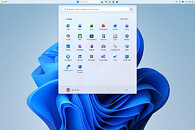
Additionally, Windows Insiders are testing a preview of the revamped Start Menu customization effort, which gives users more meaningful control over Start Menu behavior. One of the changes includes an option to choose between smaller and larger Start sizes, independently hide or show sections like Pinned, Recent, and All, and even remove their name and profile photo for extra privacy during screen sharing or presentations. Previously, these customizations weren't possible, as Windows 11 shipped with a generic Start Menu look for every build. Just as important, Microsoft is separating Start's file recommendations from File Explorer's recent items and jump lists, so disabling recommendations in Start will no longer affect recent activity elsewhere in Windows. At the same time, the company is trying to make the recommendation area more useful by renaming it to Recent, keeping newly installed apps visible, and refining which files appear in that section.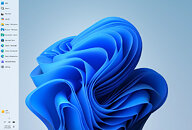
 These changes are rolling out in the coming weeks for Windows Insiders, meaning that regular Windows 11 users on versions 24H2, 25H2, and 26H1 will experience them in about a month or so. By the time these updates arrive, we hope to see some of the promised Windows K2 performance and usability improvements as well. This means that the Windows 11 OS will finally integrate these much-desired changes.
Source:
Microsoft
Additionally, Windows Insiders are testing a preview of the revamped Start Menu customization effort, which gives users more meaningful control over Start Menu behavior. One of the changes includes an option to choose between smaller and larger Start sizes, independently hide or show sections like Pinned, Recent, and All, and even remove their name and profile photo for extra privacy during screen sharing or presentations. Previously, these customizations weren't possible, as Windows 11 shipped with a generic Start Menu look for every build. Just as important, Microsoft is separating Start's file recommendations from File Explorer's recent items and jump lists, so disabling recommendations in Start will no longer affect recent activity elsewhere in Windows. At the same time, the company is trying to make the recommendation area more useful by renaming it to Recent, keeping newly installed apps visible, and refining which files appear in that section.


52 Comments on Microsoft Brings Back Windows 10-Style Taskbar and Start Menu Customization in Windows 11
This is a Windows 95 feature right here. And the bastards couldn't bother coding it in for Windows 11.I'm stealing this for my meme archives.Denied. Windows XP was the last one. Windows 7's help system is ridiculously shrinked down from XP's and was already starting to expect you to use the internet.Make an old guy happy and bring back Classic too. That thing was the good kind of minimalism, not this shit minimalism we have today, all flat and devoid of personality.
Classic actually helped my unmedicated ADHD brain make it through school/college/grad school. Modern minimalism actually requires more mental load since there's no way of telling what is a button and what isn't without physically hovering over it - trying to figure out how to navigate the app is an endeavor in itself, it's horrible.
on the other hand why not right from release and now almost too little too late
Hopefully by 26H2 W11 resembles and acts more like W10/W7 desktop OS
did they ever get the nvme driver sorted?
www.techpowerup.com/344348/windows-11-25h2-includes-a-faster-nvme-driver-needing-manual-installation
and whats the state of the scheduler?
Other than that, I don't think we have heard about issues regarding it so... maybe it's just working perfectly fine? And just waiting for Microsoft to deliver it to Windows 11 (I'd not be surprised if they made it a bullet point of the next feature update)
Windows 7 was the last Windows designed by sane people, for PC and using GUI rules developed over many decades.
After that marketing crackpots got way too much control, throwing piece by piece all those rules and common sense out of Windows... And now this tiny chance is far less than tip of iceberg from all the damage done.And same cancer is also all over the web.
Buttons/link texts used to have specific clearly distinguishable styles, but now it's often complete adventure game.
Because of that my father has lots of problem when going to any unfamiliar page... and even different part of familiar site.If change is good then you can't have anything against it, if someone decides to take shovel and start patting your face until its all flat.
After all that 3D face with nose and everything is just so from stone age and outdated.
I never understood why they locked the taskbar in Windows 11 and made the icons go to the middle by default, it just seems like an arbitrary and bizarre decision...would love for someone in Microsoft to explain the logic
This is my current setup with OpenShell as a start menu.
Heck, it'd be great if they brought back proper Windows Themes support from the 95 - Win7 era and expanded upon it with entire GUI overhauls, and included 98, XP, Vista, and Win7 options. 98 and Win7 were personal favorites of mine, while XP had nostalgia factor going for it, and Vista had all the fancy micro animations/shading/rendering to icons, mouse cursors, and window elements (which was partly why it ran like shit unless one had a strong CPU and GPU able to handle all the little extra detail processing).I spent hours with the little robot assistant. It was always hilarious animating its self-destruct after it accidentally ate its little drone. The alternate was the relatively unobtrusive legacy WinLogo assistant, where it simply glowed different sections in its idle animations and occasionally just rotated like the early 3D WinLogo.
Theming should be brought back. To save on work, 2000 could represent Classic/9x, then Luna for XP, and Aero as seen in 7. Let the user choose during setup; it would eleminate an entire class of complaints. Also, send that ugly, blue, digital flower to Hades, and get something like Bliss or 7's excellent wallpaper. (I know it's been changed since Spotlight, but that branding is still everywhere in the marketing materials.)Judging from the outside, it's their old Apple fixation, trying to copy macOS instead of being confident in Windows' identity.Excellent and necessary tool. I would argue it is the single most important change to make Windows feel like Windows again.