Monday, August 24th 2026

Windows 11 26H2 Update Focuses on Extended Servicing, Not New Features
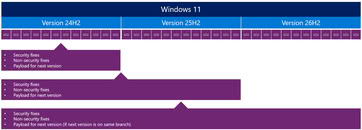
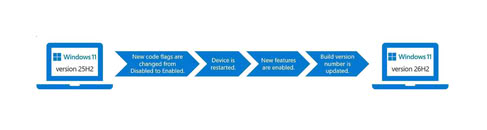
According to Windows Latest, Microsoft's upcoming Windows 11 26H2 is expected to be one of the most uneventful releases in terms of new features. Instead, this release focuses on resetting the support cycles that Microsoft is implementing, rather than introducing major features or overhauls. For those who are not aware, Microsoft has altered its update approach for Windows 11 for some time now. Since Windows 11 24H2, the company has adopted a shared servicing model applied to the Windows 11 24H2 and 25H2 branches. Since late 2024, support and updates have been rolled out across every OS branch, with each new release cycle activating these features rather than leaving them dormant in the kernel. Enablement packages (eKB) are central to this process, as downloading an update essentially involves eKBs that activate certain functionalities.
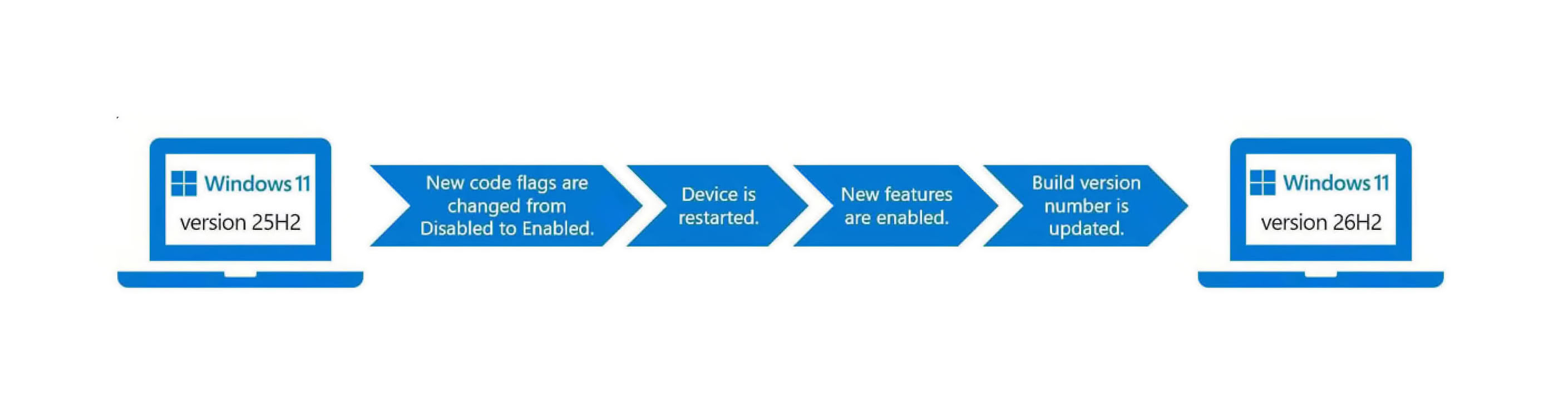
For instance, on a device running Windows 11 24H2 or 25H2, a simple eKB is needed to upgrade to the latest Windows 11 26H2 version. For older versions like 22H2 and 23H2, which are on an older servicing branch, Windows 11 26H2 will be a full feature update. In terms of new functionality with 26H2, Microsoft's focus is on resetting the support cycle timeline. The 26H2 version will receive regular support for 24 months on Home and Pro versions, while Enterprise and Education versions will receive 36 months of support. Starting from 2026, this support will extend until October 2028 for Home and Pro, and until October 2029 for Enterprise and Education. For those already running Windows 11 24H2 and 25H2 with the latest updates and patches, 26H2 will not introduce any new features.
 For a comprehensive platform-wide upgrade, next year's Windows 11 27H2 is planned as a feature-rich release with a new servicing branch. As for Windows 11 26H1, Qualcomm Snapdragon Elite and NVIDIA RTX Spark are now on a separate update track with that version. Earlier this year, Microsoft released Windows 11 26H1, but it was exclusive to Windows-on-Arm devices, primarily powered by Snapdragon chips. Although announced at Computex, notebooks and mini PCs powered by RTX Spark are not yet available but are expected to be released this fall. OEMs will launch them with Windows 11 26H1.
Source:
Windows Latest
For instance, on a device running Windows 11 24H2 or 25H2, a simple eKB is needed to upgrade to the latest Windows 11 26H2 version. For older versions like 22H2 and 23H2, which are on an older servicing branch, Windows 11 26H2 will be a full feature update. In terms of new functionality with 26H2, Microsoft's focus is on resetting the support cycle timeline. The 26H2 version will receive regular support for 24 months on Home and Pro versions, while Enterprise and Education versions will receive 36 months of support. Starting from 2026, this support will extend until October 2028 for Home and Pro, and until October 2029 for Enterprise and Education. For those already running Windows 11 24H2 and 25H2 with the latest updates and patches, 26H2 will not introduce any new features.


36 Comments on Windows 11 26H2 Update Focuses on Extended Servicing, Not New Features
By the way;
Fancy some free cookies?
Regards,
Fred.
Still, for all of us, Firefox increasing market share should be the best outcome.
I do have Firefox ready and there is no doubt in my mind that will become my new brower, as they plan to keep support for the full version of uBlock Origin.
(see last line!)SourceOtherwise, look into alternatives like "AdGuard Ad Blocker for Windows" (system-wide). I once bought a lifetime license for 3 devices for just under 10 euros (from a reseller!).
Regards,
Fred.
Edge separates each instance of incognito, so you can have 5 different accounts logged in at the same time.
Still, we will see for how long Microsoft will resist - I doubt not very long, so this is temporary at best.
I do have several issues with Firefox, but - nobody is perfect, and they are last Mohican, so they deserve our support whatsoever.
The thing is I simply don't trust MS so whenever there is a viable alternative to one of their products that's what I'll recommend as a matter of principle. For instance MS Office is arguably the "best" office suite you can have on Windows but I will still recommend you try OpenOffice or LibreOffice first. I'll add that in quite a number of cases I'll just recommend other software because their product is either subpar or just plain garbage, i.e. Teams.
I had to search for them and than use them after a while.
You already have everything sleeping on your windows installation.
Those small packages just activate the big update.
this may now explain why the previous july windows 11 pro offline update package was nearly 5gb in size. from the usual 3.5 or 4gb.
they could make it easier wiht a switch for everyone to turn it on in windows update setting box.
I'm not sure on the first one, but the second one is for sure that enablement package for the previous windows verison
Too bad the august update is broken on my laptop. I have to wait for my main box.
Most likely the august offline windows 11 pro update package.
--
I tried edge again on my notebook. It is awful in windows 11 pro.
I also do test from time to time the "linux" binary. Slow, wrong compiled, feels laggy compared with vivaldi. Both share the same chromium. + edge has very annoying annimations and has issue finding the right window. IT clips outside of i3wm.org. Not very well made the few microsoft related nonsense features. Note: I do not make screenshot of everybug i see, I would not have time for anything else. Firefox / google-chrome / vivaldi = no issue // of course edge can't do it right.
librewolf wants 1.5GB downloads to compile form git :(
Extended servicing, aham... more like expanded telemetry
Search box is at just the right position, too, for the thumb.
I was just testing to see if Lite was a solid alternative by now, and it's not.Wow, impressive. Only took them what? 6 years?
Ungoogled Chromium I tried, but performance was abysmal. However, that was some time ago, so I may be simply out-of-date 😁Thing is, I trust Google even less than Microsoft, so Edge and Outlook have upper hand to Chrome and Gmail whatsoever.
As for OpenOffice, I agree, it is very good alternative. For 95% of users it will be perfect...They are unbelievable stupid bunch of greedy ass*oles. If they supported V2 further, they would gained a ton of support and could actually distance themselves from Chrome.
However, it is obvious that Google and Microslop already agreed everything in detail, and that they can not sabotage joint effort.
Firefox FTW. They do need funding desperately, though.I have not tried it yet - how does it work? It is good?
I have similar tool as part of Kapsersky suite, but it is a bit too aggrrsive for my liking so I turned it off for now, until I have time to see how to setup it properly...
AdGuard for Windows can be tested for 14 days, among other things.
Regards,
Fred.
docs.controld.com/docs/free-dns