Thursday, August 27th 2026

Windows 11 Gets Major Taskbar and Start Menu Customization in New Feature Update

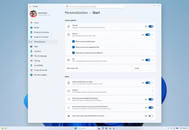
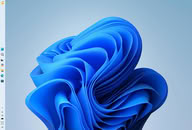
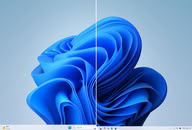
Microsoft has begun rolling out a new feature update KB5120998 for Windows 11, introducing significant visual changes to the user experience. Among the notable additions is the long-awaited expanded taskbar customization, allowing users to position the taskbar at the top, left, or right side of the display, in addition to its traditional bottom placement. Microsoft is also introducing a smaller taskbar mode that reduces both icon and taskbar size, which should be particularly useful on devices with limited screen space. The Start menu is receiving similar attention, with small, medium, and large size options, and the Recommended section has been renamed to "Recent."

Windows Search has undergone a visual and functional refresh, featuring a less cluttered search home and clearer indicators showing whether a result comes from an application, setting, file, web result, or the Microsoft Store. Users can now disable web and Store suggestions, and Windows can automatically index frequently used folders. File Explorer Home should launch faster, and its Recommended section now supports touch scrolling. Additionally, Microsoft has updated progress indicators for startup, sign-in, restart, shutdown, and update installation, while virtual desktop switching and display settings receive reliability improvements.
This non-security KB5120998 feature update for Windows 11 introduces a substantial collection of interface changes, quality improvements, and new platform capabilities. The update is being distributed in phases, so some systems may receive the changes gradually rather than immediately, depending on the system and region, so please be patient in case it is not immediately available to you.
Source: Microsoft
Add your own comment

43 Comments on Windows 11 Gets Major Taskbar and Start Menu Customization in New Feature Update

#1
JohH
holy moly it only took 5 years (and 2 months) to get the taskbar to the side.
AGILE.
AI hyperscale finally did it.
Posted on Reply
#2
_JP_
Should it work properly, this is one of the best QoL updates to be released in a long time.
Finally we will have Windows 2000 'till 10 desktop UI functionality and parity. (Along with showing the seconds on the clock and opening the docked menu on all secondary screens)

Should it work, properly.
Posted on Reply
#4
_JP_
Cheeseball

Hmm.
Happy updating! Don't forget to backup by building a whole second rig just like yours, down to the age of the cables, clone your installation and disconnect every unnecessary device and peripheral before rebooting, just in case. :laugh:
Posted on Reply
#5
Cheeseball
Not a Potato
_JP_Happy updating! Don't forget to backup by building a whole second rig just like yours, down to the age of the cables, clone your installation and disconnect every unnecessary device and peripheral before rebooting, just in case. :laugh:


I'm good dude. Thats my Windows 11 VM. :laugh:
Posted on Reply
#6
kondamin
interesting, I've been itching to do a clean install for most of the year, if it breaks something i will have an excuse.
Posted on Reply
#7
FR3D1
Ninja Cat
Cheeseball

Hmm.
I’m going to give the update a try this coming weekend as well. In my case coming from 23H2 it’ll be more of a clean install.

I hope I don't regret this.

Regards,
Fred.
Posted on Reply
#8
Aleksandar_038
Well, that did not take long :)

Truth to be told, mods like Windhawk bring more functionality to Windows 11 Taskbar than ever, but as far as Microslop own work goes... it is pathetic.
Posted on Reply
#9
_roman_
Core features which are nothing new and exists for years in other desktop environments.

first remove those core functions and than reinvent them a year later
Posted on Reply
#10
Wirko
JohHholy moly it only took 5 years (and 2 months) to get the taskbar to the side.
AGILE.
AI hyperscale finally did it.
"Agent Plummer, find that code for the movable taskbar that we wrote for Windows 95, check if it needs some scrubbing, then insert it into Build 26220.9223."
Posted on Reply
#11
Aleksandar_038
_roman_Core features which are nothing new and exists for years in other desktop environments.

first remove those core functions and than reinvent them a year later
Hah, in other desktop environments... They existed in WIndows for decades. Until Nuttela jumped in...
Posted on Reply
#12
Bigshrimp
I have been using a third-party start menu software for ages because of how bad Windows 11's interface and start menu have been. It's funny that it took them this long to just make some proper changes that people actually wanted and were familiar with in their prior operating systems.

Wish me luck, everyone. I am about to restart after installing the update. If I don't come back, I am reinstalling Windows. Well scratch that, I probably will just go straight to a Linux distro, so it may take me a hot minute if that happens, lol...

Thankfully, everything is still working after the restart. Whew...
Posted on Reply
#13
Let3r
This “new feature” that Linux has had since the 20th century.
Posted on Reply
#14
Darmok N Jalad
Is it time to bring the song back?
For all you old folks out there. Bonus points for the reference.
Posted on Reply
#15
AleXXX666
Cheeseball

I'm good dude. Thats my Windows 11 VM. :laugh:
I'm too installing VM on VBOX just to test this update LMFAO.:D

UPD: installed it on VM, can't see options to make the whole taskbar smaller (just stupid icons without the taskbar itself could be smaller) or move it around (again as old setting only start button location)
Posted on Reply
#16
Chrispy_
It's so utterly depressing that Microsoft's idea of progress is returning the functionality that was unnecessarily robbed from users without explanation five years ago.

Smaller taskbar has been a thing ever since Vista introduced a larger one, but it vanished in Windows 11.
Moveable taskbar was always a thing since Windows 95 first introduced it, until Windows 11 messed everything up. Jesus, even the UI dumpster-fire that was Windows 8 had a moveable frickin' taskbar....

The start menu reorganisation is just rubbing salt into the wound, because as much lipstick as Microsoft smear on that pig, they aren't actually returning the list functionality that was thrown out to make room for Sinovskys utterly ridiculous Windows 8 Start screen. I know there's still a "list" option in W11 but you can't reorganise it, you can't sort it, and you can't add to it, which is a problem because it's not even half complete and auto-populates in such a baffling and inconsistent way that it makes Windows Search look like a good option. It's an unwanted runt of an afterthought at best, and it would be useless because it's broken if the rest of the Start Menu wasn't also broken, making it actually something you will occasionally, desperately have to interact with :(

Search has been utterly broken since Windows 8 when Bing web search results and store results were added as a 'feature'. If you can finally decouple it from Bing and the Microsoft Store that'll be great. Third party tools have effectively done this but can be undone by Windows Update, so it's not a set-and-forget, it's something you have to occasionally re-fix.

Tell me I'm wrong. Tell me this isn't just Microsoft half-retracting decades of dumb and ridiculous changes that caused overwhelming outcry and seemed nothing short of vindictive at the time. Maybe Microsoft wouldn't have so much bloody trouble getting people to upgrade to the latest version if they didn't just REMOVE or BREAK shit that people actually depend on!

Don't get me wrong, I'm pleased that these changes are coming back. It's just that they should never have been taken away in the first place.
Posted on Reply
#17
Firedrops
JohHholy moly it only took 5 years (and 2 months) to get the taskbar to the side.
AGILE.
AI hyperscale finally did it.
we have gotten too complacent and expect too much from small indie devs smh my head
Posted on Reply
#18
TheinsanegamerN
Chrispy_It's so utterly depressing that Microsoft's idea of progress is returning the functionality that was unnecessarily robbed from users without explanation five years ago.

Smaller taskbar has been a thing ever since Vista introduced a larger one, but it vanished in Windows 11.
Moveable taskbar was always a thing since Windows 95 first introduced it, until Windows 11 messed everything up. Jesus, even the UI dumpster-fire that was Windows 8 had a moveable frickin' taskbar....

The start menu reorganisation is just rubbing salt into the wound, because as much lipstick as Microsoft smear on that pig, they aren't actually returning the list functionality that was thrown out to make room for Sinovskys utterly ridiculous Windows 8 Start screen. I know there's still a "list" option in W11 but you can't reorganise it, you can't sort it, and you can't add to it, which is a problem because it's not even half complete and auto-populates in such a baffling and inconsistent way that it makes Windows Search look like a good option. It's an unwanted runt of an afterthought at best, and it would be useless because it's broken if the rest of the Start Menu wasn't also broken, making it actually something you will occasionally, desperately have to interact with :(

Search has been utterly broken since Windows 8 when Bing web search results and store results were added as a 'feature'. If you can finally decouple it from Bing and the Microsoft Store that'll be great. Third party tools have effectively done this but can be undone by Windows Update, so it's not a set-and-forget, it's something you have to occasionally re-fix.

Tell me I'm wrong. Tell me this isn't just Microsoft half-retracting decades of dumb and ridiculous changes that caused overwhelming outcry and seemed nothing short of vindictive at the time. Maybe Microsoft wouldn't have so much bloody trouble getting people to upgrade to the latest version if they didn't just REMOVE or BREAK shit that people actually depend on!

Don't get me wrong, I'm pleased that these changes are coming back. It's just that they should never have been taken away in the first place.
MS had a reason: their users have an average IQ squarely around room temperature and keep brekaing their Windows setups in incredibly dumb ways.

Which....honestly they are not wrong. The sheer number of people who dont know how to do file backups, or what a web browser is, or still can the monitor a "hard drive" and think logging off is "rebooting", and claim they are running Office 11 is staggering. People hiding or moving or otherwise breaking the taskbar was a core part of my daily workflow 10 years ago.

Most people who use Windows are not gamers or professional IT employees or power users, its typical office workers who know about knowledgeable on computers as they are on vehicle maintenance or building houses: they know the square root of diddly squat.
Posted on Reply
#19
Let3r
On the lock screen of my windows install it literally shows ADS for local events! What the f**k Microslop? We already paid for it the OS! Let me customize the lock screen and I’ll be happy.
Posted on Reply
#20
Bigshrimp
Let3rOn the lock screen of my windows install it literally shows ADS for local events! What the f**k Microslop? We already paid for it the OS! Let me customize the lock screen and I’ll be happy.
It's a marketing platform first, and an operating system second. They said they were going to take ads out of certain elements of the OS too. Not surprised that they left them in, as their greed is endless.
Posted on Reply
#21
Aleksandar_038
Let3rThis “new feature” that Linux has had since the 20th century.
Well, Windows had it from 1995, so... Before Linux, no? I do not understand what is the point of coming up with Linux again and again... It is not about Linux, it is about Microsoft destroying Windows on purpose.
Chrispy_It's so utterly depressing that Microsoft's idea of progress is returning the functionality that was unnecessarily robbed from users without explanation five years ago.
Nutella view of advanced.
Chrispy_Smaller taskbar has been a thing ever since Vista introduced a larger one, but it vanished in Windows 11.
Moveable taskbar was always a thing since Windows 95 first introduced it, until Windows 11 messed everything up. Jesus, even the UI dumpster-fire that was Windows 8 had a moveable frickin' taskbar....

The start menu reorganisation is just rubbing salt into the wound, because as much lipstick as Microsoft smear on that pig, they aren't actually returning the list functionality that was thrown out to make room for Sinovskys utterly ridiculous Windows 8 Start screen. I know there's still a "list" option in W11 but you can't reorganise it, you can't sort it, and you can't add to it, which is a problem because it's not even half complete and auto-populates in such a baffling and inconsistent way that it makes Windows Search look like a good option. It's an unwanted runt of an afterthought at best, and it would be useless because it's broken if the rest of the Start Menu wasn't also broken, making it actually something you will occasionally, desperately have to interact with :(
Truth to be told, I actually liked full-screen start menu of Windows 8 and 10. And with proper modifications, start menu of Win10 could be the best start menu ever. Unfortunately, from the day one of Windows 10, it was abandonware. In 11, they simply gave up and turned Start menu into Android launcher, because most people do not know any better. I still watch 90% of users simply using shortcuts on Desktop for running apps...

Microsoft grave mistake is that they did not left OPTIONS for advanced users, and treated all users the same. Nuttela view of user care.
Chrispy_Search has been utterly broken since Windows 8 when Bing web search results and store results were added as a 'feature'. If you can finally decouple it from Bing and the Microsoft Store that'll be great. Third party tools have effectively done this but can be undone by Windows Update, so it's not a set-and-forget, it's something you have to occasionally re-fix.
Search is already decoupled from BIng... It is one setting away - simply turn off "show web results" in search settings and it wont bother you with Bing anymore. And actually, it is working very well now. How did passed past Nutella, I do not know...
Chrispy_Tell me I'm wrong. Tell me this isn't just Microsoft half-retracting decades of dumb and ridiculous changes that caused overwhelming outcry and seemed nothing short of vindictive at the time. Maybe Microsoft wouldn't have so much bloody trouble getting people to upgrade to the latest version if they didn't just REMOVE or BREAK shit that people actually depend on!

Don't get me wrong, I'm pleased that these changes are coming back. It's just that they should never have been taken away in the first place.
They do not care about Windows. Windows team was disbanbed almost decade ago. Results are obvious. Nuttela way of OS.
Posted on Reply
#22
Frick
Fishfaced Nincompoop
_JP_Should it work properly, this is one of the best QoL updates to be released in a long time.
Finally we will have Windows 2000 'till 10 desktop UI functionality and parity. (Along with showing the seconds on the clock and opening the docked menu on all secondary screens)

Should it work, properly.
Not even close to parity, still no toolbars.
Posted on Reply
#23
Vayra86
Cheeseball

Hmm.
It says 'You're' up to date.

This does not mean your PC. You have just been updated by Windows about the state of the system, so you're up to date.

Its all about interpretation these days, with vibe coding n all that, its not there to be useful, its there to bring you content.
_JP_Should it work properly, this is one of the best QoL updates to be released in a long time.
Finally we will have Windows 2000 'till 10 desktop UI functionality and parity. (Along with showing the seconds on the clock and opening the docked menu on all secondary screens)

Should it work, properly.
The best QoL update is not updating at all so you can actually get used to your workflow and OS for a while. Imagine following all of the Windows 10>11 updates and ending up at the same point where you started in 2026. Are there any greater exercises in futility? Windows has been done for over 10 years now, I really don't get what the fuck they're still updating for.
Posted on Reply
#24
AleXXX666
Vayra86It says 'You're' up to date.

This does not mean your PC. You have just been updated by Windows about the state of the system, so you're up to date.

Its all about interpretation these days, with vibe coding n all that, its not there to be useful, its there to bring you content.
i made same fresh 24H2 install and got needed update straight up, but no changes in settings appeared LMFAO
Posted on Reply
#25
Vayra86
TheinsanegamerNMS had a reason: their users have an average IQ squarely around room temperature and keep brekaing their Windows setups in incredibly dumb ways.

Which....honestly they are not wrong. The sheer number of people who dont know how to do file backups, or what a web browser is, or still can the monitor a "hard drive" and think logging off is "rebooting", and claim they are running Office 11 is staggering. People hiding or moving or otherwise breaking the taskbar was a core part of my daily workflow 10 years ago.

Most people who use Windows are not gamers or professional IT employees or power users, its typical office workers who know about knowledgeable on computers as they are on vehicle maintenance or building houses: they know the square root of diddly squat.
Sorry but your entire story is useless with one look at how Apple approaches the userbase. Its totally possible to make a consistent, working OS that doesn't crash every other update and still offers everything the users want. And that includes power users.

Microsoft themself isn't helping the user base either with constant GUI and styling changes, text becoming weird icons you don't understand and vice versa, moving functionality to ribbons that was in plain view, the list goes on and on. Thus it has happened that today we have a 'Windows 11' context pop up menu that has 'Show more options' for the power users and then proceed to show us half the list of same options again, in a differently styled Window. Thus, it happens that today we still have several places in the OS not destroying your screen real estate and being actually informative, alas a dying breed as clearly its better to present the 'dumb' users with even less informative screens but more icons you don't understand. Or having to click through five settings Windows to get to where you need to be.

Yep. Totally the users fault.
Posted on Reply
Add your own comment
Nov 17th, 2026 21:58 CST change timezone

New Forum Posts

Popular Reviews

TPU on YouTube

Controversial News Posts