Thursday, August 27th 2026

Windows 11 Gets Major Taskbar and Start Menu Customization in New Feature Update

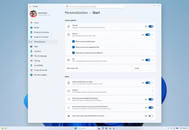
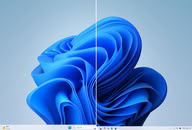
Microsoft has begun rolling out a new feature update KB5120998 for Windows 11, introducing significant visual changes to the user experience. Among the notable additions is the long-awaited expanded taskbar customization, allowing users to position the taskbar at the top, left, or right side of the display, in addition to its traditional bottom placement. Microsoft is also introducing a smaller taskbar mode that reduces both icon and taskbar size, which should be particularly useful on devices with limited screen space. The Start menu is receiving similar attention, with small, medium, and large size options, and the Recommended section has been renamed to "Recent."

Windows Search has undergone a visual and functional refresh, featuring a less cluttered search home and clearer indicators showing whether a result comes from an application, setting, file, web result, or the Microsoft Store. Users can now disable web and Store suggestions, and Windows can automatically index frequently used folders. File Explorer Home should launch faster, and its Recommended section now supports touch scrolling. Additionally, Microsoft has updated progress indicators for startup, sign-in, restart, shutdown, and update installation, while virtual desktop switching and display settings receive reliability improvements.
This non-security KB5120998 feature update for Windows 11 introduces a substantial collection of interface changes, quality improvements, and new platform capabilities. The update is being distributed in phases, so some systems may receive the changes gradually rather than immediately, depending on the system and region, so please be patient in case it is not immediately available to you.
Source: Microsoft
Add your own comment

43 Comments on Windows 11 Gets Major Taskbar and Start Menu Customization in New Feature Update

#26
_roman_
Aleksandar_038Hah, in other desktop environments... They existed in WIndows for decades. Until Nuttela jumped in...
Which i stated, they exists, moveable notification bar with startmenu, time and date in windows 95 and windows 98.
they removed it in some sort of windows 11 release. windows 8 and me, was different, i do not have much knowledge about that.

Cool that we agree on that point.
Aleksandar_038Well, Windows had it from 1995, so... Before Linux, no? I do not understand what is the point of coming up with Linux again and again... It is not about Linux, it is about Microsoft destroying Windows on purpose.
The point is, we do not talk about linux. I talked not about the kernel. I talked about desktop environments.
I could also have mentioned os/2, amiga, beos, zeta, whatever else existed, freebsd

the notification bar is a core feature of window based desktop environments
i use most of the times a tile window manager, i3wm.org

u can use those desktop environments not only with SYSTEMD init and the linux kernel. it also exists on freebsd what i see on screenshots

there are people who think about efficiency and than implement it. that field is rather big. one of the part is a desktop environment. antoher word for desktop environment for the microsoft windows user is the windows desktop, with the start menu, how windows behaves, icons, etc, etc. etc.
android has also some sort of desktop environmentr but it is based on touch input in my point of view most of the time.

Windows 11 pro, the official refurbisher license which i use, has also virtual screens and desktops, next to the startmenu button, on my refuribhs notebook, with the august w11 pro update.
But it is very bad implemented. windows repurpopsed / stole that feature from other operating systems, i saw it in kde 3, gnome 2 earlier before i saw it on any windows screenshots or operating systems.

-- Say something positive about windows 11 pro. Printing worked today, although i did not bother with it for ages. cups is broken on other operating systems. Enable the printer services in windows 11 pro and the paper was printed, not the august update applied which is problematic on my notebook.
Posted on Reply
#27
FoulOnWhite
installed this on my 11 LTSC and have none of the options for taskbar or start menu
Posted on Reply
#28
LittleBro
Wow. Plenty of kudos to them for innovations bringing taken options back.

/whatashitshow
Posted on Reply
#29
GeoffreyA
Let3rThis “new feature” that Linux has had since the 20th century.
Windows had it from the inception of the taskbar in 95, and Linux DEs copied, as in so many other ways. It's a paradox that Linux environments copy Windows left, right, and centre, but their community has a penchant for running down the OS.
FoulOnWhiteinstalled this on my 11 LTSC and have none of the options for taskbar or start menu
www.windowslatest.com/2026/08/28/windows-11s-3-most-requested-features-released-today-enable-them-using-these-steps/
Posted on Reply
#30
rusty caterpillar
If they don't add a widget same as weather one, a countdown for Ai bubble burst than I'll pass switching from 10 to 11.:peace:
Posted on Reply
#31
MarkoB88
Just install Windhawk and watch tutorials on YouTube u can do WONDERS with Windows UI!
Posted on Reply
#32
Aleksandar_038
MarkoB88Just install Windhawk and watch tutorials on YouTube u can do WONDERS with Windows UI!
Actually, thanks to Windhawk, Win11 taskbar has been more useful than in any previous versions, and Start Menu too.

There were always bunch of apps to add features, and I was always running multiple ones, but Windhawk is almost complete package in one app...
Posted on Reply
#33
Mr. Perfect
Additionally, Microsoft has updated progress indicators for startup, sign-in, restart, shutdown, and update installation
Are there any more details on these improvements? I'd love to see percentages on progress bars or details about what it's doing. Older editions of Window used to do that, they'd say something like "23%, Loading driver X". Then if boot hung you'd know that driver X was the problem and could do something about it. A return to that level of detail would be fantastic!
Posted on Reply
#34
Aleksandar_038
Mr. PerfectAre there any more details on these improvements? I'd love to see percentages on progress bars or details about what it's doing. Older editions of Window used to do that, they'd say something like "23%, Loading driver X". Then if boot hung you'd know that driver X was the problem and could do something about it. A return to that level of detail would be fantastic!
Well, they fired whole Windows team a long ago, so I doubt there is hope for that. Maybe some circle showing some random number / data, because that is best AI slop can do.
Posted on Reply
#35
Cheeseball
Not a Potato
Vayra86It says 'You're' up to date.

This does not mean your PC. You have just been updated by Windows about the state of the system, so you're up to date.

Its all about interpretation these days, with vibe coding n all that, its not there to be useful, its there to bring you content.
I'm just showing that I got the KB5120998 preview to show up right away.

The new taskbar features related to this preview are the ones that will be gradually rolled out, as its not available in my Windows 11 Pro VM yet.
Posted on Reply
#36
notoperable
I'm impressed, it took only 20 years for this sophisticated feature to get implemented. it's been around 20 years in all other operating systems, but I guess M$ needed the extra time for final touches
Posted on Reply
#37
Aleksandar_038
notoperableI'm impressed, it took only 20 years for this sophisticated feature to get implemented. it's been around 20 years in all other operating systems, but I guess M$ needed the extra time for final touches
Well, Windows 11 does not exist for 20 years, so you missed both the ball and the goal :)
Posted on Reply
#38
notoperable
Aleksandar_038Well, Windows 11 does not exist for 20 years, so you missed both the ball and the goal :)
Well, maybe you lived under a rock until now, but, spoiler alert: windows since 95 has a start menu and a taskbar, what changed is the number lol
Posted on Reply
#39
phints
Messed with this update last night, yup can move the start menu bar on any of the 4 edges again like the old days. Works great no issues. No idea why it took MS so long to do this in Win11.

Anyway, set it back to the bottom where I like it and never plan on touching the feature again.
Posted on Reply
#40
Aleksandar_038
notoperableWell, maybe you lived under a rock until now, but, spoiler alert: windows since 95 has a start menu and a taskbar, what changed is the number lol
That is the point - it could not be 20 years in Windows 11 because Windows 11 did not exist 20 years. And it could not be 20 years for Microsoft or Windows, since they had that feature since 1995. So:
notoperableI'm impressed, it took only 20 years for this sophisticated feature to get implemented. it's been around 20 years in all other operating systems, but I guess M$ needed the extra time for final touches
Who needed 20 years?
Posted on Reply
#41
GeoffreyA
notoperableI'm impressed, it took only 20 years for this sophisticated feature to get implemented. it's been around 20 years in all other operating systems, but I guess M$ needed the extra time for final touches
The feature was present from 95–10. Microsoft, I believe, rewrote the taskbar for 11; therefore, it was likely a regression (or a decision not to reimplement).
Posted on Reply
#42
AleXXX666
CheeseballI'm just showing that I got the KB5120998 preview to show up right away.

The new taskbar features related to this preview are the ones that will be gradually rolled out, as its not available in my Windows 11 Pro VM yet.
+1 here, MS at its greatness LMFAO
Aleksandar_038Who needed 20 years?
exactly: while I probably WON'T move taskbar anymore as I'm VERY used to have it at the bottom and know the downsides of moving it somewhere elsewhere - I think it SHOULD be there "just because".
Posted on Reply
#43
notoperable
I was being sarcastic, because there is nothing else when handling M$ innovation, feature additions and reality in which you need 60gb to compile a windows terminal that is in development since a decade and still doesn't work - just sayin.

Another day, another turd: learn.microsoft.com/en-us/windows/release-health/status-windows-11-25h2#incorrect-notifications-that--microsoft-defender-antivirus-is-turned-off-
This is as if Monty Python crew decided to produce software - with the difference, this is real.
Posted on Reply
Add your own comment
Nov 17th, 2026 21:48 CST change timezone

New Forum Posts

Popular Reviews

TPU on YouTube

Controversial News Posts