Monday, September 7th 2026

Mod Revives Multi-GPU Gaming With Dedicated DLSS 5 GPU for Impressive FPS Gain
If you were around during what many consider the golden age of PC gaming, back when SLI was still possible, and, going back even further, when gamers put dedicated PhysX cards into their PCs, the latest trick shown off by modder, Marcelo Guibout, on YouTube. Guibot showed off a gaming setup using two NVIDIA RTX 5060 Ti 16 GB GPUs in tandem to split the rendering and Neural Rendering workloads.
[Editor's note: Our in-depth analysis of the DLSS 5 model leaked in the NBA2K27 and in use here is now live]
Similarly to the example of PhysX cards, the idea is to split the workloads between two GPUs, theoretically allowing for improved performance on the GPU doing the primary rendering, since it will be able to use resources on raster or ray tracing rendering that might otherwise be used for DLSS 5 Neural Rendering. With the Neural Coprocessor enabled using the multi-GPU processing setup, frame rates improved anywhere from 59% to 125% compared to running DLSS 5 on the same GPU—performance was still down compared to DLSS 5 off, however.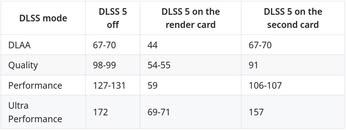 The modder used Neural Coprocessor (or MGPU Bridge), a public add-on for ReShade, to test DLSS 5 in Cyberpunk 2077 and The Blood of Dawnwalker, whose results can be seen below in the embedded YouTube videos. The add-on basically uses the PCIe link to pass the completely rendered frame from the primary GPU to the dedicated Neural Rendering GPU, which then outputs the resulting frame to the monitor after the DLSS 5 pass. It can also be tweaked in the same control ReShade control panel that DLSS 5 Swapper uses, in order to refine performance and quality.
Sources:
Marcelo Guibout on YouTube, via VideoCardz, Neural Coprocessor GitHub
[Editor's note: Our in-depth analysis of the DLSS 5 model leaked in the NBA2K27 and in use here is now live]
Similarly to the example of PhysX cards, the idea is to split the workloads between two GPUs, theoretically allowing for improved performance on the GPU doing the primary rendering, since it will be able to use resources on raster or ray tracing rendering that might otherwise be used for DLSS 5 Neural Rendering. With the Neural Coprocessor enabled using the multi-GPU processing setup, frame rates improved anywhere from 59% to 125% compared to running DLSS 5 on the same GPU—performance was still down compared to DLSS 5 off, however.

86 Comments on Mod Revives Multi-GPU Gaming With Dedicated DLSS 5 GPU for Impressive FPS Gain
The official issue of DLLS5 applies the Neural Rendering "magic" after all the previous step were made. Including DLSS 4.5 Super Resolution on Ultra Performance
(note: Optiscale may reshufle the order to make NR before SR. But that is mod thing. Not official. And cna crash when meets Cheap-Anti)
Edit ... addded this.... and that means < 44 fps max base frame rate.
Using Frame Generation gives some more work load, so the base goes down even further.
So I wont expect more than 88 fps (x2) in the best case.*6
And that is the maximum.
Not minimum.
Not average.
Maximal frame rate.
PS: The Latency will stay at the level of that 44 ± few fps level.
1) Existing official order of things:
(Creating Frame at lower resolution) --> Upscaling to final resolution --> Neural Rendering magic --> Framegen
2) What some tools from some moders do: (*)
(Creating Frame at lower resolution) --> Neural Rendering magic --> Upscaling to final resolution -->Framegen
It does not mean the latency of DLSS5 automagicaly disappears
Rendering times and max possible frame rates will look like:
1440p 202fps/4.95ms - rendering without DLSS5 using SR Quality
1440p NR 16.9ms - DLSS5 rendering time applied before SR (mod)
2160p NR 37.8 - DLSS5 rendering time applied after SR (Official nVidia)
1) 8.9 + 37.8 + 1.5 = 48.23 ms <=> 20.7 fps
2) 8.9 + 16.9 + 1.5 = 27.32 ms <=> 36.59 fps (+76% fps)
NR rendering time was halved but base fps gained only 76% bonus.
In other words:
With NR after SR you may get 18% of framerate without NR (20.7 / 112)
With NR before SR you may get 32% of framerate without NR (36.6 / 112)
Nice gain .. but still not suitable for faster pacing games.
(*) - nVidia may or may not deliver that in official drivers. Only time will tell.
Rendering times borrowed from afore mentioned TechSpot article
It never lived up to the hype. Yes, with the introduction of DX12 microsoft introduced native multi-adapter handling into windows (the death knell for Lucid as Nvidia and AMD no longer needed to pay license fees to implement their virtualization layer) but that was on top of the driver overhead issues and power efficiency improvements to idle components. It simply wasn't worth the hassle.
That we have community driven mods that allow offloading specific workloads to other cards, is a direct result of DX12 native support for multi-adapter.....but multi-gpu setups barely made sense when dual GPU cards like the 4870x2 were rated at 270w. I don't think many people are going to spend multiple thousands of dollars to have multiple gpu's that suck down a combined power in excess of 1000w to be able to enable a half baked feature that's been modded into games with all the performance and visual penalties that go along with it.
DLSS5 was clearly meant to released with the 60 series.....it's impressive how much progress nvidia made fixing the performance in 6 months, but they obviously on released it out of necessity. Games were built around the feature expecting to release in conjucnture with the hardware, AI has destroyed the industry so.....we get something that is juuuuuust good enough to get people excited about the 60 series.....which won't be here for at least 18 months, and likely be even more expensive than current gen.
In RoboCop: Rogue City – Unfinished Business, I'm currently achieving consistent 120–160 FPS from a 40 FPS base using DLSS Frame Generation, with Neural Rendering running on the secondary GPU. I've also experimented with higher frame-generation multipliers, including x6. The mod supports reduced-resolution Neural Rendering with residual reconstruction, which helps reduce the workload while preserving much of the original image detail.
As for average FPS gains, it's difficult to give a reliable percentage because performance depends heavily on the two GPUs, PCIe bandwidth, resolution, NR settings, and frame-generation configuration. Offloading work doesn't automatically guarantee higher FPS, especially if the secondary GPU becomes the bottleneck.
I have been getting acceptable scores upscaling 2560x1440 to 4K resolutions.
Here are some of my results:
MGPU Bridge fork - DLSS Frame Generation on the neural GPU (NR on)
==================================================================
Render GPU : RTX 3080 Ti Neural GPU : RTX 5060 Ti (NR + FG)
Game : RoboCop: Rogue City - Unfinished Business
2560x1440 windowed, DLAA, capped at 40 fps
NR : 67% scale (1712x960), residual rebuild
FG : NVIDIA DLSS Frame Generation (FG Lite)
Display : 3840x2160 @ 240 Hz (NIS upscale)
FG Foveation Real Output NR time Spacing sd Hitches
mode fps fps (avg ms) (ms) per 10 s
---------------------------------------------------------------------
x3 off 40 120 4.1 - 4.3 1.3 - 1.6 3 - 7
x3 centre 2x 40 120 7.8 - 8.0 1.0 - 1.5 1 - 8
x4 off 40 160 4.4 - 4.6 1.1 0 - 5 *
x4 centre 2x 40 160 8.1 - 9.6 1.5 - 2.5 7 - 70
---------------------------------------------------------------------
* typical; occasional bursts. Measured Oct 22 (x4 off) and Oct 24.
GPU load : 3080 Ti ~70% | 5060 Ti ~90% (x3), 97-100% (x4 + fov)
Temps (max) : 3080 Ti 62 C | 5060 Ti 55 C
Smooth spot : x3 (120 fps) - divides 240 Hz evenly
The latest source code is available here:
github.com/davidm71/Neural-coprocessor/releases/tag/v0.2.5-fork-FV4
I'm continuing to optimize the bridge, particularly GPU utilization, PCIe transfers, frame pacing, and compatibility across games.