Monday, October 5th 2026

Windows 11 is Phasing Out Classic Printer Drivers, Could Break Older Workflows

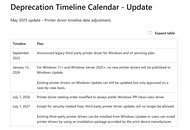
If you have any old printers in your office, updating Windows and the driver stack might become problematic in the future. Microsoft is slowly moving Windows 11 away from the traditional model of installing printer manufacturers' drivers, instead providing a unified base layer within the operating system itself for host-based compatibility. This change targets legacy v3 and v4 printer drivers and aims to make Windows printing more standardized, secure, and easier to maintain. The future vision is for plug-and-play functionality in the operating system, where every certified printer is compatible without the need for traditional driver installation. Existing drivers can still receive updates on a case-by-case basis. Since July 1, Windows has also changed its driver ranking so that compatible devices prefer Microsoft's built-in Internet Printing Protocol (IPP) Class Driver.

A final stage is scheduled for July 1, 2027, when third-party driver updates will be limited to security fixes. Existing drivers can still be installed manually using packages supplied by manufacturers, provided the manufacturers decide to continue supporting the older driver model. The foundation is Windows Ready Print, which uses standards including IPP and is designed around Mopria-certified devices. Instead of requiring a separate driver for every printer, Windows can handle compatible hardware through its own printing stack.
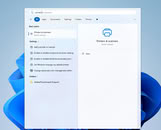
Microsoft is introducing Windows Protected Print Mode. When enabled, Windows blocks third-party printer drivers and removes printers that rely on them. Compatible Mopria printers can be reinstalled through Windows Ready Print, while unsupported models remain unavailable until protected mode is disabled. Microsoft states that this feature will eventually become the default, though no specific date has been announced. Older USB printers face the greatest compatibility concerns, especially models without IPP support. Multifunction devices may also lose manufacturer-specific scanning features, although WS-Scan and eSCL remain supported in compatible configurations. Fortunately, there is no immediate need to replace a working printer, as users can check compatibility under Settings > Bluetooth & devices > Printers & scanners. They should confirm IPP, IPP over USB, and Mopria support with the manufacturer.
Sources: Microsoft, HowToGeek, via HardwareLuxx
Add your own comment

58 Comments on Windows 11 is Phasing Out Classic Printer Drivers, Could Break Older Workflows

#1
Dukenukemx
Setting up a printer is still easier on Linux than on Windows.
Posted on Reply
#2
Gucky
Already bricked third party software to control printers at our company.
Posted on Reply
#3
AGlezB
As long as I don't have to buy a new printer.
Posted on Reply
#4
windwhirl
DukenukemxSetting up a printer is still easier on Linux than on Windows.
Depends on the printer.

I recall my now defunct Epson XP-211 was a fucking pain in the ass to set up on Linux, while on Windows it installed itself without me doing anything. Though, for what it's worth, in that specific case the blame lies more on Epson than any Linux-specific peculiarity.

As for this change, however, I find I'm fine with it. Printers should have long been standardized. They're just machines that spit toner or ink on a piece of paper. They just need to know how the ink/toner should be arranged on the paper and in which colors, nothing else, really.
Posted on Reply
#5
Jermelescu
Microsoft had more opportunities than it deserved to force everyone to get their drivers and software development on a higher quality standard, but they've fumbled so much that nobody is taking them seriously, hence they have to keep this stupid compatibility shit for everything that 99% of the users don't truly benefit from.
Posted on Reply
#6
Mmaly
DukenukemxSetting up a printer is still easier on Linux than on Windows.
I have a feeling that it is easier on any other operating system than windows. My brother multi function device works on linux out of the box. Works on android out of the box. Works on chome os out of the box. On windows, sometimes it stops printing for some unknown reason and the only option to resolve this issue is to remove the printer and install it once again. When I try to install it once again, discovery phase takes ages. On any other operating system it just shows up the first time you try to print something.
Posted on Reply
#7
CosmicWanderer
Good. I always hated dealing with printer drivers. Let the printer manufacturers focus on the hardware.
Posted on Reply
#8
Kwadratowicz
Trrrryt
Hooray another big win for windows... (and those who pays fees for certifications, I doubt it is free. )
another instance of windows xp in virtual machine will be needed for printing from older printers...
Tomorrow I need to archive old drivers for old printers that are still in use :). Cause if windows goes there, I think that manufacturers will retire more of their storage that is for drivers.
And I was thinking of going with windows 11 on My main rig. Linux stays.
Posted on Reply
#9
phints
Here is to hoping this solves the long standing problem dealing with printers.
Posted on Reply
#10
Dukenukemx
windwhirlDepends on the printer.

I recall my now defunct Epson XP-211 was a fucking pain in the ass to set up on Linux, while on Windows it installed itself without me doing anything. Though, for what it's worth, in that specific case the blame lies more on Epson than any Linux-specific peculiarity.
My experience is that Linux Mint will auto add any printer it finds. CachyOS doesn't do that and you need to usually add the printer yourself. For the most part you don't actually need to download drivers, but in cases you do then you can do it easier than visiting the manufacturers website. The biggest pain was setting up a Zebra label printer as the drivers weren't labeled correctly in CUPS. I had to report it to the CUPS github.
As for this change, however, I find I'm fine with it. Printers should have long been standardized. They're just machines that spit toner or ink on a piece of paper. They just need to know how the ink/toner should be arranged on the paper and in which colors, nothing else, really.
Chances are this will break more printers than it solves. So long as Microsoft supports installing printer drivers then it should be fine.
MmalyI have a feeling that it is easier on any other operating system than windows. My brother multi function device works on linux out of the box. Works on android out of the box. Works on chome os out of the box. On windows, sometimes it stops printing for some unknown reason and the only option to resolve this issue is to remove the printer and install it once again. When I try to install it once again, discovery phase takes ages. On any other operating system it just shows up the first time you try to print something.
It's always been a pain to deal with printing on Windows. I'm not sure why Microsoft could never get it right? I remember watching Linus Tech Tips Linux challenge years ago where one of the tasks was printing and he said that his Samsung printer was a pain because the last time it got a driver was for Vista or Windows 7 and you can't find that driver anywhere online so he saved the drivers on a backup device knowing he could never find it again. I can relate to his frustration as someone who used Windows for over 20 years.

Posted on Reply
#11
AusWolf
I can't wait for related bugs to wreak havoc at work! :roll:
Posted on Reply
#12
lexluthermiester
Great, more microsoft "advancements".. Are they literally looking in their backsides for these ideas?
Posted on Reply
#13
shamus21
Old printers . It``s hard going getting new printers to work on Windows 11.
Posted on Reply
#14
Magic Cube
MmalyI have a feeling that it is easier on any other operating system than windows. My brother multi function device works on linux out of the box. Works on android out of the box. Works on chome os out of the box. On windows, sometimes it stops printing for some unknown reason and the only option to resolve this issue is to remove the printer and install it once again. When I try to install it once again, discovery phase takes ages. On any other operating system it just shows up the first time you try to print something.
If it is network connected printer. Reason could be WSD-port. At work we have Brother printers and everytime when Windows has decided that port is WSD instead of IP address->Communication just often fails. Using with IP address as a port, never had any problems.

About that Microsoft Windows 11 Printer driver. It has problems with Brother printers->If Microsoft's driver is chosen and you print, it does not print anything->It uses all paper from the paper tray and printing fails according to Windows. Nice Microsoft.
Posted on Reply
#15
EsaT
windwhirlAs for this change, however, I find I'm fine with it. Printers should have long been standardized.
Yes, printers should have been standardized long ago.
Now can we trust especially "modern" Microslop to not fuck it up, break things and make things just worse for the users? 100% no.

Now for some experience IIRC shy 20 years ago installed network laser printer also for old Win98 SE PC.
While printer didn't have any Win98 SE drivers/support, because it was PostScript supporting printer it was possible to get it working fine using generic PostScript printer driver.
Pretty sure "more modern" non-PostScript printer would have been lot harder to get working.
Posted on Reply
#16
PLAfiller
Canon network scanning a document with their MFtoolbox....shudders shoulders...horror incoming....
Posted on Reply
#17
Frick
Fishfaced Nincompoop
lexluthermiesterGreat, more microsoft "advancements".. Are they literally looking in their backsides for these ideas?
This is printers, hatred of them is even more unified than for MS itself. If anything this should have been done when they released Windows 10.
Posted on Reply
#18
wurschti
This is perfect. We need more waste. Why use the products you bought and you still own when you can get a new one that you cannot own because it will not let you print in your subscription is expired?
All these companies that state to be environmentally friendly, they are doing the opposite, this is called hypocrisy if anyone has forgotten.
CosmicWandererGood. I always hated dealing with printer drivers. Let the printer manufacturers focus on the hardware.
What they are really going to focus is you not owning and using that hardware how you wish. Modern printers are even worse than the old ones. You need a subscription to print and they will not allow refills to work, not because they may damage the printer, but because you won't be giving the your money.
Posted on Reply
#19
Dukenukemx
wurschtiThis is perfect. We need more waste. Why use the products you bought and you still own when you can get a new one that you cannot own because it will not let you print in your subscription is expired?
All these companies that state to be environmentally friendly, they are doing the opposite, this is called hypocrisy if anyone has forgotten.


What they are really going to focus is you not owning and using that hardware how you wish. Modern printers are even worse than the old ones. You need a subscription to print and they will not allow refills to work, not because they may damage the printer, but because you won't be giving the your money.
This isn't Microsoft doing consumers favors. This is them dumping something that requires effort to maintain and therefore money. Modern printers are extremely unreliable and HP is now the worst. You can refill almost any printer, but avoid HP. Epson EcoTank comes with the ability to allow refillable ink. I don't buy printer ink from the manufacturer. I buy refillable cartridges and the ink itself costs very little. Even toner is cheap so long as you can make a hole to refill the cartridge. Printer technology hasn't really advanced either. No point buying a new printer unless your old printer broke. Even then, I'd still make an attempt to repair the old printer. Usually the print head goes bad and needs replacing.
Posted on Reply
#20
Magic Cube
DukenukemxModern printers are extremely unreliable and HP is now the worst.
I agree with this. They have stupid restrictions on their firmware. You cannot use third party cartridges and if cardridges are older than 5 year, it won't print. I had to find modified firmware to use HP original cartridge. After that I disabled firmware updating, because HP is worst.
Posted on Reply
#21
windwhirl
wurschtiThis is perfect. We need more waste. Why use the products you bought and you still own when you can get a new one that you cannot own because it will not let you print in your subscription is expired?
What in the fuck are you talking about? You buying a shit printer has nothing to do with the printer driver policy.
Posted on Reply
#22
TheinsanegamerN
You know, I miss when Techpowerup was full of techies discussing tech news. Microsoft ditching the enormous PITA that is printer drivers and the actual demons that are printer company software packages for a streamlined OS maintained solution, ala Unix, should have been celebrated.
DukenukemxThis isn't Microsoft doing consumers favors. This is them dumping something that requires effort to maintain and therefore money. Modern printers are extremely unreliable and HP is now the worst. You can refill almost any printer, but avoid HP. Epson EcoTank comes with the ability to allow refillable ink. I don't buy printer ink from the manufacturer. I buy refillable cartridges and the ink itself costs very little. Even toner is cheap so long as you can make a hole to refill the cartridge. Printer technology hasn't really advanced either. No point buying a new printer unless your old printer broke. Even then, I'd still make an attempt to repair the old printer. Usually the print head goes bad and needs replacing.
So just use your old printer. Nobody is taking it away. Including Microsoft. You just have to install the driver yourself. Read the article.
wurschtiThis is perfect. We need more waste. Why use the products you bought and you still own when you can get a new one that you cannot own because it will not let you print in your subscription is expired?
All these companies that state to be environmentally friendly, they are doing the opposite, this is called hypocrisy if anyone has forgotten.


What they are really going to focus is you not owning and using that hardware how you wish. Modern printers are even worse than the old ones. You need a subscription to print and they will not allow refills to work, not because they may damage the printer, but because you won't be giving the your money.
So keep using your old printer. RTA.
EsaTYes, printers should have been standardized long ago.
Now can we trust especially "modern" Microslop to not fuck it up, break things and make things just worse for the users? 100% no.
100% yes. From a system management standpoint, every new system works great together. Its when you cross the border into pre windows 11 systems that thing a break apart.

MS modernizing this is great news and should have been done a long time ago.
lexluthermiesterGreat, more microsoft "advancements".. Are they literally looking in their backsides for these ideas?
Why are you upset at this idea? Standardizing drivers and removing control from the manufacturers that make abysmal dogship like the HP control center is a major win for the consumer.
Posted on Reply
#23
lexluthermiester
FrickThis is printers, hatred of them is even more unified than for MS itself. If anything this should have been done when they released Windows 10.
Can't argue too much with that..
Posted on Reply
#24
Dukenukemx
windwhirlWhat in the fuck are you talking about? You buying a shit printer has nothing to do with the printer driver policy.
Not a shit printer if it still works.
TheinsanegamerNSo just use your old printer. Nobody is taking it away. Including Microsoft. You just have to install the driver yourself. Read the article.
Eventually this will break printing. It works for now because right now we're on Windows 11. What happens in Windows 12? I feel like we'll hear a situation where a business can't print because their perfectly working printers will not interface on Windows due to a Windows update. Seems like a downgrade for users.
Posted on Reply
#25
lexluthermiester
TheinsanegamerNWhy are you upset at this idea? Standardizing drivers and removing control from the manufacturers that make abysmal dogship like the HP control center is a major win for the consumer.
While there is definite merit to those ideas, removing backward compatibility for existing printers that happen to be older but still perfectly functional is not, at all, acceptable.
Posted on Reply
Add your own comment
Nov 14th, 2026 17:00 CST change timezone

New Forum Posts

Popular Reviews

TPU on YouTube

Controversial News Posts