News Posts matching #optimization

Return to Keyword Browsing

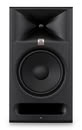
JBL Professional Introduces 3 Series MkIII Powered Studio Monitors and Subwoofer

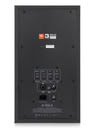
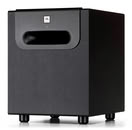
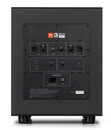
HARMAN Professional Solutions, the global leader in audio, video, control and lighting systems, today announced the JBL Professional 3 Series MkIII powered studio monitor family. Representing the most extensive redesign of the 3 Series platform to date, the new lineup includes the JBL 305P MkIII, 306P MkIII and 308P MkIII powered studio monitors, along with the JBL 310S MkIII powered subwoofer.

Building on the legacy of the JBL Professional 3 Series, the MkIII family introduces redesigned acoustic systems, new Class D amplification, simplified room optimization and integrated mounting options to support workflows ranging from compact stereo production setups to 2.1, surround and immersive monitoring.

Hitscan Hyperlight X Launches: 35-37 g Wireless Gaming Mouse with SPDT Switches and Updated Internals

Hitscan has announced an update to its Hyperlight wireless gaming mouse from 2024, both reducing the weight of the symmetrical mouse and updating its internals in the name of faster clicks and lower response times. The Hitscan Hyperlight X will use the same shape as the original Hyperlight, but the Hyperlight X will allegedly weigh in at 35-37 g, depending on whether you're using full-size or dot skates. While Hitscan itself hasn't shared all that much about the new mouse, aside from its October 28 launch date, @jakeufps on X shared some information about the new hardware.

[Editor's note: Our in-depth review of the original Hitscan Hyperlight is live]

While the Hyperlight X will allegedly have the same shape, it will feature new SPDT switches—nominally closed mechanical switches that send a click when the circuit is opened, effectively reducing the actuation distance and click latency substantially. The Hyperlight X will also launch with the PixArt PAW 3950 sensor, an update from the prior 3395, and a Nordic nRF54L15 MCU. It will also ship with an 8K receiver, enabling 8 kHz polling from the factory instead of requiring an additional accessory purchase.
Update Oct 29th: Hitscan has updated the product page of the Hitscan X with official $109.99 pricing and a proper spec sheet.

The Blood of Dawnwalker Update 1.1 Arrives Next Week With Skill Respec and New Difficulty

Rebel Wolves has confirmed that Update 1.1 for The Blood of Dawnwalker arrives next week, a little later than the "early October" window the studio mentioned last month. There's no exact date yet. The biggest addition is the Draught of Mind Rebirth, an item that lets players reset their Swordmastery, Witchcraft, and Vampirism skills and get back the in-game time spent learning them, which matters a lot under the game's 30-day limit. There's also a new Story difficulty with extra combat assists, while the existing Story mode gets renamed to Forgiving. Combat targeting, lock-on, and disengaging have been improved, Shadowstep and Planeshift should feel more responsive, and the camera has been tweaked. Players can also pet dogs and cats now, using the directional combat system, of all things.

For PC players, frame generation is getting an update along with its own dedicated settings, though Rebel Wolves hasn't shared any specifics. The game already supports NVIDIA DLSS, and in a September interview, game director Konrad Tomaszkiewicz said broader optimization work was still ongoing, so it's reasonable to hope some of the 1,100+ improvements and fixes target performance. The update also adds larger font sizes and subtitles for all dialogue, and it removes blood and gore censorship from the Japanese version. The Blood of Dawnwalker launched on September 3 for PC, PS5, and Xbox Series X|S, and sold a million copies within days, on a budget that is reportedly just $40 million.

Microsoft Confirms 20% Faster Windows 11 Experience, 8 GB Systems Also Run Better

Microsoft is making its long-promised Windows 11 changes official! Today, the company confirmed that Windows 11 is finally getting a responsiveness improvement, up to 20% more noticeable than the older Windows experience. In footnotes, Microsoft states that the company compared response times across Search, Start, Settings, Snipping Tool, File Explorer, Microsoft 365, and right-clicking on applications and functions across the operating system. Compared to the older Windows 11 build 26200.7628, the newest Windows 11 build 26300.9550 offers up to a 20% faster, noticeable improvement in response time. Microsoft has spent months of engineering work optimizing this behavior, and we are finally seeing a concrete figure that will help get Windows 11 to where Microsoft promised months ago.

Additionally, Microsoft has stated in the past that 8 GB systems will receive a significant set of optimizations to ensure that millions of users across the Windows ecosystem continue to have a smooth experience, even with 8 GB of RAM in their systems. With the latest Windows 11 build 26300.9550, the operating system will keep up to 2 GB more data in memory instead of storage, enhancing responsiveness. Keeping more data in RAM doesn't mean that resources are inefficient; rather, it means that services will start faster, and overall usage will feel smoother. To combat unnecessary background memory-hogging processes, Microsoft has confirmed that when your PC runs on 8 GB of memory or less, Widgets will load only when you open them, freeing up more than 200 MB of memory for your apps and other tasks. Hence, only what is needed will be loaded into the memory.

IBM and Siemens Collaborate on Research to Advance Nanostack Architecture

Today, IBM (NYSE: IBM), in collaboration with Siemens, announced new research aimed at advancing IBM's nanostack architecture, a new transistor architecture unveiled by IBM earlier this year. The collaboration will bring together IBM's leadership in semiconductor device innovation and Siemens' expertise in electronic design automation (EDA), process simulation, lithography optimization, and advanced manufacturing software to accelerate the development of nanostack.

Nanostack is the industry's first known three-dimensional, nanosheet-based design, vertically stacking and staggering transistors to pack more transistors onto a chip, with nearly 100 billion transistors in a space the size of a fingernail at its current 7 angstrom node. The design also unlocks the use of different material combinations within each stacked layer to optimize performance and power efficiency of each transistor independent of the other. These innovations power substantial leaps in energy efficiency, performance, and SRAM scaling.

NVIDIA DLSS 5 Gets 2x Performance Boost with 20% Less VRAM Usage

NVIDIA's continuous optimization of software and its technology stack has yielded another great improvement. The latest DLSS 5 update, scheduled for October 16, will deliver another 2x performance boost, meaning that previously DLSS 5-optimized workloads will literally run twice as fast. Alongside this significant performance uplift, NVIDIA promises that in 4K gameplay with DLSS 5 enabled, the neural rendering technology will use 20% less VRAM, leaving more room for game textures to load without DLSS 5 interfering with capacity or hogging resources. NVIDIA updates its DLSS by running a continuous loop on top of an internal supercomputer that constantly optimizes DLSS technology for performance, efficiency, and visual fidelity. Specifically for this week's DLSS 5 update, NVIDIA states that the company used a combination of systematic pipeline optimizations and neural model refinements to achieve that 2x performance boost.

Originally in late August, we saw that the leaked DLSS 5 file was roughly a 148 million parameter model. Our analysis turned out to be accurate, and we see that, according to NVIDIA, the DLSS 5 October update shrinks the footprint of this model by another 24% to roughly 118 million parameters, meaning that our original estimation was correct. Consequently, the smaller model scales memory usage almost linearly and cuts VRAM usage by about 20%. Compared to the initial launch in mid-March, when the DLSS 5 was showcased on two GeForce RTX 5090 GPUs, we see that NVIDIA managed to scale the performance by 10x in the span of a couple of months.

The Witcher 3 Wild Hunt Remastered Gets Substantial Improvements Following Player Feedback

The Witcher 3: Wild Hunt Remastered launched on September 29, bringing with it a number of improvements to the legendary RPG's gameplay and graphics and pushing it to its highest peak concurrent player count to date. However, despite the widespread praise for the remaster's overall execution, there were still complaints about issues with the game's performance and some aspects of the remaster's visual style, especially on consoles, where some graphics toggles were missing for users. One complaint in particular was distracting or unappealing graphics, which came down to poor lighting, tone mapping, and bloom implementation.

At a global scale, Patch 5.01, which is already available for Steam, GOG, Epic Games, Battle.net, and Xbox Play Anywhere, as well as on PS5 and Xbox Series consoles, improves bloom, tone mapping, character lighting, Ray Tracing, and Path Tracing. On PC, the update fixes a bunch of graphics settings, like being able to enable hardware-specific graphics settings when the hardware was not available to support them; dynamic resolution scaling not applying correctly; and disabling dynamic resolution scaling by default. It also addresses some of the visual issues some console players were having, adding options in the graphics settings for bloom, light shafts, and depth of field. Consoles also received "various optimizations to improve performance," although there are no specifics attached to that claim.

Steam Beta Update Automatically Sets Non-Steam Windows Apps To Launch Under Proton

Seemingly as part of the ongoing efforts to streamline and polish Steam and SteamOS, Valve has published a new beta update for the Steam client that fixes a handful of issues with the library, Steam Input, the Steam Controller's BLE mode, and Big Picture mode. More notably, with this update, Steam clients installed on Linux machines will automatically set Windows programs added to Steam as non-Steam games to launch via Proton by default.

This change only removes one step in the installation process, but it may help shift the compatibility burden away from the consumer, since they would only have to go digging for the compatibility options if the program doesn't initially launch. This simplification seems to be part of Valve's strategy to bring in more users and more or less goes hand-in-hand with recent changes that give developers more tools to optimize their games for Valve's hardware and SteamOS—again, taking some of the fiddliness out of running Linux and SteamOS by placing optimization in the hands of developers. The full update notes follow.

NVIDIA Releases GeForce 617.42 WHQL Game Ready Drivers

NVIDIA today introduced its GeForce 617.42 WHQL Game Ready driver, bringing support and optimizations for various new game releases. First, there is Game Ready support for two new titles: Call of Duty: Modern Warfare 4 and STAR WARS: Galactic Racer. These two AAA games are newly supported with this driver version, meaning the experience should be ready to go, but keep an eye out for any possible issues, as with every newly supported game. Next, we have optimizations for Dragon's Dogma 2: Dark Arisen and Valor Mortis, which have been fine-tuned to work better on NVIDIA GeForce RTX graphics cards, extracting more performance and reducing visual glitches. Support for updates like Microsoft Flight Simulator 2024 Sim Update 7 has also been included, ensuring the package covers modern game updates and releases.

The driver itself also fixes an issue with Assassin's Creed Shadows, which previously crashed to the desktop after extended gameplay with driver version 616.56. Gamers running this specific version should upgrade to the latest 617.42 WHQL edition, and the full changelog can be found below.

DOWNLOAD: NVIDIA GeForce 617.42 WHQL

Valve Confirms Steam for Linux Isn't Officially Supported on Arm Chips

Valve has confirmed that its Steam Client for Linux-based operating systems on Arm chips is not officially supported. This follows a user's report on GitHub claiming issues with Steam for Linux on ARM64 systems. Despite detailing the problem, a Valve developer responded that "Steam for Linux is not currently supported on Arm-based hardware," a stance that has been consistent for years. While Steam has expanded on Linux-based machines, official support is currently limited to systems running x86-64 processors from AMD and Intel. On Arm-based devices, Valve would likely need to make significant optimizations to get Steam for Linux working properly, but the potential user base is so small that the effort may not be justified.

This is surprising given that Valve's VR headset, the Steam Frame, runs on Qualcomm's Snapdragon 8 Gen 3 mobile platform. Valve specifically optimized its SteamOS for this chipset and ported its compatibility layer, Proton 11.0, to Arm. This version of Proton allows a full range of games designed for x86 to run on Arm hardware, but the Steam Client itself, which is crucial for game delivery, is not officially supported.

Windows 11 26H2 Update Lowers RAM Consumption

When Microsoft released its Windows 11 26H2 update last week, it didn't include many under-the-hood changes that would affect everyday users. However, according to Windows Latest and several Reddit users, the update reportedly reduces RAM consumption when the system is idle, and even when does better management of RAM when applications are loaded. This improvement wasn't advertised by Microsoft, but it seems to be a welcome change for those who prefer lower RAM usage when not running any tasks. On Reddit, users are reporting a reduction in memory consumption of around 2 GB, with some experiencing up to a 3 GB decrease in idle RAM usage. Testing by Windows Latest on a laptop with 16 GB of RAM shows that, whereas it usually idled at 10 GB of usage, it now consumes 7 GB, with 4 GB of that cached and 8.8 GB available.

The update also introduces features like the Low Latency Profile, which is expanding to nearly all applications and could potentially make software launch faster on weaker hardware. Previously available for Microsoft-branded "in-box" applications, this feature boosts the CPU to its maximum frequency for 1-3 seconds, resulting in noticeably smoother app launches during testing. Launching Microsoft applications like Edge and Outlook is about 40% faster, and other applications, such as the Start Menu and context menus across the operating system, may be up to 70% faster. Now, other applications are receiving this update, which means the overall experience will be much smoother.

NVIDIA Files Patent for AI Tool to Help Developers Diagnose GPU Performance Issues

NVIDIA has filed a patent for an AI tool that could help developers diagnose and optimize GPU performance issues through a plain-language chat interface. The application, published September 17 and first spotted by Respawn First, describes a system connecting an LLM-based chat agent directly to GPU profiling tools, letting a developer ask about a performance problem and get back custom-generated code that digs through diagnostic data to find the answer. The patent describes separate agents for general GPU questions versus report-specific ones, with a router sorting each query. It's framed as a general GPU optimization tool rather than something built only for games, though the same approach would apply to frametime issues and stutter in PC titles.

In theory, a developer could ask something like why a specific scene is dropping frames, and the chat agent would write and run a script to pull relevant telemetry from a profiler, then use that data to flag bottlenecks and suggest fixes. This could, in theory, help with game optimization. As always, a patent filing is not a product, and companies file plenty that never go anywhere. Still, it's a decent hint at what NVIDIA is planning for the future. The company already ships Project G-Assist, its AI assistant for tuning GeForce RTX systems, and this reads like a developer-facing counterpart of that. Sony has been circling similar territory too, recently patenting a cloud AI system meant to diagnose and automatically write firmware fixes for PlayStation hardware. Both companies seem to be betting on AI to cut down the guesswork in finding what's broken.

The Blood of Dawnwalker Director Questions 120 FPS Demands, Says PC Optimization Work Continues

The Blood of Dawnwalker director Konrad Tomaszkiewicz seems unconvinced that a story-driven RPG needs to run at 120 FPS. Speaking to Eurogamer, the Rebel Wolves boss said the studio is still working on PC performance, but that he doesn't see high frame rates as especially important for a game like this. Discussing the many PC hardware configurations that make optimization difficult, he said:
"We're observing this, we're trying to ask people about the hardware, and we are trying to do the fixes. But yes, when you see that the game works well - over 60 FPS - but people still complain that it's not 120, but 90 or 70... It's like, I understand that but the game is about something else. It's not a shooter - it's not a game where it's so important. But people want to have good performance or performance above good: it's fine. We're working on it and we will still work on it."

Majority of TPU Users Don't See Microsoft's Promised Windows 11 Improvements

A few months ago, Microsoft promised its Windows enthusiast community that the company would implement a major overhaul to improve performance and stability in the Windows 11 operating system. We conducted a poll and received nearly 33,000 responses from the community to answer one question: Are you experiencing the promised improvements in Windows 11? However, the findings are quite polarized, as the majority of the enthusiast community doesn't actually notice any difference before and after the promise was made. Among all respondents, 43.4% voted that there are no noticeable improvements. This represents thousands of Windows 11 users worldwide who are not seeing any enhancement in their day-to-day operations with Microsoft's latest operating system.

What is perhaps more alarming is that many enthusiasts report a worse experience following Microsoft's promises. About 38.1% of the voters indicated they are experiencing actual degradation in day-to-day operations, as Microsoft continues to push updates that negatively impact everyday use and introduce more bugs. Notably, a recent example is the Windows 11 August update, which reset custom cursors to an oversized default one. In some cases, the color and size settings don't stick, no matter how many times they are changed. This update has also caused gameplay issues, such as forced crashes, random freezing, errors, and unexpected device restarts due to RGB peripherals.

Intel-Backed "Hypertune" PC Overlocking Tool Reportedly Boosts FPS by Up to 60%

A new tool called Hypertune has emerged after being in early testing with 60,000 PC DIY enthusiasts. According to exclusive launch coverage from GamesBeat, a Miami-based gaming company announced a new automated overclocking platform named Gaming Performance Engineering, which is said to deliver a significant FPS performance boost of up to 60%. While that figure sounds impressive, it is not expected to become the norm, as most systems will see only a few percentage points of improvement. The company states that Hypertune is based on Intel's Extreme Tuning Utility (XTU) software development kit (SDK) and was developed in partnership with Intel, which supported the project with engineering resources.

The tool itself includes automated overclocking for your CPU and GPU and optimizes RAM settings for improved latency, frequency, and overall performance. Once downloaded, the tool analyzes hardware configuration, drivers, Windows settings, and other elements. The company refers to this as a Smart Optimization Engine, which first monitors and observes your system's configuration to deliver an optimization preset. After applying this preset, users should notice immediate differences. For example, Hypertune demonstrated two systems: one featuring an Intel Core Ultra 9 285K and an NVIDIA GeForce RTX 5090 GPU, and the other with a Core i7-14700K and an RTX 3080 GPU. The first system showed performance gains ranging from 18.9% to 28.2%, while the second saw a boost in frames per second ranging from 4.3% to 9.8%.

NVIDIA Confirms DLSS 5 for GeForce RTX 40-Series is Coming

NVIDIA has officially confirmed that the company is working to bring DLSS 5 neural rendering to the previous-generation GeForce RTX 40-Series "Ada Lovelace." Previously, it was believed that DLSS 5 technology would be exclusive to the latest GeForce RTX 50-Series "Blackwell" and future models, without looking back. As NVIDIA continues to focus on hardware-software cooptimization, we now have official confirmation that the GeForce RTX 40-Series will also receive a DLSS 5 port. However, the launch of DLSS 5 on the GeForce RTX 40-Series is secondary, as NVIDIA is still preparing and optimizing performance for the GeForce RTX 50-Series to ensure that the model won't significantly impact the final game performance, despite reportedly being very compute-heavy.
NVIDIADLSS 5 is our most computationally demanding model to date. Since we initially announced it in March, we've achieved a 5X performance gain and there's more to come. Our current focus is on optimizing performance for the GeForce RTX 50 Series with model updates expected later this fall. Once RTX 50 Series performance is more fully tuned, we plan to work on expanding official support to the GeForce RTX 40 Series.

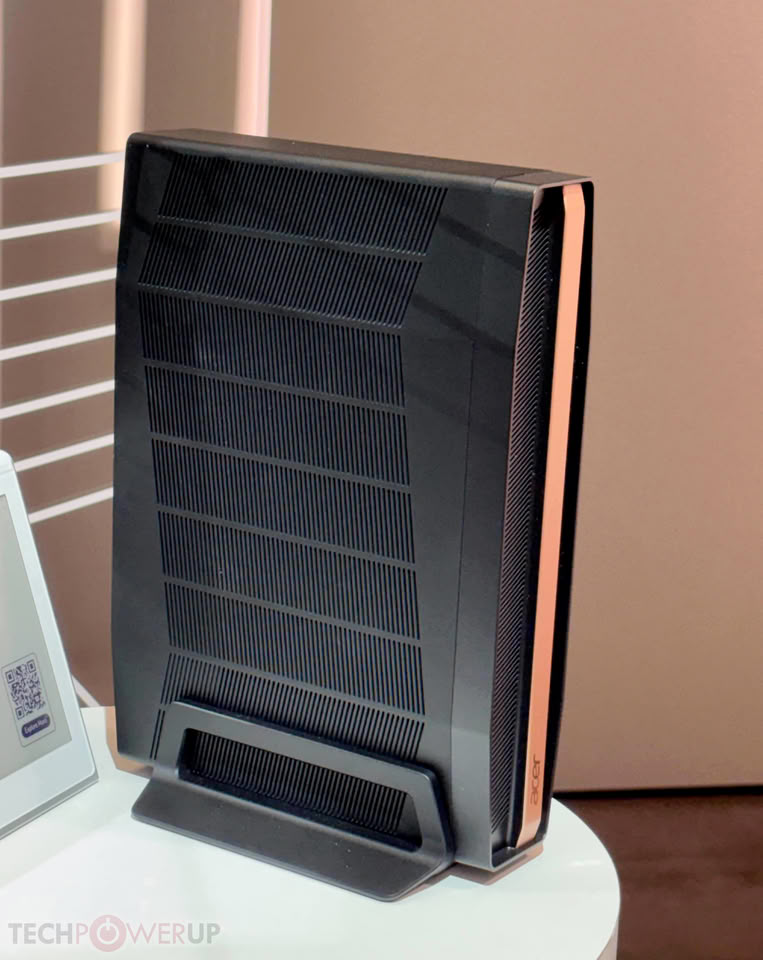
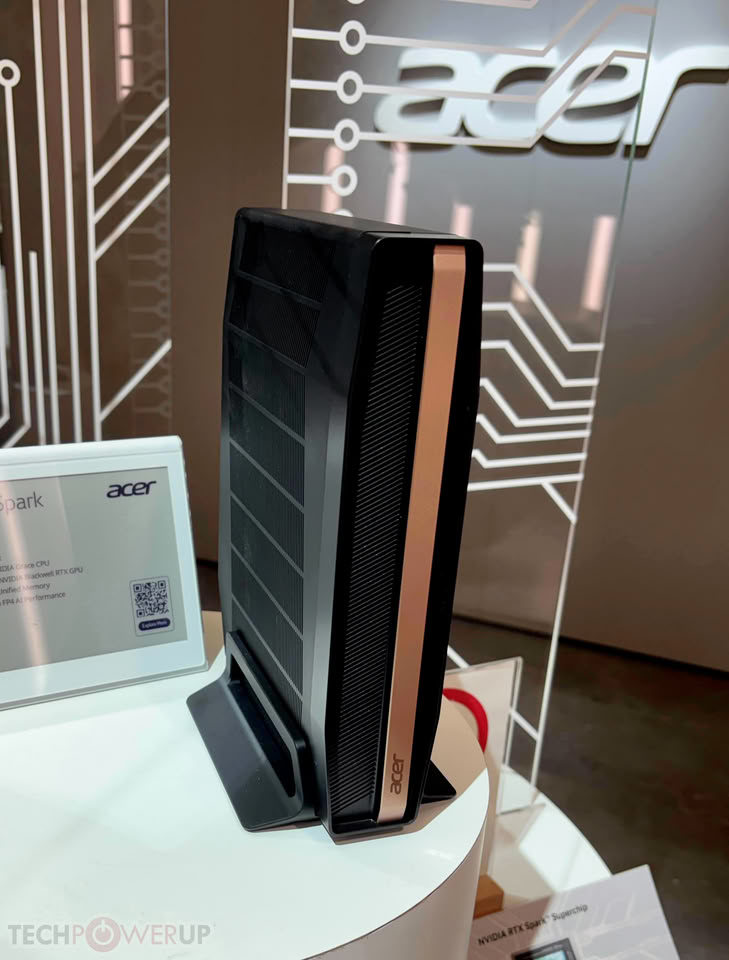
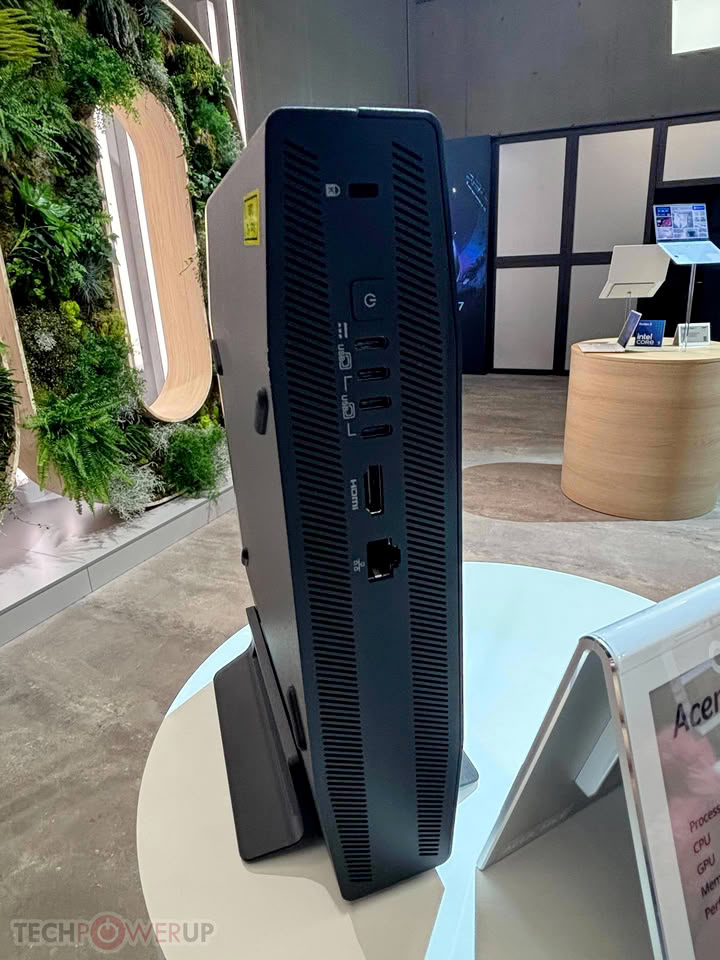
Acer Showcases SFF RTX Spark with a Unique Chassis Design

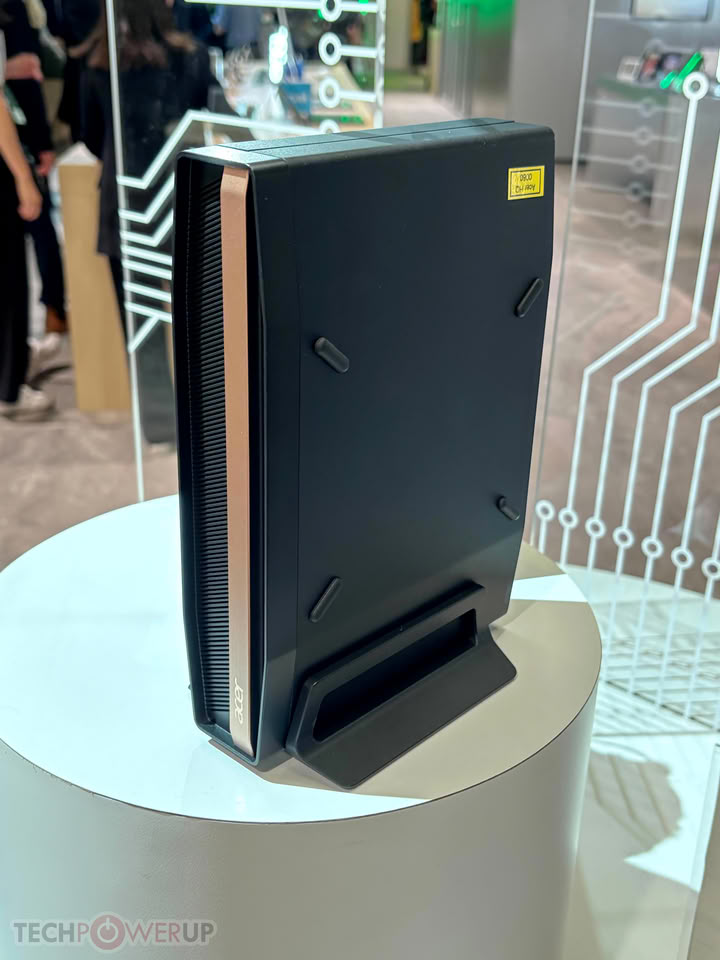
At IFA 2026, Acer showcased its unique take on the new NVIDIA RTX Spark desktop PC platform with a new chassis. In a package Acer calls the SFF RTX Spark, likely emphasizing the small-form-factor of this PC, the design differs from previous DGX Sparks. The RTX naming convention focuses more on home office users, creators, gamers, and local AI enthusiasts. The SFF RTX Spark from Acer features up to a 6,144-core GeForce RTX "Blackwell" GPU, alongside up to 20 cores on the NVIDIA "Grace" CPU, delivering a total of 1 PetaFLOPS of FP4 compute power. The entire package can be configured with up to 128 GB of LPDDR5X unified memory, all running on the Windows 11 desktop operating system.

Acer used a black shroud with a single bronze accent, providing an elegant and edgy design. The system can stand on its own in a horizontal position, while there is a specific holder for a vertical position, as shown in the images below. NVIDIA's full optimization stack for gaming and local AI is included, along with Acer's customizations that are typically featured in the company's PCs and laptops.

RPCS3 Team Won't Touch Leaked DLSS 5, Calls the Output "Slop"

The RPCS3 developers have made their stance on DLSS 5 pretty clear after fans started poking around with a leaked version of the tool on the PS3 emulator. Responding to questions about whether official support was coming, the team posted on X that some users are already testing a leaked DLSS 5 DLL on the renderer, but that they've seen what it produces and want no part of it. Modders are already testing DLSS 5 on emulators such as PCSX2, but the RPCS3 team apparently wants its emulator to avoid it completely. Here's what they posted:
"Whilst the gaming industry pushes more upscalers and frame generation to hallucinate games and hide their lack of optimization, we do not ship any of that slop."

DLSS 5 No Longer Needs Two RTX 5090s, NVIDIA Says Model is 5x Faster Since March

NVIDIA has shared its first-party performance numbers for DLSS 5, the neural rendering feature arriving September 3 in NBA 2K27. The company says the model is now five times faster than when it was first shown at GTC in March, which required two RTX 5090 GPUs just to run. It now works on a single card across the whole RTX 50-series lineup, from the RTX 5060 up to the RTX 5090. That is a commendable improvement in a span of just 6 months, but DLSS 5 will still incur a significant performance penalty compared to native rendering, contrary to what we have come to expect from DLSS.

In NBA 2K27, running at 4K with the Ultra preset, ray tracing, and Multi Frame Generation, NVIDIA's own figures put the RTX 5090 at roughly 370 FPS with DLSS 5 on, and the RTX 5080 around 233 FPS. At 1440p, the RTX 5090 gets close to 600 FPS, while even the RTX 5070 stays above 260 FPS. NVIDIA also shared some 1080p benchmarks with the RTX 5090 hitting nearly 800 FPS, but those are not relevant to how these cards will be used in the real world. NVIDIA did not provide performance figures without DLSS 5 enabled.

Intel "Nova Lake-S" Tested with AVX-512 and APX Enabled

Intel's upcoming "Nova Lake-S" series of desktop processors is set to bring some exciting changes. As previous rumors suggested, the company is incorporating the AVX-512 and APX instruction sets into this new processor lineup. Late last year, Intel published its 60th Architecture Instruction Set Extensions and Future Features manual, indicating that ultra-fast vector processing with 512-bit width is returning to desktops after years of absence from this sector. Thanks to @InstLatX64 on X, we have learned that the company is testing two SKUs—a 24-core model running at 3.4 GHz and a 28-core model running at 3.2 GHz—both featuring AVX-512 and APX instruction support. This further supports the claim that Intel's desktop processors are returning to their full potential.

Powered by "Coyote Cove" P-Cores and "Arctic Wolf" E-Cores, both models will support AVX-512 and APX, aligning software optimization and support with the HEDT and Xeon server segments that already use these vector and advanced accelerators. Initially, Intel chose to disable AVX-512 for the "Alder Lake" and "Raptor Lake" client-oriented CPU lineups, meaning only server-grade Xeon CPUs benefited from the accelerated 512-bit data paths. This decision was due to differences in P-Core and E-Core designs, which complicated software optimization on the consumer side. However, with "Nova Lake," these features are finally making a comeback.

Warhammer 40,000: Dawn of War IV Now Launches on December 3

Developer KING Art Games today announced that Warhammer 40,000: Dawn of War IV will now launch on December 3, with Commander Edition players gaining early access from November 30.

The team at KING Art Games is taking a little more time to further refine the experience ahead of launch, focusing on performance optimization, bug fixing, gameplay polish, and incorporating additional feedback from recent community playtesting.

Marvel Tokon: Fighting Souls Gets PC Performance Improvements in New Update

When Marvel Tōkon: Fighting Souls launched towards the end of July 2026, online spaces were littered with complaints about everything from PlayStation's online services crashing to PC performance issues that seemingly affected gamers on both brand-new high-end PCs and aging hardware.

Following those complaints, PlayStation and Arc System Works have issued an update to Marvel Tōkon: Fighting Souls that they claim has corrected those issues. The update notes on Steam say that the August 10 update reduced CPU usage with multiple fixes, corrected an issue whereby continuous audio device scanning resulted in random frame rate drops, and fixed a bug that resulted in low frame rates at certain resolutions.

Windows 11's Built-In Weather App Wastes More Than 1 GB of RAM

According to Windows Latest, the default weather application in Windows 11 can consume more than 1 GB of RAM just by displaying the weather forecast. When the Weather application is open, it uses nearly 1.2 GB of RAM, even without any scrolling, clicking, or other interactions. By default, Windows 11 uses the "MSN Weather" application, which not only uses a significant amount of RAM but also displays ads. For an operating system that costs real money, having ads in a Microsoft-owned weather app, for which you paid a licensing fee, is a disappointing experience.

Last week, Microsoft removed documentation from its website and materials that recommended 32 GB of RAM for new PC builds or purchases. The company now emphasizes that 8 GB devices are optimized to run Windows 11 smoothly. However, with an 8 GB RAM configuration, the weather application alone consumes about 15% of the available RAM. This is before any other services start running or daily tasks begin. Below screenshots are taken by the Windows Latest team.

Microsoft Is Quietly Deleting 32 GB RAM Recommendation for Windows 11

Microsoft is retroactively removing documentation from its website and materials that mention 32 GB of RAM as a recommendation for new PC builds or purchases. Instead, the company is now emphasizing 8 GB devices that are optimized to run Windows 11 smoothly, even with that RAM configuration. Thanks to Windows Latest, which spotted the changes, Microsoft's Windows Learning Center has been updated to remove mentions of the 32 GB RAM recommendation. Previously, Microsoft published a document suggesting that 16 GB is a baseline for a modern PC, describing it as a good "starting point." However, the company also used to recommend that gamers try to surpass this baseline, suggesting 32 GB as a "no worries" upgrade for gaming PCs.

At that time, this sparked significant controversy as gamers were vocal about Microsoft recommending more RAM when purchasing additional memory could cost as much as an entire PC, depending on the configuration. Amid a severe DRAM shortage, Microsoft faced pushback from gamers and quietly removed the mention of the 32 GB "no worries" recommendation. This also raised concerns about whether Microsoft would optimize the Windows 11 operating system to perform better on lower-spec PCs with less than 16 GB of RAM, such as the 8 GB PCs that Microsoft sells itself, like the Surface Pro 12 and Surface Laptop 13, both of which come with 8 GB base configurations.

Microsoft Promises Better Windows 11 Memory Efficiency

Following large-scale dissatisfaction with the overall Windows experience, Microsoft in March 2026 issued a statement explaining that it would be working to deliver "smoother navigation and more reliable performance for everyday tasks." Now, over four months later, Pavan Davaluri, President of Windows + Devices, has provided an update on the progress of this initiative in a new X post.

In this X post, one of the more notable improvements Davuluri claims Microsoft has made during recent months—along with improvements to the Taskbar and Start—is improved memory efficiency. He explains that Microsoft has implemented "substantial improvements in memory efficiency and latency," in order to "accelerate the modernization of Windows 11," that it has reduced memory overhead across apps and components, and that the company has tuned WinUI 3 to make built-in apps use less memory. Microsoft also outlined its plans for the future of Windows 11 memory efficiency improvements, specifically stating that the Windows team will be working on "memory optimization for 8 GB and above."
Return to Keyword Browsing
Nov 11th, 2026 06:14 CST change timezone

New Forum Posts

Popular Reviews

TPU on YouTube

Controversial News Posts