Thursday, November 6th 2025

MSI Portal X is a Web Tool to Control ARGB on GPUs and Motherboards
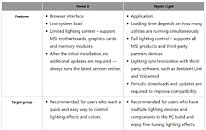
In mid-May, MSI previewed its upcoming Portal X project, offering customers a way to adjust ARGB lighting for GPUs and motherboards directly from their browser, eliminating the need for the MSI Mystic Light software. MSI now suggests that users seeking quick and easy light control use the browser-based Portal X. This tool can manage MSI motherboards with Intel and AMD 800 series chipsets, MSI GPUs from NVIDIA's GeForce RTX 50 series, and various memory modules. MSI states that Portal X is compatible with most memory brands available. To install it, go to portalx.msi.com, and you'll be automatically redirected to install the MSI Portal X Launcher from the Microsoft Store. Once installed, you can access Portal X anytime through your browser or the Launcher app—no further updates needed.
For more advanced lighting control and users with multiple lighting devices, MSI advises using the Mystic Light application. Portal X has the advantage of running in a browser and consuming fewer system resources, but it requires a somewhat more modernized setup. Tests by VideoCardz revealed that Portal X lacks certain fine-tuning options, such as separate control for AIO cooler lighting, which follows the motherboard's lighting setup. Additionally, Portal X does not support fan speed control or AIO display status, features exclusive to the full Mystic Light application. MSI users should explore Portal X to see if it meets their needs, but for more comprehensive tuning, the full Mystic Light application remains superior. For those of you with MSI hardware, please let us know if you tried the new Portal X app in the comments.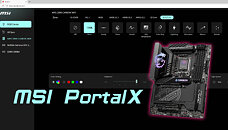
Sources:
MSI, via VideoCardz
For more advanced lighting control and users with multiple lighting devices, MSI advises using the Mystic Light application. Portal X has the advantage of running in a browser and consuming fewer system resources, but it requires a somewhat more modernized setup. Tests by VideoCardz revealed that Portal X lacks certain fine-tuning options, such as separate control for AIO cooler lighting, which follows the motherboard's lighting setup. Additionally, Portal X does not support fan speed control or AIO display status, features exclusive to the full Mystic Light application. MSI users should explore Portal X to see if it meets their needs, but for more comprehensive tuning, the full Mystic Light application remains superior. For those of you with MSI hardware, please let us know if you tried the new Portal X app in the comments.


11 Comments on MSI Portal X is a Web Tool to Control ARGB on GPUs and Motherboards
Look inside
Install an app
Man.