Tuesday, November 11th 2025

Windows 11 November Update Brings Redesigned Start Menu and Battery Icon

Microsoft has officially rolled out the Windows 11 November Tuesday update, aiming to fix previous bugs and introduce a new design language for the battery icon and Start menu. The update, labeled KB5067035 with build 26200.7121, remains seated on the 25H2 branch. It addresses a highly requested user feature by adding a battery percentage display. This numerical/visual indicator is conveniently located on the Taskbar, providing instant visibility of the remaining charge without any extra steps. Additionally, the battery icon has been redesigned with a larger size and intelligent color shifting to reflect different power states and charging conditions. This will help with easy visualization of the battery charge.

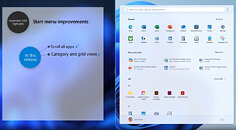
The Start menu has also seen significant changes, starting with adaptive sizing. The interface now scales appropriately based on monitor dimensions, creating a more balanced visual experience. Microsoft has introduced several customization tools, allowing users to control what appears in their workspace. The application library view has been moved to a more accessible location, and users can now add more app shortcuts to the Start menu. Those who find the recommended content section unnecessary can now disable it completely, which is a welcome improvement. We applied the latest update, but we aren't seeing these changes. We assume gradual rollout is in place. Below is Microsoft's explanation of the new Start menu, as well as battery icon comparison from Windows Latest.
This Tuesday's update finally addresses the unusual Task Manager duplication bug associated with KB5067036. Previously, this update caused Task Manager to remain open even after being closed, creating a new instance each time a user opened and closed it. Each instance consumed about 20-95 MB of RAM, so if you opened and closed Task Manager 100 times, you could end up with 2 GB of RAM occupied by these persistent instances. Additionally, these background instances could consume CPU resources. Despite being a minimally invasive application, each tskmgr.exe instance used about 0.9% of CPU resources, meaning that 10 instances could reduce your CPU's capacity by almost 10% without you even noticing. Thankfully, this is now resolved.
Sources: Microsoft, Windows Latest
Add your own comment

39 Comments on Windows 11 November Update Brings Redesigned Start Menu and Battery Icon

#26
Darmok N Jalad
EnviousFrogAlso, what is with the ridiculous amount of padding used in the start menu?
That's for all the users who MS wished used their laptop like a tablet, but don't.
Posted on Reply
#27
AusWolf
dgianstefaniJust use Valinet Explorerpatcher if the stock menus bother people so much...
Gotta love the "Windows is not shit, it just needs to be modified" argument. I mean, if it has to be modified, it means that it's shit, right? ;)
Posted on Reply
#28
dgianstefani
TPU Proofreader
AusWolfGotta love the "Windows is not shit, it just needs to be modified" argument. I mean, if it has to be modified, it means that it's shit, right? ;)
Yeah Linux users are well known for never modifying anything.

Something something vegans.
Posted on Reply
#29
AusWolf
dgianstefaniYeah Linux users are well known for never modifying anything.

Something something vegans.
The only thing I've modified is my Task Manager / System Monitor screen. I'm a big fan of things that just work.
Posted on Reply
#30
Hecate91
I like the excuses that come with just how shitty windows has become. Just use this and that add on and use the server version of the OS just so the enshittified updates don't break things or undo the changes you made so the OS does when an OS is supposed to do, let you interact with the system and stay out of the way.
At this point Linux has been easier to use and doesn't require any modifications at all to have a decent user experience.
Posted on Reply
#31
Darmok N Jalad
Hecate91I like the excuses that come with just how shitty windows has become. Just use this and that add on and use the server version of the OS just so the enshittified updates don't break things or undo the changes you made so the OS does when an OS is supposed to do, let you interact with the system and stay out of the way.
At this point Linux has been easier to use and doesn't require any modifications at all to have a decent user experience.
Linux has come a long way for sure, and it really helps that we’re getting more native hardware support right out of the box. I mean, we’re getting to a place where gaming on Linux is not only at parity (minus the dumb unsupported anti-cheat stuff), but it is sometimes even faster than Windows. Installation is easier now too, because there aren’t MSA user account hoops to jump through.
Posted on Reply
#32
SemperPC09
PERSONALLY, I do not like the change to word, PowerPoint, and the other apps. Kinda made them look like a two year old drew them with one of those big markers. The battery icon is fine guys. It does what it needs to, never have an accurate picture representation of where the battery charge actually is. Personal opinion, is that Microsoft needs to focus less on a reskin and more in providing an update that doesn't break something. I haven't updated since the Nvme scare a few months back. Too many potential issues, and I cannot have my rig down, or have to spend hours troubleshooting it.
Posted on Reply
#33
AusWolf
Darmok N JaladLinux has come a long way for sure, and it really helps that we’re getting more native hardware support right out of the box. I mean, we’re getting to a place where gaming on Linux is not only at parity (minus the dumb unsupported anti-cheat stuff), but it is sometimes even faster than Windows. Installation is easier now too, because there aren’t MSA user account hoops to jump through.
I actually find Linux gaming much better than Windows. For one, full screen programs do not jumble all the windows on my secondary screen. For two, HDR looks way better on my screen under Linux. The colours are crisp, blacks are black, etc. Just like it should be. On Windows, enabling HDR only results in washed out colours and overly bright everything. But enough of me offing the topic. :)
Posted on Reply
#34
Upgrayedd
Can we get back into safe mode yet?
Posted on Reply
#35
Aquilino
chrcolukThese updates are akin to pre release software, bit random for something supposedly in a stable state.

The UI remains poor, agree with Auswolf, loads of excess padding, someone needs to be put in charge of the dev department, bang some heads together, and tell the devs to put back in older UI thats more functional.

The UI I guess in 11 is a in a constant state of flux.
I like to think that Windows 11 is the alpha version of Windows 12.
I really hope so, because what a clusterf*ck.
Posted on Reply
#36
_roman_
Not everyone is in modding Windows.

I use my gnu gentoo linux for around 20 years. It is well defined. It did not changed much since kernel 2.0.0. Easy, clear text, human readable config files. They did move around a lot of config files in past months and some are gone for openrc. Still it is well defined. Windows does not have such. The windows registry is a joke since windows 95.

Downloading a questionable binary which modifies the operating systems does not sound like a well thought idea.

--

I did read about desktop environments when gnome 3 was introduced. There are so many different good ideas. I checked out basically anything available at the time and set up i3wm.org (note - I wrote on purpose not I3 - many will assume i talk about a intel I3 processor, which i did not.). There are so many good ideas and decent ways. I do not understand why windows wastes so much productivity times with several reboots for simple software updates and with the fail design of moving a mouse around all the time. I prefer functionality over visible gains. windows 95 had it's use but these days are gone. It was a nice transition product from windows 3.11. I talk about the same feel like Windows 95 start menü which looks similar as the Windows 10 one, Windows 11 just moved it in the middle and made it worse.
Posted on Reply
#37
Wirko
AusWolfThe only thing I've modified is my Task Manager / System Monitor screen. I'm a big fan of things that just work.
I'm also a fan of UI mods that just work. I'm less of a fan of MS actively fighting those mods. Want to choose the taskbar icon size in 11? At first it worked (code inherited from 10), then it worked with a registry mod, then it worked with an exe patcher, I don't know what the current state is.
AusWolfIt's still full of empty spaces
Yes, strange padding, also inconsistent with the rest of UI.
AusWolfbesides being an unorganised list. Useless.
Not so bad as it first seems. In the "Pinned" section, I put my own shortcuts in the order I wanted, and they stayed there. The "Recommended" section is a list of recently used documents. That's in 11 Pro, or at least was before this latest redesign.
AusWolfI want the Windows 98 start menu back with folders and all... Not in design, but in functionality at least.
Hierarchical start menu in 98/XP? Prolly too few people knew how to make the best of it. I surely did.
Posted on Reply
#38
lexluthermiester
tpa-prI think this is the correct link for their website? It comes straight from their Github and the site you listed has some outdated information (that confused me for a bit!).
The one I listed is their official site, your link is the github. Either one will get everyone to the right installer.
Posted on Reply
#39
AusWolf
WirkoYes, strange padding, also inconsistent with the rest of UI.

Not so bad as it first seems. In the "Pinned" section, I put my own shortcuts in the order I wanted, and they stayed there. The "Recommended" section is a list of recently used documents. That's in 11 Pro, or at least was before this latest redesign.
You can pin your favourites, or the system can make recommendations based on usage. Is this the best that a multibillion $ company can come up with, really? :confused:
WirkoHierarchical start menu in 98/XP? Prolly too few people knew how to make the best of it. I surely did.
I did too... at the age of 8. It's not that hard, really.

Honestly though, why do we have newly installed apps create folders in your start menu if there is no way to make use of those folders?
Posted on Reply
Add your own comment
Nov 17th, 2026 21:26 CST change timezone

New Forum Posts

Popular Reviews

TPU on YouTube

Controversial News Posts