Tuesday, December 23rd 2025

Windows 11 25H2 Includes a Faster NVMe Driver Needing Manual Installation
Although Windows has had awareness of the NVMe storage media protocol since Windows 8.1, it turns out that the stock Microsoft driver for NVMe devices, disk.sys, offers suboptimal performance. This driver dates back to 2006, and is part of Microsoft's oldest internal basic drivers. Disk.sys appears to treat NVMe devices like SCSI drives. Microsoft released a new native driver with a greater degree of awareness of NVMe with Windows 11 25H2 (client) and Windows 2025 (server) operating systems, called nvmedisk.sys. The easiest way to check if your drive is using the older driver would be to bring up Device Manager, collapse "Disk Drives," open the Properties of your drive, go to the Driver tab, and click on the "driver details" button.
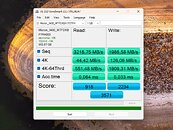
Notebookcheck made a fascinating discovery that has the potential to unlock greater performance with your NVMe drives, if they are compatible. Apparently, nvmedisk.sys significantly improves performance, both in sequential and random workloads. Using this driver, however, is fraught with risks. Not all NVMe SSDs support it, and if incompatible, it could break Windows 11 boot. The publication put out a guide on how to get Windows 11 to use nvmedisk.sys. This involves changing three Windows Registry values. It would be a good idea to image or backup your data before you tinker with this, so you can perform a full image restore if it breaks Windows booting. The guide can be found in the source links below, use it at your own risk.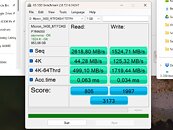
Sources:
Notebookcheck, HotHardware
Notebookcheck made a fascinating discovery that has the potential to unlock greater performance with your NVMe drives, if they are compatible. Apparently, nvmedisk.sys significantly improves performance, both in sequential and random workloads. Using this driver, however, is fraught with risks. Not all NVMe SSDs support it, and if incompatible, it could break Windows 11 boot. The publication put out a guide on how to get Windows 11 to use nvmedisk.sys. This involves changing three Windows Registry values. It would be a good idea to image or backup your data before you tinker with this, so you can perform a full image restore if it breaks Windows booting. The guide can be found in the source links below, use it at your own risk.


115 Comments on Windows 11 25H2 Includes a Faster NVMe Driver Needing Manual Installation
I clearly labeled test results with disk.sys on the left and nvmedisk.sys on the right with the images.
If i didn't test disk.sys before, then how could i have measured differences after making the change?
You're not viewing on mobile by any chance? scroll right to see all images :)
In case you're referring to the CDM setting then i tested with the default mode, not NVME mode because that is what most people use for comparison.
Only thing i changed was the number of test passes from 5 to 1 (less accurate) and the theme to dark.
The OG standard test is supposed to be used for good ol' spinnin' rust.
Since SSDs, particularly NVMe SSDs gained in popularity to the point where everybody has one, the tool needed to adapt.
Switching to the native NVMe driver is basically doing nothing for HDD-like workloads, but will show significant imrovements if you are selecting the test that will show its forté.
Also the only differences are that random 4K has 16 threads instead of 1 so a bigger number and the sequential has bigger queue depth with smaller test file size and thus again bigger number.
So testing in the NVME mode only makes the second and third row numbers bigger.
First and fourth row remain the same.
Also arguably for regular users high queue depth testing is pretty meaningless as they'll never utilize such high queue depth anyway.
The most important number that determines how snappy an SSD feels has always been the last row 4K random low queue.There were SSD's that existed around that time like Intel's X-25E. My first SSD was in my machine by 2011 under Windows 7.Last row did increase regardless. It's is not "HDD like workload". It's a regular user workload, not some storage server running absurd queue depths.
With a friendly smile,
Fred.
Edit. Latest version of Crystal Disk Info reads SMART data from both drives.
Why not explicitly name the NVMe used? For example, one user on ComputerBase (de) had a Lexar NM790 marked as RAW after the procedure.
With a friendly smile,
Fred.
2023 Asus Rog Strix
G713PV T705 Gen 5 2tb
Ryzen 9 7945HX
The title of this TPU story is misleading; there is no new NVMe (controller) driver, there is a new disk layer driver nvmedisk.sys that is just an optimization of disk.sys that provides marginally better performance for NVMe drives (some SCSI command translations removed; multiple queues supported; presumably latency optimization and cache flush behavior). This is not really an "NVMe driver" because it's not the controller driver. The disk layer driver is not super specific to a particular storage medium; this is just optimization to pair better with stornvme. It's possible that you could force install nvmedisk.sys on HDD and it may even work, albeit unreliably and/or slowly.
Source: I worked at MS for decades. You know that checkbox in Device Manager for drives that says "Turn off Windows write-cache buffer flushing on the device"? That was me.
Nevertheless will install and test this on my new SN8100 I bought myself for christmas once I swap it in and clean install 25H2 this weekeend.
But i see that my HDD still uses disk.sys so until someone does some performance tests i wont bother forcing it on HDD.
Also i have only one HDD. Maybe there could be some befits with multiple drives.The checkbox i never check despite running my PC behind an UPS 🙂
ByPassIO missing
SafeBoot class keys missing, so its not safemode compatible without further registry additions (both on Server and Consumer)
vendor tools are lacking in support
some firmware implementations are slower, or less stable.
its not sql server or deduplication compatibleAIDA64 requires an update to address this driver, Crystal Disk and HwInfo can both read the smart stats no issues.WD doesn't support dashboard anymore, move on to Sandisc Dashboard.
www.neogaf.com/threads/microsoft-introduces-native-nvme-driver-stack.1691507/page-2
Would be interesting to see what direct storage functionality bypassio is responsible for, and if these are indeed redundant with this particular driver.
Here is an example. Lexar NM790 2TB:
And these are mine. Kingston KC3000 2TB:
During AS SSD bench peak CPU usage for my Micron drive dropped from 37% to 29%.