Tuesday, December 23rd 2025

Windows 11 25H2 Includes a Faster NVMe Driver Needing Manual Installation
Although Windows has had awareness of the NVMe storage media protocol since Windows 8.1, it turns out that the stock Microsoft driver for NVMe devices, disk.sys, offers suboptimal performance. This driver dates back to 2006, and is part of Microsoft's oldest internal basic drivers. Disk.sys appears to treat NVMe devices like SCSI drives. Microsoft released a new native driver with a greater degree of awareness of NVMe with Windows 11 25H2 (client) and Windows 2025 (server) operating systems, called nvmedisk.sys. The easiest way to check if your drive is using the older driver would be to bring up Device Manager, collapse "Disk Drives," open the Properties of your drive, go to the Driver tab, and click on the "driver details" button.
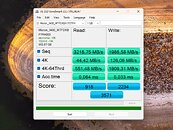
Notebookcheck made a fascinating discovery that has the potential to unlock greater performance with your NVMe drives, if they are compatible. Apparently, nvmedisk.sys significantly improves performance, both in sequential and random workloads. Using this driver, however, is fraught with risks. Not all NVMe SSDs support it, and if incompatible, it could break Windows 11 boot. The publication put out a guide on how to get Windows 11 to use nvmedisk.sys. This involves changing three Windows Registry values. It would be a good idea to image or backup your data before you tinker with this, so you can perform a full image restore if it breaks Windows booting. The guide can be found in the source links below, use it at your own risk.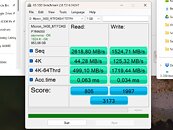
Sources:
Notebookcheck, HotHardware
Notebookcheck made a fascinating discovery that has the potential to unlock greater performance with your NVMe drives, if they are compatible. Apparently, nvmedisk.sys significantly improves performance, both in sequential and random workloads. Using this driver, however, is fraught with risks. Not all NVMe SSDs support it, and if incompatible, it could break Windows 11 boot. The publication put out a guide on how to get Windows 11 to use nvmedisk.sys. This involves changing three Windows Registry values. It would be a good idea to image or backup your data before you tinker with this, so you can perform a full image restore if it breaks Windows booting. The guide can be found in the source links below, use it at your own risk.


115 Comments on Windows 11 25H2 Includes a Faster NVMe Driver Needing Manual Installation
The safe mode reg entries would not work on mine red errors, checked and were not added
Also i wanted to see what happens before and after.
1. With nvmedisk.sys set i tried entering Safe Mode with Networking.
Initially it seemed to load, but the Windows logo and spinning circle stayed on screen for bit too long.
It then gave me an BSOD (black screen of death now) with "error inaccessible boot device."
2. Strangely after it went to a restart by itself after BSOD it did boot into safe mode, but this time with disk.sys instead.
So somehow Windows knew and went back to disk.sys:
3. However once i booted back into normal mode it was still using disk.sys again. I thought maybe i needed another restart. I did that but no change. What's strange was that the override values were still present in the registry, but ignored.
4. So i removed the override values, restarted and re-added the override values and restarted again.
Now it's using nvmedisk.sys again and i tested safe mode with the added registry values to confirm it works:
No problem adding these values like user FoulOnWhite had. Perhaps he was not running as admin or something.
[ICODE]reg add HKEY_LOCAL_MACHINE\SYSTEM\CurrentControlSet\Policies\Microsoft\FeatureManagement\Overrides <span>/</span>v 1176759950 <span>/</span>t REG_DWORD <span>/</span>d 1 <span>/</span>f[/ICODE]
I think in my case it performs ~10% than without it for some tests, but it might very well be run to run variance.
I personally wont be using this new driver, if its not been automatically used, then its a unsupported configuration. I/O is an area I dont like to take chances with.In your case looks like old is better for consumer load, and new is better for server load on performance, did you check power draw and idle temps to see if its idling properly?
Also is CPU/RAM spec same on old/new tests? Q32/T1 is basically a CPU test. For more realism match threads to queue depth. Also perhaps limit queue depth to 4 absolute maximum if consumer use.
Yes BypassIO is missing for now, but i dont see degraded game load times or performance and DirectStorage still works.
Safe Mode also works with added registry values.
Also deleting the override values and restarting goes back to the old system.
So it's not like it's permanent. Personally i will take the extra performance anytime even if it breaks some legacy systems.
Im not running server here.
I will continue using it unless i stumble upon a showstopper.
Programs also launch faster after login. Disk access with a lot of small files on the disk is also somewhat faster.
I've always moved to new tech reasonably early. I moved to two cores when people were still using one. Same with 64bit vs 32bit.
Same with GPT vs MBR. SSD vs HDD. G-Sync vs VSync. High refresh vs 60Hz etc.
Microsoft will eventually make it the default anyway. The only thing you're doing is postponing the inevitable.
I can understand people who postpone this due to compatibility reasons in a server environment as most of the listed downsides seems to be there.
My install works fine, my drives work fine, why do i need to hack windows to use this driver, when it will be released by microsoft anyway officially without no hacking. I will wait.
"I've always moved to new tech reasonably early." Not AM5 or DDR5 though.
All drives are Gen 4x4.
For two drives connected trough the chipset the losses were between -0,02% to -0,29% and gains were +3,51% to +3,66%
However for OS drive connected to the CPU the losses were none and gains were +14%.
I had to exclude two outliers from OS drive data. One of them was -2,54% loss and other was +158% gain.Understood. Im not trying to convince somebody to use it. I just saw several posts where people said they were going back so i wanted to add my post about staying on it. Otherwise the impression might be that everyone tried it and rolled back.That's the exception tho. It's both monetarily and performance wise bad idea to move to a new memory standard in the beginning.
It's better to do it in the middle or even near the end of a memory generation because it brings several benefits:
The standard has far exceeded initial JEDEC specs.
Speeds are higher.
Timings have decreased or at least stayed flat.
Compatibility has been much improved trough numerous patches.
Price has fallen significantly. Unless memory cartels decide to collude or AI companies decides to reserve half of the future production capacity.
My first computer had DDR-400 speeds. I skipped DDR2.
With DDR3 i jumped to DDR3-1866 CL8. DDR3 lasted from 2008-2014 (roughly).
I bought it in 2011 so right in the middle. Initial speeds were DDR3-1066 CL7.
Highest speed kits eventually reached about DDR3-2400 CL10. Lowest latency kits DDR3-1866 CL8.
With DDR4 i jumped to DDR4-3600 CL16. DDR4 lasted from 2014-2022 (roughly).
I bought it in 2019 so more towards the end. Initial speeds were DDR4-2133 CL15.
Highest speed kits eventually reached about DDR4-5333 CL22. Lowest latency kits DDR4-4000 CL14.
With DDR5 i plan on doing the same. Eventually get a low latency kit at the middle or near the end of the generation.
Because for DDR6 it will take years to match and exceed mature DDR5 just like it has been every time in the history.
DDR5 presumably lasts from 2022-2030 (roughly).
I may buy it in 2027 (Zen 6 X3D) so more towards the end. Initial speeds were DDR5-4800 CL40.
Highest speed kits have currently reached about DDR5-9600 CL46. Lowest latency kits DDR5-6000 CL26, but there's more room for improvement.
I have no doubt we will see kits with 10000+ speeds at around CL42-46 and low latency kits at around 6400-7200 CL24-CL26.
Truth be told i have not moved to AM5 and DDR5 also because Zen 5 is not yet sufficiently faster compared to my Zen 3. Even when comparing X3D variants.
Im hoping Zen 6 X3D will be a good step above Zen 5 because Zen 5 was very underwhelming compared to Zen 4.
With rumored move to a bigger 12c/24t CCD, IPC and clock improvements and overclockable (more like unlocked) X3D im aiming for that for my next upgrade. Hopefully by 2027 DDR5 prices have fallen back down (they're already plateauing now) so i can get a low latency kit with which to ride out half the DDR6 generation again.
I switched because at the time the 7800X3D was/is the best CPU for gaming which is what i mostly do, and it is better than my previous intel setup. (I have no bias eother way, i go where the best performance is) My board is at least ok for zen 6 i believe so i can drop in some zen 6 X3D CPU and still be good for a while too.
Imo a 7800X3D is significantly faster than a zen 3 5800X3D setup.
That means that:
Any driver, written for one of those ctlrs, will work on ALL drives that use that same ctlr.
"BUT THEY DON'T!" I hear you say. 😄
The actual .sys driver works.
The plain text, easily editable .inf file is where the driver writer specifies: "Only for OUR drives!"
So if the .inf file is edited to add your drive's name to the: "Only for" list; it works.
Yes, but the whole driver package (.zip or whatever) is signed by it's hash value.
You have to sign the driver to get it to work.
Or:
You can just read the 'How to's' and download a mod+signed driver from the Win-RAid Forum. (Fernando)
Pre Linux, I was running the Samsung driver on a 500GB Corsair MP600:
Stock MS Driver:
Samsung Driver:
Seems on par with the discussed driver, WITHOUT all the "not working" drawbacks..?
MS driver vs Intel Driver on 58GB Optane 800p (on AMD System..!)