Tuesday, December 23rd 2025

Windows 11 25H2 Includes a Faster NVMe Driver Needing Manual Installation
Although Windows has had awareness of the NVMe storage media protocol since Windows 8.1, it turns out that the stock Microsoft driver for NVMe devices, disk.sys, offers suboptimal performance. This driver dates back to 2006, and is part of Microsoft's oldest internal basic drivers. Disk.sys appears to treat NVMe devices like SCSI drives. Microsoft released a new native driver with a greater degree of awareness of NVMe with Windows 11 25H2 (client) and Windows 2025 (server) operating systems, called nvmedisk.sys. The easiest way to check if your drive is using the older driver would be to bring up Device Manager, collapse "Disk Drives," open the Properties of your drive, go to the Driver tab, and click on the "driver details" button.
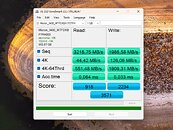
Notebookcheck made a fascinating discovery that has the potential to unlock greater performance with your NVMe drives, if they are compatible. Apparently, nvmedisk.sys significantly improves performance, both in sequential and random workloads. Using this driver, however, is fraught with risks. Not all NVMe SSDs support it, and if incompatible, it could break Windows 11 boot. The publication put out a guide on how to get Windows 11 to use nvmedisk.sys. This involves changing three Windows Registry values. It would be a good idea to image or backup your data before you tinker with this, so you can perform a full image restore if it breaks Windows booting. The guide can be found in the source links below, use it at your own risk.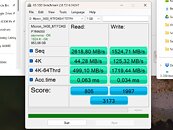
Sources:
Notebookcheck, HotHardware
Notebookcheck made a fascinating discovery that has the potential to unlock greater performance with your NVMe drives, if they are compatible. Apparently, nvmedisk.sys significantly improves performance, both in sequential and random workloads. Using this driver, however, is fraught with risks. Not all NVMe SSDs support it, and if incompatible, it could break Windows 11 boot. The publication put out a guide on how to get Windows 11 to use nvmedisk.sys. This involves changing three Windows Registry values. It would be a good idea to image or backup your data before you tinker with this, so you can perform a full image restore if it breaks Windows booting. The guide can be found in the source links below, use it at your own risk.


115 Comments on Windows 11 25H2 Includes a Faster NVMe Driver Needing Manual Installation
Presumably storage is a touchy subject for them at the moment as I was again offered cloud storage after installing that recent out of band update. Ironically the cloud storage servers are probably running said nvme driver...
Only deprecated or rarely updated utilities will end up missing support and thus simply dont display the drives in Windows.
Boot time utilities such as Clonezilla etc should be fine.
www.techpowerup.com/347650/microsoft-removes-registry-hack-for-faster-nvme-ssds-in-windows-11
Ah, I see the block is for insider builds.
It will check if your system meets the criteria and auto enable, or if not, it stops at what doesn't match what microsoft has as requirement.
My github page for the microsoft nvme driver enablement
I also attached the file with this message.
Simply change the .txt extension to .bat and run it.
*Some have had to go to the file properties and choose unblock first before running it.
What it does:
The script will elevate as admin, and show the menu.
Start with the first option that runs the prerequisite checks and if all pass automatically enables the features and safe mode protections for the driver.
Yes, there is an UNDO option that you can run in safe mode.
I included all known compatibility issues in the disclaimer, so read that, dont skip it.
The second option is there because for some reason I still have some drive brands that show incompatible in my script but after enabling anyway, it works.
Don't ask me why, but I know I'm missing something in my logic checks for the drive being tied to the driver.
If anyone wants to look through it and give me feedback, I welcome it 1000%.
If you add a suggestion, obvious credit will be given in the updated script.
Also, (side note) if you need more drive space in windows... Feel free to also look through my repositories for Scripts from my videos and find yhe BeardSweeper. It my ultimate disk cleanup script I created for maximum junk / temp files cleanup.
BeardSweeper Disk cleanup
That explanation seems to have a bit more meaning to it, but I think its best to wait until its made default by Microsoft.
But given all the vendor driver all only ever had improvements within margin of error margin's, does this mean they all have the same scsi emulation design? I am not fully convinced of the explanation, but at least it explains why people have been jumping on it.
Just now i see in Partition Control that there is a not initialized volume?
Trying to initialise the volume gives an I/O error?
Windows 11 Device Manager also shows that the NVMe Devices are set back to normal drives again?
In drive settings Both NVMe SSD are also set back to the normal windows disk.sys drivers ??
Is The 25h2 NVMe option taken out of Windows update or what?
Any Help apreciated.
grtz
Mr Jay Cee Corp!
I Got Dutch W11 OS installed.
I did re-enter de Registrys Commands given here to activate the NVMe options in W11 update 25h2
Rebooted and again nothing changed to get older earlier succesfull settings back?
Checked for Viruses within Windows Security and Thirth Party AVIRA Prime.
Nothing came up??
All drives in Windows Explorer give no errors in accessing files or folders.
When Bedtime i wil do CHKDSK within CMD as adminstrator and see what this brings up?
Are there any other remarks about unstable NVMe or Drives when using the 25H2 option on NVMe SSD ?
Thanks for any help here, Me confused :)
use recovery tools to check the partition headers
I will do the recovery first.
Reading my systemerror log and the www.
Could This be that Windows 11 update KB5063878 bug?
As the system time log says, this happened just around i was transferring a big amount of Data from external USB drive to internal drive?
All info around this Windows Bug says it mostly occurs when transferring Big Data ?
Ik keep you Posted !
Thanks for any Help so far :)
Have a Nice Day.
Grtz
Mr Jay Cee
I tried my Old Seagate Disc Wizard Software to Access not Initialized drive, no succes there.
I got a License for another Third party Software Called Mini Tool Partion Wizard.
That Tells me That a MBR of System Drive Got Faulty. Reason ???
Windows 11 probably went into safe Mode as everything still is running fine?
(more checks for this needed)
See if i Can recover any Data from Faulty MBR, If not no problem as
i can do a re-install if again probs occure.
Grtz
Mr Jay Cee Corp!
Netherlands
This New Software looks neat.
GUI shows lots of Possible Options Not seen in Olde Seagate Disc Wizard.
Partition Scan is in Progress now ( see attached scrn shot )
As is Big partition i guess this full scan will take a Couple of days to show up Report.
Further investigation in Event Logs en Windows 11 Settings about this occured " Not Initialized Drive " Fault is
probably a NVMe crash of some sort?
All parameters somehow lead to the KB Update bug causing Faulty NVMe Control Chip?
If So I Replace MBR OS NVMe with new one and do a " Clone Disc " with Seagate Disc Wizard.
using my USB Docking stations
Have fun this Weekend.
Grtz
Mr Jay Cee Corp.
Netherlands