Tuesday, December 23rd 2025

Windows 11 25H2 Includes a Faster NVMe Driver Needing Manual Installation

Although Windows has had awareness of the NVMe storage media protocol since Windows 8.1, it turns out that the stock Microsoft driver for NVMe devices, disk.sys, offers suboptimal performance. This driver dates back to 2006, and is part of Microsoft's oldest internal basic drivers. Disk.sys appears to treat NVMe devices like SCSI drives. Microsoft released a new native driver with a greater degree of awareness of NVMe with Windows 11 25H2 (client) and Windows 2025 (server) operating systems, called nvmedisk.sys. The easiest way to check if your drive is using the older driver would be to bring up Device Manager, collapse "Disk Drives," open the Properties of your drive, go to the Driver tab, and click on the "driver details" button.

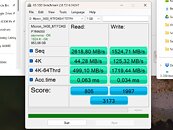
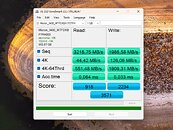
Notebookcheck made a fascinating discovery that has the potential to unlock greater performance with your NVMe drives, if they are compatible. Apparently, nvmedisk.sys significantly improves performance, both in sequential and random workloads. Using this driver, however, is fraught with risks. Not all NVMe SSDs support it, and if incompatible, it could break Windows 11 boot. The publication put out a guide on how to get Windows 11 to use nvmedisk.sys. This involves changing three Windows Registry values. It would be a good idea to image or backup your data before you tinker with this, so you can perform a full image restore if it breaks Windows booting. The guide can be found in the source links below, use it at your own risk.
Sources: Notebookcheck, HotHardware
Add your own comment

115 Comments on Windows 11 25H2 Includes a Faster NVMe Driver Needing Manual Installation

#76
Logic
MakaveliIt doesn't work on Win 10 as the driver file is missing.
Ask Fernando, on Win-Raid if he'd be so kind as to take a look at making a mod package that does work on 10 etc.
eg:
Modded NVMe Drivers for Intel(R) Optane Controllers

If malware is a concern?;
read the .inf file And send the .sys etc to VirusTotal.
I trust Fernando by now. He has this 'down!' after all these years.
But still: EVERYTHING I install goes through VirusTotal, if not more places.
Posted on Reply
#77
Prima.Vera
Are there any better drivers for SK Hynix Platinum P41 2TB, I wonder...
Posted on Reply
#78
Dwarden
MakaveliIt doesn't work on Win 10 as the driver file is missing.
bugger, well the more reason to dump Windows completely and move to Linux ...
Microsoft is dead end or for those who enjoy headaches
Posted on Reply
#79
Deeveo
Dwardenbugger, well the more reason to dump Windows completely and move to Linux ...
Microsoft is dead end or for those who enjoy headaches
Eh? So because MS didn't add a driver, that is still in development and not ready to be released to public, to Windows 10 (for which support has basically ended) is a reason to move to Linux. I mean there can be a lot of reasons to move to using Linux, depending on what you'r software etc needs are, but that is just silly.
Posted on Reply
#80
INSTG8R
Vanguard Beta Tester
I did it and my “game drive” 1Tb Corsair MP600 “moved” in Device Manager from Disk Drives to Storage Disks so I did have a moment of panic it’s running fine on the newer driver. My OS drive is a Samsung so it’s on the Samsung NVME driver
I didn’t even think to do a before/after. I did double check Direct Storage is working as my game/s use it.
Posted on Reply
#81
LinxESP
DeeveoEh? So because MS didn't add a driver, that is still in development and not ready to be released to public, to Windows 10 (for which support has basically ended) is a reason to move to Linux. I mean there can be a lot of reasons to move to using Linux, depending on what you'r software etc needs are, but that is just silly.
They should've done it like wayland, don't put anything on testing branch until is perfect... so never
Posted on Reply
#82
FoulOnWhite
Well, i personally have never had any problem with any win 11 install, no crashes, or bsods. Not to say there might be problems with it, i just have not experienced any.
Posted on Reply
#83
Makaveli
Dwardenbugger, well the more reason to dump Windows completely and move to Linux ...
Microsoft is dead end or for those who enjoy headaches
Nah I don't have issues with windows and I already have a laptop here that I run Ubuntu on when I want to dabble with linux.
Posted on Reply
#84
Logic
INSTG8R...My OS drive is a Samsung so it’s on the Samsung NVME driver...
This driver (modded+signed) works well and faster on most all drives.
AFAIK, because the MS's overzealous flushing.
Posted on Reply
#85
gs020p
I can see reduction in time during in game screen's changing, screen's feels more smooth.

MSI X870 E Carbon MOBO,
Posted on Reply
#86
Unregistered
I've been experimenting with @THEBOSS619 's Custom Modded Solidigm Driver. But recently decided to install a Beta Channel Insider Preview Build and wanted to try out this native 2025 NVMe Driver from Microsoft.

Here's my results:


Here's my results with default driver from 2022 and 2025, plus the Modded Solidigm driver:
Deleted member 256077 in Solidigm NVMe Custom Modded Driver for All NVMe Brands SSDs & Any NVMe SSDsThanks for the timely response and providing an informed perspective regarding your personal experience using your custom driver on a laptop. Also, appreciate the foresights provided in the comment re…
Posted on Edit | Reply
#87
Jtuck9
SpecTre322*I've been experimenting with @THEBOSS619 's Custom Modded Solidigm Driver. But recently decided to install a Beta Channel Insider Preview Build and wanted to try out this native 2025 NVMe Driver from Microsoft.

Here's my results:


Here's my results with default driver from 2022 and 2025, plus the Modded Solidigm driver:
Deleted member 256077 in Solidigm NVMe Custom Modded Driver for All NVMe Brands SSDs & Any NVMe SSDsThanks for the timely response and providing an informed perspective regarding your personal experience using your custom driver on a laptop. Also, appreciate the foresights provided in the comment re…
Is it enabled in the Beta Channel Insider Preview Build?
Posted on Reply
#88
Unregistered
Jtuck9Is it enabled in the Beta Channel Insider Preview Build?
Yeah, simple process to enable:

In Elevated CMD (Admin) or Powershell/Terminal (Admin) Run the following commands:
  • reg add HKEY_LOCAL_MACHINE\SYSTEM\CurrentControlSet\Policies\Microsoft\FeatureManagement\Overrides /v 735209102 /t REG_DWORD /d 1 /f
  • reg add HKEY_LOCAL_MACHINE\SYSTEM\CurrentControlSet\Policies\Microsoft\FeatureManagement\Overrides /v 1853569164 /t REG_DWORD /d 1 /f
  • reg add HKEY_LOCAL_MACHINE\SYSTEM\CurrentControlSet\Policies\Microsoft\FeatureManagement\Overrides /v 156965516 /t REG_DWORD /d 1 /f
Restart Computer, if you did it correctly disk layout in Device Manager will change:

Before


After


Also, don't enable "Turn off Windows write -cache buffer flushing on the device". Found it's highly unstable with this driver <------ (Correction, it's not unstable, just this driver needs to have approval and enabling in the registry to allow Safe Mode to permit, which can easily be done).
#89
Jtuck9
SpecTre322*Yeah, simple process to enable:

In Elevated CMD (Admin) or Powershell/Terminal (Admin) Run the following commands:
  • reg add HKEY_LOCAL_MACHINE\SYSTEM\CurrentControlSet\Policies\Microsoft\FeatureManagement\Overrides /v 735209102 /t REG_DWORD /d 1 /f
  • reg add HKEY_LOCAL_MACHINE\SYSTEM\CurrentControlSet\Policies\Microsoft\FeatureManagement\Overrides /v 1853569164 /t REG_DWORD /d 1 /f
  • reg add HKEY_LOCAL_MACHINE\SYSTEM\CurrentControlSet\Policies\Microsoft\FeatureManagement\Overrides /v 156965516 /t REG_DWORD /d 1 /f
Restart Computer, if you did it correctly disk layout in Device Manager will change:

Before


After


Also, don't enable "Turn off Windows write -cache buffer flushing on the device". Found it's highly unstable with this driver.
Cheers for this. I'm wondering when it will show up in an official capacity.
Posted on Reply
#90
Unregistered
Jtuck9Cheers for this. I'm wondering when it will show up in an official capacity.
You're welcome. Well, officially, I'm thinking maybe 26H2, which should come out around October 2026.
#91
FR3D1
Ninja Cat
@btarunr
In the meantime;
(Update March 23, 2026) Microsoft has since updated the settings for native NVMe support. As a result, the settings listed above no longer work. Thanks to Phantom, however, there is a new version available via ViVeTools that works again.
Download and extract ViVeTool

Right-click in the folder and hold down Ctrl+Shift to open the Terminal (this will launch it as an administrator)

Type `.\vivetool /enable /id:60786016,48433719` and press Enter.

After a restart, the NVMe should then be listed under Storage Devices in Device Manager.
Deskmodder (de)

Best regards,
Fred.
Posted on Reply
#92
Octopuss
I guess it's not ready yet, otherwise Ms wouldn't use resources to block this.
Posted on Reply
#93
Jtuck9
OctopussI guess it's not ready yet, otherwise Ms wouldn't use resources to block this.
An update from third party vendors would be nice

Increasing OS, driver and app reliability: Delivering a smoother, more dependable Windows 11 experience by strengthening system stability, driver quality and app reliability across our vibrant ecosystem of silicon, ISV and OEM partners. Our priorities include:
  • Strengthening the Windows foundation by reducing OS level crashes, improving driver quality and app stability across our ecosystem so PCs run smoothly and reliably every day
blogs.windows.com/windows-insider/2026/03/20/our-commitment-to-windows-quality/
Posted on Reply
#94
Tomorrow
FR3D1@btarunr
In the meantime;


Deskmodder (de)

Best regards,
Fred.
If you previously enabled this then it stays the same and there is no need to re-enable native NVMe.
The updated code is only for those that try and enable this for the first time.
Posted on Reply
#95
FR3D1
Ninja Cat
@Tomorrow
It seems that, at least for now, this can be enabled “on the server side”; otherwise, the IDs wouldn't exist. This means the feature will soon be—or may already be—‘officially’ supported in the client as well. After all, the workaround via the registry was anything but “official” and, until now, has only resulted in the inability to boot into the Windows Recovery Environment (Windows RE). Yes, I know; thanks to MDL, a workaround for this is known.

Regards,
Fred.
Posted on Reply
#96
Tomorrow
I have it enabled since last year with 24H2 and i updated to 25H2 at the start if this year. On my system drive this resulted in 14% performance uplift.

My second and third drives connected via the chipset only gained about 1-3% of performance.
Thankfully there was no performance regression.
Posted on Reply
#97
Octopuss
Jtuck9An update from third party vendors would be nice
What do you mean? This has nothing to do with vendors.
Posted on Reply
#98
Jtuck9
OctopussWhat do you mean? This has nothing to do with vendors.
"The main takeaway is simple: this looks like a real architectural step forward, not just benchmark noise. But it is also not a one-size-fits-all miracle patch. The performance upside is clearly there, especially for read-heavy and CPU-sensitive workloads, though broader adoption will likely depend on how quickly Microsoft and storage vendors smooth out compatibility and deployment concerns."

www.lemon-web.net/lemon-blog/technical-solutions/microsoft-s-native-nvme-driver-could-be-one-of-the-biggest-windows-storage-upgrades-in-years
Posted on Reply
#99
Shrek
SpecTre322*Yeah, simple process to enable:

In Elevated CMD (Admin) or Powershell/Terminal (Admin) Run the following commands:
  • reg add HKEY_LOCAL_MACHINE\SYSTEM\CurrentControlSet\Policies\Microsoft\FeatureManagement\Overrides /v 735209102 /t REG_DWORD /d 1 /f
  • reg add HKEY_LOCAL_MACHINE\SYSTEM\CurrentControlSet\Policies\Microsoft\FeatureManagement\Overrides /v 1853569164 /t REG_DWORD /d 1 /f
  • reg add HKEY_LOCAL_MACHINE\SYSTEM\CurrentControlSet\Policies\Microsoft\FeatureManagement\Overrides /v 156965516 /t REG_DWORD /d 1 /f
Restart Computer, if you did it correctly disk layout in Device Manager will change:

Before


After


Also, don't enable "Turn off Windows write -cache buffer flushing on the device". Found it's highly unstable with this driver <------ (Correction, it's not unstable, just this driver needs to have approval and enabling in the registry to allow Safe Mode to permit, which can easily be done).
The driver under 'Storage disks' still seems to be dated 6/21/2006
Posted on Reply
#100
Octopuss
Jtuck9"The main takeaway is simple: this looks like a real architectural step forward, not just benchmark noise. But it is also not a one-size-fits-all miracle patch. The performance upside is clearly there, especially for read-heavy and CPU-sensitive workloads, though broader adoption will likely depend on how quickly Microsoft and storage vendors smooth out compatibility and deployment concerns."

www.lemon-web.net/lemon-blog/technical-solutions/microsoft-s-native-nvme-driver-could-be-one-of-the-biggest-windows-storage-upgrades-in-years
Yes but if I understand it correctly, this is internal Windows thing, not something that has anything to do with specific SSDs.
Posted on Reply
Add your own comment
Nov 13th, 2026 19:13 PST change timezone

New Forum Posts

Popular Reviews

TPU on YouTube

Controversial News Posts