Friday, January 2nd 2026

ASUS Intros Pro WS B850M-ACE SE Motherboard with IPMI for Home and SMB Servers

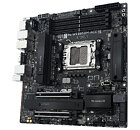
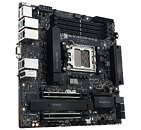
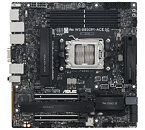
ASUS introduced the Pro WS B850M-ACE SE, an AMD Socket AM5 motherboard in the microATX form-factor that's laid out like a server motherboard, but targets a range of consumers spanning from home and small-business servers, to workstations with storage-heavy loadouts. The board draws power from a combination of 24-pin ATX, and 8+4 pin EPS. It supports the entire range of consumer Ryzen and commercial Ryzen PRO desktop processors from the Ryzen 7000 and Ryzen 9000 series. It also supports EPYC 4005 series server processors in the AM5 package. The board also supports ECC DDR5 unbuffered memory, with support for up to 256 GB of dual-channel (4 sub-channel) DDR5-5600 memory.

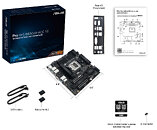
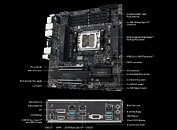
Among its use case-specific features are IPMI, U.2, and PCIe Gen 4 MCIO NVMe interfaces. The IPMI is driven by an ASPEED AST2600 chip that includes ASUS Control Center Express IT management software. Storage options include two M.2-2280 slots each with PCI-Express 5.0 x4 wiring, a PCIe Gen 4 MCIO, a U.2 Gen 3, and four SATA 6 Gbps ports. There's also an internal microSD slot for software key storage. There are three wired LAN interfaces—a 10 GbE driven by a Realtek RTL8127 PHY, a 2.5 GbE driven by Intel i225 series controller, and a third 1 GbE interface for the IPMI controller. USB interfaces include two 10 Gbps USB-C ports on the rear panel, a 20 Gbps USB-C header, three 10 Gbps USB type-A, an internal type-A, and additional 5 Gbps ports via headers. Display outputs include HDMI and DisplayPort from the iGPU, and a D-Sub from the IPMI chip. The board is expected to be priced around the $400 mark.
Add your own comment

35 Comments on ASUS Intros Pro WS B850M-ACE SE Motherboard with IPMI for Home and SMB Servers

#1
Solaris17
Super Dainty Moderator
Finally a BMC. An actual small board that is worthy of claiming its use as a server board.
Posted on Reply
#2
lambda
Almost perfect but why not x8, x8 lane splitting?

:banghead:
Posted on Reply
#3
Chaitanya
U.2 and MCIO that should be useful for applications while competition seems to exclude it.
Posted on Reply
#4
Blue4130
Wonder what the lane sharing is like. My guess, if you use the u.2 or mcio then the m.2 and second pcie slot stop working.
Posted on Reply
#5
TheLostSwede
News Editor
Blue4130Wonder what the lane sharing is like. My guess, if you use the u.2 or mcio then the m.2 and second pcie slot stop working.
5 points goes to you for sussing out configuration A. Zero points are awarded for configuration B.

Posted on Reply
#6
Chaitanya
TheLostSwede5 points goes to you for sussing out configuration A. Zero points are awarded for configuration B.

So typical Shitsus castration fetish at work for "entry" level product and I was glad they had not forgotten to include MCIO and U.2.
Posted on Reply
#7
TheLostSwede
News Editor
ChaitanyaSo typical Shitsus castration fetish at work for "entry" level product and I was glad they had not forgotten to include MCIO and U.2.
More like a lack of PCIe lanes from the chipset, same problem as on many other motherboard today, too many features, not enough PCIe lanes.
Posted on Reply
#8
Chaitanya
TheLostSwedeMore like a lack of PCIe lanes from the chipset, same problem as on many other motherboard today, too many features, not enough PCIe lanes.
Atleast AMD doesnt remove bifurcation on B series of chipsets and its possible to divide x16 slot for MCIO and U.2 instead of disabling M.2 and Sata ports.
Posted on Reply
#9
Tomorrow
Rotated socked with four memory slots?
Usually on mainstream boards the socket is rotated 90 degrees only on boards that are focused on memory OC such as X870 Tachyon.

I assume here it is done due to space issues.
Posted on Reply
#10
simlariver
Best mobo release in a while. Too bad we can't split the x16 slot in 2 physical pcie connectors.
Posted on Reply
#11
HBSound
I am just wondering why manufactor will not offer a dual slot 5.0X16 on a motherboard like this? That could go dual 5.0X8 IF you needed to for the sake of GPU support. I have been waiting for these specs for this specific motherboard to be released. I was ready to swap out my current motherboard just for this one.
Posted on Reply
#12
LastDudeALive
lambdaAlmost perfect but why not x8, x8 lane splitting?

:banghead:
They probably figure that someone who needs a multi-GPU AI workstation is not going to be using an mATX board like this with the low-end Ryzen or EPYC CPUs. Consumers who want to create multi-GPU setups can buy one of the many consumer boards with x8/x8 splitting. Businesses who want a multi-GPU workstation will buy a Threadripper workstation or EPYC server (or they'll get a professional GPU with more VRAM instead of a multi-consumer-GPU setup). This is just a jack-of-all-trades mobo for SMBs to put in a small server or generic workstation.
Posted on Reply
#13
lambda
LastDudeALiveThey probably figure that someone who needs a multi-GPU AI workstation is not going to be using an mATX board like this with the low-end Ryzen or EPYC CPUs. Consumers who want to create multi-GPU setups can buy one of the many consumer boards with x8/x8 splitting. Businesses who want a multi-GPU workstation will buy a Threadripper workstation or EPYC server (or they'll get a professional GPU with more VRAM instead of a multi-consumer-GPU setup). This is just a jack-of-all-trades mobo for SMBs to put in a small server or generic workstation.
How about high end networking plus a GPU?

AsrockRack makes a few matx motherboards that have proper lane splitting afaik.
Posted on Reply
#14
Tigerfox
lambdaAlmost perfect but why not x8, x8 lane splitting?

:banghead:
Probably because on µATX there isn't enough space for so many PCIe-slots. You either get x8 x8 or x16 x4 if you want to put anything that isn't strictly single-slot anywhere.
ChaitanyaSo typical Shitsus castration fetish at work for "entry" level product and I was glad they had not forgotten to include MCIO and U.2.
How would you do it otherwise? Promotory21 only has 8 lanes Gen4 and 4 lanes Gen3, which have to be used for LAN, SATA, WiFi, M.2 and anything else. Making MCIO shared to one M.2 Gen5x4 is the only way to get max speed and making U.2 shared with SATA is necessary because 4-5 lanes Gen4 got to 10GbE/2.5GbE/GbE and Aspeed AST2600.
You can, however, transform every M.2-slot and every PCIe x4-slot into U.2 by a simple adapter.
ChaitanyaAtleast AMD doesnt remove bifurcation on B series of chipsets and its possible to divide x16 slot for MCIO and U.2 instead of disabling M.2 and Sata ports.
Is is possible, but not used on this board. MCIO is provided by lanes shared with one of two M.2 Gen5x4, seperate from the x16-slot, while U.2 is only Gen3x4 and is shared with 4xSATA. You can, however, transform every M.2-slot and every PCIe x4-slot into U.2 by a simple adapter.
Posted on Reply
#15
igormp
lambdaHow about high end networking plus a GPU?
I think it's more of a matter of space constraints.
A ProArt-like version with IPMI would be nice and fit this role easily.
Posted on Reply
#16
simlariver
We can see the 10G RTL8027 without a heatsink on the mobo. This is one of the first mobo with that chip. 10G is getting mainstream for real.
Posted on Reply
#17
azrael
Completely missed opportunity. This is supposed to be a *workstation* motherboard, so why mATX and B850? Give us a full ATX version using the X870E chipset and as many PCIe slots as possible.
Posted on Reply
#19
Scrizz
azraelCompletely missed opportunity. This is supposed to be a *workstation* motherboard, so why mATX and B850? Give us a full ATX version using the X870E chipset and as many PCIe slots as possible.
Exactly, I need more PCIe lanes.
Posted on Reply
#20
LastDudeALive
ScrizzExactly, I need more PCIe lanes.
The CPU's don't have more lanes, though. That's what Threadrippers are for. This uses all the available PCIe lanes on the storage, GPU slot, and networking.
Posted on Reply
#21
_roman_
A new board where I instnalty see the bad ASUS quality. the paint is already partly gone from the M2 screws on the pictures. Why not use proper screws or not painted screws? Cheap screws and someone who is not a tech guy who ignores such stuff made the picture

the million different way to mount a m2 too small passive cooling header is not to my liking. That usually implies it was not done correctly so far and there is no established way to to for ASUS.
Posted on Reply
#22
azrael
LastDudeALiveThe CPU's don't have more lanes, though. That's what Threadrippers are for. This uses all the available PCIe lanes on the storage, GPU slot, and networking.
Well, they could stop wasting lanes on 700 USB ports and M.2 slots... Let *us* decide how to use the available lanes. Especially with a professional product.

That said, it's about time AMD gave us more lanes. I don't think it'd cut too deeply into Threadripper sales.
Posted on Reply
#23
LabRat 891
TheLostSwedeMore like a lack of PCIe lanes from the chipset, same problem as on many other motherboard today, too many features, not enough PCIe lanes.
Esp. in a 'Enterprise/SOHO' product,
Why didn't they just attach 2 PROM21s in parallel to the SoC (for additional PCIeGen4 fanout)? Why not a Gen4 or Gen5 PCIe Switch, instead?
No USB4 means there's a whole block of Gen#x4 lanes that could be used for such.


Looking back, it were these kinds of boards that had PCIe switches and other non-standard expansion fanout.

Kinda surprised to see such a castrated 'Professional/Server board'. Much cost-cut. Very wow.
Posted on Reply
#24
Rover4444
LabRat 891Why didn't they just attach 2 PROM21s in parallel to the SoC (for additional PCIeGen4 fanout)?
Because then it'd be an X870?
Posted on Reply
#25
csendesmark
This board looks great! Wish I had this option back when I did my home server, which became a low power: Asrock N100M with 1×16GB RAM and an ASUS 10G nic.
Would have this new board with
A Ryzen 5 8500GE or Ryzen 3 8300GE and 2×16GB RAM (or 2×8GB with today's prices...)
lambdaAlmost perfect but why not x8, x8 lane splitting?

:banghead:
simlariverBest mobo release in a while. Too bad we can't split the x16 slot in 2 physical pcie connectors.
You can split that 16× into 2 connectors of 8× with a PCIe packet switch card or if the BIOS can do it a PCIe splitter card.
I got your point, you wanted it by default, but still you can make this into two 8×
Posted on Reply
Add your own comment
Nov 14th, 2026 00:48 CST change timezone

New Forum Posts

Popular Reviews

TPU on YouTube

Controversial News Posts