Wednesday, March 11th 2026

Intel Launches "Arrow Lake Refresh": Core Ultra 5 250K Plus and Core Ultra 7 270K Plus, New Binary Optimization Tool

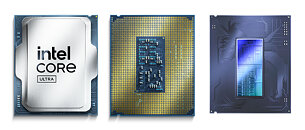
Intel today announced the Core Ultra 5 250K Plus and Core Ultra 7 270K Plus desktop processors in the Socket LGA1851 package. These chips are drop-in compatible with existing Intel 800-series chipset motherboards, with some boards needing UEFI firmware updates. Both chips are based on the current "Arrow Lake" microarchitecture, and are carved out of the "Arrow Lake-S" disaggregated silicon that uses TSMC N3B (3 nm) foundry node for its Compute tile containing the CPU cores, TSMC N5 (5 nm) for its Graphics tile, and TSMC N6 (6 nm) node for its SoC and I/O tiles.

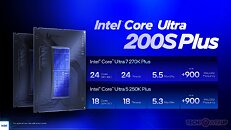
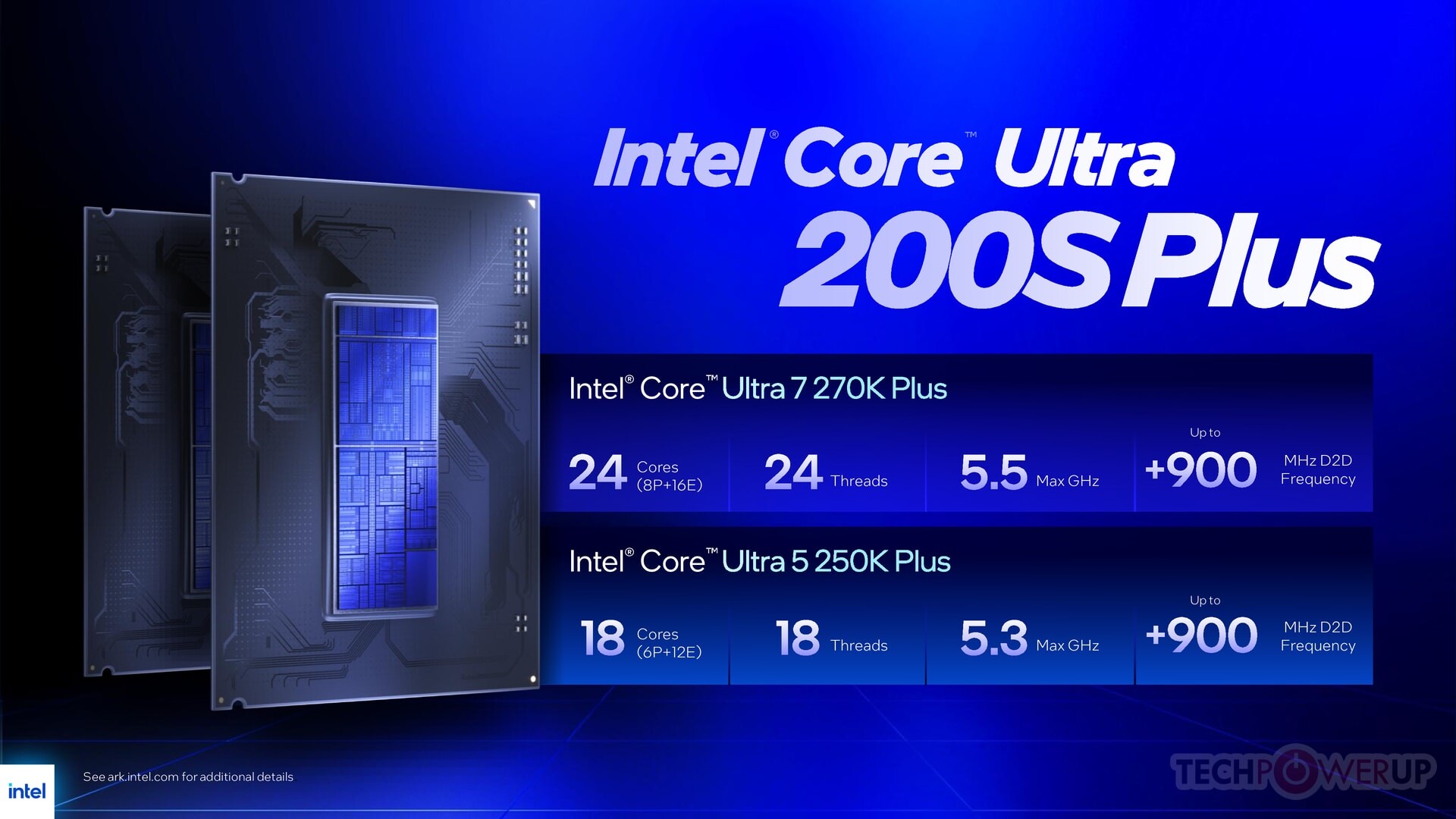
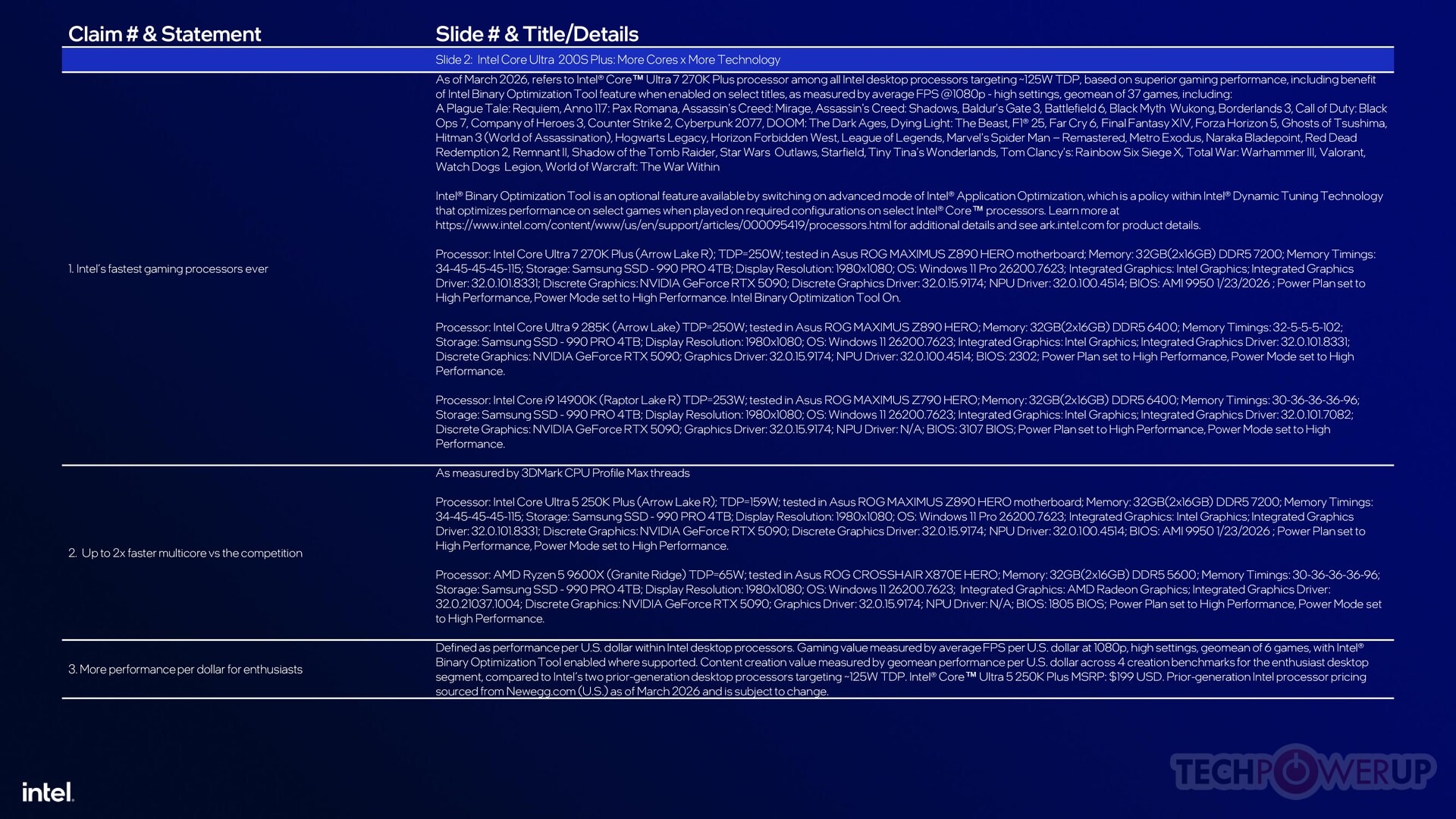
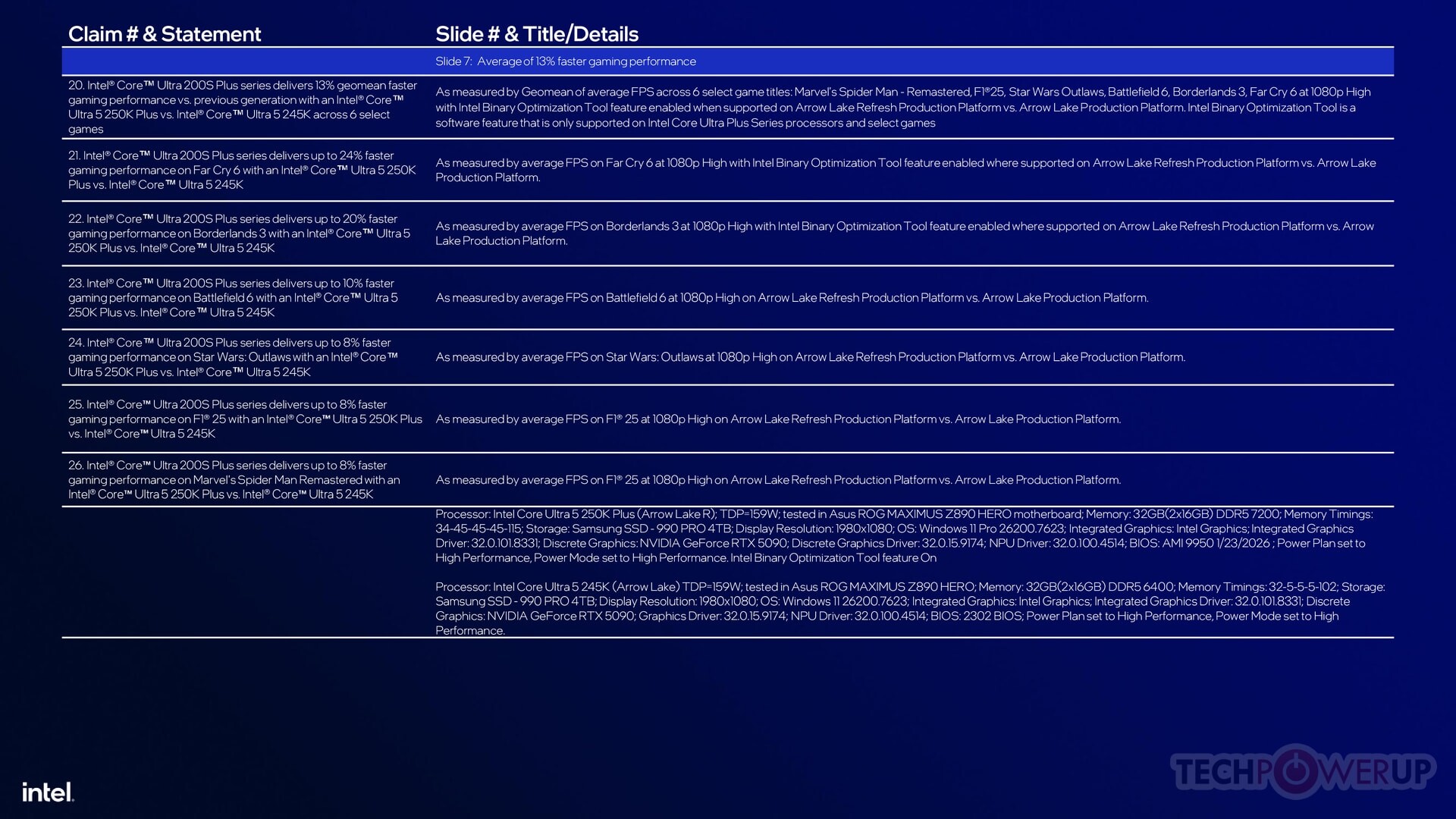
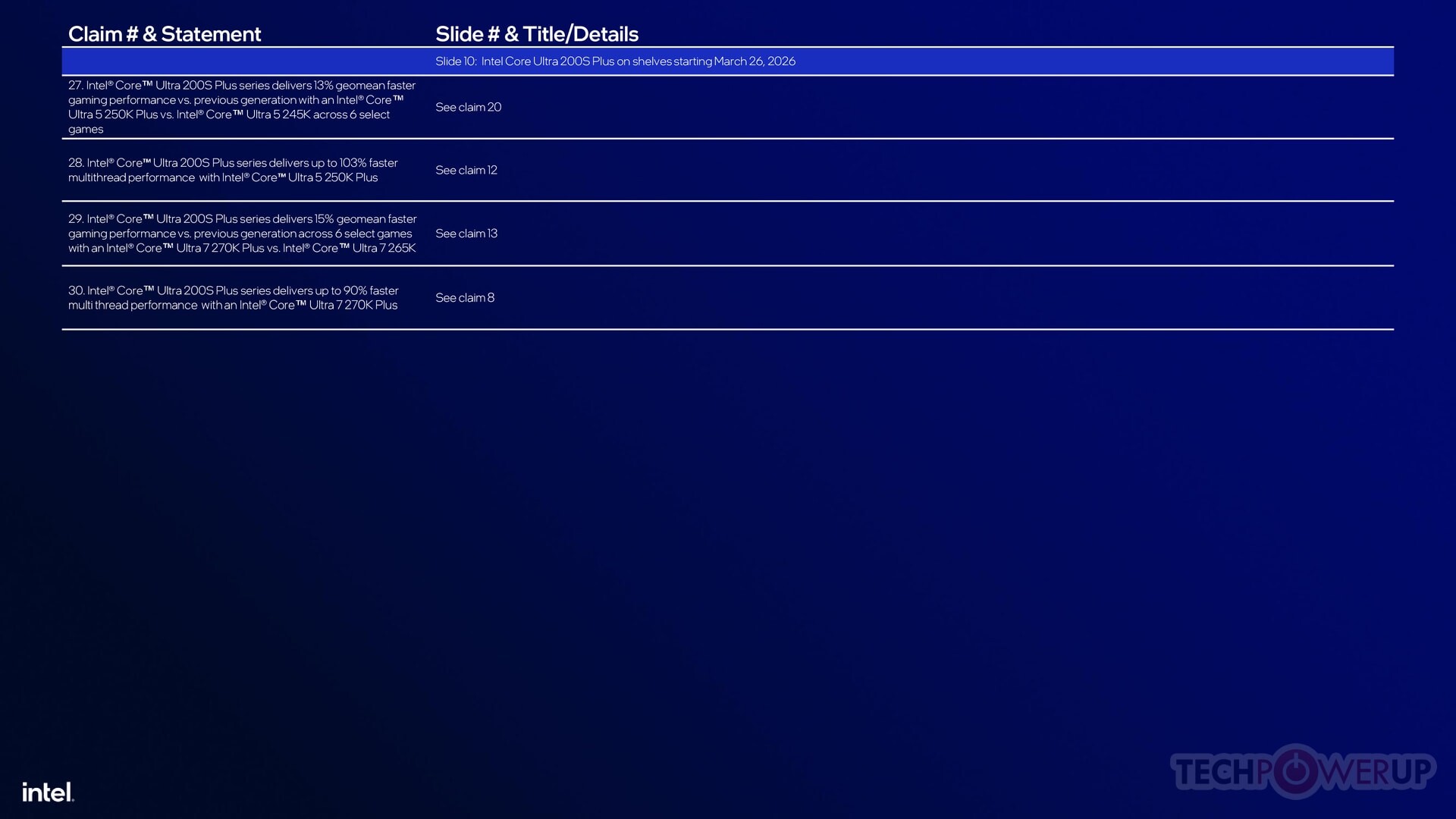
Both the Core Ultra 5 250K Plus ($199) and Core Ultra 7 270K Plus ($299) processor models are designed to push the current Core Ultra 5 245K and Core Ultra 7 265K, respectively, down from their current price-points. The two come with increased E-core counts, larger L3 caches, slightly increased P-core maximum boost frequency, and a 900 MHz faster die-to-die I/O frequency among the Compute and SoC tiles, which essentially makes these chips have "200S Boost Mode" out of the box. The new Core Ultra 5 250K Plus comes with a 6P+12E core configuration compared to the 6P+8E of the Core Ultra 5 245K. Its shared L3 cache has been enlarged to 30 MB, up from the 24 MB on the 245K. The P-core maximum boost frequency is up to 5.30 GHz from 5.20 GHz.
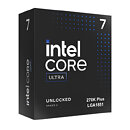
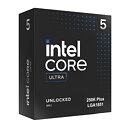
Meanwhile, the Core Ultra 7 270K Plus maxes out the "Arrow Lake-S" silicon, enabling all 8 P-cores, and all 16 E-cores, along with the entire 36 MB of L3 cache present on the silicon. In comparison, the 265K only comes with an 8P+12E core configuration, with 30 MB of shared L3 cache. The only things segmenting the 270K Plus from the Core Ultra 9 285K are a lack of Thermal Velocity Boost algorithm, and a maximum P-core boost frequency of 5.50 GHz, compared to 5.70 GHz of the 285K. While it lacks Thermal Velocity Boost, it features Turbo Boost Max 3.0, just like the 265K does.

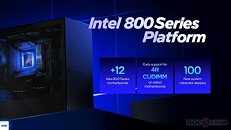
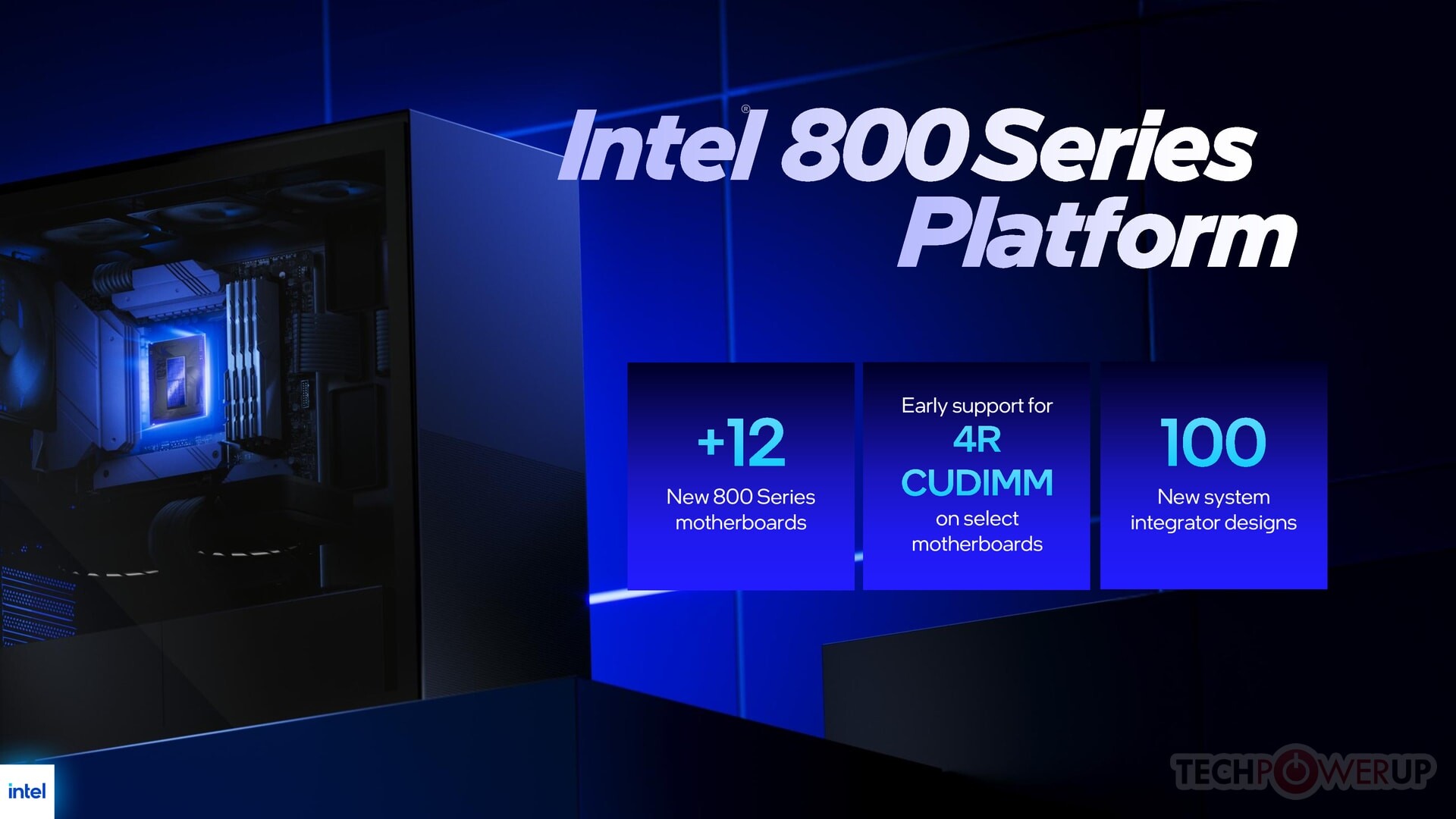
The Core Ultra 5 250K Plus and Core Ultra 7 270K Plus come with native support for DDR5-7200 memory speed, an increase from the DDR5-6400 native support of the older "Arrow Lake" desktop chips. Product warranty covers memory overclocking up to DDR5-8000. The two new chips also come with native support for quad-rank DDR5 CUDIMMs. These are new-generation UDIMMs that feature four DDR5 ranks and a client clock driver (CKD), helping consumer memory manufacturers significantly dial up densities along with memory speeds without having to use expensive high-density DRAM chips that are in short-supply. 4-rank CUDIMM support will also require motherboard vendors to implement it on their end with their latest products. It also requires certain UEFI firmware-level readiness.

Intel also announced the Binary Optimization Tool, a utility that helps end-users optimize application/game binaries to get the most performance out of "Arrow Lake-S" processors, we will have more details on that in our review later this month.

As mentioned earlier, the Core Ultra 5 250K Plus and Core Ultra 7 270K Plus are intended to displace the 245K and 265K, respectively, from their current price points. Both chips will begin retailing from March 26, 2026 for $199 and $299.

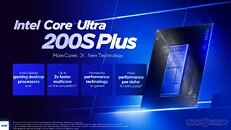
The full Intel presentation deck follows

Add your own comment

59 Comments on Intel Launches "Arrow Lake Refresh": Core Ultra 5 250K Plus and Core Ultra 7 270K Plus, New Binary Optimization Tool

#1
Vayra86
Nice, so does the plus mean 'Plus free ram'?

Otherwise, insta skip
Posted on Reply
#2
Onasi
Brother, Intel, I am sorry, but if a user of your CPU has to use a separate tool for each program they want to run to optimize for optimal performance, then by that you are directly admitting that there are underlying architectural issues with your CPUs. I said the same thing about AMD and their ridiculous "run the Game Bar" with the dual-chiplet 3D Cache CPUs. A CPU is by definition the one part of your PC that should be completely "what you see is what you get" from the moment you boot. Any additional faffing around should absolutely not be required.
Posted on Reply
#3
Grimling
OnasiBrother, Intel, I am sorry, but if a user of your CPU has to use a separate tool for each program they want to run to optimize for optimal performance, then by that you are directly admitting that there are underlying architectural issues with your CPUs. I said the same thing about AMD and their ridiculous "run the Game Bar" with the dual-chiplet 3D Cache CPUs. A CPU is by definition the one part of your PC that should be completely "what you see is what you get" from the moment you boot. Any additional faffing around should absolutely not be required.
I agree. The reason is because intel has the e-cores and the p-cores. But it is not possible for programs to always use the right cores. so intel must use a software to put the right threads on the right cores. otherwise performance is horrible.
Posted on Reply
#4
_roman_
a bad architecture needs duct tape. other processors do not need dirty hacks in any operating systems and any usage scenario by default.
Intel also announced the Binary Optimization Tool, a utility that helps end-users optimize application/game binaries to get the most performance out of "Arrow Lake-S" processors, we will have more details on that in our review later this month.
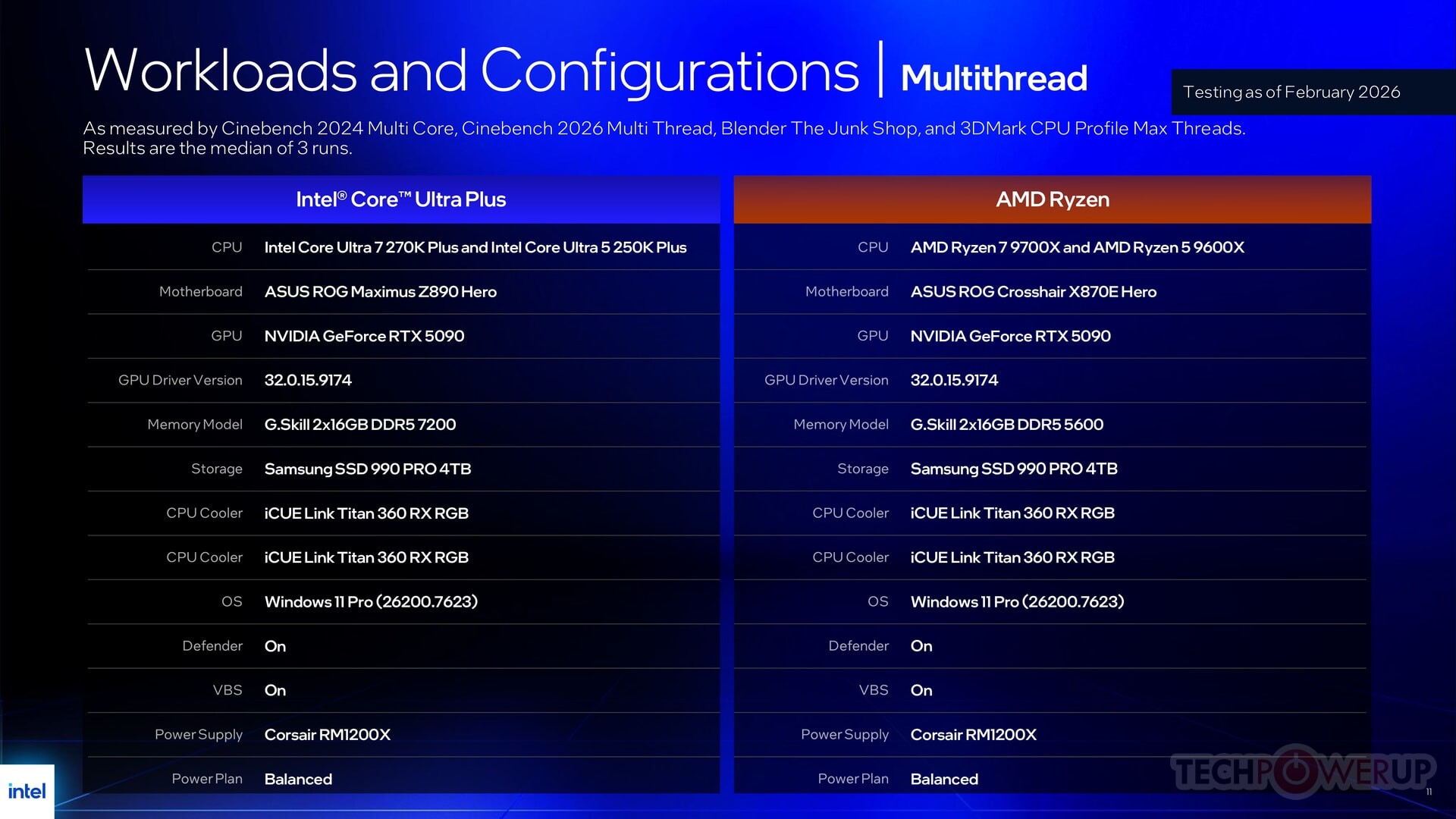
why is there two times the same cooler on the picture?
360 is that an aio? two aio on one cpu is a new record

z890 sounds like consumer motherboard, expensive with one socket.
Posted on Reply
#5
RootinTootinPootin
apps work even without that crap, come on guys if its AMD you wouldn't say a thing..lol..
Posted on Reply
#6
Nathaaab
GrimlingI agree. The reason is because intel has the e-cores and the p-cores. But it is not possible for programs to always use the right cores. so intel must use a software to put the right threads on the right cores. otherwise performance is horrible.
That's the job of the thread director, and it's working pretty well, better than software.
_roman_a bad architecture needs duct tape
Arrow Lake isn't a bad architecture.
Posted on Reply
#7
Darmok N Jalad
OnasiBrother, Intel, I am sorry, but if a user of your CPU has to use a separate tool for each program they want to run to optimize for optimal performance, then by that you are directly admitting that there are underlying architectural issues with your CPUs. I said the same thing about AMD and their ridiculous "run the Game Bar" with the dual-chiplet 3D Cache CPUs. A CPU is by definition the one part of your PC that should be completely "what you see is what you get" from the moment you boot. Any additional faffing around should absolutely not be required.
That’s the challenge of big.LITTLE, especially on Windows. Windows has so much legacy support that such an architecture will have to accommodate many years of programs that never dreamed of such a configuration. It’s telling that Qualcomm never bothered with this approach with Snapdragon X, but rather just did all one core type, even up to 12 total cores. The other half of this is how can developers even count on the target device has more than one core type? Now you’re leaning on the OS or the CPU to grab the right process, which it can do pretty well. However, in a world of high-speed computing, a few mistakes can turn into noticeable hitches, like latency and lag. I think that’s why these CPUs do great at something that loads all the cores, but you’ll have trouble when it’s a mixed workload, or one that doesn’t need all the threads, just the correct CPUs. In all, it’s not terrible, it’s just not ideal.
Posted on Reply
#8
Grimling
NathaaabThat's the job of the thread director, and it's working pretty well, better than software.
Not always. For example some games (like Metro Exodus PC Enhanced Edition) switch randomly from p-core to e-cores, performance gets horrible. I can fix that by using a software like Process Lasso. So the thread director is not working perfectly at all and sometimes you NEED a software to fix it. Or use a CPU that only has one type of cores.
Posted on Reply
#9
Quicks
Only way I am buying Intel again is when they ditch this E cores crap.
Posted on Reply
#10
user-009
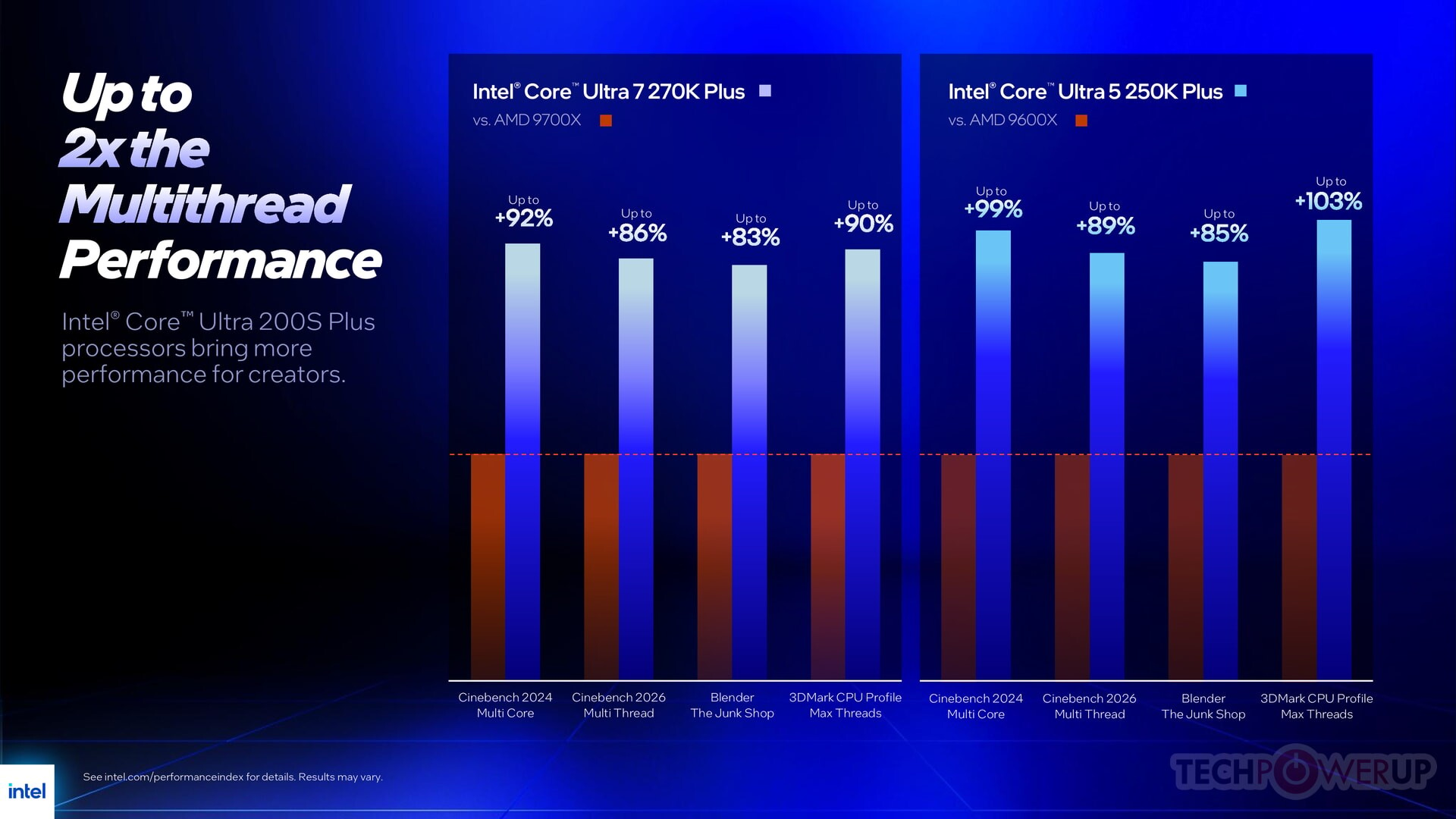
Love the intel slides (reported of course also here)

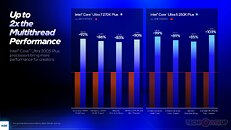
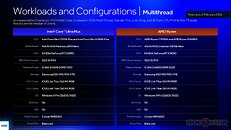
multithread performance, new processors vs 9600x and 9700x

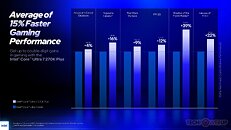
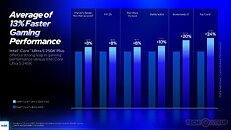
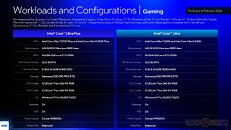
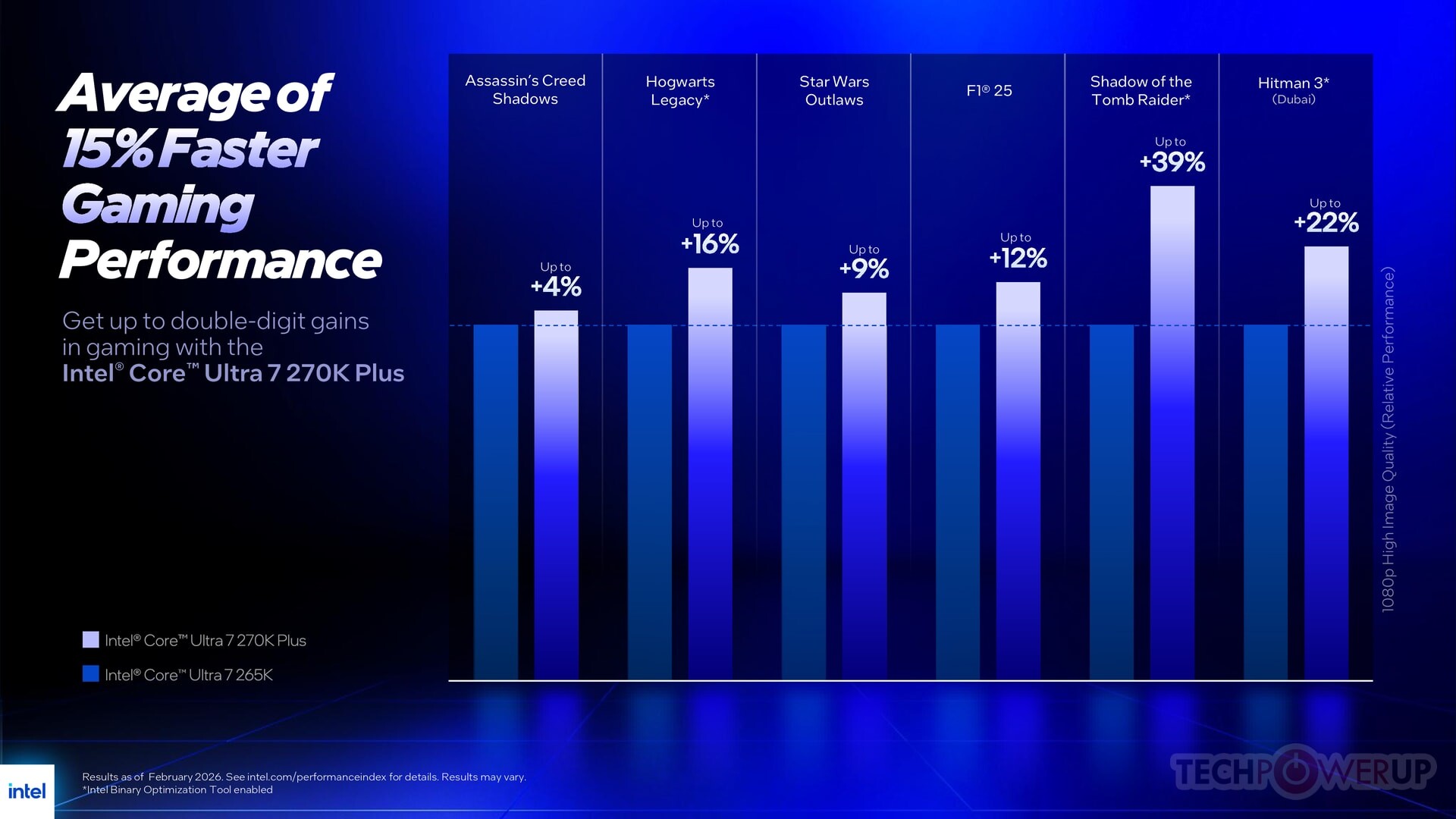
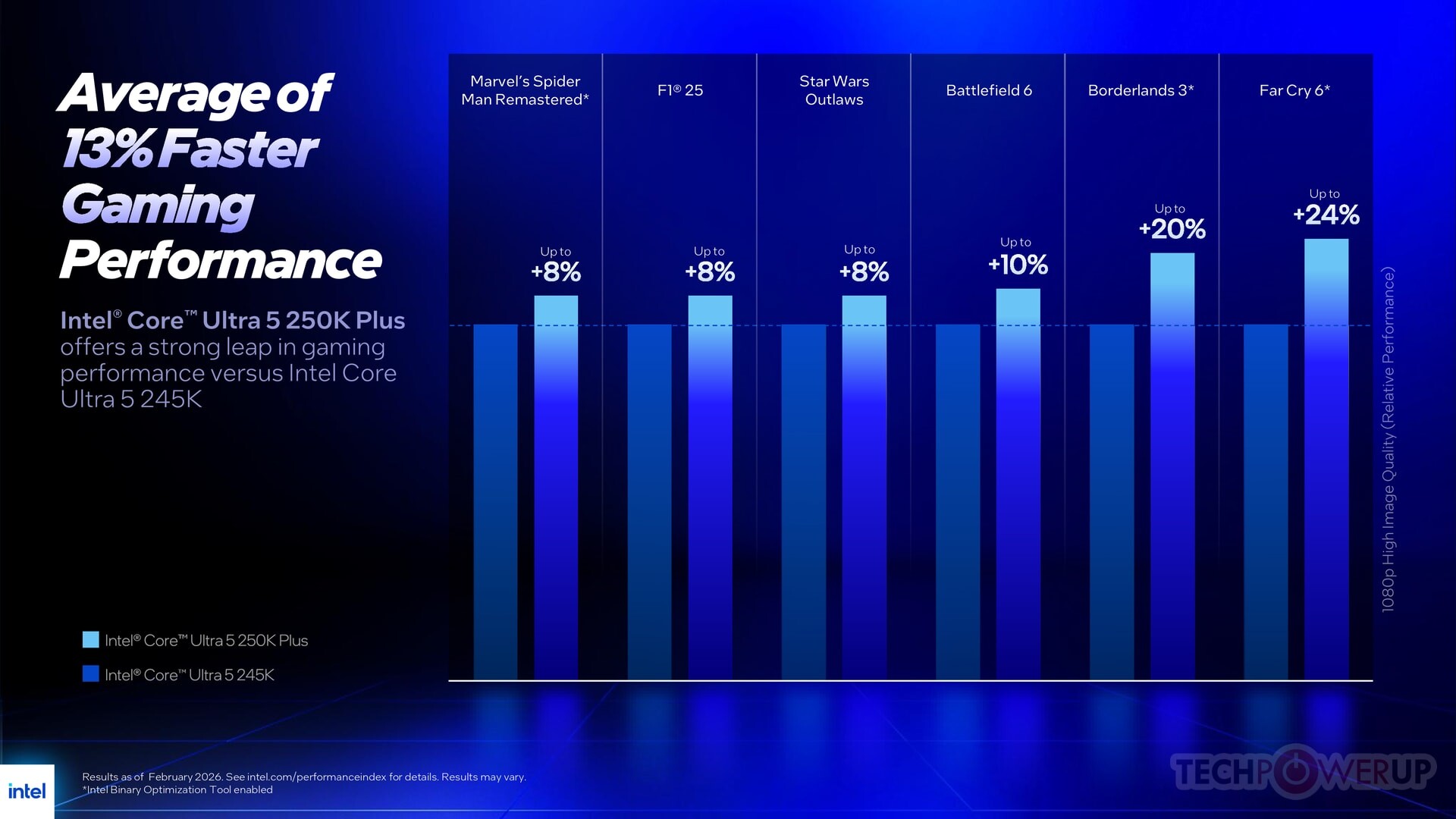
gaming performance, new processors vs... intel new processors

:toast:
Posted on Reply
#11
HLB
I had a fair share of problems with my 13900K because the E-Core/P-Core architecture issues. The CPU itself is good, stable, it doesn't have any of the known "Intel issues", I don't mean that, but the E-Cores cause headaches with many games and even some apps. I had to buy a copy of Process Lasso to keep things in check.
Posted on Reply
#12
dgianstefani
TPU Proofreader
6+12/8+16 for $200 and $300 is insanely good value. Beaten by Zen 5 X3D in gaming, yes, but competitive on all other fronts.
Posted on Reply
#13
tfp
So the the 250k is a slightly lower clocked version of the 265k and the 270k is similar to the 285k but they already have the D2D clocked like the 200S Boost setting by default. Shocker. At least the price is lower.

I wonder if this Binary Optimization will work on the original Arrow Lake processors/all big.Little Intel processors?
Posted on Reply
#14
lemans24
OnasiBrother, Intel, I am sorry, but if a user of your CPU has to use a separate tool for each program they want to run to optimize for optimal performance, then by that you are directly admitting that there are underlying architectural issues with your CPUs. I said the same thing about AMD and their ridiculous "run the Game Bar" with the dual-chiplet 3D Cache CPUs. A CPU is by definition the one part of your PC that should be completely "what you see is what you get" from the moment you boot. Any additional faffing around should absolutely not be required.
But...its not required and you do not have to use it
Posted on Reply
#15
napata
OnasiA CPU is by definition the one part of your PC that should be completely "what you see is what you get" from the moment you boot. Any additional faffing around should absolutely not be required.
If only you knew how much performance gets wasted between all the software layers from hardware to eventual app performance. This app just optimizes part of that. I really don't see the problem. If I don't install the proper AMD chipset drivers my 9800X3D also loses a bunch of performance in games. This isn't all that different from that. It's just less wasted performance by reducing inefficient software.
Posted on Reply
#16
HLB
lemans24But...its not required and you do not have to use it
You may not have to as much now as Windows 11 scheduler improved since. I'm not familiar with the AMD chiplet issues, but couple of years back many games would stutter badly or freeze unless forced to run on P-cores only on Intel CPUs. You may come across such games even now. Now, new BIOSes have options to disable E-cores temporarily with a press of a key, but two years ago people often had to disable E-Cores manually, in the BIOS, to be able to play games. You could do this by hand, create launch shortcuts, but you'd need to calculate affinity mask, it was PITA and Process Lasso was the only way. Then Bitsum released free Core Director. So yeah, it was absolutely required.
Posted on Reply
#17
Sol_Badguy
The only things segmenting the 270K Plus from the Core Ultra 9 285K are a lack of Thermal Velocity Boost algorithm, and a maximum P-core boost frequency of 5.50 GHz, compared to 5.70 GHz of the 285K.
Like in this table:
overclock3d.net/news/cpu_mainboard/intel-to-launch-new-core-ultra-desktop-cpus-on-march-11th/
tfpSo the the 250k is a slightly lower clocked version of the 265k and the 270k is similar to the 285k
Not quite.
245K has 6P+8E, 24 MB L3, 6x3 MB P-core L2, 2x4 MB E-core L2
250K has 6P+12E, 30 MB L3, 6x3 MB P-core L2, 3x4 MB E-core L2
265K has 8P+12E, 30 MB L3, 8x3 MB P-core L2, 3x4 MB E-core L2
270K and 285K have 8P+16E, 36 MB L3, 8x3 MB P-core L2, 4x4 MB E-core L2
The 270K is really a downclocked 285K but the 250K is something completely new regarding the core config.
Posted on Reply
#18
dj-electric
dgianstefani6+12/8+16 for $200 and $300 is insanely good value. Beaten by Zen 5 X3D in gaming, yes, but competitive on all other fronts.
Hallelujah, finally a comment that understands the value proposition in selling what is essentially a 285K for 299 USD.
Posted on Reply
#19
El_Capitan
Sucks to be the early Arrow Lake adopters, lol.
Posted on Reply
#20
dj-electric
El_CapitanSucks to be the early Arrow Lake adopters, lol.
From what it looks like, it seems like it might also suck to be a late adopter of Arrow Lake S CPUs. At least from what we supposedly know about Nova Lake S.
Posted on Reply
#21
XeonsNOpterons
Very cool stuff, the value is extremely good. I do not understand people complaining about the "early Arrow Lake adopters" being screwed... Arrow Lake launched over a year ago, expect new CPUs to be better at this point.

Interested to see independent reviews on gaming, Arrow Lake as a whole is a powerful generation at its core, so its weak gaming performance always was bizarre. The Lion Cove P-cores have UFO performance compared to Zen 5, and even the E-cores are not very far behind Zen 5. For compute, a very good generation. Even the L2 cache is larger per core on Lion Cove compared to Zen 5, making it even weirder how bad the gaming is.
Posted on Reply
#22
El_Capitan
dj-electricFrom what it looks like, it seems like it might also suck to be a late adopter of Arrow Lake S CPUs. At least from what we supposedly know about Nova Lake S.
I feel like it's marketing. They want their previous generation CPU's to look good. Hey, look, our last generation CPU's were a success! Forget about the original Arrow Lake fiasco, and the 13th and 14th gen issues. That they also have more motherboards incoming for a dead socket confuses me.
XeonsNOpteronsVery cool stuff, the value is extremely good. I do not understand people complaining about the "early Arrow Lake adopters" being screwed... Arrow Lake launched over a year ago, expect new CPUs to be better at this point.
Because it's something that can't be changed with the original Arrow Lake CPU's, and I'm sure they had a headache of a time wondering why gaming performance was so slow, and why it was so expensive on launch, and waiting patiently for the BIOS updates that would enhance gaming performance, and...
Posted on Reply
#23
XeonsNOpterons
El_CapitanBecause it's something that can't be changed with the original Arrow Lake CPU's, and I'm sure they had a headache of a time wondering why gaming performance was so slow, and why it was so expensive on launch, and waiting patiently for the BIOS updates that would enhance gaming performance, and...
Arrow Lake did not launch at any kind of unusually high price compared to previous generations. Also, honestly, while I can understand people being disappointed in Arrow Lake's gaming performance if they bought a CPU for the absolute best gaming performance, Arrow Lake still does decent in gaming. Its not like it is as slow as a FX-9590 or i7-870. Maybe it is just me, but I find the obsession with gaming performance from CPUs a little silly, especially when running higher resolutions. As long as the CPU can run the game at a decent FPS, anything additional is just a minor benefit.
Posted on Reply
#24
Lew Zealand
XeonsNOpteronsArrow Lake did not launch at any kind of unusually high price compared to previous generations. Also, honestly, while I can understand people being disappointed in Arrow Lake's gaming performance if they bought a CPU for the absolute best gaming performance, Arrow Lake still does decent in gaming. Its not like it is as slow as a FX-9590 or i7-870. Maybe it is just me, but I find the obsession with gaming performance from CPUs a little silly, especially when running higher resolutions. As long as the CPU can run the game at a decent FPS, anything additional is just a minor benefit.
Makes me wonder how many non-X3D people are seeing this in the vast majority games:


But do occasionally see this:


And end up fixating on those rare games where their fps are maybe discernibly lower.
Posted on Reply
#25
El_Capitan
XeonsNOpteronsArrow Lake did not launch at any kind of unusually high price compared to previous generations. Also, honestly, while I can understand people being disappointed in Arrow Lake's gaming performance if they bought a CPU for the absolute best gaming performance, Arrow Lake still does decent in gaming. Its not like it is as slow as a FX-9590 or i7-870. Maybe it is just me, but I find the obsession with gaming performance from CPUs a little silly, especially when running higher resolutions. As long as the CPU can run the game at a decent FPS, anything additional is just a minor benefit.
Their CPU prices were high, but not unusually high. However, their motherboards were uncomfortably high. Price was the only reason I didn't go for it. I got a 13600K for $150, and a used z690 board for under $100 at the time the Core Ultra 245K was at $309, and their most budget LGA1851 motherboard was just under $200. Their pricing was not good. I'm glad I waited and didn't bite.
Posted on Reply
Add your own comment
Nov 13th, 2026 21:58 CST change timezone

New Forum Posts

Popular Reviews

TPU on YouTube

Controversial News Posts