Friday, June 12th 2026

MSI and ASUS Release BIOS Updates to Support EXPO-ULL on AMD X670E Motherboards

Motherboard vendors ASUS and MSI began releasing UEFI firmware updates to their AMD 600-series chipset motherboards that introduce support for AMD EXPO-ULL memory profiles. EXPO-ULL is an SPD extension that simplifies memory settings. While AMD Ryzen 7000 series and Ryzen 9000 series processors are relatively behind Intel in memory clock speeds, there is room for memory vendors to release memory kits with significantly tighter timings within their memory speed classes. An example of an EXPO-ULL profile would be DDR5-6000 with CL26, as opposed to the CL30-36 usually available for this speed.

ASUS began by releasing Beta BIOS 3803 version for its motherboards based on AMD X670E spanning the ROG Crosshair, ROG Strix, ProArt, and TUF Gaming product lines. These include EXPO-ULL support, and AGESA 1.3.0.1b. Meanwhile, MSI released a similar firmware update for its top MEG X670E GODLIIKE motherboard featuring EXPO-ULL support and AGESA 1.3.0.1b. More vendors are expected to catch on, as AMD hasn't restricted EXPO-ULL to any chipset generation.
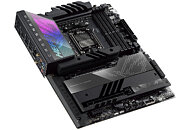
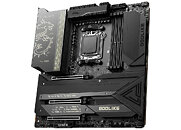
Source: VideoCardz
Add your own comment

24 Comments on MSI and ASUS Release BIOS Updates to Support EXPO-ULL on AMD X670E Motherboards

#1
Chaitanya
Looking forward to reviews of these new kits.
Edit: Gigabyte also has new EXPO ULL AGESA updated available for their boards.
Posted on Reply
#2
Grimling
Are these the new "UHP" (Ultra High Price) DDR5 Modules?
Can not wait to not buy them.
Posted on Reply
#3
FR3D1
Ninja Cat
btarunrMSI released a similar firmware update for its top MEG X670E GODLIIKE motherboard featuring EXPO-ULL support and AGESA 1.3.0.1b.
Not just for this one. Also for other models like mine (B650M GAMING PLUS WIFI);
AMI BIOS
7E24v1D
2026-06-10
17.85MB
Description:
- AGESA ComboAm5 1.3.0.1 released.
- Fixed system auto power-on when pressing the power button during POST after Wake-on-LAN.
- Better compatibility with some older graphics cards.
- Support with AMD EXPO Technology: Featuring Ultra Low Latency.
And by the way, for all the flashing addicts:
The update resets the BIOS!

And—as I have just discovered—barely two days later, another update followed;
AMI BIOS
7E24v1E1
2026-06-12
17.87MB
Description:
- AGESA PI-1.3.0.1b updated.
- Optimized with AMD EXPO Technology: Featuring Ultra Low Latency.
Regards,
Fred.
Posted on Reply
#4
Grimling
FR3D1And—as I have just discovered—barely two days later, another update followed
Yeah that is exactly as i experienced it. I have an X670E GAMING PLUS WIFI that i currently use, and i updated the Bios a few Days ago to the new 7E16v1C with AGESA ComboAm5 1.3.0.1.
Then a few days later, a new version appears (not beta) 7E16v1D1 with AGESA PI-1.3.0.1b.
Now what, do i update AGAIN, or do i wait for the 7E16v1D2 with AGESA PI-1.3.0.1c that will come out eventually in a few days...
Posted on Reply
#5
FR3D1
Ninja Cat
@Grimling
In my opinion, waiting is the best strategy. Personally, I do like to take advantage of improvements, but in this case (e.g., AMD’s EXPO 1.2 Ultra Low Latency), I can easily do without—unless, of course, AMD sends me a compatible kit for free.

Regards,
Fred.
ChaitanyaLooking forward to reviews of these new kits.
Why? Because of the average 4% compared to the legacy EXPO?
Posted on Reply
#6
_roman_
I appreciate the work of others

docs.google.com/spreadsheets/d/12zg6yT_H7H-W1voyw1ZoIrj0GSE7WI4Ug-uLlv-Asa8/edit?gid=937453961#gid=937453961

You will see what uefi version exists.

Another time a fact, my lying around ASUS Prime X670-p motherboard is "dell" grade. no update

That spreadsheet, in my browser tab pinned, shows me clearly from time to time what motherboard modell and brand is "dell" grade.

Asus shows clearly no money reserved for uefi updates, again.

If the changes are only DRAM related or also contain security fixes are on another topic
Posted on Reply
#7
Wirko
What exactly makes the new ULL profiles incompatible with previous BIOS versions? Have they been expanded with some additional data?
Posted on Reply
#8
Alieove
No updates for ROG STRIX X670E-I yet.🥲
Posted on Reply
#9
Nater
One of those upgrades for the guy that already has everything and needs to spend 4x more for an extra +3 FPS for a rig already pushing 500fps+ in 720p.
Posted on Reply
#10
Let3r
FR3D1@Grimling
In my opinion, waiting is the best strategy. Personally, I do like to take advantage of improvements, but in this case (e.g., AMD’s EXPO 1.2 Ultra Low Latency), I can easily do without—unless, of course, AMD sends me a compatible kit for free.

Regards,
Fred.


Why? Because of the average 4% compared to the legacy EXPO?
Even less on x3d chips. That is probably why they didn’t show them in the slides.
Posted on Reply
#11
gerard.bow
Most, if not all, DDR5 modules already have their timings stored in the SPD; AMD just hasn’t been using them yet. With Expo, manufacturers can now once again stay slightly below the JEDEC standard without feeling guilty. It’s basically the same as with trfssb, which Intel and AMD’s APUs have always used, but which wasn’t introduced for regular CPUs until years later. Nobody needs new RAM for the placebo ULL!
5/10/20 ns is standard. Anyone can read these values from the SPD. The unit in the BIOS is tCK instead of ns, as usual, but anyone should be able to figure that out ;-)

The PBO Boost on the X3D with 2CCX has been broken for 3 years now; it can only be set up manually via AMD OC—it’s been broken via the MSI menu since AGESA 1.0.08 and remains so to this day!
With the current S1 BIOS, it no longer works via the AMD OC menu either! I guess most people have never seen their 7950X3D run at 5.25/5.95 GHz and have been stuck at <5.2/5.2 GHz for years.
F U MSI!
My DDR6000 runs at <59.5 ns in AIDA on the production system, even with a cluttered system and a running hypervisor, etc. This “miracle BIOS” doesn't make anything go any faster at all. As is so often the case, it's just a tool for the average user that brings them closer to optimal performance with a single click. Anyone who has optimized manually will still be light-years ahead!
Instead of tweaking the RAM, I just want to be able to use the CPU to its full potential again, just like when I bought it three years ago. Since the AMD overclocking menu is now broken, the workaround of simply copying the values from Ryzen Master into the BIOS doesn’t work either. Maybe that’s why those idiots at MSI didn’t notice for three years that their overclocking menu is broken and that only AMD’s own menu actually works.
Oh, and the AMD OC menu isn't completely broken after all—PBO doesn't work anymore, but CO still does, though it seems like the positive and negative values are now swapped. From 0 to -20 CO, the cores don’t clock higher anymore; instead, they go 200–400 MHz lower. The 7950X3D now still reaches 4.8/5 GHz in Ropbench!
Posted on Reply
#12
Waweq
I dunno my LEXAR ram stick are already CL26 6000mt and runs wonderful for almost a year now, no tuning just straight out the box
Posted on Reply
#13
RejZoR
Got update for my B850 a bit ago. What is this, like special profile on new RAM or extra timing settings for existing EXPO profiles?
Posted on Reply
#14
FR3D1
Ninja Cat
@RejZoR
Do I need new RAM for EXPO Ultra Low Latency?
Yes, EXPO Ultra Low Latency requires DDR5 modules with a corresponding ULL profile in the SPD register; existing EXPO kits cannot be upgraded via a BIOS update.
PCGH(de)

Regards,
Fred.
Posted on Reply
#15
johnnypop
I'm here on MSI X670E Carbon WiFi and have to warn some people might have issues after the update to boot linux os, I've been on fedora and bazzite along with win10 but after this update I couldn't boot, and it wasn't due to secure boot, seems that recently introduced microsoft security level 2 been causing issues with linux, that wasn't there before and previous bios versions always worked just fine, other than this system seem stable.
Opened ticket to MSI with this issue suggesting to maybe put in change log that this could cause problems for linux users or just keep setting disabled by default.
Apparently fix to this coming in future versions.
Posted on Reply
#16
Paganstomp
I flashed F11b BIOS ULL for Gigabyte B850M DS3H this morning. Seemed to fix an issue I was having with G.Skill Flare X5 5600 EXPO RAM which kept going back to 4800 after shutdowns. This has been a known issue for sometime.
Posted on Reply
#17
RejZoR
FR3D1@RejZoR

PCGH(de)

Regards,
Fred.
So, from what I understand this still needs to be baked into RAM sticks themselves, just beyond the base timing parameters. Essentially this is the same as MSI's Low Latency controls that range from Relaxed to Tight and from what I understand control the rest of timings not included in regular EXPO. But that's trial and error and not what's considered guaranteed timings.
Posted on Reply
#18
Grimling
RejZoRSo, from what I understand this still needs to be baked into RAM sticks themselves
Yes, you need new RAM Modules that have been programed with the new ULL EXPO Profiles. Your old RAM will run normal like before, but you get nothing new out of it by updating the UEFI Bios of your MB.
Posted on Reply
#19
_roman_
johnnypopseems that recently introduced microsoft security level 2 been causing issues with linux
no issues, i replaced the cmos battery a few days ago. I learnt all uefi settings are only stored with teh cmos battery. i tried to find some quiet fan settings and i also saw microsoft secruity level 2.
i do not have any issues with microsoft security level 2 with an efi stub kernel. msi always removes forgets any bootloader entries, microsoft made it that way that it adds itself automatically on asus and msi. so writing the uefi boot entry for the linux kernel is only needed once every time on msi on every new uefi firmware update.

i assume it is more a distro related issue or bootloader related issue. the motherboard just loads regardless of operating system a single efi binary. it is not a motherboard issue.

as can be seen by

roman@Wheat_Nas ~ $ efibootmgr -v
Posted on Reply
#20
Bwaze
RejZoRBut that's trial and error and not what's considered guaranteed timings.
All the XMP / EXPO profiles are officially overclocking - they are not guaranteed, and although AMD and Intel, motherboard and memory stick makers aren’t enforcing this, you basically void your warranty if you enable them.

Yes, the whole industry relies on ignoring it’s own rules.
Posted on Reply
#21
rusty caterpillar
GrimlingYeah that is exactly as i experienced it. I have an X670E GAMING PLUS WIFI that i currently use, and i updated the Bios a few Days ago to the new 7E16v1C with AGESA ComboAm5 1.3.0.1.
Then a few days later, a new version appears (not beta) 7E16v1D1 with AGESA PI-1.3.0.1b.
Now what, do i update AGAIN, or do i wait for the 7E16v1D2 with AGESA PI-1.3.0.1c that will come out eventually in a few days...
I would wait
BwazeYes, the whole industry relies on ignoring it’s own rules.
That also means free testing on thousands of systems and different OS-es.;)
Posted on Reply
#22
gerard.bow
FR3D1@RejZoR

PCGH(de)

Regards,
Fred.
GrimlingYes, you need new RAM Modules that have been programed with the new ULL EXPO Profiles. Your old RAM will run normal like before, but you get nothing new out of it by updating the UEFI Bios of your MB.
an this is bullshit!
This Moduls are from 7/23!
Once again, these timings have been around forever. The only thing new is that AMD is using them now! It’s no big deal to manually set these timings a bit tighter, just like any other timings. Even with super-awesome new ULL modules featuring the latest Expo, you’ll never come close to achieving what’s possible manually. No manufacturer in the world has ever set its SPD to the tightest possible values. The memory controller is still in the CPU, and every one is different. So the RAM manufacturer has to make sure it runs even on the shabbiest CPU.

The whole thing is marketing bullshit! Just like with the Expo so far, the extra timings used there are ridiculous—any motherboard will set them appropriately for the few memory chips on the market anyway!
Posted on Reply
#23
RejZoR
BwazeAll the XMP / EXPO profiles are officially overclocking - they are not guaranteed, and although AMD and Intel, motherboard and memory stick makers aren’t enforcing this, you basically void your warranty if you enable them.

Yes, the whole industry relies on ignoring it’s own rules.
Tested for those sticks specifically. MSI Low Latency settings are generic, they are not aware of memory capabilities in any way, EXPO ULL is. Another is if they validate those. My Patriot 6000 CL28 sticks are validated for my board specifically since I looked for QVL specific modules, but they'd have to test ULL timings separately from regular timings I'm guessing for the QVL list.
Posted on Reply
#24
Jtuck9
RejZoRTested for those sticks specifically. MSI Low Latency settings are generic, they are not aware of memory capabilities in any way, EXPO ULL is. Another is if they validate those. My Patriot 6000 CL28 sticks are validated for my board specifically since I looked for QVL specific modules, but they'd have to test ULL timings separately from regular timings I'm guessing for the QVL list.
People are already tinkering with the TccdL, TccdL_WR, and TccdL_WR2 values.

"If testing manually, keep 1:4:2 relationship, compare against Auto, and check AIDA64 latency/read/write/copy plus PyPrime or y-cruncher for any measurable difference."

rog-forum.asus.com/t5/amd-600-series/x670-x870-resource-thread/td-p/901576/emcs_t/S2h8ZW1haWx8dG9waWNfc3Vic2NyaXB0aW9ufE1OOVlHTklMVURaV0IzfDExNDM5NTh8U1VCU0NSSVBUSU9OU3xoSw/page/605

I'd be interested in picking up an EXPO LL pair of Patriot modules in the future if they are of the same calibre as something like the Viper Xtreme 5's.


Might pair well with a non X3d Zen 6 chip. (I'm sure I read someone saying that non X3d chips would have roughly the same amount of cache as the current 9800 X3d chips, or that ballpark)
Posted on Reply
Add your own comment
Nov 23rd, 2026 13:23 CST change timezone

New Forum Posts

Popular Reviews

TPU on YouTube

Controversial News Posts