Saturday, August 29th 2026

Intel Confirms LGA1954 as the Socket for "Nova Lake-S" Processors Through Internal Tools

The upcoming Nova Lake-S lineup of Intel desktop CPUs has been the subject of strong rumors for a while, and one of them concerned the socket itself. Intel is moving away from LGA1851 and will have a brand-new socket for its upcoming Core Ultra 400 series processors, namely LGA1954. We already know about LGA1954 as its records appeared in shipping manifests months ago, and we even know what the socket looks like. Nova Lake-S will debut on this new socket, and Intel has now officially confirmed this, though not in the usual way.

Intel has just published an internal test tool on its website that connects the LGA1954 socket to Nova Lake-S processors. This listing is for validation hardware and provides some engineering and technical enablement equipment. Nevertheless, the important part is that this is the first time Intel itself has mentioned Nova Lake-S alongside LGA1954 in any sort of official capacity. This is confirmation that Nova Lake-S will indeed launch alongside the LGA1954 socket and Intel 900-series motherboards. Nova Lake is currently expected to launch in Q1 2027.

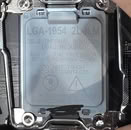
Source: Harukaze5719 on X
Add your own comment

87 Comments on Intel Confirms LGA1954 as the Socket for "Nova Lake-S" Processors Through Internal Tools

#51
cyberdamn
john_Do you think someone who bought a motherboard with, say, the b650E chipset will be FORCED to change their motherboard just to move to an X870, for example?
I bet being an intelboy she doesn't know how it is, not changing your mobo every year. I also think she has no idea what's the difference between a socket and a chipset.
Posted on Reply
#52
Konceptz
oh well, some buy a new board when they upgrade CPUs.
Socket longevity is overrated.
Posted on Reply
#53
john_
Konceptzoh well, some buy a new board when they upgrade CPUs.
Socket longevity is overrated.
25 years ago when it was excited to keep swapping hardware and (re)installing windows all the time I would agree with you. From the moment I decided to stop fooling around and start doing work on my PC, I started thinking that socket longevity wasn't overrated, but rather a mandatory feature.
But for each person this can be different.
Posted on Reply
#54
RinSenpai
john_Do you think someone who bought a motherboard with, say, the b650E chipset will be FORCED to change their motherboard just to move to an X870, for example?
Depends on if their needs change at the point when they upgrade. You do get PCIe 5.0 and more recent USB standards with most X870 compared to a B650E. It may also have something to do with whether you upgrade from low-end/lower mid-range to high-end CPU, in which case you may need beefier VRMs. Maybe you just had a board with insufficient USB ports and you need more. Maybe you now want a 2.5G ethernet port for whatever reason. Maybe you just want a USB C port. Maybe you want better built-in audio capability. Maybe you don't have the correct plugs/supported standards for a front case panel so you can't use some ports there (it's stupid af but I've seen that happen).
There are lots of reasons why someone may change their boards while the one they have technically support the CPU they upgrade to. Motherboards don't release at the same time and brands may release a "v2" later in the cycle.
While upgradability is a factor, it's overrated because you don't know exactly what's coming in the incoming years and when precisely it'll come, and for how long the CPU manufacturer will keep its hardware compatible. In the case of AMD, it has just been about bullying them in order to keep Zen3 on AM4, so we had an estimation of the date because people knew this would be the last generation on AM4.
Posted on Reply
#55
Sol_Badguy
RinSenpaiYou do get PCIe 5.0 and more recent USB standards with most X870 compared to a B650E.
B650E has a Gen5 GPU slot, just like the X870.
With B650 it varies based on the model, either Gen4 or Gen5 GPU slot.
Posted on Reply
#56
kazuviking
john_and (re)installing windows all the time
I never resintalled windows after hardware change. Swap parts, boot without issues then install all the drivers.
Posted on Reply
#57
chrkeller
I wonder if Intel understands that new sockets makes me wait longer for upgrades since I do not want to buy a new MB and reinstall windows, download games, etc.
Posted on Reply
#58
kazuviking
chrkellerreinstall windows
Why would you reinstall when windows knows not to load the old chipset drivers.
Posted on Reply
#59
chrkeller
kazuvikingWhy would you reinstall when windows knows not to load the old chipset drivers.
I was under the impression new MB means new install, not accurate?
Posted on Reply
#60
Fouquin
ThunderslatSocket 423, 11 months. And the only option why waste of sand Williamette.
Technically correct but this one is complicated because at the time we had socket adapters. Northwood does work on 423 with the correct 478 carrier adapter. The same complication exists for other sockets like 754; boards exist that can adapt to 939 or AM2 and greatly extend the capability. For the sake of argument though I'll concede that 423 absolutely counts, and I'd even add Socket 4 which had technically four but really only two processors in total, and was dead on arrival due to its bugs and higher clocked 486 and 5x86 competition retaining majority market share. Even then it 'lasted' 12 months, but in reality it was not on shelves after only a few months (and hardly made it to store shelves at all outside of a couple big-box brands). Socket 8 would get a nod if it weren't for the Pentium II Overdrive carrying it into the early 2000s on military and industrial contracts.

While we're firmly out of modern sockets in the total lifespan discussion, AMD's Slot A gets a boost toward the podium even though it technically housed four variants of K7, it did so in 11 months (and 14 days).
Posted on Reply
#61
john_
RinSenpaiDepends on if their needs change at the point when they upgrade. You do get PCIe 5.0 and more recent USB standards with most X870 compared to a B650E. It may also have something to do with whether you upgrade from low-end/lower mid-range to high-end CPU, in which case you may need beefier VRMs. Maybe you just had a board with insufficient USB ports and you need more. Maybe you now want a 2.5G ethernet port for whatever reason. Maybe you just want a USB C port. Maybe you want better built-in audio capability. Maybe you don't have the correct plugs/supported standards for a front case panel so you can't use some ports there (it's stupid af but I've seen that happen).
There are lots of reasons why someone may change their boards while the one they have technically support the CPU they upgrade to. Motherboards don't release at the same time and brands may release a "v2" later in the cycle.
While upgradability is a factor, it's overrated because you don't know exactly what's coming in the incoming years and when precisely it'll come, and for how long the CPU manufacturer will keep its hardware compatible. In the case of AMD, it has just been about bullying them in order to keep Zen3 on AM4, so we had an estimation of the date because people knew this would be the last generation on AM4.
That's why the PCIe slots are on the board. All the above examples are in most cases a PCIe X1 expansion card that probably costs from 5 to 15 euros. There are adapters from USB3 to 2.5G ethernet with a cost of less than 10 euros. Beefier VRMs on AM5 aren't really a necessity, because even the cheapest boards can work with the most expensive CPUs. I might be wrong here, but probably someone will have to dig out some 50 euros microATX that might be having a hard time with a 16 core CPU. Its a different case with Intel CPUs asking for 300W to hit their turbo speeds. Now if someone got a PCIe 5.0 SSD, even before the price increases, probably that person is wealthy enough to keep swapping motherboards anyway, no matter the platform they buy and use.

The main reason to replace a motherboard is the CPU. A new architecture can bring double the cores, or 20% performance increase from that new architecture. Someone who replaces a motherboard because of a new USB standard, well, probably doesn't know why those PCIe slots are on the motherboard for.
kazuvikingI never resintalled windows after hardware change. Swap parts, boot without issues then install all the drivers.
Windows got much better on this the last many years, basically from Windows 10 and latter, still replacing the motherboard isn't 100% warranted that you wouldn't end up troubleshooting problems that weren't there with the old setup. And if the person using the PC isn't someone with tech knowledge, what will be the cost of upgrading simply the CPU, compared to a motherboard? What will the technician charge in the first case and what in the second one? Let's not limit conversation to ourselves alone.
Posted on Reply
#62
efikkan
Aah, the eternal debate over AM5 for platform longevity and planned obsolescence...
There would be a point if AM5 offered better IO, which it doesn't, so this advantage is at best exaggerated. And a such advantage would be for buyers in the beginning of the platform, not buyers considering LGA1954 vs. AM5 at the tail end, where the platform becomes more of a limitation than an advantage.

Buy whichever performs the best for your use case, not a theoretical edge case where you upgrade the least likely part to be upgraded, and keep the most obsolete part of the system. :rolleyes:
kondaminThat’s just x4 32bit, a dram channel has been 64 bit for ages until ddr5 changed that for some reason
For higher throughput and lower effective latency.
Posted on Reply
#63
Rulumi
john_That's why the PCIe slots are on the board. All the above examples are in most cases a PCIe X1 expansion card that probably costs from 5 to 15 euros. There are adapters from USB3 to 2.5G ethernet with a cost of less than 10 euros. Beefier VRMs on AM5 aren't really a necessity, because even the cheapest boards can work with the most expensive CPUs. I might be wrong here, but probably someone will have to dig out some 50 euros microATX that might be having a hard time with a 16 core CPU. Its a different case with Intel CPUs asking for 300W to hit their turbo speeds. Now if someone got a PCIe 5.0 SSD, even before the price increases, probably that person is wealthy enough to keep swapping motherboards anyway, no matter the platform they buy and use.
One is going to want good enough VRMs to run some of the higher power consumptions parts like the Ryzen 9 7950X with its PPT of 230W, and specially you want a good VRM setup with a Ryzen 9 9950X3D2 Dual Edition and its 270W PPT.
efikkanAah, the eternal debate over AM5 for platform longevity and planned obsolescence...
There would be a point if AM5 offered better IO, which it doesn't, so this advantage is at best exaggerated. And a such advantage would be for buyers in the beginning of the platform, not buyers considering LGA1954 vs. AM5 at the tail end, where the platform becomes more of a limitation than an advantage.

Buy whichever performs the best for your use case, not a theoretical edge case where you upgrade the least likely part to be upgraded, and keep the most obsolete part of the system. :rolleyes:
Yes, that's something that I can fully agree with and I personally find disappointing that AMD insists on reusing the Promontory 21.
Posted on Reply
#64
Thunderslat
RulumiYes, that's something that I can fully agree with and I personally find disappointing that AMD insists on reusing the Promontory 21.
If you wanted to make an argument about platforms, that's the one to make. Not bashing socket longevity. The lack of a real chipset upgrade with more PCIe is frustrating, though it is fine for most use cases.
Posted on Reply
#65
Sol_Badguy
RulumiOne is going to want good enough VRMs to run some of the higher power consumptions parts like the Ryzen 9 7950X with its PPT of 230W, and specially you want a good VRM setup with a Ryzen 9 9950X3D2 Dual Edition and its 270W PPT.
Yeah buddy! 👍
You remember this one? You posted there.
A ticket to the concert yes, but not a front row experience. People have to plan better.
Posted on Reply
#66
john_
RulumiOne is going to want good enough VRMs to run some of the higher power consumptions parts like the Ryzen 9 7950X with its PPT of 230W, and specially you want a good VRM setup with a Ryzen 9 9950X3D2 Dual Edition and its 270W PPT.
I understand that, but I doubt someone who gone for a mid range, even microATX board and an Ryxen 5 7600 as a starting point, years latter will care to max out a Ryzen 9 7950X or a Ryzen 9 9950X3D2 on that board. They will get 80-90% or even more of the performance of those chips, without having to upgrade to a newer much more expensive motherboard. On the other hand someone who will need to replace the whole set up to go to a newer CPU with more cores and stuff, will have the new USB version on the back of their motherboard as a consolation for the money and extra time they needed to remove that board, put the new board in place, put an advertisement for the old board, come in contact with one or more buyers, negotiate pricing, post the motherboard, wait to see if the buyer got the board and verified that the board works as expected.
Posted on Reply
#67
chrkeller
Even if a Windows install isn't required, upgrading $500 CPU that requires a $100-200 MB upgrade... makes me wait longer. MB's are not cheap anymore.
Posted on Reply
#68
DAPUNISHER
ThomasKOr who should be polled? LinusTechTips' yelling clowns?
LULZ, Even Linus is on board with socket longevity. Compared the 5800X3D in a 9 year old board to X570. Ended by hoping he gets to revisit AM5 the same way in the future.


1954 needs to have long term support. Most indications are, it will. Flagship gaming performance will go a long way, but not as far as assurances it's just the beginning for the socket.
Posted on Reply
#69
kazuviking
chrkellerI was under the impression new MB means new install, not accurate?
Its a misconception that is being repeated to this day. Even under win 7 you couldve done a full upgrade and it booted without issues. Most issues came from when you went from intel to amd or vice versa and you didn't uninstall the old chipset drivers. This became a complete non issue with win 10 unless your install was corrupted. Running DISM and sfc/scannow before hardware upgrade is a good idea.

Your windows license gets de-activated but it can be re-activated for free so there's that.
Posted on Reply
#70
Frick
Fishfaced Nincompoop
kazuvikingIts a misconception that is being repeated to this day. Even under win 7 you couldve done a full upgrade and it booted without issues. Most issues came from when you went from intel to amd or vice versa and you didn't uninstall the old chipset drivers. This became a complete non issue with win 10 unless your install was corrupted. Running DISM and sfc/scannow before hardware upgrade is a good idea.

Your windows license gets de-activated but it can be re-activated for free so there's that.
One reason it became the norm among nerds is because it became so fast and so easy to reinstall. And one could argue that because people don't change their motherboards very often, reinstalling Windows when you change it might be a good idea anyway; there are myriads little ways Windows gets a bit screwy over time, heavily depending on what you do of course, and how stable your hardware is.
Posted on Reply
#71
chrkeller
kazuvikingIts a misconception that is being repeated to this day. Even under win 7 you couldve done a full upgrade and it booted without issues. Most issues came from when you went from intel to amd or vice versa and you didn't uninstall the old chipset drivers. This became a complete non issue with win 10 unless your install was corrupted. Running DISM and sfc/scannow before hardware upgrade is a good idea.

Your windows license gets de-activated but it can be re-activated for free so there's that.
Good information to know because I looked into it and got very mixed views, even from tech websites. Still a few sites that recommend full reinstall.
Posted on Reply
#72
kondamin
chrkellerGood information to know because I looked into it and got very mixed views, even from tech websites. Still a few sites that recommend full reinstall.
A fresh install is still a good thing to do since it's not unlikely there is a bunch of stuff you no longer use taking up space
Posted on Reply
#73
Phayzon
john_25 years ago when it was excited to keep swapping hardware and (re)installing windows all the time I would agree with you.
This is exclusively an XP-era problem.

My currently Win11 install started life as a Win7 install on my very first SSD when I built an i5-3570K based system. It has since been upgraded to 10 and 11, cloned across at least 5 new SSDs, and called at least a dozen different motherboards home across both AMD and Intel over the years. Modern Windows just doesn’t care.
Posted on Reply
#74
chrcoluk
Candycrushsodasaga2It looks like they have returned with the lga 2011-style dual latch ilm retention designs... interesting. Seems like they would need a lot of pressure to make the land pins contact perfectly.
I could tell right away on my raptor lake the existing latch was a problem, the force needed actually scared me.
I think they should just change to the thermalright type contact frame, consumer installation is not much harder than a M.2, and has even without excess pressure installation alongside a better looking board, I would imagine it could be made clip on or something for even easier installation.
These existing latches must be cheaper as is the only way I can think of them to keep using them.
Posted on Reply
#75
Sol_Badguy
chrcolukI could tell right away on my raptor lake the existing latch was a problem, the force needed actually scared me.
I think they should just change to the thermalright type contact frame, consumer installation is not much harder than a M.2, and has even without excess pressure installation alongside a better looking board, I would imagine it could be made clip on or something for even easier installation.
These existing latches must be cheaper as is the only way I can think of them to keep using them.
Intel pretty much fixed the issue with the new RL-ILM.
Admittedly the IHS is still not perfectly flat but way better than the old one.
Unfortunately not every LGA1851 board has the RL-ILM, some cheaper B860 ones have the old one. You can actually tell from pictures, even the official ones if the resolution is high enough, if not then from reviews.
www.techpowerup.com/review/intel-core-ultra-7-270k-plus/26.html
Fortunately even if the IHS is not perfectly flat using the RL-ILM for chips such as 245K and 250K a contact frame is not needed, the temps are too low to worry about.
For the 265K it's 50-50 in my opinion, a contact frame could improve things a bit, but the temps are very reasonable, so it makes more sense for an air cooler setup, an air cooler being less capable than a 360 AIO.
For the full chips however, the 270K and 285K a contact frame would yield somewhat larger improvements which would matter more relative to the higher temps.
So I wouldn't say mandatory but recommended.

Regarding the new two lever ILM I'm guessing that will achieve more IHS flatness due to the symmetry, but something else which could also help is the shape of the IHS. I'm expecting LGA1954 to be obviously larger, but closer to a square than LGA1851 which was narrower but longer than LGA1700.
As such I don't think a contact frame will be really needed for LGA1954.
Posted on Reply
Add your own comment
Nov 12th, 2026 06:32 PST change timezone

New Forum Posts

Popular Reviews

TPU on YouTube

Controversial News Posts