Thursday, September 10th 2026

Majority of TPU Users Don't See Microsoft's Promised Windows 11 Improvements
A few months ago, Microsoft promised its Windows enthusiast community that the company would implement a major overhaul to improve performance and stability in the Windows 11 operating system. We conducted a poll and received nearly 33,000 responses from the community to answer one question: Are you experiencing the promised improvements in Windows 11? However, the findings are quite polarized, as the majority of the enthusiast community doesn't actually notice any difference before and after the promise was made. Among all respondents, 43.4% voted that there are no noticeable improvements. This represents thousands of Windows 11 users worldwide who are not seeing any enhancement in their day-to-day operations with Microsoft's latest operating system.
What is perhaps more alarming is that many enthusiasts report a worse experience following Microsoft's promises. About 38.1% of the voters indicated they are experiencing actual degradation in day-to-day operations, as Microsoft continues to push updates that negatively impact everyday use and introduce more bugs. Notably, a recent example is the Windows 11 August update, which reset custom cursors to an oversized default one. In some cases, the color and size settings don't stick, no matter how many times they are changed. This update has also caused gameplay issues, such as forced crashes, random freezing, errors, and unexpected device restarts due to RGB peripherals.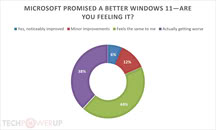 Regarding other responses in the poll, only 12.6% of participants reported that Microsoft managed to introduce a few minor improvements in their daily use, while just 6.3% noticed significant improvements. While the results vary, it's important to note that Windows 11 runs on half a billion PCs worldwide, many of which have unique configurations and hardware differences, each with its own issues and quirks.
At the recent IFA 2026 show, Microsoft confirmed that the company is listening to user feedback on various aspects of the Windows experience, including boot times, Windows Hello, and optimizations for PC systems with 8 GB of RAM. Microsoft is already working on improving Windows 11 performance through the Low Latency Profile, which is expanding to more applications and could potentially make software launch faster on less powerful hardware. However, we have yet to see these optimizations make a real-world impact, so for now, that remains uncertain.
What is perhaps more alarming is that many enthusiasts report a worse experience following Microsoft's promises. About 38.1% of the voters indicated they are experiencing actual degradation in day-to-day operations, as Microsoft continues to push updates that negatively impact everyday use and introduce more bugs. Notably, a recent example is the Windows 11 August update, which reset custom cursors to an oversized default one. In some cases, the color and size settings don't stick, no matter how many times they are changed. This update has also caused gameplay issues, such as forced crashes, random freezing, errors, and unexpected device restarts due to RGB peripherals.

At the recent IFA 2026 show, Microsoft confirmed that the company is listening to user feedback on various aspects of the Windows experience, including boot times, Windows Hello, and optimizations for PC systems with 8 GB of RAM. Microsoft is already working on improving Windows 11 performance through the Low Latency Profile, which is expanding to more applications and could potentially make software launch faster on less powerful hardware. However, we have yet to see these optimizations make a real-world impact, so for now, that remains uncertain.
84 Comments on Majority of TPU Users Don't See Microsoft's Promised Windows 11 Improvements
Yes, that's it; I posted a GIF if you remember. Again, seems to be due to WinUI and XAML islands being brought in as a component in the Win32 Explorer.
I have been playing a lot with 11 in VM, and now have it on my laptop.
Install start11v2 to get win10 menu.
Startallback to enhance file explorer and taskbar.
Everywhere, an actual decent search engine.
Various windhawk mods. The ones that I remember off top of my head.
- Show size of folder contents in file explorer (instant with everywhere backend).
- Show freespace and other additional info in status bar of file explorer.
- Fix a performance bug in file explorer by removing some coding loops. (wtf microsoft lol).
- Remove a large part of the bloated file explorer toolbar. (wtf microsoft).
Startallback I am torn between 10 style file explorer (with modern icons) or 11 style, 11 style does have tabs, but is slower and has too much padded UI. 11 style is a lot more viable with windhawk mods though.I also used a windhawk mod to standardise all windows borders on apps that dont respect it, namely edge and office 365 apps.
I've heard more than a few people say so, yes. I asked an AI and it agrees too:
[INDENT=2]
[INDENT=2]
[INDENT=2][/INDENT]
Sorry for all the AI quotes, I know a lot of folks don't particularly enjoy that.
Despite the speed regression mentioned above, I think the 11 Explorer is closer to classical Windows with regards to the toolbar.
Thanks!