Thursday, September 10th 2026

NVIDIA's Statistics Overlay Finally Shows CPU Temperature and Power Draw

NVIDIA App version 11.0.9 has added CPU temperature, clock speed, and power consumption to its built-in Statistics overlay. GeForce owners previously had to run a separate tool like HWiNFO or MSI Afterburner just to check processor thermals mid-game, so this brings one of the more requested features straight into NVIDIA's own software. To turn it on, open the NVIDIA app, press Alt+Z, head into the Statistics section, switch to Custom view, then enable the overlay with Alt+R. From there, pick which metrics show up, tweak the font size and color, and choose between a compact horizontal layout or a vertical stack if there's a lot on screen at once.

It works alongside DLSS override tracking too, so users can confirm which preset is actually running in a given game while keeping an eye on CPU numbers. That said, it's not a full replacement for dedicated monitoring software. VRAM and system RAM usage are still missing, and CPU utilization is reported as one overall number rather than broken out per core. Anyone who wants that level of granularity will still want RTSS running alongside it. For most GeForce users, though, this closes one of the more obvious gaps in the overlay, and it's nice not needing a third app open just to check the CPU temperature.
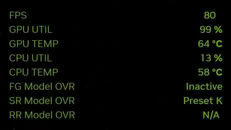
Source: Digital Foundry
Add your own comment

23 Comments on NVIDIA's Statistics Overlay Finally Shows CPU Temperature and Power Draw

#1
_larry
Meanwhile, AMD has been doing this for years..
Posted on Reply
#2
aalbass
Strange post... this has been available for a long time
Posted on Reply
#3
KLMR
Its all we were expecting from nvidia, at last, ty Jensen!
Posted on Reply
#4
DeathtoGnomes
the app doesnt look as intrusive as others of its ilk, ill give it a shot for a month or so.

One thing I already dont like is that you cant display on other monitors, only main monitor.
Posted on Reply
#5
Chaitanya
Everything other than GPU hotspot temp.
Posted on Reply
#6
FR3D1
Ninja Cat
DrUsmanSaleemGeForce owners previously had to run a separate tool like HWiNFO or MSI Afterburner just to check processor thermals mid-game
DrUsmanSaleemso this brings one of the more requested features straight into NVIDIA's own software.
NVIDIA hasn't just started offering this feature recently;

Nvidia FrameView

Regards,
Fred.
_larryMeanwhile, AMD has been doing this for years..
🥱
Posted on Reply
#7
phanbuey
i wish they made drivers with the ability to go into a lighter (less overhead) mode like AMDs. I feel like the 9070XT has really consistent MIN and 0.1% low performance even over my 4090.

I recently built a 270K (microcenter bundle) rig with a 9070XT with a friend and when we benched / OC'd it the lows and 0.1% lows were astonishingly tight. Such a smooth rig... ever since then I've started noticing in reviews that the 9070xt outperforms on the lows regardless of the setup (though the combo with the 270k made that even better).

Not sure but I think that has to do with the drivers not hogging up so many CPU cycles, would be nice to have that option.
Posted on Reply
#8
MikOnTopGG
Hasn't this already been available?
Posted on Reply
#9
Pets4Ever
I thought most people who would be interested in statistics would have this disabled for better compatibility with games. Extra overlays = no bueno
Posted on Reply
#10
phanbuey
Pets4EverI thought most people who would be interested in statistics would have this disabled for better compatibility with games. Extra overlays = no bueno
indeed - especially since windows Xbox game bar and steam and msi riva server all try to do it at the same time. Cpu is just getting hammered by mosquitos.
Posted on Reply
#11
Pets4Ever
phanbueyindeed - especially since windows Xbox game bar and steam and msi riva server all try to do it at the same time. Cpu is just getting hammered by mosquitos.
Xbox Game Bar
Steam Overlay
EA overlay
Nvidia Overlay
Discord Overlay
Recording software overlay (medal, obs etc)
Monitoring software (HWinfo, riva statistics etc)

There are too many overlays that could potentially be active at once.
Posted on Reply
#12
FR3D1
Ninja Cat
Pets4EverThere are too many overlays that could potentially be active at once.
You don't necessarily have to use them at the same time. However, in the case of the NVIDIA app (overlay/statistics display) and FrameView, this actually does cause a problem (since both are based on PresentMon!), resulting in that specific overlay crashing.

Best regards,
Fred.
Posted on Reply
#13
Dr. Dro
_larryMeanwhile, AMD has been doing this for years..
AMD also has the advantage of being a CPU vendor. But this has been available for a very long time, weird post.
phanbueyi wish they made drivers with the ability to go into a lighter (less overhead) mode like AMDs. I feel like the 9070XT has really consistent MIN and 0.1% low performance even over my 4090.

I recently built a 270K (microcenter bundle) rig with a 9070XT with a friend and when we benched / OC'd it the lows and 0.1% lows were astonishingly tight. Such a smooth rig... ever since then I've started noticing in reviews that the 9070xt outperforms on the lows regardless of the setup (though the combo with the 270k made that even better).

Not sure but I think that has to do with the drivers not hogging up so many CPU cycles, would be nice to have that option.
I cannot reproduce this behavior, my RTX 5090 system has always vastly outperformed my brother's 9070 XT system in lows, averages and maximums. The "better lows, especially on slower CPUs" should show crystal clear given hes on my old 3900XT and my 13900KS is much much faster. I also cannot observe any excessive CPU load with my 9850X3D system playing games at 1080p with the Titan V.

MLID swears by this tripe, but to this day I was never able to produce, reproduce or find anyone who could back this claim of Nvidia "driver overhead" with hard data.
Posted on Reply
#14
Pets4Ever
FR3D1You don't necessarily have to use them at the same time. However, in the case of the NVIDIA app (overlay/statistics display) and FrameView, this actually does cause a problem (since both are based on PresentMon!), resulting in that specific overlay crashing.

Best regards,
Fred.
Interesting, that's pretty egregious considering they are both Nvidia branded, you'd think they would have thought of what would happen when they both run.

I've had issues with games that either crashed or stuttered because too many overlays were active. The problem is that too many are active by default. Game Bar overlay enabled by default, Steam overlay enabled by default, most third party launchers have an overlay enabled by default. So if you open up a game by EA or Ubisoft through Steam you're already 3 overlays deep and you may not even realize it. Then you add one or two that you chose on purpose like a recording software or system status software and you've got 5 active overlays. These days I make sure I disable every overlay I am not actively using.
Posted on Reply
#15
phanbuey
Dr. DroAMD also has the advantage of being a CPU vendor. But this has been available for a very long time, weird post.


I cannot reproduce this behavior, my RTX 5090 system has always vastly outperformed my brother's 9070 XT system in lows, averages and maximums. The "better lows, especially on slower CPUs" should show crystal clear given hes on my old 3900XT and my 13900KS is much much faster. I also cannot observe any excessive CPU load with my 9850X3D system playing games at 1080p with the Titan V.

MLID swears by this tripe, but to this day I was never able to produce, reproduce or find anyone who could back this claim of Nvidia "driver overhead" with hard data.
You're sort of coming at it backwards - if you put your 5090 in his 3900xt system and then ran a CPU heavy game, he would get less fps than with the 9070xt, as long as the CPU is the bottleneck.


There is no universe where a 3900xt with a 9070xt ever beats a 13900k with a 5090.


here's an example for BF6 ^ the 9070xt should in theory never beat a 5080

as you pump the rez the roles will reverse (because the 5080 is just an objectively faster card by 30%):
Posted on Reply
#16
Dr. Dro
phanbueyYou're sort of coming at it backwards - if you put your 5090 in his 3900xt system and then ran a CPU heavy game, he would get less fps than with the 9070xt, as long as the CPU is the bottleneck.


There is no universe where a 3900xt with a 9070xt ever beats a 13900k with a 5090.


here's an example for BF6 ^ the 9070xt should in theory never beat a 5080

as you pump the rez the roles will reverse (because the 5080 is just an objectively faster card by 30%):
Your own screenshots are showing significantly lower CPU load on the Nvidia system in both resolutions shown, which goes directly against the claim of high CPU overhead. Given we're talking about a multiplayer game here, and server load cannot be consistently reproduced, this data is pretty much completely meaningless
Posted on Reply
#17
phanbuey
That's
Dr. DroYour own screenshots are showing significantly lower CPU load on the Nvidia system in both resolutions shown, which goes directly against the claim of high CPU overhead. Given we're talking about a multiplayer game here, and server load cannot be consistently reproduced, this data is pretty much completely meaningless
While great points - Thats' just because they're screenshots and the cpu load % fluctuates - there's more examples out there of CPU bottlenecked scenarios favoring AMD that are not multiplayer - I've seen enough evidence across multiple outlets (and latency mon rage threads) that I believe the nvidia tax is a real thing.

Now - is it basically meanignless on modern CPUs? Yes! but I also overclock to get that extra 3% of performance, so basically meaningless to me means "they could include a toggle to get me an extra 2-3% on top of my OC's and tweaks" - i would 100% hit that toggle - why not? gimme the toggle - no telemetry, no overlays, no runners, no helpers (unless they add performance), etc.
Posted on Reply
#18
kazuviking
Dr. Drowhich goes directly against the claim of high CPU overhead.
This is exactly what a cpu overhead looks like. The CPU just cannot send information fast enough so its usage is lower. At 4K the cpu usage is higher for nvidia so does the fps.
Posted on Reply
#19
Dr. Dro
kazuvikingThis is exactly what a cpu overhead looks like. The CPU just cannot send information fast enough so its usage is lower. At 4K the cpu usage is higher for nvidia so does the fps.
Why would driver overhead result in LOWER CPU utilization that isn't shown ANYWHERE - not on a task manager, not on a monitor, not even on a profiler?
Posted on Reply
#20
phanbuey
Dr. DroWhy would driver overhead result in LOWER CPU utilization that isn't shown ANYWHERE - not on a task manager, not on a monitor, not even on a profiler?
Because a driver can force the cpu to wait without doing anything (hence nvidia nvmddlkm.sys latency mon DPC/ISR freakouts) - when it does that a utilization graph will pick that up as the CPU being idle (which it is - it's waiting on the driver).

It may be what's happening there but hard to say since those bounce around pretty aggressively during gameplay so im not sure there's even a material difference there.

At the end of the day a card that's 30% slower, suddenly matching perfomance on slower CPUs and bottlenecked resolutions, across a range of titles including single player games, is a pretty good indicator that the drivers are misbehaving a bit.

I mean look at TPUs own reviews even with a 9800x3d:


It goes from matching a 5090 at 1080P to being only slightly behind and matching a 5080 at 1440P and then to getting beat by the 5070ti at 4k. Game is heavily CPU bound at 95-96FPS ceiling but even across the mid range resolution the AMD cards outperform their class - it's only once you get FULLY GPU bound that they start falling down. Notice also none of the nvidia cards do that they pretty much stay in the same order - you can flip through a bunch of game reviews and you will see the same thing, and I think w1zz even calls it out it in a few of them.

So in a very-heavy CPU bound scenario a similar performing nv card will push 90fps while the amd equivalent card is pushing 96, or in 1440P where the 9070XT pushes 71 and the 5070ti pushes 66 - that's a good amount of overhead to me on a 9800x3d even - since if you're playing this in 4k you're probably upscaling and the 5070ti would feel slower despite being the same/faster.
Posted on Reply
#21
kazuviking
Dr. DroWhy would driver overhead result in LOWER CPU utilization that isn't shown ANYWHERE - not on a task manager, not on a monitor, not even on a profiler?
This can be easly checked with presentmon as it have gpu busy and gpu wait which you can compare to cpu busy and cpu wait. Or you can take the frametime, gpu wait and the differnce between them will be your cpu overhead/bottleneck. CapframeX have this built in already as gpu busy deviation.
Posted on Reply
#22
DeathtoGnomes
takes up too much memory, doesnt shut off... doesnt use a lot of CPU is the only plus i seen.
Posted on Reply
#23
Sleazus
Now if they could give us the official option to use dlss5 before upscaling, that'd be nice
Posted on Reply
Add your own comment
Nov 11th, 2026 07:08 CST change timezone

New Forum Posts

Popular Reviews

TPU on YouTube

Controversial News Posts