Monday, October 5th 2026

Windows 11 26H2 Update Lowers RAM Consumption

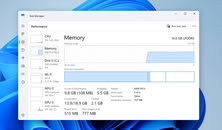
When Microsoft released its Windows 11 26H2 update last week, it didn't include many under-the-hood changes that would affect everyday users. However, according to Windows Latest and several Reddit users, the update reportedly reduces RAM consumption when the system is idle, and even when does better management of RAM when applications are loaded. This improvement wasn't advertised by Microsoft, but it seems to be a welcome change for those who prefer lower RAM usage when not running any tasks. On Reddit, users are reporting a reduction in memory consumption of around 2 GB, with some experiencing up to a 3 GB decrease in idle RAM usage. Testing by Windows Latest on a laptop with 16 GB of RAM shows that, whereas it usually idled at 10 GB of usage, it now consumes 7 GB, with 4 GB of that cached and 8.8 GB available.

The update also introduces features like the Low Latency Profile, which is expanding to nearly all applications and could potentially make software launch faster on weaker hardware. Previously available for Microsoft-branded "in-box" applications, this feature boosts the CPU to its maximum frequency for 1-3 seconds, resulting in noticeably smoother app launches during testing. Launching Microsoft applications like Edge and Outlook is about 40% faster, and other applications, such as the Start Menu and context menus across the operating system, may be up to 70% faster. Now, other applications are receiving this update, which means the overall experience will be much smoother.
Finally, it is worth pointing out that when Windows loads something in the background, it doesn't necessarily mean that the RAM consumption is wasted. Windows caches services and applications in RAM to ensure that once a user needs a service, the application is already loaded in the background, providing an instantaneous response. This, however, doesn't mean that Windows is perfect and unnecessary telemetry isn't present, but Microsoft has surely made optimizations to find a balance between needed background applications to operate smoothly and just enough space to free up some capacity.
Sources: Windows Latest, Reddit
Add your own comment

76 Comments on Windows 11 26H2 Update Lowers RAM Consumption

#26
Onasi
Dr. DroSeems like S.S.D.D. here and this is a day old 26H2 install

Day old is actually realistic, as any OS, it’s expected that it will run heavier initially since it hasn’t REALLY finished setup yet. Give it couple of days, some bloat removal and I can bet it will get to 3-ish.
dgianstefaniUnused RAM is wasted RAM. People do obsess over using minimal amounts, and while there is some logic to that regarding CPU usage etc. It doesn't really matter if the application is cached in RAM when not used, then ends up used, or it isn't used, something else is, and it's removed from cache to make space for that other thing.
Agreed, but I am baffled BECAUSE I don’t obsess over RAM. I haven’t religiously cut apart my install to run as little memory as possible. Hell, I have fucking Resume in the background since I am too lazy to turn it off. I am still at 3 or below though. I guess just removing the tick on the “Launch *insert shitty Electron/CFE app* at boot” is some hyper-advanced optimization that makes me a Tech-Priest? I guess?
Posted on Reply
#27
maxli86
Fresh install of Windows 11 26H2 fresh start RAM consumption is around less than 4GB.
Been testing various PC to verify this observation so far it is confirm.
Windows 11 26H2 does feel snappier due to RAM optimization is one thing.
I did notice RAM does not spike that aggressively previous Windows 11 build are atrocious for consuming lots of RAM.

The more apps or program you open the RAM consumption spike up but 26H2 seems different.
PS take my opinion with grain of salt as it may differ from PC to PC.
Mine is using 32GB will test on 16GB to understand it's behaviour.
Posted on Reply
#28
Wirko
maxli86Mine is using 32GB will test on 16GB to understand it's behaviour.
If you can be bothered and have 8 GB sticks, could you also test with only 8 GB? It would tell a lot about how the OS manages itself and the applications under high memory pressure.
Posted on Reply
#29
maxli86
WirkoIf you can be bothered and have 8 GB sticks, could you also test with only 8 GB? It would tell a lot about how the OS manages itself and the applications under high memory pressure.
Sure I can do that.
Posted on Reply
#30
dgianstefani
TPU Proofreader
WirkoIf you can be bothered and have 8 GB sticks, could you also test with only 8 GB? It would tell a lot about how the OS manages itself and the applications under high memory pressure.
This update was specifically designed to work well on 8 GB machines, that's the new 16 GB entry level tier due to memory prices, and MS is aware of that.
Posted on Reply
#32
Dr. Dro
OnasiDay old is actually realistic, as any OS, it’s expected that it will run heavier initially since it hasn’t REALLY finished setup yet. Give it couple of days, some bloat removal and I can bet it will get to 3-ish.


Agreed, but I am baffled BECAUSE I don’t obsess over RAM. I haven’t religiously cut apart my install to run as little memory as possible. Hell, I have fucking Resume in the background since I am too lazy to turn it off. I am still at 3 or below though. I guess just removing the tick on the “Launch *insert shitty Electron/CFE app* at boot” is some hyper-advanced optimization that makes me a Tech-Priest? I guess?
We'll see, it's already configured with my usual optimizations and updated. I do feel like it's a lot more polished than it was about a year ago though
Posted on Reply
#33
GeoffreyA
WirkoIf you can be bothered and have 8 GB sticks, could you also test with only 8 GB? It would tell a lot about how the OS manages itself and the applications under high memory pressure.
A VM is another way to test this.
OnasiThe fuck are those idle numbers? My system is at, like, 2.5 gigs at idle with 32 gigs of RAM. What are those systems even doing to idle at 10? Before someone brings up browser tabs - I don’t consider that being “idle”. To me, and AFAIK to any sensible person, “idle Windows” is what the OS uses showing the desktop after a clean boot and a couple of minutes to finish up all startup scheduled tasks to reach steady memory state. As far as that definition goes, I have never seen a competently ran Windows install that would consume 10 gigabytes of fucking RAM.
The context missing from this article is that the laptop had various startup programs running:

"The 7GB shown could’ve been smaller if it weren’t for the startup apps: Lenovo Smart Connect, Plex, Quick Share, PowerToys, WhatsApp, Teams, and more." (Windows Latest)

But the key point is the relative difference.
Posted on Reply
#34
droopyRO
SleepDart"Unused RAM is wasted RAM" You need to have more than you need, to evade issue related to your SSD becoming a paper weight.
I don't think that is an issue for modern SSD's. Maybe for an 60GB SSD made in 2010 :)
Posted on Reply
#35
AsRock
TPU addict
KonceptzI'm at 5.0gb.
4GB here with what i want to use, W10.


Posted on Reply
#36
Windows_worker
It's time for Windows 11 to lower CPU requirement, eliminate UEFI and TPM 2.0 compliance to run, when Google is encouraging people to switch to Google Book. Windows is getting unpopular since the launch of Windows 11. It has so many problems that people are downgrading to Windows 10 and even Windows 7. I know Windows 7 does not have a lot of browsers for the internet but there is a way to solve this issues. These OS are stable light weight, secure and assures privacy compared to Windows 11. I simply didn't like Windows 11 by the look of its desktop.
Posted on Reply
#37
Zhebroni
23h2 without microslop bloat and another drivers bloatware...
Posted on Reply
#38
AntiX3DGlazer
zaku49Windows will try to cache everything into ram, it will also cache things it predicts you might open. It's working as designed and will free up the ram as needed. More being used is actually a good thing based on how modern systems work. The more ram you have the more it will try to cache.
Absolutely. Too much discourse misses this.
Posted on Reply
#39
Guwapo77
I believe this update may have introduced an occasional and reoccurring stutter to my games. This is the only update I've made to my computer recently.
Posted on Reply
#40
AntiX3DGlazer
Windows_workerIt's time for Windows 11 to lower CPU requirement, eliminate UEFI and TPM 2.0 compliance to run, when Google is encouraging people to switch to Google Book. Windows is getting unpopular since the launch of Windows 11. It has so many problems that people are downgrading to Windows 10 and even Windows 7. I know Windows 7 does not have a lot of browsers for the internet but there is a way to solve this issues. These OS are stable light weight, secure and assures privacy compared to Windows 11. I simply didn't like Windows 11 by the look of its desktop.
1 billion users and counting!
Posted on Reply
#41
harm9963
What you can do for yourself ,I know how to control my system RAM and stuff running in the background plus start up with services .
Posted on Reply
#42
windwhirl
Windows_workerIt's time for Windows 11 to lower CPU requirement, eliminate UEFI and TPM 2.0 compliance to run, when Google is encouraging people to switch to Google Book. Windows is getting unpopular since the launch of Windows 11. It has so many problems that people are downgrading to Windows 10 and even Windows 7. I know Windows 7 does not have a lot of browsers for the internet but there is a way to solve this issues. These OS are stable light weight, secure and assures privacy compared to Windows 11. I simply didn't like Windows 11 by the look of its desktop.
You think they care? :roll:

Let's dismantle all that:
Windows_workerIt's time for Windows 11 to lower CPU requirement,
Not gonna happen. Microsoft wants to take advantage of all the cool stuff found in newer processors, and they really shouldn't go "hey, we supported this CPU in 25H2 but now we are not supporting it from 26H2 and later." By establishing a baseline set of required features and a minimum processor generation, they are giving themselves space to take advantage of new features without having to care for really old processors and without designing themselves into a corner too soon.

Also, tbh, anything prior to Zen2/Kaby Lake is fairly old now. If you can't run Windows 11 because of CPU architecture, there's ESU updates for Windows 10, there's Linux, there's W10 LTSC. You're not lacking in alternative options.
Windows_workereliminate UEFI
The entire fucking world moved away from BIOS to the much more modern UEFI. Nobody is gonna move back to an old platform type that is outdated and has been long surpassed by UEFI. It's not even supported by some hardware devices to go back to BIOS.
Windows_workerTPM 2.0 compliance
This is the only somewhat reasonable thing so far...
Windows_workerwhen Google is encouraging people to switch to Google Book.
But this is the wrong reasoning. Googlebooks come with TPM enabled. In fact, every single processor from Intel or AMD in the last, roughly, 10 years, come with TPM built-in, and in the last 3 or 4 years every motherboard maker has changed their default UEFI settings to enable TPM, if it wasn't already enabled that way even further back. So arguing that it shouldn't be required entirely on the basis of Googlebooks is the wrong argument.

Realistically, there's nothing wrong with TPM in itself. The problem lies more in people building entire security or compliance architectures that fall apart the moment the TPM is removed from the picture or compromised somehow.
Windows_workerWindows is getting unpopular since the launch of Windows 11. It has so many problems that people are downgrading to Windows 10 and even Windows 7.
The only thing we usually hear is the people complaining. The people that don't have issues with it usually don't say a peep.

Additionally, Windows is used nearly everywhere. If a single issue affects a 0.1% of the total userbase, that's still a million of humans that are very angry that their printer doesn't print from Windows 11, or whatever other issue it may be. So any issue that isn't ultra niche enough gets traction fast.
Windows_workerI know Windows 7 does not have a lot of browsers for the internet but there is a way to solve this issues.
Firefox still supports Windows 7 and will continue supporting it until early next year, if I recall correctly.
Windows_workerThese OS are stable light weight, secure and assures privacy compared to Windows 11.
True, not true, and somewhat true.
Lightweight, sure.
Secure no. There's no more updates for the W7 codebase so "secure" depends entirely on how much you can minimize the attack surface exposure and a bit of luck.
And privacy is sort of true, unless you installed the telemetry updates that Microsoft shipped for Windows 7. As for Windows 11, you can reduce the telemetry somewhat with its user-facing toggles.
Additionally, Windows 7 is old. It lacks support for a number of things out of the box, such as USB 3.0, so you need drivers that support the newer stuff. Hardware makers are more and more unlikely to make drivers for a certain operating system the longer that OS has been out of support.
Windows_workerI simply didn't like Windows 11 by the look of its desktop.
And this is technically irrelevant.
Posted on Reply
#43
DaemonForce
Windows_workerIt's time for Windows 11 to lower CPU requirement, eliminate UEFI and TPM 2.0 compliance to run
The day Win11 raised the CPU requirement, I retired the spare workstation to permanent server duty.
zaku49Windows will try to cache everything into ram, it will also cache things it predicts you might open.
The old SuperFetch technology made sense when everything was still HDD (or ~30GB SSD if you were rich on the emerging 2009-2010 market) but is no longer needed.
We are now in a world of desktops and servers with SSD boot volumes in their 5th generation. 4th if you're clever and mindful during a global DRAM crunch.
Point is, there's a difference between HDD R/W speeds hovering at 45MB/s, first gen sata SSD at 150-215MB/s and current M.2 SSDs floating 13-14GB/s.
There is such a thing as too fast, as I've encountered with SteamVR perpetually logging to (trashing) a new 3rd gen M.2 to the tune of 11MB/s. Hard to catch.
droopyROI don't think that is an issue for modern SSD's. Maybe for an 60GB SSD made in 2010 :)
Written to hell and back. Still runs fine.

Also that's the primary boot volume on my 2019 FX rack and current production server. Everything about that sounds awful, I know.
Going by this entire thread, the real world idle consumption would be absolutely atrocious on Win11. Glad I stayed off of it.
OBS opens, CPU spikes 65% and ram loads up to 20%. Brave opens 10 tabs, CPU jumps to 57%, ram jumps to 30%. Still good.
Windows_workerI simply didn't like Windows 11 by the look of its desktop.
Appearance can be managed like every Windows before it. Try the sluggish loading of menus, disruptive change to menu structure, binary versioning disrupting workflows, interruption or outright disabling of jump lists, forced AI integration in randomly "upgraded" Office apps, unprompted network interruption and hijacking of the entire workstation by rogue telemetry going apeshit on Google DNS, etc. I'll stay on 10/2019.
Posted on Reply
#44
lexluthermiester
I've been testing the ISO's via fresh installs and can confirm this one. RAM usage is reduced. By how much seems to depend on system specs and Windows config.
Posted on Reply
#45
maxli86
lexluthermiesterI've been testing the ISO's via fresh installs and can confirm this one. RAM usage is reduced. By how much seems to depend on system specs and Windows config.
This I conclude, so far I tested PC using 32gb and 16gb.
RAM consumption on fresh install hovers less than 4gb.
The only test I kind of reluctant to do is fresh install of Windows 11 with only 8GB of ram.
😂
A promise is a promise that I will do it, it's just have to bear the duration to do that testing. Lol!
Posted on Reply
#46
shamus21
Well i use a few different low end laptops at work and i can say that i have noticed no improvements in every day use what so ever. i still find the few that we have that still have windows 10 installed due software incompatibility with windows 11 work considerable better.
again this is just more Microsoft misinformation. Same old crap.
Posted on Reply
#47
xxxZAURxxx
Microslop should have shut down the company after Windows 8.1.

This my Custom 8.1

Posted on Reply
#49
maxli86
_Zaur_Microslop should have shut down the company after Windows 8.1.

This my Custom 8.1

I still have a Windows 8.1 PC running, RAM usage not as low as yours.
Around 1.5GB but certain apps no longer can run on Windows 8.1.
Posted on Reply
#50
Thimblewad
Can't complain.
I only ever saw over 32 GB of use when editing my TV shows (3x4k cam source).
Posted on Reply
Add your own comment
Nov 23rd, 2026 06:54 CST change timezone

New Forum Posts

Popular Reviews

TPU on YouTube

Controversial News Posts