Monday, October 5th 2026

Windows 11 26H2 Update Lowers RAM Consumption

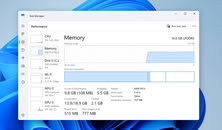
When Microsoft released its Windows 11 26H2 update last week, it didn't include many under-the-hood changes that would affect everyday users. However, according to Windows Latest and several Reddit users, the update reportedly reduces RAM consumption when the system is idle, and even when does better management of RAM when applications are loaded. This improvement wasn't advertised by Microsoft, but it seems to be a welcome change for those who prefer lower RAM usage when not running any tasks. On Reddit, users are reporting a reduction in memory consumption of around 2 GB, with some experiencing up to a 3 GB decrease in idle RAM usage. Testing by Windows Latest on a laptop with 16 GB of RAM shows that, whereas it usually idled at 10 GB of usage, it now consumes 7 GB, with 4 GB of that cached and 8.8 GB available.

The update also introduces features like the Low Latency Profile, which is expanding to nearly all applications and could potentially make software launch faster on weaker hardware. Previously available for Microsoft-branded "in-box" applications, this feature boosts the CPU to its maximum frequency for 1-3 seconds, resulting in noticeably smoother app launches during testing. Launching Microsoft applications like Edge and Outlook is about 40% faster, and other applications, such as the Start Menu and context menus across the operating system, may be up to 70% faster. Now, other applications are receiving this update, which means the overall experience will be much smoother.
Finally, it is worth pointing out that when Windows loads something in the background, it doesn't necessarily mean that the RAM consumption is wasted. Windows caches services and applications in RAM to ensure that once a user needs a service, the application is already loaded in the background, providing an instantaneous response. This, however, doesn't mean that Windows is perfect and unnecessary telemetry isn't present, but Microsoft has surely made optimizations to find a balance between needed background applications to operate smoothly and just enough space to free up some capacity.
Sources: Windows Latest, Reddit
Add your own comment

76 Comments on Windows 11 26H2 Update Lowers RAM Consumption

#51
Dr. Dro
OnasiDay old is actually realistic, as any OS, it’s expected that it will run heavier initially since it hasn’t REALLY finished setup yet. Give it couple of days, some bloat removal and I can bet it will get to 3-ish.
Day 2, let's see if it improves as das pass by. Nothing was installed since - all the PC has been used for is some Genshin

Posted on Reply
#52
jameslapc
Dubiopolis"Idle"

My work laptop is the same
Crazy thing is I barely have anything open. Just the 10k apps work puts on the computer leaking like crazy.
Posted on Reply
#53
_roman_
Faster computer, same task,

below 2GIB DRAM usage with the same www-client, but much longer uptime. And no cheating with extra ram usage written to the nvme like what windows 11 does


that is a hard fact

Windows needs over 200% for the same www-client and wlan connection. Different cpu architecture, one amd64 with and one without avx512.

I do not tune that box for over 10 years. I am sure i could compress the dram even more when i would rize the compiler like i did around 2010. Tweak the software, change the software. I have very bloated user interface installed. There are projects which reduce the software usage far more than the components i use on a daily basis, the software of this screenshot.

DRAM has to stay free, one box has pcie 4 lanes pcie 3.o the other has storage pice 4 with 4 lanes. Nothing needs to be cached. Taht is a hoax from year 1995 to cache stuff in DRAM for faster loading times.
When you have such issues, you have an issue with slow file system, e.g. ext4, ntfs, vfat, etc. or other issues, slow PCIE bus, slow storage, etc.

-- Anyway Windows needs to loose bare minimum 3GiB DRAM idle DRAM consumption. Even that end result number is far too high DRAM consumption.

I could build the software for code size or dram size which i do not do of course or execution speeds. i use default values, which are mediocre and waste also too much dram.
Posted on Reply
#54
Raiden85
OnasiThe fuck are those idle numbers? My system is at, like, 2.5 gigs at idle with 32 gigs of RAM. What are those systems even doing to idle at 10? Before someone brings up browser tabs - I don’t consider that being “idle”. To me, and AFAIK to any sensible person, “idle Windows” is what the OS uses showing the desktop after a clean boot and a couple of minutes to finish up all startup scheduled tasks to reach steady memory state. As far as that definition goes, I have never seen a competently ran Windows install that would consume 10 gigabytes of fucking RAM.
The last time I had a system idle with 2.5GB RAM usage was probably around the Windows Vista days. I have 64GB and by the time some of my programs have started in the background that I use, I’m usually at 10GB to 11GB of RAM usage before I even open things like Chrome, and this is also on 26H2.

Even my MacBook Air with 16GB idles around 4GB to 5GB before caching at boot.
Posted on Reply
#55
Wirko
maxli86This I conclude, so far I tested PC using 32gb and 16gb.
RAM consumption on fresh install hovers less than 4gb.
The only test I kind of reluctant to do is fresh install of Windows 11 with only 8GB of ram.
😂
A promise is a promise that I will do it, it's just have to bear the duration to do that testing. Lol!
You're doing a separate install with 8 GB? Why don't you just remove/replace DIMMs after testing with 32 and 16?
GeoffreyAA VM is another way to test this.
True, with the added bonus of being able to squeeze memory size further down.
Posted on Reply
#56
lexluthermiester
maxli86RAM consumption on fresh install hovers less than 4gb.
On the systems I tested, it was hovering around 1.2 to 1.4 GB. So to microsoft's credit, they are actually making improvements to memory management.

Of course, on the down-side they've renamed Windows Defender to "microsoft defender) and made it more difficult to disable/remove. It can still be done, just takes a bit more effort.
Posted on Reply
#57
RootinTootinPootin
lexluthermiesterI've been testing the ISO's via fresh installs and can confirm this one. RAM usage is reduced. By how much seems to depend on system specs and Windows config.
I will build an ISO tomorrow, is 27H1 worth trying?
Posted on Reply
#58
dgianstefani
TPU Proofreader
RootinTootinPootinI will build an ISO tomorrow, is 27H1 worth trying?
I doubt it, "release" ISOs are buggy enough these days, let alone insider preview ones.
Posted on Reply
#59
windwhirl
dgianstefaniI doubt it, "release" ISOs are buggy enough these days, let alone insider preview ones.
27H1 doesn't exist yet anyway.

Experimental Future Platforms is just "Dev" and it's not meant to be any specific future release.
Posted on Reply
#60
dgianstefani
TPU Proofreader
windwhirl27H1 doesn't exist yet anyway.

Experimental Future Platforms is just "Dev" and it's not meant to be any specific future release.
Yeah I did wonder "bit early for that?" but assumed it must have been released in some form online if he was talking about it.

I'm firmly happy on 24H2 LTSC, and likely will be until 28H2.
Posted on Reply
#61
droopyRO
My 6 years laptop, had the option to update to 26H2. But the idle usage of RAM is about 5GB out of 16GB total. None of my desktops have the option to update to 26H2 though 🤷
Posted on Reply
#62
windwhirl
droopyROMy 6 years laptop, had the option to update to 26H2. But the idle usage of RAM is about 5GB out of 16GB total. None of my desktops have the option to update to 26H2 though 🤷
Microsoft is probably doing staggered rollout like usual. You most likely will get the offer in the coming months.
Posted on Reply
#63
lexluthermiester
RootinTootinPootinI will build an ISO tomorrow, is 27H1 worth trying?
Seriously? Just is case, No!
maxli86The only test I kind of reluctant to do is fresh install of Windows 11 with only 8GB of ram.
😂
I've tried it, perfectly fine. Memory management seems to have been improved to a very good level. Tried it down to 4GB. 4GB is doable but 6GB is what I would consider the usable starting point for 26H2.
Posted on Reply
#64
mechtech
OnasiThe fuck are those idle numbers? My system is at, like, 2.5 gigs at idle with 32 gigs of RAM. What are those systems even doing to idle at 10? Before someone brings up browser tabs - I don’t consider that being “idle”. To me, and AFAIK to any sensible person, “idle Windows” is what the OS uses showing the desktop after a clean boot and a couple of minutes to finish up all startup scheduled tasks to reach steady memory state. As far as that definition goes, I have never seen a competently ran Windows install that would consume 10 gigabytes of fucking RAM.
Our work laptops with all the corp security and spyware idle at 14GB/32GB................

My home desktop with w11 24h2 ltsc trial with FF open and nothing else and basically nothing installed
Posted on Reply
#65
jameslapc
mechtechOur work laptops with all the corp security and spyware idle at 14GB/32GB................

My home desktop with w11 24h2 ltsc trial with FF open and nothing else and basically nothing installed
Basically how my company's work laptops are. Opening Teams makes it sound like a 747 taking off.
Posted on Reply
#66
Vista2003
Honestly 26H2, gets pretty close to a Win10 22H2 system. Though close but no cigar.

My Windows 10 ThinkPad at idle with just the background tasks running.

Posted on Reply
#67
Dubiopolis

Just turned my work pc on.


Openned up all of my work apps. They really did drop the ram usage
Posted on Reply
#68
jdrch
Laughs in 256 GB RAM
Posted on Reply
#69
Razor512
For me the memory usage didn't improve at least on my laptop.

Furthermore, the RAM usage is still ridiculous. Both windows 10 and windows 11 will scale their memory usage depending on how much RAM the system, has up to a certain point. I currently use windows 10 on my desktop, and windows 11 on my laptop.
The windows 10 desktop has 64GB of RAM (within the lower region of the recommend amount of RAM for windows 10).
The laptop has 32GB (real world bare minimum for windows 11).

With that in mind, windows 10 can load the OS, radeon software, logitech's software, PIA, and dispcalgui's display calibration profile loader, and still stay under well under 4GB of RAM usage.

On the other hand, windows 11 26H2, with some debloating, as well as the intel graphics software loading, as well as the audio driver service that dell uses for waves maxx audio, it takes 6.5GB of RAM.

PS, earlier versions of windows 11 used less RAM than 26H2


Posted on Reply
#70
lexluthermiester
Razor512On the other hand, windows 11, with some debloating, as well as the intel graphics software loading, as well as the audio driver service that dell uses for waves maxx audio, it takes 6.5GB of RAM.
You're letting things run in the background that shouldn't be. Again;

This was with drivers installed but before I'd finished my customizing, debloating and whatnot.

So either I'm doing something I didn't realize was really amazing or everyone else is missing something.
Posted on Reply
#71
Razor512
I haven't tried the IOT version yet, I wonder if it makes a good difference relating to bloat. Beyond that, windows 11 pro is horribly inefficient.


Beyond that, some of the bloat is hard to avoid, e.g., seemingly for every dell latitude that relies on waves maxx audio, it seems they use really horrible speakers that relies on a custom EQ and psychoacoustics to sound right, thus the speakers sound drastically better with their driver software as compared to using a basic EQ in a music player or video player, only issue is it takes around 320MB of RAM.
Posted on Reply
#72
lexluthermiester
Razor512I haven't tried the IOT version yet, I wonder if it makes a good difference relating to bloat. Beyond that, windows 11 pro is horribly inefficient.

Even Pro can be debloated to an acceptable level. I like IOT/LTSC because it's easier to get leaned up and doesn't get a bunch of crap automagically installed to it by updates.
Posted on Reply
#73
Razor512
Overall, it sucks that with windows 10, I can have more stuff in the startup (Logitech gaming software, MSI afterburner, AMD radeon related software, display cal profile loader, creative audio driver software (uses only about 4MB of RAM :) to implement all of the audio features and settings once configured), and PIA for the VPN. and it still uses far less than a laptop with less RAM running windows 11. And on windows 10, I didn't do much debloating beyond getting rid of the extra software and copilot junk that microsoft installs, as well as everything related to onedrive, the office 365 junk, and and the game bloat for things like solitaire as well as disabling any related services for them. It is just weird how microsoft managed to make windows 11 so bloated while adding virtually no new features.

PS, the laptop is an ancient Dell Latitude 5330, with the only change being upgrading the SSD and installing a Intel BE200 WiFi adapter, out of the limited upgrade options, it wat least allows for faster backups and working with files on my NAS, since when in the same room as the AP, it can hit a moderately acceptable throughput of 4.1Gbps.

Posted on Reply
#74
GeoffreyA
Apart from the flabby, unnecessary apps on the consumer release, Windows scales memory usage based on how much RAM there is. I tested this not too long ago in a VM.
GeoffreyA in Microsoft Promises Better Windows 11 Memory EfficiencyDid some testing on a fresh 11 LTSC 24H2 VM, untouched except opening TM, Notepad, and Paint, and the evidence suggests that, at idle, Windows caches rather than filling up memory with "bloat." 512MB…
It is quite possible that, in 26H2, they curtailed the aggressiveness of the caching algorithm.
Posted on Reply
#75
WOLFTECHS
AleksandarKWhen Microsoft released its Windows 11 26H2 update last week, it didn't include many under-the-hood changes that would affect everyday users. However, according to Windows Latest and several Reddit users, the update reportedly reduces RAM consumption when the system is idle, and even when does better management of RAM when applications are loaded. This improvement wasn't advertised by Microsoft, but it seems to be a welcome change for those who prefer lower RAM usage when not running any tasks. On Reddit, users are reporting a reduction in memory consumption of around 2 GB, with some experiencing up to a 3 GB decrease in idle RAM usage. Testing by Windows Latest on a laptop with 16 GB of RAM shows that, whereas it usually idled at 10 GB of usage, it now consumes 7 GB, with 4 GB of that cached and 8.8 GB available.

The update also introduces features like the Low Latency Profile, which is expanding to nearly all applications and could potentially make software launch faster on weaker hardware. Previously available for Microsoft-branded "in-box" applications, this feature boosts the CPU to its maximum frequency for 1-3 seconds, resulting in noticeably smoother app launches during testing. Launching Microsoft applications like Edge and Outlook is about 40% faster, and other applications, such as the Start Menu and context menus across the operating system, may be up to 70% faster. Now, other applications are receiving this update, which means the overall experience will be much smoother.

Finally, it is worth pointing out that when Windows loads something in the background, it doesn't necessarily mean that the RAM consumption is wasted. Windows caches services and applications in RAM to ensure that once a user needs a service, the application is already loaded in the background, providing an instantaneous response. This, however, doesn't mean that Windows is perfect and unnecessary telemetry isn't present, but Microsoft has surely made optimizations to find a balance between needed background applications to operate smoothly and just enough space to free up some capacity.
The "10 GB Idle" is a Myth: As many users pointed out in the discussion, a clean install, competently run Windows 11 does not idle at 10 GB of active RAM unless there's heavy OEM bloatware, a stack of background services, or user error in reading Task Manager.

Active vs. Cached Memory: Out-of-the-box Windows is designed to pre-load and cache apps and services into RAM to make launching things faster (which frees up instantly if an active app actually needs that memory). Outlets sometimes misinterpret total allocated or cached footprints as "active idle usage.

While dramatic idle drops are largely sensationalized, the 26H2 update does expand the Low Latency Profile system-wide. This feature temporarily bursts the CPU frequency during app launches to make elements like the Start Menu and system context menus feel significantly snappier, which is a genuine under-the-hood optimization. So, when your start up, apps gets a bust heats up the Cpu for a moment and then cools down

So, is Windows suddenly carving out 3 GB of pure free space across the board? Not really. If your system is already well-optimized, you likely won't see a dramatic shift, so pls optimize windows everyone must do it but many dont know about it?


1. Disable Unnecessary Startup Apps: Task Manager.
Press Ctrl + Shift + Esc to open Task Manager, navigate to the Startup apps tab (the speedometer icon on the left), and disable non-essential programs (like Discord, Steam, or update helpers) from launching automatically.
Verification: Check that fewer non-system tray icons appear in the bottom-right corner after rebooting. Its A MUST Also you can go into Windows Settings and look up startup

2. Clean Up Background Services and Telemetry, Settings.
Go to Settings > Privacy & security and turn off unnecessary background app permissions, diagnostic data sharing, and tailored experiences to reduce background CPU wake-ups.

Verification: Monitor CPU and memory usage in Task Manager while the system sits idle on the desktop.

3. Streamline Visual Effects: System Properties.
Press Win + R, type sysdm.cpl, go to the Advanced tab, click Settings under Performance, and select Adjust for best performance (or manually uncheck animations and shadows you don't mind losing).

Verification: Windows animations (like minimizing and opening windows) will feel sharper and more instantaneous. it turns off animations that makes ur system feel smooth oh and remember turn off transparency too,

4. Purge Temporary Files and Bloat: Storage Sense.
Go to Settings > System > Storage and enable Storage Sense, or open Disk Cleanup (cleanmgr) to wipe out leftover Windows update files, temporary installation files, and the system cache.

Verification: Check free space on your primary drive in File Explorer before and after running the cleanup.

I hope it helps. I do this on every client pc i get.
Posted on Reply
Add your own comment
Nov 23rd, 2026 07:02 CST change timezone

New Forum Posts

Popular Reviews

TPU on YouTube

Controversial News Posts