Monday, November 3rd 2025

Windows 11 Finally Fixes "Update and Shut Down" Functionality After a Decade
If you ever tried the infamous "Update and shut down" option in any Windows build, it often leads to a reboot instead to an actual shutdown. Now, Microsoft has finally fixed this issue starting with Windows 11 25H2 Build 26200.7019 (or 26100.7019 on 24H2). According to the Windows Latest, Microsoft has shipped this broken functionality way back with Windows 10, and has never fixed it since. However, the Windows teams working behind the update have finally managed to ship a working solution with a note stating in Windows 11 experiences that the new build: "Addressed underlying issue which can cause "Update and shutdown" to not actually shut down your PC after updating."
Microsoft has not disclosed the exact cause of the failure, but Windows Latest speculates it might be due to a race condition or an issue within the Windows Servicing Stack. When a user selects "Update and shut down," the operating system must complete two sequential tasks: applying all pending updates and then shutting down the computer. This process isn't straightforward because Windows needs to reboot into an offline servicing phase to replace locked system files, as indicated by the "working on updates" message. After this phase, the machine should power off, but instead, it returns to the login screen. The most likely explanation is that the Servicing Stack either fails to save or never receives the shutdown instruction, with the directive possibly getting lost during the reboot due to a timing conflict or interference from features like Fast Startup.
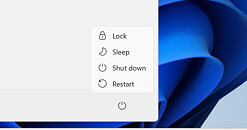 This bug has plagued Windows PCs since the announcement of Windows 10 and has been an issue for an entire decade. Countless users relied on this feature to mark the end of their workday with an updated PC that would shut down once updates were complete. Instead, users often found their machines powered on and sitting idle. Laptop users who left their PCs on battery power frequently discovered their devices drained, and if someone left their laptop before heading out or going to sleep, the issue was a significant source of trouble. Thankfully, Microsoft is gradually ironing out bugs like this to enhance the Windows 11 experience.
Source:
Windows Latest
Microsoft has not disclosed the exact cause of the failure, but Windows Latest speculates it might be due to a race condition or an issue within the Windows Servicing Stack. When a user selects "Update and shut down," the operating system must complete two sequential tasks: applying all pending updates and then shutting down the computer. This process isn't straightforward because Windows needs to reboot into an offline servicing phase to replace locked system files, as indicated by the "working on updates" message. After this phase, the machine should power off, but instead, it returns to the login screen. The most likely explanation is that the Servicing Stack either fails to save or never receives the shutdown instruction, with the directive possibly getting lost during the reboot due to a timing conflict or interference from features like Fast Startup.


32 Comments on Windows 11 Finally Fixes "Update and Shut Down" Functionality After a Decade
I think it's irrelevant when I'm forced to do the update, at that point I'll need to wait for the computer to finish before putting it on my backpack so if having to click shutdown again is a minor annoyance.
I turn on the PC, after a while I get a Windows Update tray icon. I click on it and choose "hide for now". When I'm done using the PC, I press Alt+F4 and choose "update and shut down" and the PC shuts down every time (I wait to make sure). Then when I turn it on again, it finishes installing updates upon boot.
Anyway, only a decade later it's fixed. Wow! :rolleyes: