Monday, November 3rd 2025

Windows 11 Finally Fixes "Update and Shut Down" Functionality After a Decade
If you ever tried the infamous "Update and shut down" option in any Windows build, it often leads to a reboot instead to an actual shutdown. Now, Microsoft has finally fixed this issue starting with Windows 11 25H2 Build 26200.7019 (or 26100.7019 on 24H2). According to the Windows Latest, Microsoft has shipped this broken functionality way back with Windows 10, and has never fixed it since. However, the Windows teams working behind the update have finally managed to ship a working solution with a note stating in Windows 11 experiences that the new build: "Addressed underlying issue which can cause "Update and shutdown" to not actually shut down your PC after updating."
Microsoft has not disclosed the exact cause of the failure, but Windows Latest speculates it might be due to a race condition or an issue within the Windows Servicing Stack. When a user selects "Update and shut down," the operating system must complete two sequential tasks: applying all pending updates and then shutting down the computer. This process isn't straightforward because Windows needs to reboot into an offline servicing phase to replace locked system files, as indicated by the "working on updates" message. After this phase, the machine should power off, but instead, it returns to the login screen. The most likely explanation is that the Servicing Stack either fails to save or never receives the shutdown instruction, with the directive possibly getting lost during the reboot due to a timing conflict or interference from features like Fast Startup.
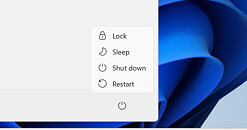 This bug has plagued Windows PCs since the announcement of Windows 10 and has been an issue for an entire decade. Countless users relied on this feature to mark the end of their workday with an updated PC that would shut down once updates were complete. Instead, users often found their machines powered on and sitting idle. Laptop users who left their PCs on battery power frequently discovered their devices drained, and if someone left their laptop before heading out or going to sleep, the issue was a significant source of trouble. Thankfully, Microsoft is gradually ironing out bugs like this to enhance the Windows 11 experience.
Source:
Windows Latest
Microsoft has not disclosed the exact cause of the failure, but Windows Latest speculates it might be due to a race condition or an issue within the Windows Servicing Stack. When a user selects "Update and shut down," the operating system must complete two sequential tasks: applying all pending updates and then shutting down the computer. This process isn't straightforward because Windows needs to reboot into an offline servicing phase to replace locked system files, as indicated by the "working on updates" message. After this phase, the machine should power off, but instead, it returns to the login screen. The most likely explanation is that the Servicing Stack either fails to save or never receives the shutdown instruction, with the directive possibly getting lost during the reboot due to a timing conflict or interference from features like Fast Startup.


32 Comments on Windows 11 Finally Fixes "Update and Shut Down" Functionality After a Decade
Looks like yet another great reason to not update a single thing and stick with my LTSC install as is.
No, Windows still needs quite often 6 reboots for a single windows update. Why do i know that? My uefi bootloader points to something else. I have to change 6 times to windows to get the update installed.
I do not get the point why windows needs reboots for updates. Anything else does not need so many reboots or any reboots at all for software installation. there is even software to reload the full new software without rebooting out there.
--
I have no idea which educations windows coders have gotten. I installed a new kernel and new linux-firmware and i shutdonw my box a few hours ago. I reboot my openrc and i3wm and it works. No extra reboot - it works instantly. It is not like the linux source and the gnu userspace is closed sourse so no one could learn from it.
It is never a good idea to shutdown and not to wait until the box is really shutdown: Personal example: MSI x670e and asus 670 have both the same bug that regularly, but not too often, a reboot or shutdown keeps the box in a waiting stage forever. Using the reset button or sevearl reset button like a few hours ago on msi forces the box to wake up. The firmware of the novuton chip may have bugs or issues with uefi.
-- My 5 weeks waiting periods are running out for both of my w11 pro boxes. Every few days a really big issue with w11 pro. I see troubles ahead.
The behaviour described in this topic is the fact that Windows restarts instead of shutting down after doing an update. If you needed more reboots, you also had multiple update packages with wildly varying release dates going on. That's not the topic.
But better late than never, I suppose.
Strange? But that's how it is...
With a friendly smile,
Fred.
The loss of productivity and increase in cortisol this bug made should not be ignored.
A decade?!?!?!
lol
Maybe it's just me, but when one compares say Linux Mint (cinnamon) to MS say as in capital $ and manpower, how is windows so full of bugs and why does it take so long to fix them?
Anybody that has configured their Windows Server for full time duty with ~200 days of uptime knows.
It's the client boxes that keep nagging for perpetual reboots, especially while Win10 was in service.
Nags to update, nags to restart, nags to FORCE update and restart, no option to make it stfu and quit.
Forced updates that would often fail and completely yeet the Win10 desktop.
Imagine going through this and then rebooting to a default size and color CMD window.
Then "rolling back changes..." for God knows how many minutes or hours if you're on OLD hardware.
Tools like wushowhide.diagcab, O&O Shutup and various telemetry removal tools are in dire need.
Fix the "reopen windows after automatic update and reboot" function in Windows 11.
50% of the time it didn't work for me.
25% of the time it worked fine, it restored the tabs in file explorer, tabs in Firefox, almost everything.
The remaining 25% were the most annoying. It would wait for me to start reopening programs manually, then suddenly wake up from unconsciousness and reopened those windows. So I ended up with two instances of Outlook and other stuff.
Its exactly all the dynamic bullshit that's causing Windows so much trouble AND adds a shitload of latency to the OS.