Friday, September 25th 2026

DLSS 5 Boosts RTX 5090 Connector Power Spikes to 647 W, Pushing Past 90°C

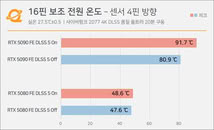
NVIDIA's DLSS 5 has been controversial ever since its announcement and eventual launch. Perhaps more concerning than the visual changes is its effect on the user's hardware. As reported by Videocardz, Korean outlet QuasarZone ran its own thermal tests on the RTX 5090's power connector with DLSS 5 enabled, to see if the technology really has a hand in recent reports of melting 12V-2x6 connectors. Testing an RTX 5090 Founders Edition in Cyberpunk 2077 at 4K with DLSS Quality and the Ultra preset over 20 minutes, the 12V-2x6 connector reached 91.7°C on the sense-pin side with DLSS 5 on, up from 80.9°C without it. The latch side climbed from 77.1°C to 83.4°C. An RTX 5080 FE tested the same way stayed far cooler, reaching just 48.6°C and 52.2°C at those two points with DLSS 5 enabled.

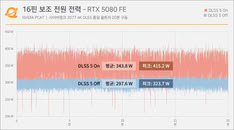
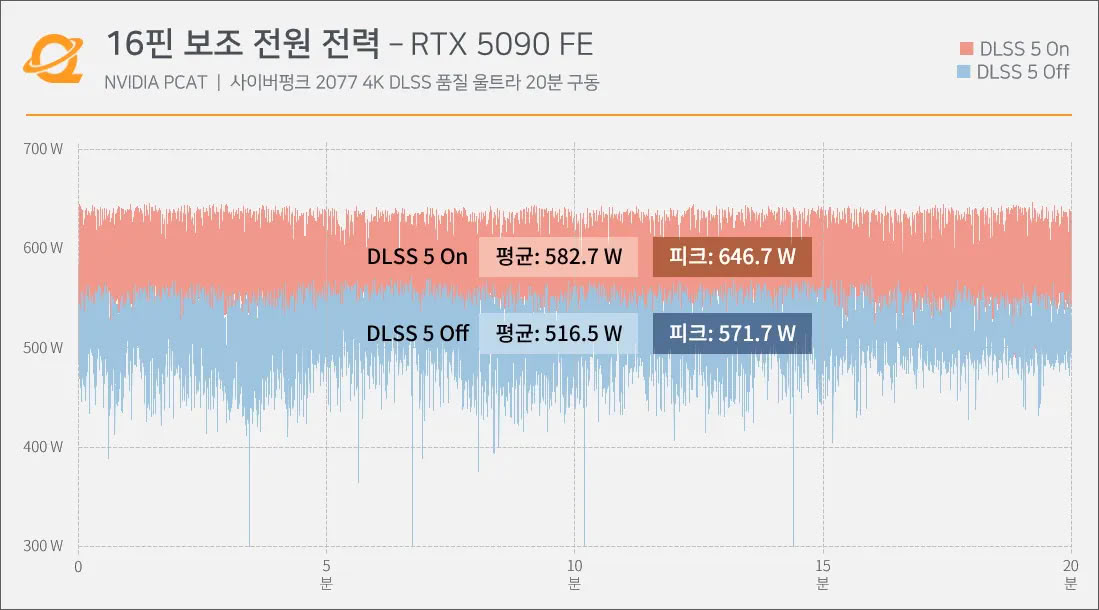
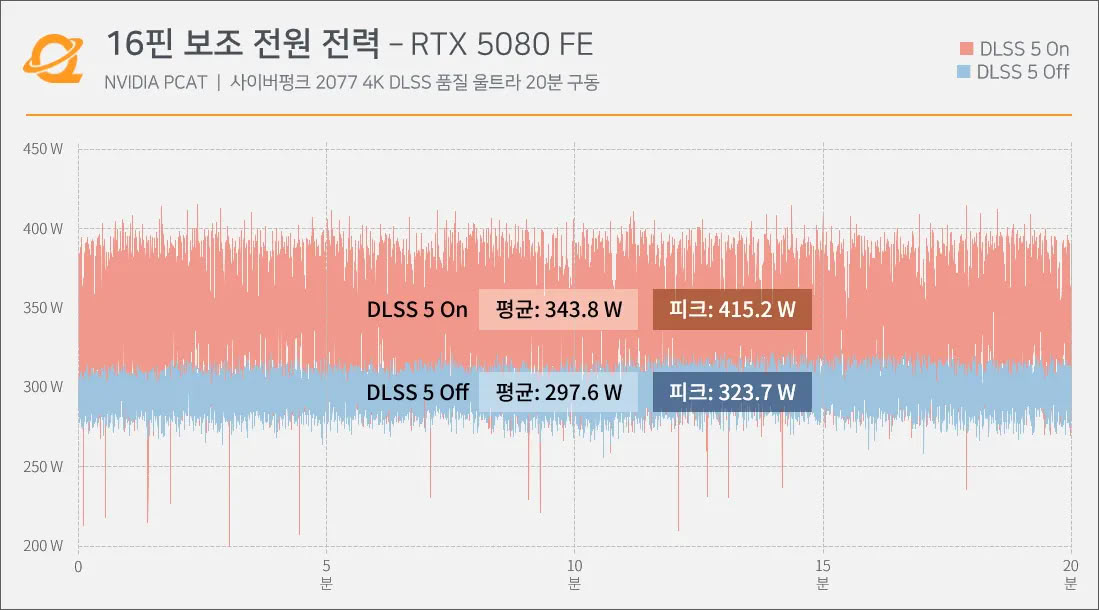
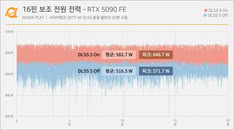
The increased heat aligned with a real jump in power draw. HWiNFO logged the RTX 5090's average power draw rising from 509.2 W to 575.1 W with DLSS 5 on, right at its 575 W limit. The RTX 5080 went from 298.2 W to 350.3 W, close to its own 360 W ceiling. External PCAT readings, which also catch short spikes, showed higher figures still: total board power rose from 527.3 W average and 582.5 W peak to 593.9 W average and 658.0 W peak. On the 16-pin 12V-2x6 connector alone, the RTX 5090 pulled 582.7 W on average and briefly spiked as high as 646.7 W. Of course, transient power spikes over 600 W are normal, and are not necessarily to blame for any melting connector issues. The increased power draw, however, lines up with Tom's Hardware's early DLSS 5 testing, which showed a noticeable jump in power draw with DLSS 5 enabled.

Despite the fresh data, this doesn't confirm that DLSS 5 is directly responsible for connectors melting, or GPU failures, for that matter. However, it's entirely possible that DLSS 5 may be propagating the issue and exposing limits that would otherwise stay hidden. The 12V-2x6 implementation has had occasional melting issues since the RTX 4090 days, and the cables could simply be being pushed past their limit under higher sustained loads. There's one reported case of a 5090 connector melting after a DLSS 5 test, and another one of an RTX 5080 reportedly "dying" after testing DLSS 5. A 10°C+ jump tied to one software feature is hard to brush off, not to mention the increased power draw, but it's probably worth waiting for more independent tests before drawing firm conclusions.
Sources: Quasar Zone, via Videocardz
Add your own comment

55 Comments on DLSS 5 Boosts RTX 5090 Connector Power Spikes to 647 W, Pushing Past 90°C

#26
JustBenching
TomgangWell i dont use the stock cable. I use a cable from cable mods. It looks more neat with that cable in stead of that ugly cable. But i´ll keep playing safe. If anything i still saves on the electric bill.
I'm also using a cable mod cable. Usually I'm running at 320 watts limit but I run it at 500+ maxed out to test the cable with the wire view.
HarlowI thought I'd check the temperature rating of Molex Mini-Fit connectors to see if 91.7°C would be a problem.

I'm not sure if I've found the correct data sheet, but I found a number of links at the end of the Wiki page:
en.wikipedia.org/wiki/12VHPWR

It's possible this pdf under Reference 34 might be valid:
tools.molex.com/pdm_docs/ps/PS-5556-001-001.pdf

Checking the temperature rating of the connector pins, I found this:

4.4 TEMPERATURE
Terminal Type Formed - Brass Solid - Brass Phos Bronze
Operating: * -40°C to +80°C -40°C to +105°C -40°C to +105°C
Non operating: -40°C to +80°C -40°C to +105°C -40°C to +105°C

If I'm reading this right and the Mini-Fit housings are populated with 'Formed metal contacts', they're rated at +80°C, which is well below the +91.7°C measured.

Even if the contacts are Brass - Phosphor Bronze with a rating of +105°C, it doesn't provide much headroom above 91.7°C.

The Mini-Fit plastic housing appears to be rated at +125°C.

Quite possibly I'm looking at the wrong connector and contact type. Does anyone know better?

If you want higher temperature wires, you could swap PVC insulation for PTFE rated at +200°C, but it's slippery stuff and difficult to strip back.
According to all the reports it's around the 150 mark that the 12vh cables start melting
Posted on Reply
#27
Tomgang
JustBenchingI'm also using a cable mod cable. Usually I'm running at 320 watts limit but I run it at 500+ maxed out to test the cable with the wire view.


According to all the reports it's around the 150 mark that the 12vh cables start melting
Ah for test purpose. I run around the 300 watt as well. That sound to me as a good safe margin.
Posted on Reply
#28
JustBenching
TomgangAh for test purpose. I run around the 300 watt as well. That sound to me as a good safe margin.
Try 320w with +100mhz core and around 1500 ram. This should give you better than stock performance with a lot less power.
Posted on Reply
#30
Six_Times
Many years ago a power supply maker had the solution. They were ahead of their time. It was a metal round screw-on connector. Although the connector solved resistance (heat) buildup on one end (the power supply end), the supplier that made the special screw-on type metal connectors were willing to supply and work with video card makers, but unfortunately that never happened. If I happen remember the power supply brand and can locate pictures, I'll post.
Posted on Reply
#31
Vraelon
TomgangYikes. I may have to be careful with dlss5 on my rtx 4090. If that card will support it. I think i should be careful at least until we know more about this.

I have so far not had melting issues with my card. But i also on purpose runs my card well below the 450 watt threshold with first of all undervolting the card. Why not both save the card and on the electric bill. Secondly i use the power limit slider to throttle the card down more when possible. I dont need 120 fps+ all the time. It can go down to 150 watt so why not save on power and protect your hardware in one go.
Why not just buy a lower end card at that point? If you are ok with reduced FPS in exchange for less heat and power you could have also saved a good chunk of money too. I don't really get the point of buying the highest end card just to kneecap it.
Posted on Reply
#32
Tomgang
VraelonWhy not just buy a lower end card at that point? If you are ok with reduced FPS in exchange for less heat and power you could have also saved a good chunk of money too. I don't really get the point of buying the highest end card just to kneecap it.
Actually i all ready have a RTX 4060 in my case to. There two pc´s in the same case.
Posted on Reply
#33
user556
JustBenchingAccording to all the reports it's around the 150 mark that the 12vh cables start melting
You can be certain that they are melting at 150 C.

Personally, I'd be worried if I had a plug exceeding 60 C.
Posted on Reply
#35
Tomgang
JismAmd/comments/1pzl14m/sapphire_rx_9070_xt_nitro_hits_fifth_burned_power
The connector is just messed up. It needs a class action lawsuit and be recalled by Nvidia. Period. You can't even have a fire risk inside your house like this. It's absurd.
Yeah i have been against it from the start. Its way to much throw to thin wires and pins. Test have also shown that if it is not pushed all the way in and make a bad connection. Melting is even higher risk.

3 or 4 8 pins may look more ugly, but its safer and you spread the load better in my opinion.
Posted on Reply
#36
MikOnTopGG
SnoutBaronIs there a reason why we keep doing this clickbait nonsense of saying it's explicitly DLSS 5 doing anything at all. It has nothing to do with DLSS 5. It has to do with people finally finding something that actually maxes their card.
Yeah, I must agree, this is like the 3rd post about power issues caused by DLSS 5

So it must be something with power management to the VRM's.
Posted on Reply
#37
_JP_
Six_TimesMany years ago a power supply maker had the solution. They were ahead of their time. It was a metal round screw-on connector. Although the connector solved resistance (heat) buildup on one end (the power supply end), the supplier that made the special screw-on type metal connectors were willing to supply and work with video card makers, but unfortunately that never happened. If I happen remember the power supply brand and can locate pictures, I'll post.
You mean like BNC connectors? Those are used for power, just not graphics cards, but it's a power connector for A/V gear.
Posted on Reply
#38
SnoutBaron
Six_TimesMany years ago a power supply maker had the solution. They were ahead of their time. It was a metal round screw-on connector. Although the connector solved resistance (heat) buildup on one end (the power supply end), the supplier that made the special screw-on type metal connectors were willing to supply and work with video card makers, but unfortunately that never happened. If I happen remember the power supply brand and can locate pictures, I'll post.
_JP_You mean like BNC connectors? Those are used for power, just not graphics cards, but it's a power connector for A/V gear.
Hiper, and it was a type of GX-16 style aviation connector called Omnigrid. Around the mid 2000s.

HIPER HPU-4B580-MS 580 W


Posted on Reply
#39
PowerBuilder
It would be great if we could leverage GeForce Now to offload just the DLSS processing to an online server; that way, even GTX series cards could support DLSS. Ideally, the complex DLSS tasks would be handled entirely by the server, while the workload for fundamental 3D processing—such as polygon, raster, and shader operations—would be split, with the server handling about 50% of the load and the local GPU in the PC handling the remaining 50%.
Posted on Reply
#40
SnoutBaron
PowerBuilderIt would be great if we could leverage GeForce Now to offload just the DLSS processing to an online server; that way, even GTX series cards could support DLSS. Ideally, the server would handle about 50% of the workload, leaving the remaining 50% to the PC's dedicated GPU.
Are you planning on being literally down the road from this DC?
Posted on Reply
#41
PowerBuilder
SnoutBaronAre you planning on being literally down the road from this DC?
I live close enough to the GeForce Now service area to use the service (with network latency to the server of 8ms or less and a 1Gbps connection).
Posted on Reply
#42
SnoutBaron
PowerBuilderI live close enough to the GeForce Now service area to use the service (with network latency to the server of 8ms or less and a 1Gbps connection).
Tell me what FPS you think you'll be getting being EIGHT MILLISECONDS AWAY
Posted on Reply
#43
dgianstefani
TPU Proofreader
PowerBuilderIt would be great if we could leverage GeForce Now to offload just the DLSS processing to an online server; that way, even GTX series cards could support DLSS. Ideally, the complex DLSS tasks would be handled entirely by the server, while the workload for fundamental 3D processing—such as polygon, raster, and shader operations—would be split, with the server handling about 50% of the load and the local GPU in the PC handling the remaining 50%.
The latency would make it pointless. The usefulness of a local GPU is low latency, if you're waiting on a part of the frame from a remote server, why wouldn't you just run the entire thing off a remote server.

Bringing back multi-DGPU could be a solution, but I doubt it will happen, at least officially. What I expect is for traditional render to continue to have low double digit gains each generation, but AI and other advanced post-native hardware would take up larger portions of the die, or the different types of cores will eventually merge, instead of being separate units in a kind of hybrid approach as it is currently.
SnoutBaronTell me what FPS you think you'll be getting being EIGHT MILLISECONDS AWAY
Best case scenario.
Posted on Reply
#44
Vayra86
FR3D1since these newfangled people have taken over the planet, the quality of games has also declined.
The quality of games was in the shitter long before the streamers took over the popular discourse, and is in no way related to it. Consumers were (pre-ordering or) buying and therefore funding stupid shit long before then. I won't deny there is a subset/segment of gaming that is clearly aimed at the streamer crowd... but that same streamer crowd has been at the forefront of pushing indies into the limelight. They're just advertisers, following what gets released. I think you've switched around cause and effect.

Game quality declined because triple A wants to make games not as art and products of brilliance, but as fast-food joints that churn out standard issue burgers every day. Game quality declined because Ubisoft releases their AC, Far Cry, etc ad infinitum, because every online shooter is a lootbox-slot-fest and because they introduced pay to win, seasonal content that fragments playerbases etc etc etc. The list is long. Streamers ain't on it.
Posted on Reply
#45
dgianstefani
TPU Proofreader
Vayra86The list is long. Streamers ain't on it.
I mean I agree with some of what you said, but streamers are definitely part of marketing these days. Thus have complicity.
Posted on Reply
#46
Sora
funny how the connector only does 70c at 1500w, unless theres a resistance fault present.


these guys might want to learn how to plug things in properly.
HarlowIf I'm reading this right and the Mini-Fit housings are populated with 'Formed metal contacts', they're rated at +80°C, which is well below the +91.7°C measured.
You're reading the wrong specs, these molex connectors are good up to 250c, PCI-Sigs 105c is a "tested to" rating.
user556Personally, I'd be worried if I had a plug exceeding 60 C.
you only get 60-70c at the connector if you're overloading it above 1000w - impaired/damaged connection saw up to 100c.
Posted on Reply
#47
JustBenching
Sorayou only get 60-70c at the connector if you're overloading it above 1000w - impaired/damaged connection saw up to 100c.
Not entirely true, Im hitting 60c at around 500w (4090 + wire view 2). My ambient was high at 28c though
Posted on Reply
#48
Sora
JustBenchingNot entirely true, Im hitting 60c at around 500w (4090 + wire view 2). My ambient was high at 28c though
then you have a resistance fault.

Posted on Reply
#49
Kdingo
I find it rather alarming that a simple piece of software even results in hardware components running quite above the designed powerlevels. Why isn´t there a safety feature to prevent the gpu from drawing more then 600w? At least one you would have to manually disable if you want to go further.
Posted on Reply
#50
JustBenching
Sorathen you have a resistance fault.

Or his camera doesn't measure the exact thing as the wire view...
Posted on Reply
Add your own comment
Nov 26th, 2026 07:58 CST change timezone

New Forum Posts

Popular Reviews

TPU on YouTube

Controversial News Posts