Tuesday, August 19th 2025

NZXT Intros N7 B850 Socket AM5 Motherboard

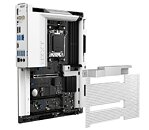
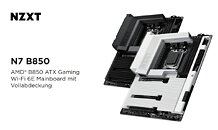
NZXT today rolled out the N7 B850 Socket AM5 motherboard. It comes in two trims—the first one is all-black, while the other is 2-tone (white+black). Both trims come with black PCBs, the 2-tone model has matte while across the front shrouding, the M.2 heatsink, rear I/O shroud, and VRM heatsinks. The board is based on the AMD B850 chipset. It pulls power from a combination of 24-pin ATX and two 8-pin EPS power connectors, and uses a solid 16+2+1 phase CPU VRM with 80 A DrMOS on all phases. The board uses an 8-layer PCB with 2 oz copper layers.

The Socket AM5 is wired to four DDR5 DIMM slots for up to 256 GB of memory at speeds of up to DDR5-8000. It is also wired to one PCI-Express 5.0 x16 slot, and two M.2 NVMe Gen 5 slots. There is a third M.2 NVMe slot that runs at Gen 4 x4 speeds, and is wired to the B850 FCH. The two other physical x16 slots are electrical x4 and x1, with the x4 slot sharing its lanes with the third M.2 slot. A standard feature with all NZXT motherboards is support for the company's in-house NZXT CAM standard of PC real-time monitoring, fan-control, and lighting control.
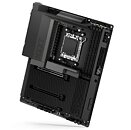
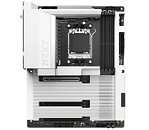
Besides the three M.2 NVMe slots, you get four SATA 6 Gbps ports. USB connectivity includes a 10 Gbps USB-C port, two 10 Gbps USB 3.2 Gen 2 type-A ports, four 5 Gbps USB 3.2 Gen 1 ports, and a couple of USB 2.0 ports. There are internal headers for a 10 Gbps USB-C, and two 5 Gbps USB 3.2 Gen 1 ports. Display outputs includes HDMI. Networking options with the NZXT N7 B850 are Wi-Fi 6E + Bluetooth 5.2, powered by a MediaTek RZ608 WLAN controller, and a 5 Gbps wired Ethernet driven by a Realtek 8126 series PHY. The onboard audio solution is based on a Realtek ALC1220 CODEC.
Add your own comment

11 Comments on NZXT Intros N7 B850 Socket AM5 Motherboard

#1
CosmicWanderer
Rebranded Ryzen 9000 series murder boards from AsRock?
Posted on Reply
#2
tommo1982
Flashy covers, etc. No separate outputs for 5.1 speakers, however. I'd gladly drop WiFi for that. I have old Logitech 5.1 speakers and it's difficult to find B850 motherboards with more than 3x 3.5mm jack outputs. There are soundcards, but I want to avoid that, having microATX board. Sometimes extra PCIe slots are really baldy placed.
Posted on Reply
#3
_roman_
Less Displayports causes more E-waste.

A very DIY Friendly mainboard. I assume when changing WIFI module or storage module you need to disassemble the hole mainboard first. This is a very quick and easy solution. /sarcasm.

White is for sure nice. I saw it recently with a burner grahpic card that such a white mainboard was heavily damaged. It's a visual protection cover which does not protect the mainbaord at all.
I still wonder where here I did not saw a news piece about that burner graphic card.
Posted on Reply
#4
Chaitanya
tommo1982Flashy covers, etc. No separate outputs for 5.1 speakers, however. I'd gladly drop WiFi for that. I have old Logitech 5.1 speakers and it's difficult to find B850 motherboards with more than 3x 3.5mm jack outputs. There are soundcards, but I want to avoid that, having microATX board. Sometimes extra PCIe slots are really baldy placed.
Unlike in past those flashy covers are actually made of finned alumnium and not plastic covers so they really should cool the SSD installed underneath. Otherwise I would much rather see motherboard makers stop providing any onboard audio solutions and provide PCIe slot for installing sound cards or usb DACs/sound cards.
Posted on Reply
#5
tommo1982
ChaitanyaUnlike in past those flashy covers are actually made of finned alumnium and not plastic covers so they really should cool the SSD installed underneath. Otherwise I would much rather see motherboard makers stop providing any onboard audio solutions and provide PCIe slot for installing sound cards or usb DACs/sound cards.
You mean internal PCIe port? That'd be nice. Outputs could be on a bracket. Such design solves a problem with boards where the x1 slot is bellow x16 for GPU and will obstruct airflow or become inaccessible with cards bigger than two slots.
Posted on Reply
#6
Chaitanya
tommo1982You mean internal PCIe port? That'd be nice. Outputs could be on a bracket. Such design solves a problem with boards where the x1 slot is bellow x16 for GPU and will obstruct airflow or become inaccessible with cards bigger than two slots.
early ROG boards came with a PCIe 1x slot(top most one above 1st x16 slot) for sound card(with option for either using the bundled one or users could simply install their own) in the same vein would really like to see board makers simply drop onboard sound instead of current trend of just 2 audio outputs and lack of digital outputs. Most board do have space for a x1 slot and M.2 slot above the 2nd x16 slot.
Posted on Reply
#7
_roman_
My m-audio air usb audio interface uses afaik only usb 2.0. Far better as the onboard crapware on most mainboards.
I never installed any drivers as I the original buyer did not provide me any and I did not found any when i bough it second hand.
Works for my purposes quite well.

Not everything should be on PCIE bus.
Posted on Reply
#8
Hereticbar
_roman_Less Displayports causes more E-waste.

A very DIY Friendly mainboard. I assume when changing WIFI module or storage module you need to disassemble the hole mainboard first. This is a very quick and easy solution. /sarcasm.

White is for sure nice. I saw it recently with a burner grahpic card that such a white mainboard was heavily damaged. It's a visual protection cover which does not protect the mainbaord at all.
I still wonder where here I did not saw a news piece about that burner graphic card.
If there can only be one display output, no idea why they can't make it a DisplayPort.

Actually this is the easier design for replacing the Wi-Fi module, same as M.2 SSD, all you have to remove is the heatsink that is being held in place by clips/magnets. Nothing to disassemble, just a mirror inconvenience of having to remove graphics card. The other design would have you remove the entire I/O shroud, maybe even the VRM heatsink if it is a one piece design, in order to access the Wi-Fi module. Either way, glad that most people don't replace their Wi-Fi module often or in most cases ever.

On a totally serious note. What's a burner graphics card? Is it the same as a burner phone that one would use to hide their extra curricular activities. Like contacting the local human resource specialist to arrange for meetings with friendly and warm ladies to spend a night with?
Posted on Reply
#9
_roman_
First time i found the reference was on igorslab recently.
The criticism was that the shroud will not protect your hardware with burner graphic cards. Any graphic card can fail badly. I hint out the picture 3 there. I'm not fond of shourds which do not protect the hardware below it.

www.tomshardware.com/pc-components/gpus/zotac-rtx-5090-reportedly-catches-fire-during-battlefield-6-session

Note: This is not a statement about the build quality of nzxt.
Posted on Reply
#10
8086
_roman_Less Displayports causes more E-waste.

A very DIY Friendly mainboard. I assume when changing WIFI module or storage module you need to disassemble the hole mainboard first. This is a very quick and easy solution. /sarcasm.

White is for sure nice. I saw it recently with a burner grahpic card that such a white mainboard was heavily damaged. It's a visual protection cover which does not protect the mainbaord at all.
I still wonder where here I did not saw a news piece about that burner graphic card.
In case you didn't know, you can daisy chain multiple monitors from one single displayport.
tommo1982Flashy covers, etc. No separate outputs for 5.1 speakers, however. I'd gladly drop WiFi for that. I have old Logitech 5.1 speakers and it's difficult to find B850 motherboards with more than 3x 3.5mm jack outputs. There are soundcards, but I want to avoid that, having microATX board. Sometimes extra PCIe slots are really baldy placed.
Logitech never ever made decent speakers. Maybe it's time you upgrade your audio, go find a Marantz receiver somewhere with some Elac speakers or Yahama Speakers and a Yamaha subwoofer.
Posted on Reply
#11
Hereticbar
_roman_First time i found the reference was on igorslab recently.
The criticism was that the shroud will not protect your hardware with burner graphic cards. Any graphic card can fail badly. I hint out the picture 3 there. I'm not fond of shourds which do not protect the hardware below it.

www.tomshardware.com/pc-components/gpus/zotac-rtx-5090-reportedly-catches-fire-during-battlefield-6-session

Note: This is not a statement about the build quality of nzxt.
I think either you have the wrong idea or unrealistically high expectation what they can do or are there for. They are there to act as a heatspreader/heatsink for M.2 SSDs and maybe at the same time also make the motherboard look more aesthetically pleasing to the eyes.

If a 600w graphics card literally caught on fire, nothing is going to protect against that.....
Posted on Reply
Add your own comment
Nov 26th, 2026 03:22 CST change timezone

New Forum Posts

Popular Reviews

TPU on YouTube

Controversial News Posts