Wednesday, October 1st 2025

Microsoft Releases Windows 11 25H2... With Zero New Features?

Microsoft has officially released Windows 11 version 25H2 after months of testing and previews. Delivered as a lightweight enablement package (eKB), 25H2 update is not a complete OS replacement but a light switch that turns on feature code already present on machines running 24H2. Microsoft stages new features inside regular cumulative updates in a disabled state. When the eKB is installed, it flips those flags, and a single restart activates the features, upgrading the device to 25H2 with minimal downtime. Because 24H2 and 25H2 share a servicing branch, they utilize the same codebase and servicing pipeline, which provides annual feature updates with the same efficiency and reliability as monthly updates. That helps reduce package size and installation time, making the transition from 24H2 to 25H2 about as easy as rebooting. The only difference between 25H2 and 24H2 is the support duration. For example, 25H2 Enterprise and Education Windows 11 versions move to a 36-month cycle, while Pro editions follow a 24-month cycle, typical for all Windows 11 24H2 builds.

With the 25H2 update, Microsoft is not focusing on significant under-the-hood changes or a visual overhaul, which were common in previous updates. Instead, the emphasis is primarily on security improvements. For instance, Microsoft is removing features like PowerShell 2.0 and Windows Management Instrumentation command-line (WMIC) during installation. These features were previously deprecated due to vulnerabilities to security exploits. Additionally, IT administrators now have the ability to remove pre-installed Microsoft default apps using Group Policy/MDM CSP on Enterprise and EDU devices.
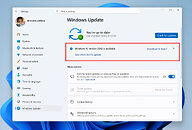
If you want 25H2 right away, flip on "Get the latest updates as soon as they're available" in Windows Update to move your PC earlier in the staged rollout, but keep in mind Microsoft can delay the update for devices with detected issues (like driver or app incompatibilities) until those are fixed, so it still might not show up immediately. If you'd rather upgrade straight from 24H2 to 25H2, download the enablement package that matches your system architecture from Microsoft's website.
Source: Windows Blog
Add your own comment

122 Comments on Microsoft Releases Windows 11 25H2... With Zero New Features?

#76
R-T-B
TomorrowOnly the commandline component WMIC was. WMI itself still works.
Ah. Thanks, wasn't entirely clear on that.
Posted on Reply
#77
Tomorrow
Those who want it back can add WMIC trough optional features. Same as with Wordpad and other deprecated components.
Posted on Reply
#78
Draconis
TomorrowSame here. Maybe i've been lucky but no significant problems with updates during the years of using Win 11. Started with 22H2. Then 23H2. Now at 24H2.
Still on Win 10 at home but we have been moving staff to Win 11 at work, no significant issues either, so far. I have a theory on why this is.
[INDENT]
  1. We wait for months before rolling out feature update releases via WSUS. Updates are never forced from Microsoft.
  2. All the machines are "business class" OEM. This means conservative hardware settings and zero overclocks of any description. This also means no trialware type bloat installed by default.
  3. Majority of settings are controlled via group policy and I have not noticed Microsoft stealth changing anything that are not controlled via group policy.
  4. The specific combination of CPU, RAM, Chipset, Storage etc are is more likely to be tested by Microsoft that a more random combination the typical gaming user building their own machine has.
[/INDENT]
Before all the people that do have issues with Microsoft updates run for their pitchforks I am not defending Microsoft, I have sympathy for you. There is a lot in the above that your typical gaming user does not have the luxury of access to. The above is just a theory as to why gaming users typical of TPU forums have more issues than normal or corporate users that just go out and get a pre built or laptop.
Posted on Reply
#79
Tomorrow
DraconisStill on Win 10 at home but we have been moving staff to Win 11 at work, no significant issues either, so far. I have a theory on why this is.
[INDENT]
  1. We wait for months before rolling out feature update releases via WSUS. Updates are never forced from Microsoft.
  2. All the machines are "business class" OEM. This means conservative hardware settings and zero overclocks of any description. This also means no trialware type bloat installed by default.
  3. Majority of settings are controlled via group policy and I have not noticed Microsoft stealth changing anything that are not controlled via group policy.
  4. The specific combination of CPU, RAM, Chipset, Storage etc are is more likely to be tested by Microsoft that a more random combination the typical gaming user building their own machine has.
[/INDENT]
Before all the people that do have issues with Microsoft updates run for their pitchforks I am not defending Microsoft, I have sympathy for you. There is a lot in the above that your typical gaming users does not have the luxury of access to. The above is just a theory as to why gaming users typical of TPU forums have more issues than normal or corporate users that just go out and get a pre built or laptop.
Well i fit the definition of a gamer who has overclocked memory and GPU (and undervolted CPU).
I install normal updates on Friday (for the patch Tuesday update i check for problem reports before install).
So if something goes wrong i have an entire weekend plus Monday to fix or roll back.
Meanwhile i pause updates for two weeks after installing them on Friday. Two weeks because i dont want the one week counter ticking over if i cant do the check at the exact same time each Friday.

For yearly H2 updates i wait six months if it's a major update like 24H2 or three months if it's a minor update via enablement package like 23H2 or 25H2.
So far this system has worked well for me.
Posted on Reply
#80
Draconis
TomorrowWell i fit the definition of a gamer who has overclocked memory and GPU (and undervolted CPU).
I install normal updates on Friday (for the patch Tuesday update i check for problem reports before install).
So if something goes wrong i have an entire weekend plus Monday to fix or roll back.
Meanwhile i pause updates for two weeks after installing them on Friday. Two weeks because i dont want the one week counter ticking over if i cant do the check at the exact same time each Friday.

For yearly H2 updates i wait six months if it's a major update like 24H2 or three months if it's a minor update via enablement package like 23H2 or 25H2.
So far this system has worked well for me.
Mayhap's the most effective strategy is waiting and checking for issues before applying updates, especially H2 updates.
Posted on Reply
#81
lexluthermiester
DraconisThe above is just a theory as to why gaming users typical of TPU forums have more issues than normal or corporate users that just go out and get a pre built or laptop.
And you would not be wrong. Of course, this does not excuse microsoft from doing their due diligence.
Posted on Reply
#82
Draconis
lexluthermiesterAnd you would not be wrong. Of course, this does not excuse microsoft from doing their due diligence.
That's for sure, never meant otherwise.
Posted on Reply
#83
cvaldes
DraconisMayhap's the most effective strategy is waiting and checking for issues before applying updates, especially H2 updates.
I've been doing that for years, not just Windows but also on macOS, iOS, iPadOS. These days I wait about 8-10 months after the initial launch.

I upgraded to iOS 18 and macOS Sequoia in July. I upgraded to Windows 24H2 in August. All of these came out in autumn 2024. Far fewer OS-related headaches to deal with. All these operating systems are quite stable once they reach security-patch-only service level. I stayed on Windows 10 and never installed Windows 11 21H2 nor 22H2, went straight to W11 23H2 in summer 2024.

Staying behind for a while will save you a lot of system administration time and frustration. Operating systems should not be a hindrance. Unfortunately Windows often is.

Microsoft frequently seems to find a way to bollocks up Windows with any given Patch Tuesday update regardless of the Windows generation the patch is being applied to. I generally wait a week or so to apply a Patch Tuesday update (to see what size dumpster fire they delivered) whereas I'll usually only wait a day to apply a macOS or iOS security patch. Apple cares more about software QA.

Microsoft decided that Windows software QA was not a priority over ten years ago. And boy does it ever show. Pity.
Posted on Reply
#84
RJARRRPCGP
I'm back to 11. I was very-briefly on 10, weeks ago. (on the ASRock A320M/ac build in the other room, which has the Ryzen 7 3700X and GeForce RTX 3050)
I got the Ryzen 7 3700X during the very-early pandemic, in June, 2020 and got another PC build for a backup the same year, which is the ASRock A320M/ac, which had a Ryzen 5 2600, when I got it.
That's the little PC that I sometimes test Windows builds on.
Posted on Reply
#85
lexluthermiester
RJARRRPCGPI'm back to 11. I was very-briefly on 10, weeks ago.
What made you switch back?
Posted on Reply
#86
RJARRRPCGP
lexluthermiesterWhat made you switch back?
I wasn't having that SSD issue.
Posted on Reply
#87
lexluthermiester
RJARRRPCGPI wasn't having that SSD issue.
Wait, what SSD issue? The Psion controller thing?
Posted on Reply
#88
RJARRRPCGP
lexluthermiesterWait, what SSD issue? The Psion controller thing?
Where it was reported that almost every SSD was affected, but I never had the SSD drop out of the system, even with large files written.
Posted on Reply
#89
chrcoluk
TomorrowThose who want it back can add WMIC trough optional features. Same as with Wordpad and other deprecated components.
In that case no different to 24H2 then. Same on that, disabled by default, enable via optional features.
Posted on Reply
#90
lexluthermiester
RJARRRPCGPWhere it was reported that almost every SSD was affected, but I never had the SSD drop out of the system, even with large files written.
That was an exaggeration. It was a limited number of SSDs.
Posted on Reply
#91
RJARRRPCGP
lexluthermiesterThat was an exaggeration. It was a limited number of SSDs.
I did a test of reinstalling Cyberpunk 2077, literally, because IIRC, I heard that it would crash when installing a game.
Posted on Reply
#92
Reacher
Somehow I am slowly getting scared of these updates, nowadays most of them 'breaks' something.
Posted on Reply
#93
chrcoluk
ReacherSomehow I am slowly getting scared of these updates, nowadays most of them 'breaks' something.
I had to roll back my laptop only last week from a backup, Microsoft reissued that really dodgy recovery partition update, I installed it (and this is a system with a 1 gig recovery partition so not too small), then the CU refused to update after it, after recovery the CU installed fine with me hiding the recovery update.

I think given that I have macrium available for a recovery OS if needed, moving forward I wont have a recovery partition at all. I have never actually needed to use the recovery partition and for Macrium images I just use PE instead of RE.
Posted on Reply
#94
Draconis
cvaldesI've been doing that for years, not just Windows but also on macOS, iOS, iPadOS. These days I wait about 8-10 months after the initial launch.

I upgraded to iOS 18 and macOS Sequoia in July. I upgraded to Windows 24H2 in August. All of these came out in autumn 2024. Far fewer OS-related headaches to deal with. All these operating systems are quite stable once they reach security-patch-only service level. I stayed on Windows 10 and never installed Windows 11 21H2 nor 22H2, went straight to W11 23H2 in summer 2024.

Staying behind for a while will save you a lot of system administration time and frustration. Operating systems should not be a hindrance. Unfortunately Windows often is.

Microsoft frequently seems to find a way to bollocks up Windows with any given Patch Tuesday update regardless of the Windows generation the patch is being applied to. I generally wait a week or so to apply a Patch Tuesday update (to see what size dumpster fire they delivered) whereas I'll usually only wait a day to apply a macOS or iOS security patch. Apple cares more about software QA.

Microsoft decided that Windows software QA was not a priority over ten years ago. And boy does it ever show. Pity.
While I normally avoid Reddit like the plague I find searching Patch Tuesday Megathread <month> useful as a starting point for patch Tuesday issues.

Edit. Clarification
Posted on Reply
#95
Jermelescu
C1ff0I had one a few yearts back at work with windows update.
The pc of a colleague, a Thinkstation P900, received a update, as usual. The problem was this: every time she tried to print something, the pc would BSOD. I tried uninstalling the print driver, starting with the Canon plotter, and after that didn't work, with the Utax photocopier. Nothing. I had to burn my brain to find a solution. Then i found out this was the problem.

Windows10/comments/m1vljh/windows_10_kb5000802_march_update_is_crashing_pcs
I haven't used a personal printer since 2010 iirc. Heart they are problematic tho.
Posted on Reply
#96
Tomorrow
I have used the same Canon multi-functional laser printer since Win 7. Then on Win 10 and now on Win 11.
Maybe it's because it's an enterprise, not a consumer model, but it has always been rock solid.
The most problems i've had on Win 11 has been with UWP apps. Either them randomly losing icons, shortcuts stop working or other oddness. Hence why i use standard Win32 whenever possible.
Posted on Reply
#97
AMiGamer
I had the same problems with Final Fantasy XV and Enemy Front on Windows 11 24H2, so I’ve been using Windows 11 23H2 for over six months.
I’ll test Windows 11 25H2 soon.
But Windows is getting slower, more bloated, and unnecessarily complex. Windows is a shit OS!
Posted on Reply
#98
trparky
AMiGamerBut Windows is getting slower, more bloated, and unnecessarily complex. Windows is a shit OS!
I’ve had the opposite experience. Explorer in 24H2 is faster, snappier, than in 23H2.
Posted on Reply
#99
lexluthermiester
trparkyI’ve had the opposite experience. Explorer in 24H2 is faster, snappier, than in 23H2.
I never noticed any difference.
Posted on Reply
#100
chaoshusky
Well, after just updating, this machine feels a little more responsive and starts a little faster, so there is that.. Not even my main rig! Kinda old now this one (9980XE, Arc A770 etc) with quite a crap boot drive (WD Blue 1TB NVMe) and so far nothing broken, at least for me.. Test servers still work through loopback and so on.
Posted on Reply
Add your own comment
Nov 14th, 2026 19:15 CST change timezone

New Forum Posts

Popular Reviews

TPU on YouTube

Controversial News Posts