Saturday, April 4th 2026

Microsoft is Forcing Windows 11 25H2 Update to 24H2 Users

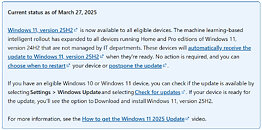
Microsoft is now force-installing the latest version of Windows 11, the 25H2, for users of the older 24H2 version of the operating system. Through what Microsoft calls a "machine learning-based intelligent rollout," the company is automatically updating 24H2 users to Windows 11 25H2 when their devices are ready. This forced update is part of a staged update plan for Windows 11, where Microsoft is gradually updating systems worldwide to phase out the 24H2 version, as support for this operating system will officially end on October 13, 2026. It makes sense to upgrade users to an operating system with a longer support period. However, Windows 11 users might be frustrated with the constant forced upgrades that Microsoft is pushing, which seem to offer little real-world benefit beyond regular security maintenance.

Regarding Windows versions, the situation has been a bit confusing recently. Microsoft has dedicated the 26H1 update exclusively for Windows-on-Arm devices, supporting new silicon, including the Snapdragon X2 Elite and X2 Plus platforms, as well as the potential launch of NVIDIA's N1/N1X laptop SoCs. The latest feature and security updates have been delivered through both the 24H2 and 25H2 versions, which have been the primary focus for x86-based PC systems. However, as support for 24H2 is coming to an end, the focus is gradually shifting to 25H2. There is still time before October of this year, and Microsoft is using AI for a staged rollout. Importantly, users cannot refuse this update. They can only schedule the restart for the update to be applied or postpone it slightly before it is finally installed.

Importantly, forcing updates on users can be annoying, but like every Windows version, its life cycle is limited. Microsoft is promising more quality updates for Windows 11, so future updates like 26H2, which we will see later this year, may bring a host of new features, improvements, bug fixes, better performance, and much more. We have to stay tuned and see what Microsoft's developers deliver.
Source: Microsoft
Add your own comment

78 Comments on Microsoft is Forcing Windows 11 25H2 Update to 24H2 Users

#1
_roman_
several months ago when i manually downloaded the "worsening package" I came personally tho the conclusion the only difference is the version string shown in winver.exe

too bad i did it manually on both of my test installations. usually the version upgrade never worked by itself. i kept those special software packages in my software folder as microslop was unable to do it itself

after a year rolling out such a cosmetic change is very late.

windows update = to get something to a newer software state. that also includes the version string
do not run it if you do not want it
Posted on Reply
#2
fe3a8b63
Oh well, can't even update to Win 11 at all. Sucks to be me.
Posted on Reply
#3
_JP_
and Microsoft is using AI for a staged rollout
Oh, surely this will be a great thing, that no recent events regarding other (monthly) updates cast fear about.
Importantly, users cannot refuse this update
If you're using base Windows 11, yes, SOL. If you have "Pro", I beg to differ:

Then, selectively download and install security KBs from the catalog. Small effort for lesser headaches per week.
so future updates like 26H2, which we will see later this year, may bring a host of new features, improvements, bug fixes, better performance, and much more.
I dread this sentence so much. Very much not looking for this build update.
We have to stay tuned and see what Microsoft's developers deliver.
Ahem, "what Microsoft's GitHub CoPilot deliver". Fixed.
Posted on Reply
#4
FR3D1
Ninja Cat
@_JP_
I recommend the following:
Here you are!
which seem to offer little real-world benefit beyond regular security maintenance.
Exactly!

Greetings from the Windows 10 camp,
Fred.
Posted on Reply
#5
zenlessyank
Welcome to the darkside. We have been waiting all along.
Posted on Reply
#6
SiliconSeraph
_JP_If you're using base Windows 11, yes, SOL. If you have "Pro", I beg to differ:
Hey, that's actually pretty neat! Is that a normal Windows 11 Pro function (like I could look this up on my system and find it easily) or is it something that's sort of hidden?
Posted on Reply
#7
Grimling
Just get the LTSC version...
Posted on Reply
#9
ARF
I am forcing Windows 10 on all of my computers and they look happy, fast and responsive with it. :D
Posted on Reply
#10
TheDeeGee
GrimlingJust get the LTSC version...
"just"

It's a rabbit hole for the average joe.
Posted on Reply
#11
Grimling
TheDeeGee"just"

It's a rabbit hole for the average joe.
Why? It is not installing any different than the Pro or Home version.
Posted on Reply
#12
Easo
It's literally not even an upgrade, you already have all the files, takes one 5 min restart, it basically switches feature set to 25H2.
GrimlingJust get the LTSC version...
And once more someone without an enterprise agreement cannot get that.
Posted on Reply
#13
R-T-B
EasoAnd once more someone without an enterprise agreement cannot get that.
Even with an enterprise agreement like I have, MS wanted to sell me a minimum of like 10,000 copies lol.

Yeah MS just let me write a check that bankrupts my business of 5 employed people so I can get LTSC, that'll sell...

Wasn't gonna happen obviously.
Posted on Reply
#14
windwhirl
SiliconSeraphHey, that's actually pretty neat! Is that a normal Windows 11 Pro function (like I could look this up on my system and find it easily) or is it something that's sort of hidden?
It's the Group Policy editor. It comes with any Pro edition of Windows, from Windows 2000 to the latest one. It gives access to a bunch of settings and toggles that would otherwise need to be activated by carefully editing or creating keys in the Registry. As usual with this kind of thing, you shouldn't use the Group Policy editor unless you know what you're doing, since this thing doesn't run much of a check for whether a setting makes sense or not. Fortunately, most of the settings do come with their explanations of what each thing does, so read those carefully and do some extra research if something isn't clear before touching anything.

Anyway, you can access it by running "gpedit.msc" in the Run dialogue (Windows key + R). In the window that opens, go to Computer Configuration, Administrative Templates, Windows Components, Windows Update. Depending on your version of Windows the setting might be located slightly differently, but it should be either right there as "Configure Automatic Updates" or inside another subfolder called "Manage end user experience".

From there you can configure the behavior of the automatic updates.
GrimlingWhy? It is not installing any different than the Pro or Home version.
For fully legal LTSC licenses you need to have the corresponding license agreement with Microsoft.

For what it's worth, this isn't a concern for the regular home user, because nobody is gonna knock at their door over whether their license is correct or not, like just no, that's not ever happening (unless it's Germany I suppose). On the other hand, anyone using LTSC in their shop or business could get told to get bent and pay, though that's probably a lot less likely than getting visited by the BSA and then told to pay a huge fine over fully pirated licenses instead of "merely incorrect" licenses.

Might as well say that if you're running a business with pirated licenses you should probably at least keep those machines off the network (or learn to configure a firewall) if you don't want to be found out.
Posted on Reply
#15
eidairaman1
The Exiled Airman
Might as well just nuke windows update from the OS completely
Posted on Reply
#16
Unregistered
I'm using Winaero Tweaker on my Windows 11 Home Edition desktop and my wife's laptop, and Windows Update is completely shut off. If Microsoft ever fixes Windows 11 25H2 to my satisfaction, I will undo the "disable" and update my computers. When and if this will happen is anybody's guess...

winaero.com/winaero-tweaker/


#17
Darmok N Jalad
MS has really done this to themselves. They started with this “Windows 10 is the last Windows” vision, but really it was just Windows with constant updating. Then they worked to put some versioning behind it, calling them “feature updates” but brought those about in a rolling fashion. Because they’ve confused this concept of “One Windows” so badly with users, users see updates as a thing to dread, because “who knows what they changed or added or removed this time.” At one time, we generally saw Windows updates and service packs as a good thing, but those generally added very little in terms of features—they were just underlying improvements and security updates. And what’s the point of these Feature Updates and distinguishing them if you ultimately have no choice in which one you get?
Posted on Reply
#19
Macro Device
Good thing I found enough offline hobbies... at least for the time I'm physically sound. Software, no matter M$ or not, is a freakshow at best and unspeakable bollocks on average these days.
Posted on Reply
#20
SRB151
Ever since Microsoft got the bright idea to rehash ARM support, they've been more worried about getting ARM working then x86. Just once I'd love to have a tech company of any kind worry about their existing user base BEFORE expanding it.

The only good part about it was they were so worried about pushing ARM out the door, we wound up with some additional time before they shafted the current Windows users with Copilot.
Posted on Reply
#21
TheinsanegamerN
ymdhisLinux isn't any better, as anyone who used CentOS can attest to.
Okay, they don't fuck up every week, but you still have to deal with the OS losing support out of the blue and migration paths being fucked (too complex at best, outright not working at worst).
Oh no, if only there were other linux distros one could use. But nope, were all stuck with CentOS.......
SRB151Ever since Microsoft got the bright idea to rehash ARM support, they've been more worried about getting ARM working then x86. Just once I'd love to have a tech company of any kind worry about their existing user base BEFORE expanding it.

The only good part about it was they were so worried about pushing ARM out the door, we wound up with some additional time before they shafted the current Windows users with Copilot.
Can you please show us what features are getting delayed for x86 users because of them working on ARM? What doesnt work on x86 that we've been waiting on fixes for?
Posted on Reply
#22
TumbleGeorge
GrimlingJust get the LTSC version...
Not you got windows but windows got you. You have no word, you is forced (title).
Posted on Reply
#23
AsRock
TPU addict
Of course, they did not learn a single thing. Well they just lie and do what they want so.

As far as i can tell they are not making a OS for my needs still.
Posted on Reply
#24
StillRockinTha i7-5775c
fec32a4deOh well, can't even update to Win 11 at all. Sucks to be me.
No need! LTSC IoT to the rescue! Support until 2032. Even though Windows update still works flawlessly, I like to do manual .msu cumulative updates every so often so as to avoid the slop that comes with the streaming (steaming pile of ####) just in time delivery. Let the auto updaters partake of the bugs in their entrées at the fools banquet. I'll sit by quietly in a cozy adjacent booth, smiling with my pie and a smooth cup of coffee! I recommend the full versions instead of the dynamic. I also recommend to wait a week or at least a few days before installing. You know how Microsoft likes to drop a cumulative only to drop a new one just days later that fixes all the unexpected errors they get by rushing the warm slop out of the oven too fast. There is a Windows 11 version also, I run both. No forced updates and no unwanted changes (features) to your already perfect setup.

www.catalog.update.microsoft.com/Search.aspx?q=Cumulative%20Update%20for%20Windows%2010%20Version%2021H2%20for%20x64-based%20Systems

Posted on Reply
#25
ymdhis
TheinsanegamerNOh no, if only there were other linux distros one could use. But nope, were all stuck with CentOS.......
You can use other distros, in fact you have to use other distros, but there's no guarantee that whatever distro you use won't go tits up the same way CentOS did. And then you have no choice but to reinstall the whole OS because migrating is a pain in the arse in Linux (Windows has at least that much figured out; I could migrate all my stuff from XP to Windows 7 32bit, then from Win7 64bit to Win10 - the only real reinstall I had to do was moving from 32bit to 64bit of which there was no easy migration path).
Posted on Reply
Add your own comment
Nov 17th, 2026 14:40 CST change timezone

New Forum Posts

Popular Reviews

TPU on YouTube

Controversial News Posts