Saturday, April 4th 2026

Microsoft is Forcing Windows 11 25H2 Update to 24H2 Users
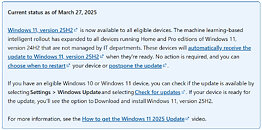
Microsoft is now force-installing the latest version of Windows 11, the 25H2, for users of the older 24H2 version of the operating system. Through what Microsoft calls a "machine learning-based intelligent rollout," the company is automatically updating 24H2 users to Windows 11 25H2 when their devices are ready. This forced update is part of a staged update plan for Windows 11, where Microsoft is gradually updating systems worldwide to phase out the 24H2 version, as support for this operating system will officially end on October 13, 2026. It makes sense to upgrade users to an operating system with a longer support period. However, Windows 11 users might be frustrated with the constant forced upgrades that Microsoft is pushing, which seem to offer little real-world benefit beyond regular security maintenance.
Regarding Windows versions, the situation has been a bit confusing recently. Microsoft has dedicated the 26H1 update exclusively for Windows-on-Arm devices, supporting new silicon, including the Snapdragon X2 Elite and X2 Plus platforms, as well as the potential launch of NVIDIA's N1/N1X laptop SoCs. The latest feature and security updates have been delivered through both the 24H2 and 25H2 versions, which have been the primary focus for x86-based PC systems. However, as support for 24H2 is coming to an end, the focus is gradually shifting to 25H2. There is still time before October of this year, and Microsoft is using AI for a staged rollout. Importantly, users cannot refuse this update. They can only schedule the restart for the update to be applied or postpone it slightly before it is finally installed.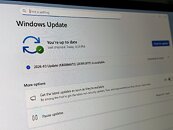
 Importantly, forcing updates on users can be annoying, but like every Windows version, its life cycle is limited. Microsoft is promising more quality updates for Windows 11, so future updates like 26H2, which we will see later this year, may bring a host of new features, improvements, bug fixes, better performance, and much more. We have to stay tuned and see what Microsoft's developers deliver.
Source:
Microsoft
Regarding Windows versions, the situation has been a bit confusing recently. Microsoft has dedicated the 26H1 update exclusively for Windows-on-Arm devices, supporting new silicon, including the Snapdragon X2 Elite and X2 Plus platforms, as well as the potential launch of NVIDIA's N1/N1X laptop SoCs. The latest feature and security updates have been delivered through both the 24H2 and 25H2 versions, which have been the primary focus for x86-based PC systems. However, as support for 24H2 is coming to an end, the focus is gradually shifting to 25H2. There is still time before October of this year, and Microsoft is using AI for a staged rollout. Importantly, users cannot refuse this update. They can only schedule the restart for the update to be applied or postpone it slightly before it is finally installed.


78 Comments on Microsoft is Forcing Windows 11 25H2 Update to 24H2 Users
For People who believe that you must buy 10.000 Copies of Windows LTSC directly from Microslop and have an enterprise agreement to be able to use it privately, this is "wrongthink"! You can download the ISO directly from MS, or any other source you like. You can legally buy a "used" LTSC-Key for 10-15 bucks. You can then legally activate it with that key.
Done.
In fact, at this point on my 2 dual-boot systems (everything else is non-windows), the arch installs are older than the windows installs by 1-2 years or so. Could have been an even bigger gap if I'd transferred my install to my fresh ZFS partitions, but I decided to clean install everything instead.It's a question of liability risk. Personal system? Sure, go for it. Worst case you get a relatively small fine.
Work systems for every other employee/coworker/boss in the company that one would be managing as the Head of IT/CTO/whatever? That's not a risk many are willing to take and/or are able to get legal to sign-off on.
How many of you guys with problems are tuning your machines? Maybe you should stop doing that..
That's why you maintain a backup of your files and programs. Reinstalling an OS is only a 10-15 minute job these days. And most distros dont have broken updates that hose the OS......"I dont have problems, so the problem doesnt exist"
Honestly expected better of you man. You've been around long enough to know that isnt a good line of argumentation. MS has a long history of borking updates and that has become more common recently, so put 2+2 together and figure out why people wouldnt be happy about forced updates.....
When on W11, I have to reconfigure all RAM timings because apparently W11 has a massive problem with XMP on my motherboard for some unknown reason, and even then I have to hope it won't die on its own without any further explanation as to how and why. Best I could get from BSoD reports was "unexpected shutdown" which only tells what I know already. And this happens regardless of what W11 version and how yohohofully I install it (and yes, I walked an extra mile and installed W11 THE MOST INTENDED WAY POSSIBLE, INCLUDING USING A LEGIT LICENCE KEY, still same results). I tested a myriad of GPU, audio, network and other drivers, tinkered with registry, ran full vanilla for a change, all ended the same: it died. More often than not, while doing "mandatory" updates.
And of course the tech support from M$ is completely underqualified. I wouldn't even trust them a damn spoon. With that, I abandoned an idea of updating from W10 to any newer Windows OS. When the time comes I either go Linux (less likely) or full offline (more likely) because frankly, the software situation went out of hand fully and irreversibly.
Though, I am running the Canary builds and rarely have a problem. I don't really do strange crap on my system and my specs are relatively normal (no legacy hardware, no uncommon hardware, no shitty drivers for bling-related hardware because I just don't give a fuck about RGB) so that's probably why things don't break much if at all.
Regards,
Fred.
www.techpowerup.com/347595/microsoft-promises-slew-of-windows-11-changes-in-response-to-microslop-criticisms
then
This is usually considered bloatware, but AMD revealed a fair time back now, that this is utilised to detect if something is a game. Which in turn effects gaming optimisations. You can have it installed whilst also having the OSD functions disabled. It only needs to be installed. You also despite some web pages saying so do not need to install Xbox software.
It fixed a long time issue I had with FF15, basically both Win10 and Win11 support what is called full screen optimisation for games. What it does is convert the old legacy full screen exclusive mode to windowed borderless full screen with flip mode activated, which is a lot better, no more weird alt tab behaviour and also no more VRR breaking mid session. (It might also be required for Windows 11 windowed gaming optimisations to work, this one forces flip mode on games that arent using full screen exclusive).
The AMD thing is so they can do optimised core assignment for the game.
I also don't have any major problems with alt-tabbing, except for few odd, older games. Though I assigned a shortcut alt-h to "Minimize Window" and I started using that to hide apps and games instead of alt-tab, it seems to work better and no games mind that as far as I can tell.
Perhaps it only affects some games and I just happen not to have any such games? I don't know, was just curious. I don't use LTSC, btw, just heavily modded custom 11 Pro.