News Posts matching #Windows 11

Return to Keyword Browsing

The Curious Case of Windows 11 Pro for Workstations, Essentially Windows 11 "Pro Max"

Most gamers and PC enthusiasts are exposed to just two editions of client Windows 11—Windows 11 Pro, and Windows 11 Home, and assume that power users are served the former by Microsoft. It turns out that Microsoft built an edition of Windows 11 that sits halfway between Windows 11 Pro and Windows Server, called Windows 11 Pro for Workstations. This is effectively "Windows 11 Pro Max," and dates as far back as 2021, and as a successor to the 2017 Windows 10 Pro for Workstations.

Windows 11 Pro for Workstations comes with reduced "consumer bloat," don't expect the Start menu to feature sponsored shortcuts to Candy Crush Saga or Netflix. It also comes with several features not found on Windows 11 Pro. To begin with, it supports ReFS (Resilient File System), a successor to NTFS that offers super resilience for fault-tolerant storage spaces. It also has hardware support not found on Windows 11 Pro.

GMKtec Launches EVO-X3 AI Workstation with AMD Ryzen AI Max+ 395

GMKtec has officially launched the EVO-X3 AI Workstation, a compact desktop system powered by the AMD Ryzen AI Max+ 395 processor, targeting developers, AI professionals, creators, and users requiring workstation-class performance for local AI workloads. The EVO-X3 is designed to address the growing demand for on-device AI computing, enabling users to run large language models (LLMs), develop AI applications, create digital content, and process data locally without relying on cloud infrastructure.

Following its reservation campaign in June, the system is now available globally through the GMKtec Official Store. Customers who participated in the reservation program can redeem their exclusive launch coupons beginning July 6.

Microsoft Improves File Explorer Launch Speed in Windows 11

Microsoft released its optional Windows 11 June update a few days ago, featuring package KB5095093. In this release, Microsoft has finally delivered significant performance improvements to its File Explorer application. One of the biggest complaints from Windows enthusiasts was the slow launch speed and poor performance of File Explorer, which is a core Windows application that reflects the state of operating system development and advancement. The performance had degraded over time to the point where Microsoft even started preloading File Explorer to improve launch speeds. However, the KB5095093 update goes a step further by actually addressing the core issues without relying on background preloading tricks to seemingly boost performance.

For example, the Home tab area has received a structural makeover that changes how files are indexed in the Home tab, resulting in a much faster initial launch. Since the Home tab can display connected cloud storage drives, information from pinned folders, and constantly pulls data from the file system, it was the biggest obstacle in delivering a performant File Explorer application. What is currently an optional update for June 2026 will become part of the mandatory update for July 2026, bringing this performance improvement to every Windows 11 PC.

Vanguard Anti-Cheat Adds On-Demand Mode

Following report surfaced that Riot's Vanguard anti-cheat was apparently soft-bricking certain hardware often used for cheating, Riot has updated Vanguard with a new on-demand mode that allows users to disable the anti-cheat mode from launching on boot. According to a blog post about the update, on-demand mode will only launch Vanguard when it's needed by a game like League of Legends or Valorant. This should theoretically allow for faster boot times and slightly reduced system resource usage on Windows PCs with Vanguard installed. However, Vanguard on-demand mode is only possible in cases wherein player hardware meets a set of security standards that Riot calls a Vanguard Pre-Check.

The Pre-Check, and thus Vanguard On-Demand mode, requires that players are running Windows 11 version 25H2 or newer and enable Secure Boot, TPM 2.0. IOMMU, VBS, and Hypervisor-Protected Code Integrity. All of these security measures basically allow Riot to ensure that no kernel-level cheats have been enabled between when the system booted and when Vanguard was launched. Riot says that around 35% of Vanguard user systems are already in a "secured-core state," meaning they meet all the requirements and will be able to enable On-Demand mode with the next Vanguard update, however, those who have one or more of the aforementioned UEFI settings disabled will have to go through the Pre-Check before being able to enable On-Demand.

Microsoft Extends Windows 10 Security Updates to 2027

Microsoft has confirmed that it will offer Extended Security Updates (ESUs) for the Windows 10 operating system until late 2027. Specifically, ESUs will cover Windows 10 until October 12, 2027, after which Microsoft will stop providing security updates for this operating system. This extension gives those unwilling to upgrade a chance to extend the life of the legendary OS that has powered millions of desktops since 2015. On October 14, Microsoft officially ended general support for Windows 10, halting feature updates, routine quality-of-life improvements, and general technical support. Devices running this OS can still boot and run existing software, but the regular system-level enhancements and new capabilities that users have come to expect have stopped.

Originally, Microsoft designed its ESU program as a temporary remedy for the end-of-life status, allowing users to transition to the newer Windows 11 operating system, as migrations to a new platform can be complex. Organizations running Windows 10 can have tens of thousands of PCs, and managing an upgrade on this scale can be challenging. Therefore, organizations can often delay this transition by purchasing ESUs, which extend security features to keep their systems protected. In the European Economic Area, users receive the ESU package free for a year before Microsoft ends support, but they must sign in with a Microsoft Account. While ESUs can buy time for complex migrations, they are explicitly a temporary measure. Relying on ESUs long-term leaves systems exposed to unsupported components and growing incompatibilities with newer software.

AAEON's Release of the EPIC-PTH9 Puts a Spotlight on Industrial AI

Industry-leading provider of embedded solutions AAEON (Stock Code: 6579) today announced the release of the EPIC-PTH9, a 4" industrial single-board computer with Intel Core Ultra Series 3 processors (formerly Panther Lake), PCIe Gen 5 x8 expansion, and a robust, low-profile design. Offering standard models with a choice of either the Intel Core Ultra X7 Processor 358H or Intel Core Ultra 7 Processor 356H, the EPIC-PTH9 can deliver up to 180 TOPS of AI performance through the Intel platform's integrated CPU, Intel Arc B390 GPU, and NPU.

Given the product's positioning as a platform for industrial AI applications, its I/O is geared towards support for the need to support multiple cameras, sensors, or control devices such solutions require. For this, the EPIC-PTH9 comes with four LAN ports, three of which three running at 2.5GbE and one at 1GbE speed, with two of these four ports supporting PXE enablement. Other notable I/Os come in the form of four USB ports (two USB 3.2 Gen 2 and two USB 2.0), as well as four internal serial port headers. The board also provides a GPIO 8-bit, and SMBus header, co-lay with I2C and timed GPIO functions, which can be changed by BOM.

FSR 4.1 Shows Massive Performance Gains on RDNA 3

When TechPowerUp spoke to AMD's Chief Software Officer and Senior Director of Software earlier in June, the executives made bold claims about the quality of its new FSR 4.1 implementation coming to older RDNA 3 GPUs, stating that, despite underlying technical differences, the actual output would have the same quality as it does on RDNA 4 GPUs. There was, however, little discussion about a potential performance hit from the upscaling tech, although it seems as though that discussion may not have been necessary at all, according to testing that has shown up on r/radeon on Reddit.

Based on the testing by the redditor, who tested AMD's FSR 4.1 in Cyberpunk 2077 on an AMD Radeon RX 7900 XTX at 3840 × 2160p resolution, high settings, and with Ray Tracing on and Ray-Traced Lighting set to Ultra, the performance improvements can be as high as 100% compared to testing conducted without the tech enabled. In benchmark screenshots shared by the redditor, the RDNA 3 GPU managed to get a 49.82 FPS average (43.46 minimum and 60.51 maximum) with FSR 4 set to Balanced and 60.81 FPS average (52.94 minimum and 73.03 minimum) with FSR 4 set to Performance. While there are no results posted, the tester claims in a follow-up comment that performance went "from 24~FPS at native to 50~FPS with FSR 4 Balanced and 61~FPS with FSR 4 Performance." These tests were conducted on a Windows 11 Pro installation with an AMD Ryzen Threadripper 3970X CPU and 128 GB of RAM, which is an unconventional setup for gaming, and it may ultimately mean that gaming performance could be higher with a more gaming-focused PC build. As the updated FSR version rolls out to older hardware, we will likely see more tests on other hardware tease out the true performance and image quality benefits, but a ~100% performance uplift is promising, especially for gaming handhelds on Radeon 780M iGPUs, for example.

Halo: Campaign Evolved PC Minimum and Recommended System Requirements Surface

Halo Studios put out the system requirements lists for the upcoming AAA FPS RPG, Halo: Campaign Evolved. The game is releasing on July 28, 2026, with pre-orders open now. There are four system requirements lists put out by the studio, "Low (minimum)", "Medium," "High (recommended)," and "Ultra." The minimum experience is 1080p @ 60 FPS. This requires either an AMD Ryzen 5 3600 or Intel Core i7-10700K processor; an NVIDIA GeForce RTX 2060 SUPER, AMD Radeon RX 6600, or Intel Arc B580 graphics card; at least 16 GB of RAM, and at least 8 GB of video memory.

The "Medium" experience is 1440p @ 60 FPS, and this calls for either an AMD Ryzen 7 5700X or Intel Core i5-12600K processor; NVIDIA GeForce RTX 3070 or AMD Radeon RX 7600 graphics card; at least 16 GB of RAM, and at least 8 GB of video memory. Things move up a significant notch with the "High" tier, which corresponds with the game's "recommended system requirements" list, offering a 4K Ultra HD @ 60 FPS experience. This requires either an AMD Ryzen 7 7700 or Intel Core i7-12700K processor, either an NVIDIA GeForce RTX 3080 Ti or AMD Radeon RX 9070 graphics card, at least 32 GB of RAM, and at least 16 GB of video memory.

Microsoft Confirms Windows 11 26H2 Update for x86-64 PCs

Microsoft late last week confirmed this year's update to Windows 11, version 26H2. This update would be exclusive to PCs powered by x86-64 processors (compatible processors from Intel and AMD); as devices based on Qualcomm Snapdragon Elite and NVIDIA RTX Spark are now on a separate update trunk. If you recall, the company earlier this year released Windows 11 26H1, but the update was exclusive to Windows-on-Arm devices, mainly powered by Snapdragon chips. Although announced at Computex, notebooks and mini PCs powered by RTX Spark aren't currently available, and will be released to market this Fall. OEMs will launch them with Windows 11 26H1.

Windows 11 26H2 won't be a major update involving a total replacement of all system files and migration of the user's environment; rather, it will be a minor update since 26H2 is based on the same code base as 25H2. The update would be effortless, take no longer than a typical monthly Patch Tuesday update, and simply roll up security and quality updates released till that time. The update to 26H2 will be recommended because Windows will release security updates to Windows 11 versions going back two years—in this case, 24H2 and 25H2 besides 26H2. Businesses looking to lock in on a particular version would have to look out for Windows 11 Enterprise LTSC versions, which lock on to a particular kernel code base, and gather security updates until a specified date in the future.

Microsoft Will Again Force-Install Microsoft 365 Copilot App on Windows 11

If readers recall, earlier this year in mid-March, Microsoft stopped automatically installing its Microsoft 365 Copilot App on Windows 11 by default. Instead, the company decided to leave this option to users, which makes sense considering it is their operating system. However, Microsoft is now reversing this decision after only a few months, once again requiring the installation of the Microsoft 365 Copilot application on Windows 11 systems. For those familiar with the regular Copilot application, Microsoft 365 Copilot is the rebranded version of what was originally called Microsoft 365 / Office Hub. This app was introduced alongside the regular Copilot app on Windows 11 systems, offering AI-enhanced Microsoft 365 services.

In a recent note on the Microsoft Admin Portal, the company states that users will have to opt out if they don't want the Microsoft 365 Copilot App installed by default on their system. This means users might end up installing the app without their consent, even if they don't want it on their systems. To remove it, users must do so manually or opt out of the installation, which involves additional steps, particularly for IT admins managing an organization's infrastructure. The company now states, "This change simplifies access to Copilot and ensures users can easily discover and engage with productivity-enhancing features."

AAEON Unveils Three New Platforms Powered by Intel "Wildcat Lake"

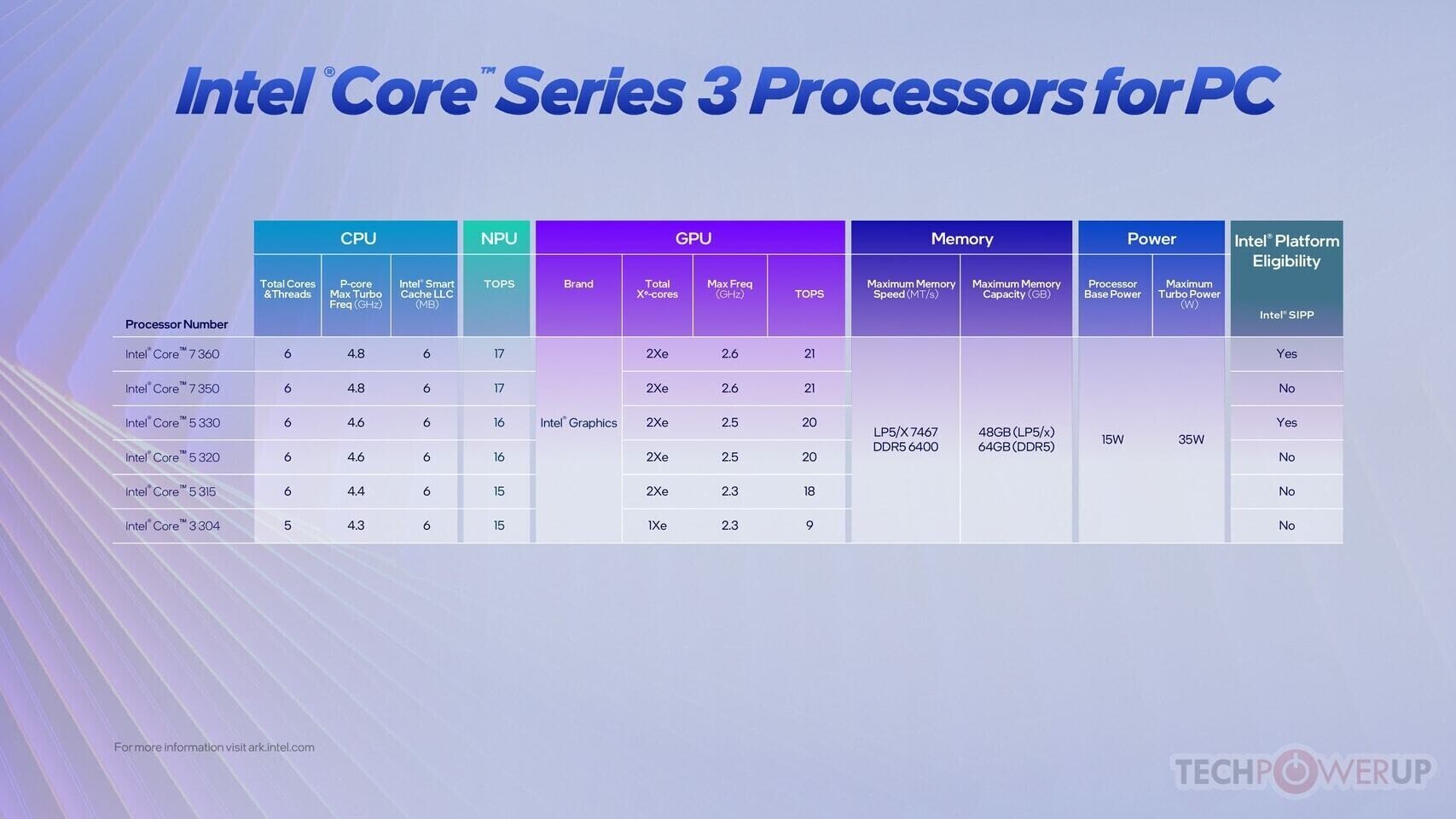
Following the unveiling of the new Intel Core processors (Series 3) (formerly Wildcat Lake) in April, AAEON's UP brand has announced its development timeline for four new platforms that will feature the processor line, with both developer boards and edge systems included. Expected to enter mass production in late Q3, 2026, the developer boards included in AAEON's roadmap are the UP WCL and UP Nexus WCL. The first of these is a credit card-sized board consistent with the original UP board's form factor, while the UP Nexus WCL represents a branding shift for the UP Squared Pro form factor, measuring 101.6 mm × 101.6 mm. Both boards will also offer a fully embedded edge system version, the UP WCL Edge and UP Nexus WCL Edge, designed to appeal to customers requiring plug-and-play systems.

All four platforms will be available with the option of Intel Core 7 processor 350 and Intel Core 5 processor 320 CPUs from the Wildcat Lake family, while the UP WCL will also provide SKUs with the Intel Core 3 processor 304. Delivering up to 40 TOPS of AI performance via integrated GPU and NPU but with a CPU prioritizing low power E-cores, the Intel Core series' first integrated heterogeneous compute architecture sees AAEON position its upcoming products as suitable for building advanced applications across market segments, but with the benefit of a lower power footprint than platforms tailored to high-performance computing needs.

Pre-Orders for $4000 AMD Ryzen AI Halo Mini PC Dev Kits Go Live

AMD announced in May 2026 that the Ryzen AI Halo Developer Platform mini PC would arrive in June, and launch day has apparently arrived, with the Strix Halo-powered mini PC now available for pre-order via Micro Center in the US. The Ryzen AI Halo developer kit is mostly aimed at AI developers, and although there are two SKUs, both have identical hardware, featuring the AMD Ryzen AI Max+ 395 CPU, with its Radeon 8060S iGPU, and 128 GB of LPDDR5x-8000 memory shared across both the CPU and GPU cores. The mini PC is launching with 2 TB of SSD storage, and it includes a 120 W PSU.

Pricing is set at $3,999, and the only difference between the two available SKUs is that one ships with Linux, while the other ships with Windows 11 Pro. No shipment date has yet been confirmed. Physical I/O is limited to USB Type-C, with three unspecified USB Type-C ports, likely USB 3.2 Gen 2×2 or USB4, one of which has DisplayPort Alt Mode support, an HDMI 2.1 port, a 10 Gbps Ethernet port, and a USB Type-C port for power input. It will also ship with both Bluetooth 5.4 and Wi-Fi 7. The mini PC itself measures just 149 × 149 × 43.18 mm, and the chassis appears to be mostly aluminium.

Steam Survey: Increased Windows 11 Adoption, AMD GPU Detection Fix Live

Despite having launched in 2021, adoption of Windows 11 has been somewhat slow-going, with Microsoft's latest desktop OS only overtaking Windows 10 nearly four years after launch and only reaching 1 billion users in 2026. If Valve's Steam Hardware and Software survey is anything to go by, it looks as though Windows 11 adoption has continued to grow in recent months. The survey results for May 2026 point to a 2.02% increase in the number of PC gamers on Windows 11, with Windows 10 losing 1.64% and Linux losing 0.53%, despite Valve's ongoing work on SteamOS and the never-ending proclamations of "the year of the Linux desktop."

Overall, however, these changes have barely moved the needle, with Windows gaining 0.38% of Steam's user share, and macOS gaining 0.15%. It's worth noting that English-language users are somewhat overrepresented in this particular Steam Survey, with 2.71% more English users than in the previous survey. These sorts of biases have previously skewed results, as certain groups may have status quo biases that play into their choice of operating system and hardware. The rest of the Steam Hardware and Software Survey results are more or less business as usual, with 16 GB of RAM and 1080p monitor resolution continuing to be the standard, although the latter has lost a negligible amount of market share. The same is true for GPUs, where the NVIDIA GeForce RTX 3060 continues to be the most popular GPU on Steam. It appears as though the fix for Steam's recent faulty detection of Radeon GPUs has been released out of beta, though, as the survey reports that the AMD Radeon RX 9070 XT has gained 1.24%.

Acer Predator at Computex 2026: Atlas Handheld, Helios 18 AI, XB273K 3D Monitor

At Computex 2026, we went hands-on with the latest gaming gear at the dedicated booth of Acer Predator. The star attraction is the new Acer Predator Atlas gaming handheld powered by the Intel Arc G3 Extreme processor, along with 24 GB of LPDDR5X memory and 1 TB NVMe storage. Perhaps its most striking feature is its 16:10 aspect-ratio, 1920×1200 120 Hz touchscreen. It comes with the PredatorSense custom interface that runs on top of Windows 11 Home. It lets you control all the hardware features of the Predator Atlas, as well as serves as a game organizer.

The Acer Predator Helios 18 AI is the company's enthusiast-segment gaming notebook powered by the Intel Core Ultra 9 290HX Plus "Arrow Lake Refresh" processor (8P+16E), NVIDIA GeForce RTX 5090 Laptop GPU, and a stunning display with 16:10 aspect-ratio, a Mini LED WQUXGA (3840×2400) panel with 1000 nits Calman-verified display. The cooling system uses Acer's AeroBlade 3D fans. The keyboard uses MagKey 4.0 low-profile mechanical switches.

NVIDIA Announces RTX Spark, a Supercomputer-grade Processor for Windows PCs with Agentic User Interfaces

NVIDIA today announced what is arguably its most important product of the year, one that—if done right—could help it break into the consumer PC processor market. NVIDIA envisions a change in the PC user interface paradigm. For over 40 years, the PC human interface contract involved you interacting with software through their toolbars, dialog boxes, and work areas, to get work done. NVIDIA sees AI agents fundamentally change the way consumers interact with PCs. Imagine you opened up Photoshop, and instead of manually running a complex workflow, simply prompted it your agent, and it did the rest. NVIDIA thinks the processor of the future should be able to not just run your applications, perform its core function as a general purpose CPU, but also run large AI models and agents entirely locally, while also fulfilling consumer-segment needs as an entertainment and gaming powerhouse. Enter, the NVIDIA RTX Spark.

Microsoft and NVIDIA Jointly Tease Possible N1X Debut as a "New Era of PC"

Microsoft and NVIDIA, through their X handles, each teased "A new era of PC," along with the map coordinates "25.0528, 121.5990," which correspond to the Nangang Exhibition Centre, the seat of Computex 2026. If it wasn't obvious already, NVIDIA is announcing its much awaited N1X client PC processor, and it has the full blessings of Microsoft to power Windows 11 AI PCs with full Copilot+ acceleration. The N1X is widely expected to get NVIDIA to supplant Qualcomm's Snapdragon X2 Elite series as the fastest Arm-based processor for Windows, powering experiences on par with high-end x86-64 PC processors from Intel and AMD.

NVIDIA is allegedly building the N1X on the TSMC 3 nm foundry node. The latest leaks hold the chip to be a 20-core processor, with an Arm big.LITTLE configuration of 10 performance cores, and 10 efficiency cores. All 20 cores are custom-designed by NVIDIA, and based on the Arm v9.2 machine architecture. The CPU complex is expected to feature 32 MB of shared, last-level cache. The star attraction here is the iGPU that allegedly doubles up as an NPU. Based on the "Blackwell" graphics architecture, the iGPU is expected to feature up to 48 streaming multiprocessors (SM) for 6,144 CUDA cores, and performance possibly comparable to the discrete GeForce RTX 5060 Ti. The chip will feature LPDDR5X interface, with a unified memory architecture. NVIDIA's plan is to outclass Apple M5 Pro and AMD Ryzen AI Max 400. There's nothing in this class from Intel, unless the company decides to build chips with large iGPUs based on its Xe3 "Celestial" architecture.

Kubb Fanless Mini PC Gets Intel Panther Lake Update with High Price

French computer manufacturer, Bleu Jour, has officially updated its Kubb Fanless mini PC with Intel's Panther Lake, equipping the mini PC with an Intel Core Ultra X7 358H CPU with its Arc B390 iGPU. Alongside the new CPU option, however, the mini PC has also received a price update, now coming in at a premium €1,850, which is a €355 increase over the previous Intel Core Ultra 5 225H CPU. That starting price gets you Windows 11 Pro, 16 GB of DDR5-5600 RAM in dual channel, and a 1 TB M.2 NVMe Gen4 SSD, but the mini PC is also available with up to 64 GB of DDR5-6400 for €545.90 extra, while a 4 TB SSD upgrade carries a €526 upcharge, coming to €2,921.90 for a maxed-out build. That pricing is starting well into the territory of mini PCs powered by the AMD Ryzen AI 395 Max+ APUs, although a compact passively cooled mini PC appeals to a very niche market.

The Kubb Fanless is a passively cooled mini PC, with the cooling coming from the fins machined directly into the aluminium chassis, but despite the fanless design, the PC fits into a footprint of just 12 × 12 cm. Kubb claims that the chassis design is optimized for thermal performance, and it weighs in at 2.3 kg, so there's a decent amount of aluminium in the passive radiator setup. The port selection is also healthy, with front I/O consisting of 1× USB 3.2 Gen 2, 1× Thunderbolt 4 with DP 2.1, 1× USB 3.2 Type-C with DP 1.4a alt mode, and a 3.5 mm audio combo jack. The rear I/O has 2× USB 3.2 Gen 2, 2× HDMI 2.1, and 2× RJ45 ports.

Microsoft is Rolling Out Windows 11 Performance Boosting Update

If readers recall, Microsoft was preparing a "Low Latency Profile" feature as part of the Windows K2 effort, which boosts the system's CPU to its maximum frequency for 1-3 seconds to ensure smoother app launches. Today, Microsoft is gradually rolling out this feature as part of the KB5089573 update for Windows 11. This update is delivered as an optional package that introduces the long-anticipated LLP. The LLP is designed to make core Windows applications, rather than general applications, launch noticeably faster, providing significant speed improvements. When launching Microsoft applications like Edge and Outlook, known as "in-box" apps, users can expect about a 40% faster application launch. Other features, such as the Start Menu and context menus across the operating system, may see speed improvements of up to 70%. Non-native Windows applications, such as your favorite AAA games, will rely on their own optimizations.

To take advantage of this performance boost, go to Settings > Windows Update > Advanced options > Optional updates, and install the KB5089573 (Build 26200.8524) for your Windows 11 system. However, it's important to note that if you don't notice an immediate difference, there's no need to worry, as the change may not be applied right away. Microsoft uses a Controlled Feature Rollout (CFR) method, which involves downloading an update but only activating it once the system is ready. The underlying change is present, but the OS will monitor the system before fully implementing it.

The Witcher 3 Free Next-Gen Upgrade Raises Minimum System Requirements Ahead of DLC Release

CD Projekt Red is releasing Next-Gen Upgrade, essentially a game remaster package, of "The Witcher 3: Wild Hunt" for free. Ahead of the release of its upcoming expansion DLC, "Songs of the Past," the developer has raised the minimum system requirements of the game. The game originally released in 2015 to some modest hardware requirements, such as a 2nd Gen Core i5-2500K (from 2012), GeForce GTX 660 "Kepler," 6 GB of RAM, and 1 GB of video memory, besides 50 GB of HDD space. The new Next-Gen Upgrade is something other studios would release as a paid remaster, but CDPR is giving away for free. It now calls for an AMD Ryzen 5 2600 or Core i5-8400, 12 GB of RAM, GeForce GTX 1660 "Turing" or Radeon RX 5500 XT RDNA GPU, and 6 GB of video memory. You also need 70 GB of SSD storage, an HDD won't do anymore. Also, Windows 11 makes its way firmly onto the requirements list.

Proton-CachyOS Adds NVIDIA Reflex and AMD Anti-Lag 2 Enablement for Non-Native Games

It was recently announced that AMD Anti-Lag 2 and NVIDIA Reflex could be run on just about any GPU under Linux with the new low_latency_layer workaround for the Vulkan driver. Now, that same support has been added to the CachyOS version of the Proton compatibility layer, CachyOS-Proton version 11.0-20260519, making enabling AMD Anti-Lag 2 and NVIDIA Reflex simpler. The low_latency_layer can be enabled by adding a launch option "LOW_LATENCY_LAYER=1" but further tweaks and configuration will need to happen via the methods in the low_latency_layer project documentation.

The other major update that has come to CachyOS-Proton version 11 is the introduction of rpc-bridge to enable Rich Presence support in Discord. This, too, is not enabled by default, and can be enabled by adding the launch option "PROTON_DISCORD_BRIDGE=1". The update also includes a number of other changes and bug fixes, like fixes for media playback to require less manual intervention; improvements to the OptiScaler injection method—which expands the number of compatible games—and a move to Windows 11 by default in Proton 11.

Microsoft Copilot Returns as a Sidebar in Windows 11

Microsoft is still experimenting with how to integrate its Copilot AI into the Windows 11 operating system, and the company seems determined to make its AI companion a primary feature on the desktop. According to a change that is gradually rolling out, Copilot now appears as a sidebar application, returning to the original form that Microsoft advertised back in 2024. By default, the first version of Copilot was a standalone application. However, Microsoft has updated the application to include an option to dock Copilot as a sidebar, which pushes all other applications aside. This change aims to increase product visibility and encourage users to discover any productivity benefits from the application. The new Copilot AI sidebar can be docked to either the left or right side, depending on user preference. In response, Windows 11's UI automatically resizes and moves desktop applications to accommodate the sidebar.

For those who remember, when Copilot launched in 2024, its original design was as a sidebar application, which was later changed to a standalone desktop design. After several iterations, we are now back to the original design, which is more integrated with desktop context menus, applications, icons, and other UI elements in Windows 11. The new design can be seen below, courtesy of Windows Latest.

Chuwi Announces the UniBook Powered by Core "Wildcat Lake" Processors

CHUWI today unveiled the UniBook, the world's first laptop powered by Intel's Wildcat Lake Core 3 304 processor (Core Series 3, Intel 18A, 5 cores/5 threads, up to 4.30 GHz). Primarily targeted for university students, entrepreneurs, and young professionals, the battery life can reach 15-20 hours (under comprehensive working conditions). Starting at an estimated $449, the UniBook directly challenges Apple's MacBook Neo with clear advantages in connectivity, keyboard backlight, display color accuracy, and price.

Key specs for CHUWI UniBook: 14-inch FHD (1920 x 1200) 100% sRGB IPS display, 8 GB LPDDR5X, 256 GB PCIe 3.0 SSD, Wi-Fi 6 + BT5.2, a full port suite (2x full-function USB-C, 1x HDMI 2.0, 2x USB 3.2 Gen 1, 1x USB 2.0, Gigabit Ethernet, TF card slot, 3.5 mm audio), white backlit keyboard, 180-degree hinge, active cooling, 53.38 Wh battery, and Windows 11 Pro.
The specifications follow.

Laptops Powered by Intel "Wildcat Lake" Arrive in China, Starting at $449

China appears to be the first in line to receive laptops powered by Intel's "Wildcat Lake" Core 300 series processors, and the initial models have already arrived. The most affordable option is the CHUWI UniBook, which features a five-core Intel Core 3 304 processor. This is the lowest in the series and the only five-core "Wildcat Lake" processor available. The laptop comes with 8 GB of LPDDR5X memory running at up to 7,467 MT/s and 256 GB of SSD storage. All of this is housed in a 14-inch body with a 1920x1200 IPS display. Interestingly, this model poses a direct challenge to Apple's MacBook Neo, operating on Windows 11 Pro and a different x86 platform.

Additionally, other laptop manufacturers have started listing their "Wildcat Lake" models on the Chinese retailer JD, including ASUS, HP, and Honor. These offerings include the ASUS Fearless 14SE 2026, HP OmniBook 3, and Honor Notebook X14 2026 Combat Edition. All three models are powered by the Intel Core 5 320 processor, which features a six-core design. They also come with 16 GB of LPDDR5X memory and 512 GB of SSD storage. The prices for these models are $597 for the ASUS, $571 for the Honor, and $662 for the HP OmniBook 3. These laptops offer twice the storage and memory compared to the popular Apple MacBook Neo, aiming to surpass Apple in the entry-level PC market. Interestingly, sales tax is not included in these prices.

Microsoft to Make Copilot Key Reprogrammable

Microsoft in 2024 announced the AI PC specification that introduces a dedicated Copilot key for laptops and desktops. This would be a key dedicated to launching the Copilot or M365 Copilot app, similar to the two Start keys. Quite a few OEMs simply replaced the right-hand Ctrl or Context Menu key with the Copilot key. The company has been reeling in pushback from the userbase over being force-fed Copilot integration with all Microsoft products and services, including XBOX. In light of this, the company is working on an update to Windows 11 that makes the Copilot key reprogrammable by end-users. You should be able to remap the key to a Context Menu key, your missing Right Ctrl key, or an additional Start key.

Microsoft Brings Back Windows 10-Style Taskbar and Start Menu Customization in Windows 11

If you were a user of the Windows 10 operating system with a customizable Taskbar location, you were familiar with Taskbar customization and different placements. However, Microsoft kept this feature restricted in Windows 11 for a long time. The company is now introducing full support for Taskbar and Start Menu customization, which will be available to Windows Insiders in the Experimental channel over the coming weeks. Specifically, the Taskbar will be movable to the top, bottom, left, or right side of the screen. From there, users will be able to customize icon alignment for each Taskbar position, whether top-aligned, center-aligned, left-aligned, or right-aligned. All it takes is a visit to Settings > Personalization > Taskbar > Taskbar behaviors, where all of the settings will be located. Interestingly, the Taskbar will also offer smaller icons and a reduced presence, which is a nice addition for anyone looking to maximize usable space.

Additionally, Windows Insiders are testing a preview of the revamped Start Menu customization effort, which gives users more meaningful control over Start Menu behavior. One of the changes includes an option to choose between smaller and larger Start sizes, independently hide or show sections like Pinned, Recent, and All, and even remove their name and profile photo for extra privacy during screen sharing or presentations. Previously, these customizations weren't possible, as Windows 11 shipped with a generic Start Menu look for every build. Just as important, Microsoft is separating Start's file recommendations from File Explorer's recent items and jump lists, so disabling recommendations in Start will no longer affect recent activity elsewhere in Windows. At the same time, the company is trying to make the recommendation area more useful by renaming it to Recent, keeping newly installed apps visible, and refining which files appear in that section.
Return to Keyword Browsing
Nov 11th, 2026 23:49 CST change timezone

New Forum Posts

Popular Reviews

TPU on YouTube

Controversial News Posts